Freedom251 › AI Floor Plan Generators

FloorDrafter
What FloorDrafter is
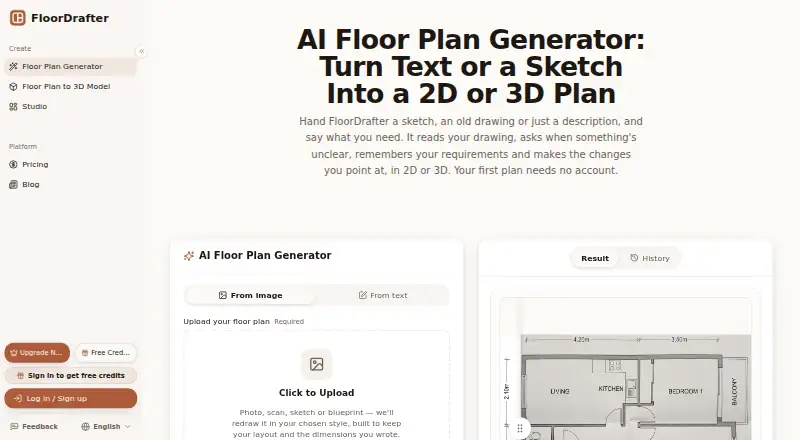
FloorDrafter turns written descriptions, sketches, existing floor plans, and room photos into editable 2D or 3D floor plans. It runs in a browser on desktop and mobile, with no download or installation required. Image uploads can be JPG, PNG, or WebP. Users can choose Rendered, Technical, Colour Plan, 2.5D, or 3D styles. Its Studio agent retains project requirements, asks clarifying questions, and keeps each revised version.
Room labels and dimension lines follow measurements supplied in the drawing or description; FloorDrafter does not measure the physical space. The first plan can be generated without an account or credit card. Signing up adds credits and enables downloads. The Free plan provides watermarked PNGs at 2K resolution. Pro costs $12 a month and includes 150 monthly credits, 4K resolution, DXF/CAD export, a commercial license, priority generation, and watermark-free output. Studio costs $24 a month and adds 400 monthly credits, highest-priority generation, and priority email support with a 24-hour response. The product page advertises high-resolution PNG downloads; its terms also list PNG, SVG, and PDF exports and API access. Generated plans are for planning and illustration, not professional architectural, engineering, or surveying services.
Who it suits
FloorDrafter suits homeowners, landlords, real estate agents, and small design practices that want to turn descriptions, sketches, existing plans, or room photos into visual floor plans. It can help with planning and illustration when users have measurements to supply and do not need direct wall editing or professional plans.
What it does well
- Accepts text, sketches, existing plans, and room photos
- Offers five visual styles, including 2D and 3D
- Runs on desktop and mobile browsers without installation
- First floor plan can be generated without an account or card
- Studio agent keeps requirements and revised versions
What to know first
- Does not measure physical spaces
- Not a CAD editor for dragging walls or entering exact dimensions
- Generated plans are not professional architectural, engineering, or surveying services
Limits
The Free plan provides watermarked PNGs at 2K resolution. Pro is $12 a month and includes 150 credits per month; Studio is $24 a month and includes 400 credits per month. Labels and dimensions rely on supplied measurements, and the service does not measure the space.
Plans
| Plan | Billed and limits | Price |
|---|---|---|
| Free | signup credits · daily check-in credits · 2K resolution · watermarked PNG | Free |
| Pro | monthly · 150 credits/month · 4K output · DXF/CAD export · commercial license · priority generation · no watermark | $12 a month |
| Studio | monthly · 400 credits/month · Pro features · highest generation priority · priority email support with 24-hour response | $24 a month |
As floordrafter.com lists them, read 15 Oct 2026. The maker's own page has the final word.
Getting started
- Open FloorDrafter in a desktop or mobile browser.
- Generate a first floor plan from a description, sketch, existing plan, or room photo.
- Upload JPG, PNG, or WebP images when using an image input.
- Sign up to add credits and enable downloads.
- Choose Free, Pro, or Studio based on the credits and export options you need.
Verdict
Choose FloorDrafter if you want browser-based 2D or 3D plans from descriptions or images, with a free first generation and paid download options. Look elsewhere if you need physical measurement, direct CAD-style wall editing, or professional architectural plans.
Questions
How much does FloorDrafter cost?
The Free plan costs nothing. Pro costs $12 a month, and Studio costs $24 a month.
Can I try FloorDrafter without signing up?
Yes. The first floor plan can be generated without an account or credit card. Signing up adds credits and enables downloads.
Which platforms does FloorDrafter support?
It runs in a browser on desktop and mobile, with no download or installation required.
What can I use to create a floor plan?
You can provide a text description, sketch, existing floor plan, or room photo. Image uploads support JPG, PNG, and WebP.
Which exports are available?
The product page advertises high-resolution PNG downloads. Its terms also list PNG, SVG, and PDF exports and API access; Pro includes DXF/CAD export.
Does FloorDrafter measure rooms or let me edit walls directly?
No. Labels and dimension lines use measurements supplied in the drawing or description, and the service does not measure physical space. It is not a CAD editor for dragging walls or entering exact dimensions.
Facts from FloorDrafter's own pages
- AI editing
- Its Studio agent remembers project requirements, asks clarifying questions, and keeps each revised version. · floordrafter.com, 30 Sept 2026
- Analytics retention
- Usage data is generally retained for up to 24 months for analytics. · floordrafter.com, 15 Oct 2026
- API data handling
- The privacy policy says API calls, parameters and usage statistics are collected when the API is used. · floordrafter.com, 15 Oct 2026
- Browser access
- The product runs in a browser on desktop computers and phones, with no download or installation. · floordrafter.com, 15 Oct 2026
- CAD export
- DXF vector export for walls, doors and windows is included with Pro and Studio. · floordrafter.com, 15 Oct 2026
- Data sharing
- FloorDrafter says it does not sell personal information and may use cloud, payment, analytics, email and AI providers. · floordrafter.com, 15 Oct 2026
- Editing limit
- It is not a CAD editor, so users cannot drag walls or enter exact dimensions directly. · floordrafter.com, 15 Oct 2026
- Editor limitation
- It is not a CAD editor, so users cannot drag walls or type exact dimensions directly. · floordrafter.com, 30 Sept 2026
- Exports
- The product page advertises high-resolution PNG downloads, while the terms also list PNG, SVG, and PDF exports and API access. · floordrafter.com, 30 Sept 2026
- First-use access
- A first floor plan can be generated without an account or credit card. · floordrafter.com, 15 Oct 2026
- Free access
- The first floor plan can be generated without an account or credit card, and signing up adds credits and enables downloads. · floordrafter.com, 30 Sept 2026
- Free account benefits
- A free account enables downloads, keeps generation history and adds bonus credits. · floordrafter.com, 15 Oct 2026
- Image redraw
- Uploaded hand drawings or existing plans are redrawn as labeled plans. · floordrafter.com, 15 Oct 2026
- Independent directory description
- AI Agents Directory describes FloorDrafter as an AI generator for rendered and technical floor plans aimed at architects, designers, agents and developers. · aiagentsdirectory.com, 15 Oct 2026
- Independent feature claim
- AI Agents Directory lists text or image generation, four visual styles, editing, high-resolution PNG export and generation measured in seconds. · aiagentsdirectory.com, 15 Oct 2026
- Independent listing status
- AI Agents Directory lists the product as paid, standard status, and says it was listed June 25, 2026. · aiagentsdirectory.com, 15 Oct 2026
- Independent open-source claim
- AI Agents Directory labels access as open source, although FloorDrafter's own terms describe its software and content as owned intellectual property. · aiagentsdirectory.com, 15 Oct 2026
- Independent popularity
- AI Agents Directory shows a 23% popularity figure and 31 page views. · aiagentsdirectory.com, 15 Oct 2026
- Independent review coverage
- AI Agents Directory reports that FloorDrafter has no reviews yet. · aiagentsdirectory.com, 15 Oct 2026
- Input formats
- The main generator accepts JPG, PNG and WebP uploads; the sketch converter also accepts PDF. · floordrafter.com, 15 Oct 2026
- Labels and dimensions
- Room labels and dimension lines follow measurements supplied in the source drawing or description, using feet or metres. · floordrafter.com, 15 Oct 2026
- Launch date
- The changelog records the first public release as version 1.0.0 on June 21, 2026. · floordrafter.com, 15 Oct 2026
- Licence status
- The terms say FloorDrafter and its original content and functionality are owned by FloorDrafter and protected by intellectual-property laws. · floordrafter.com, 15 Oct 2026
- Measurement limit
- FloorDrafter does not measure physical spaces; dimensions are copied from the supplied drawing or text. · floordrafter.com, 15 Oct 2026
Where FloorDrafter stands on Freedom251
- AI Floor Plan Generators#13 of 40