Freedom251 › PDF Form Software
Fillfront
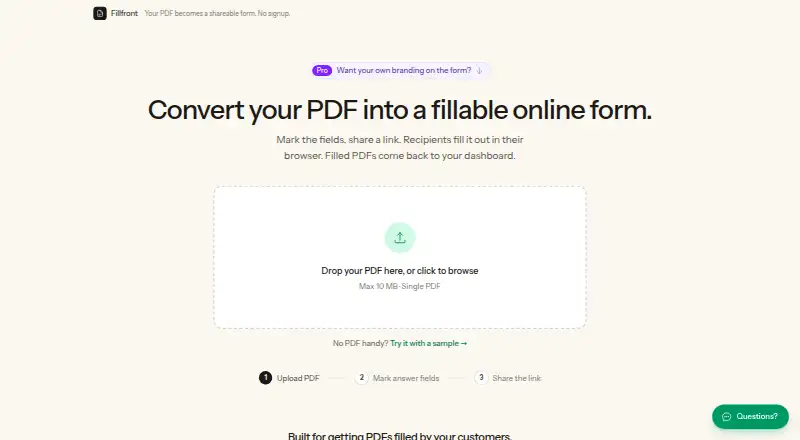
What Fillfront is
Fillfront turns an existing PDF into an online form and creates a completed PDF for each response. Upload a document and it detects blank areas, then suggests fields you can review and adjust. Answer fields support text, long text, email, numbers, dates, checkboxes, multiple choice, dropdowns, and signatures. You can require responses and validate formats such as email addresses and dates before submission. Recipients use a shared link in a browser; they do not need an account, an app, or a printer. Submitted responses appear in a dashboard and can be downloaded individually, as a spreadsheet, or as a ZIP of PDFs. Fillfront describes uses including client intake, registrations, applications, contractor estimates, and HR paperwork. The web service has a free plan for one form at a time, unlimited responses, and PDFs up to 10 MB. Its 29.00 USD one-time purchase raises the account limit to 10 forms and removes Fillfront branding on the purchased form. Uploaded documents and responses are stored on Fillfront’s server. The maker says documents are not sold or used to train models. Shared links use random codes, and recipients cannot view one another’s answers.
Who it suits
Fillfront suits people who need to collect information through an existing PDF, including for intake, registrations, applications, estimates, or HR paperwork. It is also suited to recipients who need to complete forms in a browser without an account, app, or printer.
What it does well
- Converts uploaded PDFs into browser forms with suggested fields.
- Supports signatures and several common answer types.
- Can require answers and validate email and date formats.
- Recipients can respond without creating an account.
- Responses can be downloaded as PDFs or a spreadsheet.
What to know first
- The free plan allows one form at a time.
- Free plan PDFs are limited to 10 MB.
- Paid branding removal applies only to the purchased form.
- Not suitable for medical information or regulated data.
Limits
The free plan allows one form at a time and PDFs up to 10 MB, with unlimited responses and email notifications for the first two replies. A one-time 29.00 USD purchase raises the account limit to 10 forms; branding removal and email notifications for every submission apply to the purchased form.
Plans
| Plan | Billed and limits | Price |
|---|---|---|
| Free | Nothing; no card, no trial, no expiry · One form at a time · unlimited responses · PDFs up to 10 MB · email notifications for first two replies | Free |
| Paid, per form | Paid once for one form; not a subscription · One-time purchase raises account limit to 10 forms · branding, no Fillfront badge, email for every submission · paid features apply only to purchased form | $29, paid once |
As fillfront.com lists them, read 2 Oct 2026. The maker's own page has the final word.
Getting started
- Open fillfront.com in a browser.
- Upload an existing PDF and review or adjust the suggested fields.
- Share the form link with recipients.
- Choose the free plan for one form or make a 29.00 USD one-time purchase for a higher form limit.
Verdict
Choose Fillfront to collect browser-based responses while retaining each submission as a completed copy of an existing PDF. Look elsewhere if you need to handle medical or other specifically regulated information, since Fillfront says it has no compliance posture or certifications and is unsuitable for that data.
Questions
Is Fillfront free?
Yes. Its free plan costs nothing and has no card requirement, trial, or expiry.
What does the paid plan cost?
The paid plan is $29, paid once for one form. It is a one-time purchase, not a subscription.
Which platforms does Fillfront support?
Fillfront runs on the web. Recipients complete shared forms in a browser.
Can recipients answer without signing up?
Yes. Recipients can use a shared form link without an account, app, or printer.
What happens to uploaded documents and responses?
They are stored on Fillfront’s own server. The maker says documents are not sold or used to train models; cached completed PDFs are deleted after 90 days, while submitted answers remain so the document can be regenerated.
Is Fillfront suitable for regulated data?
The terms say it has no compliance posture or certifications and is not suitable for medical information or data subject to specific regulatory regimes.
Facts from Fillfront's own pages
- Automatic fields
- On upload, Fillfront detects blanks and proposes fields for the user to review and adjust. · fillfront.com, 2 Oct 2026
- Compliance limit
- The terms say Fillfront has no compliance posture or certifications and is not suitable for medical information or data subject to specific regulatory regimes. · fillfront.com, 2 Oct 2026
- Data handling
- Uploaded documents and responses are stored on Fillfront’s own server, and the maker says documents are not sold or used to train models. · fillfront.com, 2 Oct 2026
- Field types
- Supported answer types include text, long text, email, number, date, checkbox, multiple choice, dropdown, and signature. · fillfront.com, 2 Oct 2026
- Integrations
- The pricing page says card payments are handled by Stripe. · fillfront.com, 2 Oct 2026
- Purpose
- Fillfront converts a PDF into a browser form and returns each response as a completed copy of the PDF. · fillfront.com, 2 Oct 2026
- Recipients
- Recipients fill out a shared form link in a browser without an account, app, or printer. · fillfront.com, 2 Oct 2026
- Responses
- Completed PDFs are stored in a dashboard, and responses can be downloaded individually or as a spreadsheet or ZIP of PDFs. · fillfront.com, 2 Oct 2026
- Retention
- Cached completed PDFs are deleted after 90 days, while submitted answers remain so the document can be regenerated. · fillfront.com, 2 Oct 2026
- Security
- The maker says shared form links use random codes, and recipients cannot see other recipients’ answers. · fillfront.com, 2 Oct 2026
- Support
- The site offers a contact form and says support replies by email. · fillfront.com, 2 Oct 2026
- Use cases
- The maker describes the product for client intake, registrations, applications, contractor estimates, and HR paperwork. · fillfront.com, 2 Oct 2026
- Validation
- The form can require answers and validate formats such as email addresses and dates before submission. · fillfront.com, 2 Oct 2026
Where Fillfront stands on Freedom251
- PDF Form Software#7 of 27