Freedom251 › SFTP Client Software
FilePort Pro
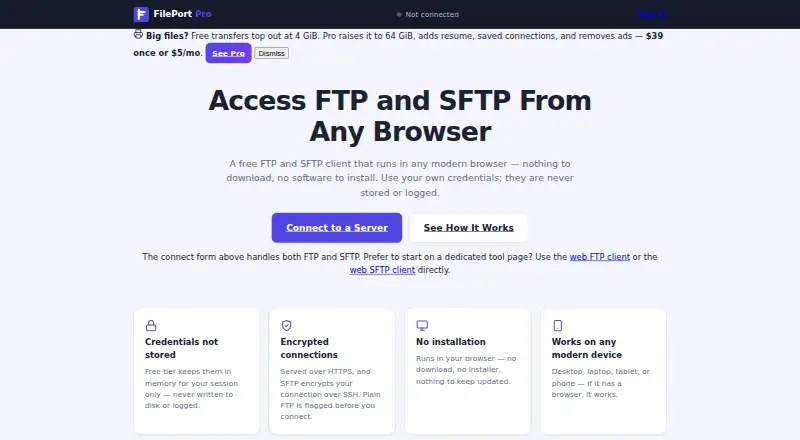
What FilePort Pro is
FilePort Pro is a browser-based FTP and SFTP client for connecting to servers, browsing files and transferring them without installing software. Its file list shows folders, sizes, types and modification times, with sortable columns and breadcrumb navigation. Users can upload multiple files, drag and drop, download files or save a whole folder as a ZIP archive; per-file transfers show byte-counted progress. For SFTP, the client displays and remembers the server’s host-key fingerprint, and blocks a connection after a key change until the user confirms it. Credentials pass through the service’s server for connections but remain in memory during the session and are not written to disk, stored in a database or logged. A session ends when disconnected or after approximately 15 minutes of inactivity. The Free plan costs nothing and permits transfers up to 4 GiB and two concurrent sessions per IP, without saved connections. Pro costs $5 a month and adds a saved-connections vault encrypted before reaching the service, automatic resume and a 64 GiB transfer limit. The service recommends SFTP because FTP is unencrypted by design.
Who it suits
It suits people who need to transfer files through a browser, including users on managed computers where installation is blocked or transferring from mobile browsers.
What it does well
- Runs in a browser without installation.
- Supports FTP and SFTP.
- Shows byte-counted progress per file.
- SFTP host-key changes require confirmation.
What to know first
- Free plan limits transfers to 4 GiB.
- Free plan allows two concurrent sessions per IP.
- Free plan has no saved connections.
- Sessions end after about 15 minutes of inactivity.
Limits
The Free plan allows transfer sizes up to 4 GiB and two concurrent sessions per IP, and it does not include saved connections. Pro allows transfers up to 64 GiB and eight concurrent sessions per account; automatic resume and the saved-connections vault are also Pro features.
Plans
| Plan | Billed and limits | Price |
|---|---|---|
| Free | Dedicated ad slots · 4 GiB transfer size · 2 concurrent sessions per IP · No saved connections · No account required | Free |
| Pro | Ad-free · Zero-knowledge saved-connections vault · 64 GiB transfer size · Automatic resume · 8 concurrent sessions per account · Account required | $39, paid once |
| Pro | Ad-free · Zero-knowledge saved-connections vault · 64 GiB transfer size · Automatic resume · 8 concurrent sessions per account · Account required | $5 a month |
As fileportpro.com lists them, read 11 Oct 2026. The maker's own page has the final word.
Getting started
- Open fileportpro.com in a browser.
- Choose the Free plan without creating an account, or choose Pro and create an account.
- Connect to a server using FTP or SFTP; the site recommends SFTP when available.
- Browse files, then upload or download them using the file list or drag and drop.
- For Pro saved connections, set up the account-password-derived vault and keep recovery codes available.
Verdict
FilePort Pro handles common server file tasks in a browser, with SFTP host-key checks and clear plan limits. The service recommends SFTP when available because FTP is unencrypted by design.
Questions
How much does FilePort Pro cost?
The Free plan costs nothing. Pro is $5 a month.
Can I use FilePort Pro without an account?
Yes. The Free plan requires no account. Pro requires an account.
Which protocols does it support?
FilePort Pro supports FTP and SFTP. The site recommends SFTP when available because FTP is unencrypted by design.
What are the Free plan limits?
Free allows transfer sizes up to 4 GiB and two concurrent sessions per IP. It does not include saved connections.
What does Pro add?
Pro adds an encrypted saved-connections vault, automatic resume, a 64 GiB transfer-size limit and eight concurrent sessions per account.
How are saved Pro connections protected?
They are encrypted before reaching the service with a key derived from the account password. Support cannot recover a lost password or recovery codes.
Facts from FilePort Pro's own pages
- Audience
- The site describes use cases including web hosting uploads, server file updates, managed computers where installation is blocked, and file transfers from mobile browsers. · fileportpro.com, 11 Oct 2026
- Credentials
- Credentials pass through FilePort Pro’s server to make the connection but are held in memory during the session and are not written to disk, stored in a database, or logged. · fileportpro.com, 11 Oct 2026
- File browsing
- The file listing includes folders, sizes, types, and modification times, with sortable columns and breadcrumb navigation. · fileportpro.com, 11 Oct 2026
- Hosting
- The service says it is hosted on the cto.new platform and its database runs on Neon. · fileportpro.com, 11 Oct 2026
- Host-key verification
- For SFTP, the app shows and remembers the server host-key fingerprint and refuses a connection after a key change until the user confirms. · fileportpro.com, 11 Oct 2026
- No installation
- The client runs in a browser without a download or software installation. · fileportpro.com, 11 Oct 2026
- Protocols
- The client supports FTP and SFTP, and the site recommends SFTP when available because FTP is unencrypted by design. · fileportpro.com, 11 Oct 2026
- Pro vault
- Saved Pro connections are encrypted before reaching the service with a key derived from the account password, and support cannot recover a lost password or recovery codes. · fileportpro.com, 11 Oct 2026
- Purpose
- FilePort Pro is a browser-based FTP and SFTP client for connecting to servers, browsing files, and uploading or downloading them. · fileportpro.com, 11 Oct 2026
- Security review
- The maker reports an internal design-level security review in August 2026 and says the product has not undergone an independent third-party or paid security audit. · fileportpro.com, 11 Oct 2026
- Session timeout
- A session ends when the user disconnects or after approximately 15 minutes of inactivity. · fileportpro.com, 11 Oct 2026
- Support
- The privacy policy lists [email protected] for questions. · fileportpro.com, 11 Oct 2026
- Transfer progress
- Transfers show per-file byte-counted progress. · fileportpro.com, 11 Oct 2026
- Transfers
- Users can upload multiple files, drag and drop files, download files, and download an entire folder as a ZIP archive. · fileportpro.com, 11 Oct 2026
Where FilePort Pro stands on Freedom251
- SFTP Client Software#11 of 31