Freedom251 › Game recording software

FBX
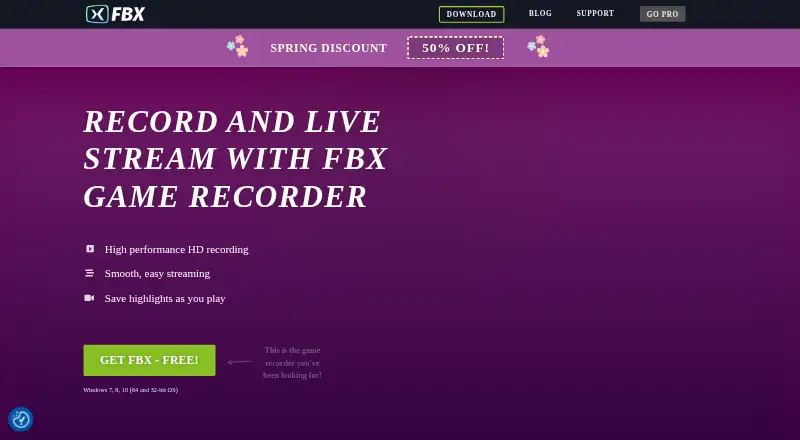
What FBX is
FBX is Windows software for recording and streaming gameplay, with tools for capturing clips, continuous footage, screenshots, and desktop activity. During play, a hotkey can save a short video, while DVR-style recording can keep capturing continuously. FBX also records the Windows desktop, including web content and older games, and takes screenshots of gameplay moments. For live streams, it adjusts to available bandwidth and can save streams to a hard disk. It supports Twitch and Facebook Gaming streaming, and recorded movies can be uploaded directly to YouTube through the YouTube API.
The built-in editor can add GIFs, animated stickers, sound effects, captions, slow motion, speed changes, freeze frames, and clips. Recordings can be exported as MP4 files or GIFs. FBX uses NVIDIA, AMD, or Intel hardware acceleration and is designed to work on older, low-spec PCs. It can record game or PC audio alongside microphone audio; webcam recording needs to be enabled separately. FBX supports Windows 7, 8, and 10 in 32-bit and 64-bit versions. The Free plan includes an FBX video watermark. Pro plans remove it, and the premium account can be used on one PC, with a move to another PC allowed once every 30 days.
Who it suits
FBX suits Windows players who want gameplay recording, instant clips, screenshots, and live streaming in one tool. Its hardware acceleration and support for older, low-spec PCs may also suit users with less powerful computers.
What it does well
- Hotkey saves short gameplay clips instantly.
- Continuous DVR-style recording captures gameplay as it happens.
- Records gameplay, desktop activity, and screenshots.
- Streams adjust to available bandwidth and can be saved.
- Exports recordings as MP4 files or GIFs.
- Editor includes captions, effects, speed changes, and clipping.
What to know first
- The Free plan places an FBX watermark on video.
- Supported operating systems are Windows 7, 8, and 10.
- A Pro account is limited to one PC, with moves allowed every 30 days.
Limits
The Free plan adds an FBX video watermark. A Pro account removes the watermark and is limited to one PC, though it can be moved to another PC once every 30 days.
Plans
| Plan | Billed and limits | Price |
|---|---|---|
| Free | FBX video watermark | Free |
| Pro Annual Subscription | PER YEAR · Removes FBX video watermark | $199.50 a year |
| Pro Lifetime License | INCLUDES ALL FUTURE UPDATES · Removes FBX video watermark · includes all future updates | $4,925, paid once |
As fbx.gg lists them, read 28 Sept 2026. The maker's own page has the final word.
Getting started
- Visit the FBX website.
- Use a PC running Windows 7, 8, or 10 in 32-bit or 64-bit.
- Choose the Free plan or a Pro plan.
- Enable webcam recording separately if you want to capture webcam video.
Verdict
Choose FBX if you want Windows gameplay capture with instant clips, continuous recording, streaming, and editing tools. Look elsewhere if you need watermark-free video on the Free plan or want a Pro account usable across multiple PCs at once.
Questions
Is FBX free?
Yes. Its Free plan costs nothing and adds an FBX video watermark.
What do the Pro plans cost?
The Pro Annual Subscription is $199.50 a year, billed PER YEAR. The Pro Lifetime License is listed at $49 a month, billed, and includes future updates.
Which platforms does FBX support?
FBX supports Windows 7, 8, and 10 in both 32-bit and 64-bit versions.
Can FBX record audio and webcam video?
It can record game or PC sounds and microphone audio simultaneously. Webcam recording must be enabled separately.
Where can FBX stream or upload recordings?
Streaming supports Twitch and Facebook Gaming. Recorded movies can be uploaded directly to YouTube through the YouTube API.
How many PCs can use an FBX account?
A free account has no limit on the number of PCs. A Pro account may be used on one PC and moved to another PC once every 30 days.
Facts from FBX's own pages
- Audio and webcam
- FBX can record game or PC sounds and microphone audio simultaneously, while webcam recording must be enabled separately. · fbx.gg, 28 Sept 2026
- Webcam overlay
- Yes · fbx.gg, 20 Sept 2026
- Desktop capture
- FBX can record the Windows desktop, including web and older games. · fbx.gg, 28 Sept 2026
- DVR recording
- FBX supports nonstop DVR-style recording so users can capture gameplay continuously. · fbx.gg, 28 Sept 2026
- Export formats
- Recordings can be exported as MP4 files or GIFs. · fbx.gg, 28 Sept 2026
- Free-account device limit
- A free account has no limit on the number of PCs it may be used on. · fbx.gg, 28 Sept 2026
- Free plan
- Yes · fbx.gg, 20 Sept 2026
- GPU encoding
- Yes · fbx.gg, 20 Sept 2026
- Hardware acceleration
- FBX uses NVIDIA, AMD, or Intel hardware acceleration and is designed to work on older low-spec PCs. · fbx.gg, 28 Sept 2026
- Instant clips
- A hotkey can instantly save short videos of gameplay. · fbx.gg, 28 Sept 2026
- Instant replay
- Yes · fbx.gg, 20 Sept 2026
- Other streaming integrations
- The product blog states that streaming supports Twitch API changes and Facebook Gaming via the custom-stream rmtps protocol. · fbx.gg, 28 Sept 2026
- Privacy and security
- Blueberry says it does not collect personally identifiable information without voluntary agreement, stores collected personal information in secure operating environments, and deletes personal data on request except where legally required to retain it. · fbx.gg, 28 Sept 2026
- Pro-account device limit
- A premium account may be used on one PC and can be moved to another PC once every 30 days. · fbx.gg, 28 Sept 2026
- Recording and streaming
- FBX records HD gameplay, supports live streaming, and saves highlights while you play. · fbx.gg, 28 Sept 2026
- Recording modes
- multi-mode · fbx.gg, 20 Sept 2026
- Screenshots
- FBX captures high-quality screenshots of gameplay moments. · fbx.gg, 28 Sept 2026
- Streaming behavior
- FBX adjusts streaming to available bandwidth and can save streams to a hard disk. · fbx.gg, 28 Sept 2026
- Supported platforms
- Windows 7, 8, 10 (32-bit and 64-bit) · fbx.gg, 20 Sept 2026
- Video editor
- The editor supports GIFs, animated stickers, sound effects, captions, slow motion, speed-up, freeze frames, and clipping. · fbx.gg, 28 Sept 2026
- Watermark-free video
- No · fbx.gg, 20 Sept 2026
- YouTube integration
- FBX can upload recorded movies directly to YouTube using the YouTube API. · fbx.gg, 28 Sept 2026
Where FBX stands on Freedom251
- Game recording software#21 of 30