Freedom251 › Screen Recording Software

FastCapture
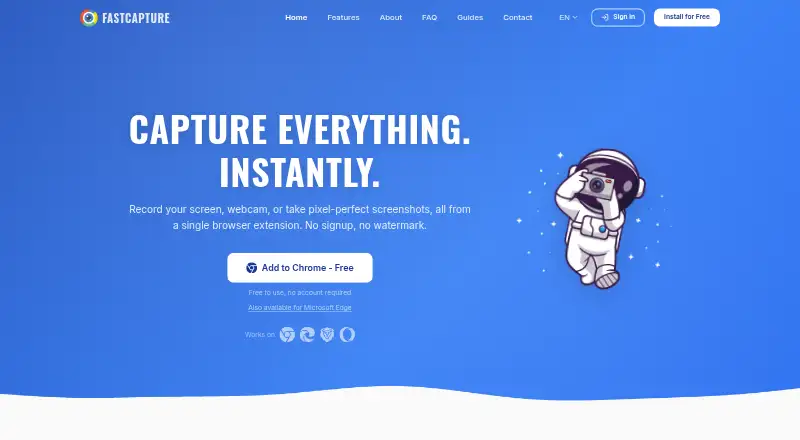
What FastCapture is
FastCapture is a browser extension for screen recording and screenshots in Chrome and Chromium-based browsers, including Edge, Brave, and Opera. It records a browser tab, desktop, region, or camera, with optional webcam overlay, system audio, and microphone recording. Screenshot modes cover the visible area, full pages, selected regions, and all open tabs. Annotation tools provide freehand drawing, text, arrows, shapes, sticky notes, and blur. The site lists WebM, MP4, GIF, PNG, JPG, and PDF exports, while the FAQ identifies MP4 and GIF as Pro features. Captures can be searched in a built-in history saved locally. FastCapture says processing happens locally and captures are not uploaded to its servers or third parties. Its policy says there are no analytics, tracking pixels, cookies, or telemetry. Gmail sharing can create drafts through Google OAuth and the Gmail API. The Free plan costs nothing and requires no account.
Who it suits
FastCapture suits people creating captures for bug reports, client communication, or documentation. It is intended for users of Chrome or compatible Chromium browsers who want local capture handling.
What it does well
- Records tabs, desktops, regions, or cameras
- Captures full pages and open tabs
- Built-in annotation tools
- Local searchable capture history
- No account required on Free
What to know first
- MP4 and GIF are Pro features
- Browser extension, not standalone app
- Supported on Chrome-based browsers
Plans
| Plan | Billed and limits | Price |
|---|---|---|
| Free | No account required · screen recording and screenshots · formats/features vary by plan | Free |
| Pro | MP4 export · GIF export · Unlimited recording duration · 60 FPS recording · Extended capture history · Additional annotation tools | On request |
As fastcapture.co lists them, read 12 Oct 2026. The maker's own page has the final word.
Verdict
FastCapture covers recording, screenshots, annotations, and local history in a browser extension. Its free plan requires no account, while advanced exports and recording options depend on an unpriced Pro plan.
Facts from FastCapture's own pages
- Annotations
- Annotation tools include freehand drawing, text, arrows, shapes, sticky notes, and blur. · fastcapture.co, 12 Oct 2026
- Browser support
- The extension works on Chrome and Chromium-based browsers including Edge, Brave, and Opera. · fastcapture.co, 12 Oct 2026
- Exports
- The site lists WebM, MP4, GIF, PNG, JPG, and PDF exports; the FAQ identifies MP4, GIF, and WebP as Pro features. · fastcapture.co, 12 Oct 2026
- Free plan
- Yes · fastcapture.co, 21 Sept 2026
- Integration
- Optional Gmail sharing uses Google OAuth and the Gmail API to create a draft with the capture attached. · fastcapture.co, 12 Oct 2026
- Local history
- The site says captures can be browsed and searched in a built-in history saved locally. · fastcapture.co, 12 Oct 2026
- Microphone recording
- Yes · fastcapture.co, 21 Sept 2026
- Supported platforms
- Chrome,Edge,Brave,Opera · fastcapture.co, 21 Sept 2026
- Pricing detail
- The FAQ says an optional Pro plan unlocks advanced features, but the page gives no Pro price. · fastcapture.co, 12 Oct 2026
- Privacy
- The maker says captures are processed locally and not uploaded to its servers or third-party services. · fastcapture.co, 12 Oct 2026
- Recording
- It records a browser tab, desktop, region, or camera, with optional webcam overlay and audio. · fastcapture.co, 12 Oct 2026
- Screenshots
- It captures the visible area, full page, a selected region, or all open tabs. · fastcapture.co, 12 Oct 2026
- Support
- Users can contact the maker to report bugs, ask questions, or suggest features. · fastcapture.co, 12 Oct 2026
- System audio
- Yes · fastcapture.co, 21 Sept 2026
- Tracking
- The privacy policy says FastCapture does not use analytics, tracking pixels, cookies, or telemetry. · fastcapture.co, 12 Oct 2026
- Webcam recording
- Yes · fastcapture.co, 21 Sept 2026
- What it does
- FastCapture is a browser extension for screen recording and screenshots. · fastcapture.co, 12 Oct 2026
- Who it is for
- The creator describes building it for screen captures used in bug reports, client communication, and documentation. · fastcapture.co, 12 Oct 2026
Where FastCapture stands on Freedom251
- Screen Recording Software#83 of 131