Freedom251 › Screen Recording Software
CamStudio
by CamStudio
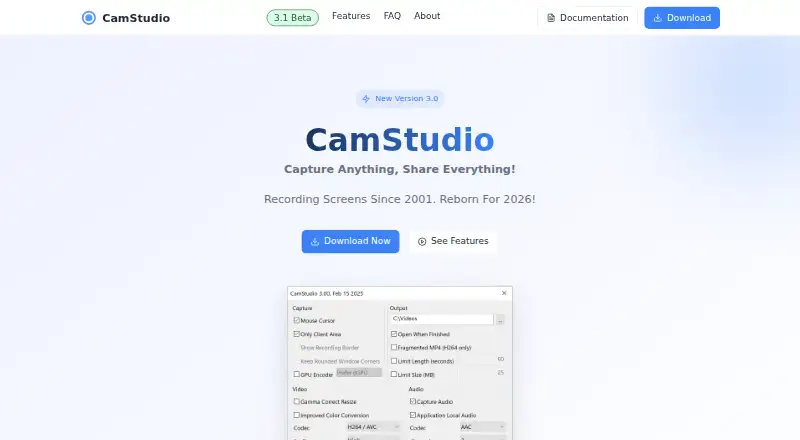
What CamStudio is
CamStudio is a free Windows screen recorder that captures computer activity and creates MP4 videos for tutorials, demos, and presentations. It can record the full screen, one window, or a selected region. CamStudio 3 supports H.264, H.265/HEVC, and AV1 video codecs, with controls for recording limits by time or file size, resolution, and frame rate. It captures system audio or audio from a designated application, with AAC and FLAC among the supported output formats. Microphone recording is temporarily disabled. CamStudio V3 runs without an installation wizard or setup, but requires 64-bit Windows 10 or 11, at least 4 GB RAM, DirectX 11-compatible graphics, 1 GB of free disk space, and administrator access at first launch. The maker says V3 is distributed exclusively from camstudio.org and is not bundled with third-party software. CamStudio was originally released as open source by RenderSoft in 2001; the current maintainer later developed V3. The listed CamStudio plan is free, with no subscription costs or paywalled premium features.
Who it suits
It suits Windows users making tutorial, demo, or presentation videos who need screen-region capture and system or application audio. Users should check the listed hardware and Windows requirements first.
What it does well
- Captures full screen, windows, or regions
- Supports H.264, H.265, and AV1
- Records system or application audio
- Offers time and file-size limits
- No subscription or paywalled premium features
What to know first
- Microphone recording is temporarily disabled
- Requires 64-bit Windows 10 or 11
- Needs at least 4 GB RAM
- Administrator access required at first launch
Plans
| Plan | Billed and limits | Price |
|---|---|---|
| CamStudio | No subscription costs or paywalled premium features | Free |
As camstudio.org lists them, read 12 Oct 2026. The maker's own page has the final word.
Verdict
CamStudio provides free Windows screen recording with selectable capture areas, modern MP4 codecs, and system-audio recording. Its disabled microphone support and specific hardware requirements may affect suitability.
Facts from CamStudio's own pages
- Audio
- It can capture system audio or audio from a designated application; microphone recording is temporarily disabled. · camstudio.org, 12 Oct 2026
- Audio formats
- Supported output audio formats include AAC and FLAC. · camstudio.org, 12 Oct 2026
- Beta scan
- The maker reports that the V3.1 beta showed 3 of 70 VirusTotal issues as of March 10, 2026, which it describes as false positives. · camstudio.org, 12 Oct 2026
- Capture modes
- It can record the full screen, a single window, or a selected region. · camstudio.org, 12 Oct 2026
- Founded
- 2001 · camstudio.org, 28 Sept 2026
- Free plan
- Yes · camstudio.org, 22 Sept 2026
- Historical bundling
- The maker says CamStudio was bundled with a third-party installation wrapper from approximately 2013 to 2019. · camstudio.org, 12 Oct 2026
- Microphone recording
- No · camstudio.org, 22 Sept 2026
- Supported platforms
- Windows · camstudio.org, 22 Sept 2026
- Portable use
- The V3 download runs without an installation wizard or setup. · camstudio.org, 12 Oct 2026
- Project history
- The maker says CamStudio 1.0 was originally released as open source by RenderSoft in 2001, and that CamStudio V3 was developed after the current maintainer took up the project. · camstudio.org, 12 Oct 2026
- Recording controls
- Users can set recording limits by time or file size and adjust resolution and frame rate. · camstudio.org, 12 Oct 2026
- Screen recording
- CamStudio records computer screen activity and creates MP4 videos for tutorials, demos, and presentations. · camstudio.org, 12 Oct 2026
- Security status
- The maker says V3 is distributed exclusively from camstudio.org, is not bundled with third-party software, and was reported clean in a VirusTotal scan. · camstudio.org, 12 Oct 2026
- Support
- The FAQ directs users with unresolved issues to documentation or contact support. · camstudio.org, 12 Oct 2026
- System audio
- Yes · camstudio.org, 22 Sept 2026
- Video codecs
- CamStudio 3 supports MP4 output using H.264, H.265/HEVC, and AV1 codecs. · camstudio.org, 12 Oct 2026
- Windows requirements
- CamStudio 3 requires 64-bit Windows 10 or 11, at least 4 GB RAM, DirectX 11-compatible graphics, 1 GB free disk space, and administrator access at first launch. · camstudio.org, 12 Oct 2026
Where CamStudio stands on Freedom251
- Screen Recording Software#82 of 131