Facet
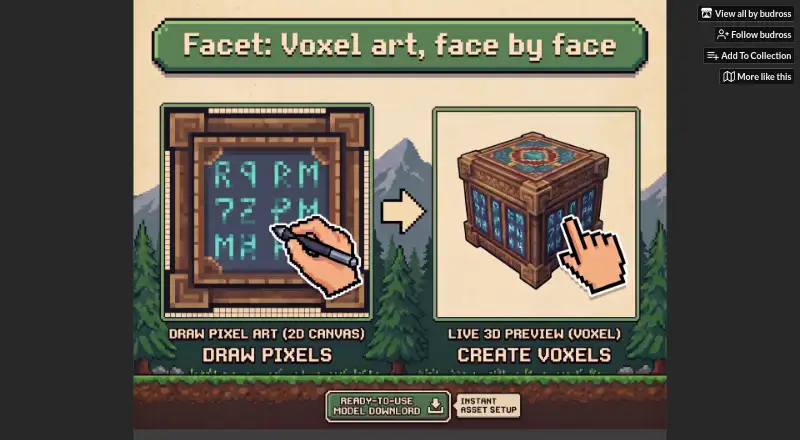
What Facet is
Facet is a voxel modeling and texturing application for creating 3D meshes and painting pixel-perfect textures on voxel faces. Its tools include edge chamfering and filleting to reshape voxels, a Pattern tool for saving and stamping pixel art across faces, and a Facade Depth Editor that extrudes individual pixels into sub-voxel 3D details. The browser demo supports face painting, compound shapes, reusable patterns, pixel extrusion, and saving projects as JSON for later reloading or sharing. The full version adds one-click OBJ export with texture atlases and automatically handled UVs. A linked Godot plugin is intended to address texture bleeding and UV alignment when importing OBJ files; the demo page describes exports as ready for Godot, Blender, or any engine. Facet is in development and available as a browser demo or a Windows installer. The demo is free. The Windows purchase is 10.00 USD or more as a one-time payment and includes future updates. The maker says buyers will receive a complimentary Steam key when Facet officially launches on Steam.
Who it suits
Facet is aimed at pixel artists and indie developers who want to make original 3D game assets. The free browser demo offers a way to create and save projects before buying the Windows version.
What it does well
- Browser demo saves and reloads JSON projects.
- Pattern tool reuses saved pixel art across voxel faces.
- OBJ export includes UVs and texture atlases.
- Purchase includes future updates.
What to know first
- Facet is listed as in development.
- The paid installer is for Windows.
- OBJ export is added in the full version.
Limits
The free browser demo saves and reloads JSON projects but does not include the full version’s one-click OBJ export. The paid plan costs $10.00 USD or more once and provides a Windows installer.
Plans
| Plan | Billed and limits | Price |
|---|---|---|
| Facet Demo | Free demo · Browser-based · saves and reloads JSON projects · full version adds one-click OBJ export | Free |
| Facet | $10.00 USD or more; minimum purchase price is $10 USD · Windows installer · OBJ export with UVs and texture atlases · future updates included | $10, paid once |
As budross.itch.io lists them, read 5 Oct 2026. The maker's own page has the final word.
Getting started
- Open the Facet website to use the browser demo.
- Paint voxel faces and try compound shapes, patterns, or pixel extrusion.
- Save the project as JSON to reload or share it.
- Choose the one-time Facet purchase for the Windows installer and OBJ export.
- Install Facet from the downloaded MSI and consult the README guide.
Overview
Facet is a focused voxel modeler for artists who want to build stylized 3D game assets from pixel art. It is most appealing if you want to shape and texture voxel faces in one workflow and can work within a browser demo or Windows application.
Its standout draw is the combination of face painting and pixel extrusion; the trade-off is that OBJ export requires a paid Windows install, and Facet is still in development.
Key features
Facet brings shaping and texture work together. Chamfering and filleting alter voxel edges, while the Pattern tool lets you save a pixel-art design and stamp it onto multiple faces. Reuse is useful for keeping repeated markings consistent, though the feature set is aimed at voxel assets rather than broad, general-purpose 3D modeling.
The Facade Depth Editor extrudes individual pixels into sub-voxel details, adding depth while keeping the pixel-art approach. The browser demo includes face painting, compound shapes, patterns, extrusion, and JSON saving, so it gives prospective users a meaningful way to explore the core creation workflow before paying.
Facet can export OBJ files with texture atlases and automatically handled UVs. The maker’s Godot plugin is designed to address texture bleeding and UV alignment during OBJ import; the demo page also says exported models are ready for Godot, Blender, or any engine. Projects can be shared by copying their JSON, including into Discord, which is convenient for sharing editable project data but is separate from OBJ export.
Pricing
| Plan | Price | What it includes |
|---|---|---|
| Facet Demo | free | Browser-based demo; save and reload JSON projects |
| Facet | $10, paid once | Windows installer, OBJ export with UVs and texture atlases, and future updates |
The free demo suits artists who want to try the modeling and texturing tools or save work as JSON without making a purchase. It gives up one-click OBJ export, so it is not enough for a workflow that needs exported assets. The paid plan is a one-time purchase with a minimum price of $10 USD; it is the practical choice for Windows users who need OBJ output. Buyers are also promised a complimentary Steam key when Facet officially launches on Steam.
Platforms
The demo runs in a browser, while the paid download is a standalone Windows MSI installer with a README guide; the downloadable archive is Facet.zip. The split makes it easy to try the core tools without installing the paid application, but buyers who need OBJ export must use Windows.
Who it's for
Facet fits pixel artists and indie developers making original, stylized game assets, particularly those who want to move from painted voxel faces to small extruded details. It is a weaker fit for people seeking a mature, general-purpose modeling suite or a paid workflow outside Windows. The maker invites users to join its Discord to share creations and shape development.
Pros and cons
- Pros: The browser demo includes face painting, compound shapes, reusable patterns, and pixel extrusion, making it possible to explore the central workflow for free.
- Pros: Paid OBJ export bundles texture atlases and automatically handled UVs, with a maker-provided Godot plugin aimed at common import alignment and bleeding issues.
- Pros: The $10 minimum is a one-time purchase and includes future updates.
- Cons: OBJ export is not included in the browser demo, so export-focused users need the paid plan.
- Cons: The paid application is Windows-only, limiting its fit for users who need an installed version on another platform.
- Cons: Facet remains in development, so it is a less settled choice for users prioritizing a mature production tool.
Alternatives
Voxel Editors is the broader category directory for comparing voxel tools.
- Goxel is a better match for users who want a free desktop voxel editor across Windows, macOS, and Linux, with an iOS version also available; its desktop scene size is described as unlimited.
- Vengi VoxEdit suits users seeking a free, open-source option across web and desktop platforms, while accepting that it is under development.
- Blockhammer is another free voxel editor for Windows, macOS, and Linux, and is also in early access.
- Mega Voxels may suit users who prefer an iOS or Android app and free content licenses, with a premium option for additional content licenses.
- Qubicle Voxel Editor is an option for macOS and Windows users who want to compare a paid voxel editor with a free demo.
- Sproxel is a free, open-source project for users on Linux, macOS, or Windows.
- The Sandbox Game Maker is free for personal, educational, and commercial projects; publishing to virtual LAND requires LAND ownership.
- VoxelShop is a free option for Linux, macOS, and Windows users.
Verdict
Choose Facet if you are a pixel artist or indie developer who wants a concentrated voxel workflow with face painting, reusable patterns, pixel extrusion, and OBJ export. The free browser demo is a strong way to assess that workflow, but anyone who needs export must pay at least $10 and use Windows; those seeking a mature or non-Windows production tool should look elsewhere.
Verdict
Facet combines voxel shaping, face painting, and pixel extrusion, with OBJ export in its paid Windows version. Its free browser demo covers several core creation tools, but the application remains in development.
Questions
Is Facet free?
Yes. The Facet Demo costs nothing and runs in a browser. It saves and reloads JSON projects.
How much does the full version cost?
The one-time purchase is $10.00 USD or more, with a minimum purchase price of $10 USD.
Which platforms does Facet support?
Facet is available as a browser demo and as a Windows MSI installer.
Can Facet export models for game engines?
The full version exports OBJ files with texture atlases and automatically handled UVs. The demo page says exported models are ready for Godot, Blender, or any engine.
Is Facet open source?
The listed facts do not identify Facet as open source.
What comes with a purchase?
The purchase includes future updates. The maker says buyers will receive a complimentary Steam key when Facet officially launches on Steam.
Facts from Facet's own pages
- Audience
- The maker describes the browser demo as intended for pixel artists and indie developers who want original 3D game assets. · budross.itch.io, 5 Oct 2026
- Demo features
- The browser demo supports painting voxel faces, compound shapes, reusable patterns, pixel extrusion, and saving work as JSON. · budross.itch.io, 5 Oct 2026
- Development status
- Facet is listed as in development. · budross.itch.io, 5 Oct 2026
- Download
- The purchase provides a standalone Windows MSI installer and a README guide; the listed downloadable archive is Facet.zip. · budross.itch.io, 5 Oct 2026
- Export
- Facet exports OBJ files with texture atlases and automatically handled UVs. · budross.itch.io, 5 Oct 2026
- Facade Depth Editor
- The Facade Depth Editor extrudes individual pixels into sub-voxel 3D details. · budross.itch.io, 5 Oct 2026
- Godot integration
- The maker links a Godot plugin that addresses texture bleeding and UV alignment issues when importing OBJ files. · budross.itch.io, 5 Oct 2026
- Other engine compatibility
- The demo page says exported models are ready for Godot, Blender, or any engine. · budross.itch.io, 5 Oct 2026
- Pattern tool
- The Pattern tool saves pixel art designs for stamping across multiple voxel faces. · budross.itch.io, 5 Oct 2026
- Project sharing
- Users can copy project JSON to share creations, including by pasting it into Discord. · budross.itch.io, 5 Oct 2026
- Purpose
- Facet is a voxel modeling and texturing application for creating 3D meshes and painting pixel-perfect textures on voxel faces. · budross.itch.io, 5 Oct 2026
- Shape tools
- It includes edge chamfering and filleting tools to reshape voxels. · budross.itch.io, 5 Oct 2026
- Support
- The maker invites users to join the Facet Discord to share creations and shape future development. · budross.itch.io, 5 Oct 2026
- Updates
- Purchases include future updates through Itch.io, and the maker says buyers will receive a complimentary Steam key when Facet officially launches on Steam. · budross.itch.io, 5 Oct 2026
Where Facet stands on Freedom251
- Voxel Editors#4 of 26