
Blockhammer
What Blockhammer is
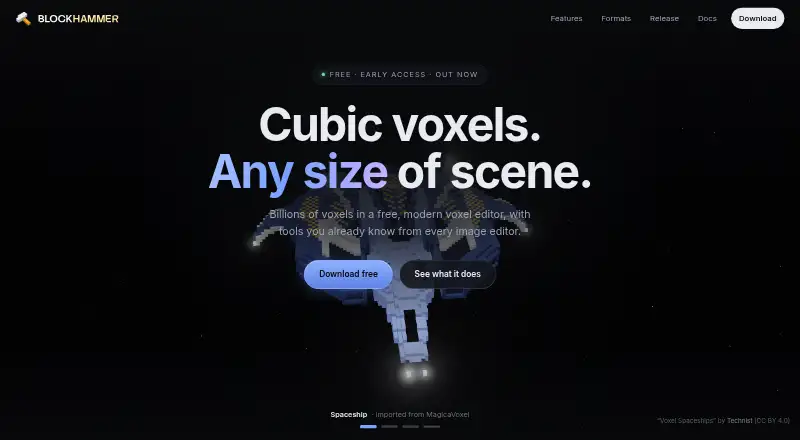
Blockhammer is a free voxel editor for building scenes from cubic blocks, available for macOS, Windows, and Linux. Its modeling tools include layers, named objects, exact position and size controls, reversible effects, and undo. For surface detail, users can paint block faces at sixteen times the blocks’ resolution with text, images, glass, metal, or glowing paint. It imports and exports MagicaVoxel .vox files and exports .glb, .obj, Minecraft .schem, and image or animation formats. The maker lists Unity, Unreal, Godot, Blender, Minecraft, and Teardown as destinations for exported work. Blockhammer autosaves every minute and can restore work after a crash. Scenes and files remain on the user’s machine, with no account required. Crash reports may include errors, recent activity, and graphics hardware details; reporting can be disabled. Optional AI texture generation is off by default and sends prompts to the image API configured with the user’s own key. The software is under active development, so features may change. Platform requirements include macOS 11 or later, Windows 10 or later on x86_64, and x86_64 Linux with glibc from Ubuntu 22.04 or newer.
Who it suits
Blockhammer suits people creating voxel scenes who want precise object controls, detailed surface painting, and exports for named tools and games. It may also suit users who prefer local files and no account requirement.
What it does well
- Free editor for macOS, Windows, and Linux.
- Autosaves every minute and supports crash recovery.
- Imports and exports MagicaVoxel .vox files.
- Scenes and files stay on the user's machine.
What to know first
- Under active development; features may change.
- AI texture prompts go to a configured image API.
- Linux download requires x86_64 and specified glibc.
Limits
The Free plan costs nothing and is listed as an early access voxel editor. The maker says features may be reworked or replaced during active development.
Plans
| Plan | Billed and limits | Price |
|---|---|---|
| Free | Free voxel editor; macOS, Windows, and Linux downloads; early access | Free |
As blockhammer.app lists them, read 30 Sept 2026. The maker's own page has the final word.
Getting started
- Open https://blockhammer.app/ to get started.
- Choose the download for macOS, Windows, or Linux that matches your system requirements.
- Build a scene using layers, named objects, position and size controls, and editing effects.
- Paint block faces or import and export supported scene formats.
Blockhammer is a free desktop voxel editor for artists and game creators who want precise scene controls, detailed face painting, and multiple export formats. Its breadth is compelling for a no-cost tool, but active development and specific desktop requirements make it less suitable for anyone who needs a stable, widely accessible workflow.
Overview
Blockhammer combines voxel modeling, surface painting, and export in one editor. Layers, named objects, exact position and size controls, reversible effects, and undo give creators useful ways to organize and adjust scenes; this is a stronger fit for structured builds than for workflows centered on unconstrained sculpting.
Scenes and files remain on the user's machine, and no account is required. Autosave runs every minute and can restore work after a crash, which helps protect longer sessions. Crash reports may include the error, recent activity, and graphics hardware details, though reporting can be disabled in settings. Optional AI texture generation is off by default and sends the typed prompt to the image API configured with the user's own key.
Key features
Fine control over models and surfaces
Exact position and size controls, layers, and named objects support deliberate placement and scene organization. Reversible effects and undo make revisions less costly. Face painting at sixteen times the blocks' resolution allows text and image details as well as glass, metal, and glowing paint, giving Blockhammer an appealing advantage for scenes where surface treatment matters. It does not include animation tools, so creators building animated work will need another part of their pipeline.
Large scenes and export
The maker says Blockhammer has rendered a 113-million-block scene and tested scenes beyond one billion blocks. Those figures suggest an ambition to handle unusually large builds, though they are not a guarantee of performance on every computer. MagicaVoxel .vox import and export, plus .glb, .obj, Minecraft .schem, image, and animation exports, make the editor useful across several creation pipelines. The maker lists Unity, Unreal, Godot, Blender, Minecraft, and Teardown as destinations for exported work.
Pricing
Blockhammer is free, with no paid tier or trial. The Free plan costs nothing and includes the voxel editor, macOS, Windows, and Linux downloads, and early access. There are no paid-plan upgrades to weigh, but users should accept that the software is under active development and features may be reworked or replaced.
Platforms
Blockhammer runs on macOS, Linux, and Windows. The requirements are macOS 11 or later, x86_64 Linux with glibc from Ubuntu 22.04 or newer, and Windows 10 or later on x86_64. It is not a mobile or browser-based option, and older or non-x86_64 systems fall outside the stated requirements.
Who it's for
Blockhammer suits voxel artists, hobbyists, and game creators who want a free desktop editor with precise scene organization, high-resolution face painting, and exports for common 3D and game workflows. Its local-file approach and lack of an account requirement may also appeal to users who prefer to keep project files on their own machine. Choose another tool if you need animation tools, mobile access, or a more settled product.
Pros and cons
- Pro: Face painting at sixteen times block resolution supports detailed text and imagery alongside glass, metal, and glowing finishes.
- Pro: Multiple export formats and named engine or software destinations make it adaptable to different downstream workflows.
- Pro: Local files, no account requirement, and optional crash-reporting controls give users meaningful control over data handling.
- Con: Active development means features may change, which is a drawback for users who need a dependable long-term workflow.
- Con: Desktop-only availability and stated operating-system and architecture requirements exclude mobile users and some older systems.
- Con: No animation tools are included, so animation-focused projects need separate software.
Alternatives
Browse Voxel Editors for more options. Goxel is worth considering if mobile access matters: it supports Android and iOS as well as desktop systems, and its desktop plan is free with scene size described as unlimited. Vengi VoxEdit is another free, under-development option, including a web version, if browser access or open-source software is a priority.
Facet suits someone who wants a browser-based editor for JSON projects; its free demo saves and reloads projects, while one-click OBJ export is added by the full version, priced at $10, paid once. Mega Voxels is a mobile alternative for Android and iOS, with a free app download and free content licenses; its premium option includes premium content licenses for $1.99 a month.
The Sandbox Game Maker is a better fit for creators specifically making content for its virtual LAND ecosystem: it is free for personal, educational, and commercial projects, but publishing to virtual LAND requires LAND ownership. pixemboss offers a free in-browser editor with no installation or account needed to start. Roxel is a free Windows and macOS download with a name-your-own-price model. VoxelDream is a free macOS option for personal and commercial use.
Verdict
Choose Blockhammer if you want a free desktop voxel editor that combines precise scene controls, unusually fine face painting, and flexible export routes. Its local-file approach is another practical advantage. Look elsewhere if animation, mobile or browser access, or a more mature development status is essential.
Verdict
Blockhammer combines voxel modeling, high-resolution face painting, and several export formats in a free editor. Note its active-development status and platform requirements before choosing it.
Questions
How much does Blockhammer cost?
The Free plan costs nothing. A free plan is available, and there is no free trial.
Which platforms does Blockhammer support?
It is available for macOS, Windows, and Linux. Requirements are macOS 11 or later, Windows 10 or later on x86_64, and x86_64 Linux with glibc from Ubuntu 22.04 or newer.
What file formats can it use?
Blockhammer imports and exports MagicaVoxel .vox files. It also exports .glb, .obj, Minecraft .schem, and image or animation formats.
Does Blockhammer have animation tools?
No animation tools are listed. It can export image or animation formats.
Does Blockhammer require an account?
No. The maker says scenes and files stay on your machine and the app has no account requirement.
How does the optional AI texture feature handle prompts?
AI texture generation is off by default. When used, the typed prompt is sent to the image API configured with your own key.
Facts from Blockhammer's own pages
- Autosave and recovery
- The editor autosaves every minute and can restore work after a crash. · blockhammer.app, 30 Sept 2026
- Data handling
- The maker says scenes and files stay on the user's machine and the app has no account requirement. · blockhammer.app, 30 Sept 2026
- Diagnostics
- Crash reports may include the error, recent activity, and graphics hardware details; users can disable crash reporting in settings. · blockhammer.app, 30 Sept 2026
- Early access
- The maker describes the software as under active development, with features that may be reworked or replaced as it changes. · blockhammer.app, 30 Sept 2026
- Formats
- It imports and exports MagicaVoxel .vox files and exports .glb, .obj, Minecraft .schem, and image or animation formats. · blockhammer.app, 30 Sept 2026
- Integrations
- The maker lists Unity, Unreal, Godot, Blender, Minecraft, and Teardown as destinations for exported work. · blockhammer.app, 30 Sept 2026
- Large scenes
- The maker says Blockhammer has rendered a 113-million-block scene and has tested scenes beyond one billion blocks. · blockhammer.app, 30 Sept 2026
- Modeling
- It supports layers, named objects, exact position and size controls, reversible effects, and undo. · blockhammer.app, 30 Sept 2026
- Optional AI feature
- Optional AI texture generation is off by default and sends the typed prompt to the image API configured with the user's own key. · blockhammer.app, 30 Sept 2026
- Painting
- Users can paint block faces at sixteen times the blocks’ resolution, including text, images, glass, metal, and glowing paint. · blockhammer.app, 30 Sept 2026
- Platform requirements
- The downloads page specifies macOS 11 or later, x86_64 Linux with glibc from Ubuntu 22.04 or newer, and Windows 10 or later on x86_64. · blockhammer.app, 30 Sept 2026
- Product
- Blockhammer is a free voxel editor for building scenes from cubic blocks. · docs.blockhammer.app, 30 Sept 2026
- Support
- Users can send feedback from the editor, and the maker lists [email protected] for questions or removal requests. · blockhammer.app, 30 Sept 2026
Where Blockhammer stands on Freedom251
- Voxel Editors#2 of 26