Freedom251 › Medical Website Builders

Fabricate
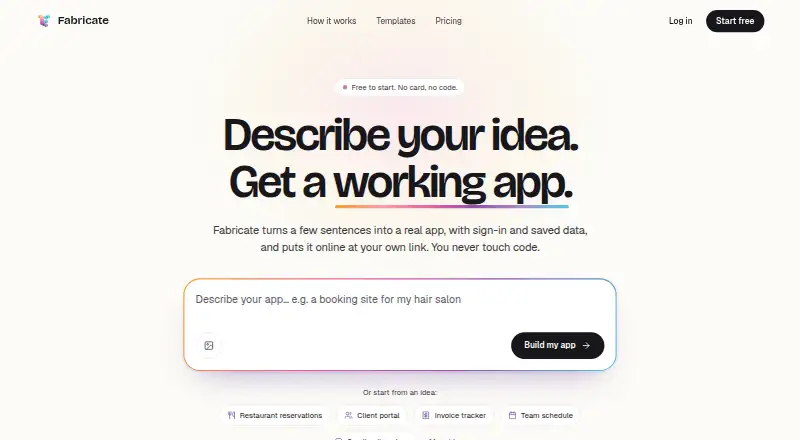
What Fabricate is
Fabricate is a web-based environment for building and publishing projects, with a browser IDE, live preview and one-click deployment. It supports database and backend work, and offers monthly credit allowances across its plans. The Free plan costs nothing and includes 60 credits per month, one published project, a web-based IDE, live preview, one-click deployment and email support. Pro costs $25 a month and provides 350 credits, unlimited project sharing, code download and export, GitHub push and sync, private projects, custom domains, and live chat and email support. Scale costs $50 a month and includes 700 credits, unlimited project sharing, code download and export, GitHub push and sync, and priority live chat. Fabricate supports custom domains, included with Pro. It is a web app; mobile apps are not available. The plans differ in their credit allowances and in access to project sharing, code export, GitHub integration and support options.
Who it suits
Fabricate suits people building and publishing projects in a browser, especially those needing database and backend capabilities. The Free plan may suit a single published project, while Pro and Scale add credits and project or code-management features.
What it does well
- Free plan includes 60 monthly credits.
- One-click deployment and live preview are included.
- Pro includes code export and GitHub push and sync.
- Pro includes private projects and custom domains.
- Scale includes 700 monthly credits.
What to know first
- Free plan allows one published project.
- Mobile apps are not available.
- Pro costs $25 a month.
- Scale costs $50 a month.
Limits
Free provides 60 credits per month and allows one published project. Pro provides 350 credits per month; Scale provides 700 credits per month.
Plans
| Plan | Billed and limits | Price |
|---|---|---|
| Free | No card needed · 60 credits/month · build and preview apps · sign-in and saved data · publishing requires Pro or Max | Free |
| Pro | Billed $240 a year, or $25 monthly · 350 credits/month · unlimited online apps · custom domain · private apps · payments · up to 3 collaborators · code download | $20 a month |
| Scale | billed monthly · 700 credits per month · Higher monthly allowance · Unlimited project sharing · Download and export code · GitHub push and sync · Priority live chat | $50 a month |
| Credit pack | 10,000 credits; packs never expire · 10,000 credits | $650, paid once |
| Max | Billed $960 a year, or $100 monthly · 1,750 credits/month · up to 20 collaborators · up to 20 domains · 25 GB file storage · up to 500 daily booking/enquiry alerts per app | $80 a month |
As fabricate.build lists them, read 15 Oct 2026. The maker's own page has the final word.
Getting started
- Open https://fabricate.build.
- Use the web-based IDE and live preview to work on a project.
- Choose Free, Pro, or Scale based on the monthly credit allowance and project needs.
- Deploy a project with one-click deployment.
- On Pro or Scale, connect with GitHub or export code if needed.
Overview
Fabricate turns plain-language app descriptions into web apps, then lets users refine them in chat and publish with one click. It is best suited to small-business owners, freelancers and teams who need a work app without installing software. Its mix of built-in backend capabilities and code export makes it more than a quick mock-up, but monthly credits and plan-based privacy and sharing limits shape who should choose it.
Key features
Users describe an app, watch it take shape and request changes through chat. Fabricate includes AI code generation, a database, authentication, payments and deployment, so generated apps can support sign-in and saved data as well as phone-sized screens. That combination suits practical internal tools and customer-facing workflows; it does not make Fabricate a route to native mobile apps.
Payment flows can include Stripe checkout, subscriptions, one-time payments, webhooks and a customer billing portal. App owners can connect Google Sheets to send form responses to a spreadsheet and Google Calendar to add events. These connectors and payment options widen the range of workflows a generated app can support, although the plan’s credit allowance still limits how much building is available each month.
Pro and Scale users can download code, and Fabricate supports pushing generated code to GitHub repositories. GitLab and Bitbucket support is planned rather than currently available. For teams that want code ownership or a GitHub workflow, the paid tiers are the relevant choice; the free tier does not include export.
Fabricate says prompts and generated content are not used to train AI models and personal data is not sold for advertising. Stripe handles payment card details, which Fabricate says it does not store. These are useful privacy boundaries, though they do not replace a reader’s own review of the platform’s privacy policy for a specific project.
Pricing
Fabricate is freemium. Its monthly credits refill each month and do not roll over; extra credits on Pro and Max do not expire. That makes the monthly allowance important for anyone whose building needs vary over time.
- Free — free: 60 credits/month, one app online at a time, public apps, sign-in and saved data. It is a sensible way to try the workflow or publish a single public app, but offers no private apps, own domain or code export.
- Pro — $25 a month, billed $25/month: 350 credits/month, unlimited apps online, private apps, own domain and live chat. This is the practical step up for individual makers or small teams that need private projects or a custom domain. New accounts that act within three days of sign-up are offered the first month for $9.99, then $25/month.
- Scale — $50 a month, billed monthly: 700 credits/month, unlimited project sharing, code download and export, GitHub push and sync, and priority live chat. It fits users who need collaboration or a code handoff; its higher allowance and export options are the main reasons to pay more than Pro.
- Max — $100 a month, billed $100/month: 1,750 credits/month, up to 20 own domains, up to 500 booking and enquiry emails/day per app, and priority chat with a first reply within 24 hours. This tier is aimed at heavier usage or multiple branded projects, not a casual single-app build.
The plans are presented with monthly billing, and the monthly credit balance does not carry forward. Max is the only tier with a stated email-volume cap and multiple-domain allowance; readers who need those limits should weigh them against the $100 monthly price.
Platforms
Fabricate runs on the web and publishes web apps. It includes a database and backend, and supports deployment as well as custom domains on Pro and above. It does not offer mobile apps, so choose it for browser-based projects rather than native phone software.
Who it's for
Fabricate is a good fit for small-business owners, freelancers and team members who need a tailored work app and prefer describing requirements to writing code from scratch. The free plan can test a small public project; Pro is the more suitable starting point when privacy or a custom domain matters. Scale is the better match for code export, GitHub integration or unlimited project sharing, while Max is for larger credit needs, multiple domains or substantial booking and enquiry traffic.
It is a weaker fit for anyone who needs a native mobile app, non-GitHub repository integration today, or a predictable carry-over of unused monthly credits. Users who need extensive work across months should account for credits expiring at each monthly refill.
Pros and cons
- Pros: The free plan includes sign-in and saved data, giving users a way to publish a functional public app before paying.
- Pros: Database, authentication, payments and deployment are built in, reducing the number of separate capabilities a maker needs to assemble for a working web app.
- Pros: Scale adds code export and GitHub push and sync, useful for teams that want to continue work in a repository.
- Cons: Free apps are public and limited to one online at a time, so the no-cost tier is not suitable for private projects or multiple live apps.
- Cons: Monthly credits do not roll over, which can waste unused allowance for occasional builders and constrain busy months.
- Cons: GitLab and Bitbucket integration is not currently supported, limiting repository choice for teams outside GitHub.
- Cons: The product is web-only, ruling it out for native mobile app requirements.
Alternatives
For a broader set of app-building choices, compare Fabricate with the No-Code AI App Builders list or the AI App Builders list. Readers focused on general no-code tools can also browse No-code app builders.
FrontDesk is a web-based freemium alternative centered on booking, staff calling minutes, texts and a dashboard; choose it when those front-desk functions matter more than building a custom app. Latrexa offers web plans priced in INR, including a free tier for one doctor; it is worth considering for a doctor-led practice with that pricing structure. Plot is a medical website builder with a Starter plan at $19.99 a month, including one published site and monthly AI generation limits; choose it for a medical website rather than a general-purpose work app.
Fabricate is also presented for restaurant website building, with the same free-plan price and a stated allowance of 60 monthly credits and one online app. Practice Front offers practice-oriented contact management and communication channels; consider it when those practice-management functions are the priority. Therapy.Page is a free web option with a custom domain included and no paid tiers. Webbin offers a free website plan with catalogue, image, review and team-member limits, making it an alternative for a small catalogue site. Willow Practice provides a free therapist website with a profile, minimal template, basic SEO and booking button.
For specialist directories, see Medical Website Builders, Restaurant Website Builders and Membership Site Platforms.
Verdict
Choose Fabricate if you want to turn a described workflow into a browser-based app with authentication, saved data and deployment in one platform. Its strongest case is the path from no-cost public app to paid private projects and, at Scale, code export and GitHub integration. Look elsewhere for native mobile apps, non-GitHub repository support or credits that carry over between months.
Verdict
Fabricate provides a browser-based route to build and deploy projects, with a free tier and two paid tiers. The choice depends on the needed credit allowance and whether project sharing, code export, GitHub integration or private projects matter.
Questions
Is Fabricate free to use?
Yes. The Free plan costs nothing and includes 60 credits per month and one published project.
How much do the paid plans cost?
Pro costs $25 a month. Scale costs $50 a month.
Does Fabricate have a mobile app?
No. Fabricate is web-based, and mobile apps are not available.
Can I use a custom domain?
Yes. Custom domains are included with Pro, and custom domains are listed as supported.
Can I export code or use GitHub?
Pro and Scale include code download and export, plus GitHub push and sync.
Does Fabricate support database and backend work?
Yes. Database and backend support are listed.
Facts from Fabricate's own pages
- AI building
- Users describe an app in chat, receive a live preview, and request changes conversationally. · fabricate.build, 15 Oct 2026
- AI data use
- Prompts and app code are sent to listed AI providers, while Fabricate says it does not train models on them or sell the data. · fabricate.build, 15 Oct 2026
- API integrations
- Fabricate can generate REST API clients, server-side credential handling, webhooks, retries, rate limiting and TypeScript response types. · fabricate.build, 15 Oct 2026
- App behavior
- The maker says generated apps support sign-in and saved data, and adapt to phone screens. · fabricate.build, 11 Oct 2026
- Authentication
- Authentication generation supports Clerk-backed signup, login, password reset, social login, roles, sessions and protected routes. · fabricate.build, 15 Oct 2026
- Availability limitation
- Accounts are unavailable in 48 listed countries because of sanctions, regional-pricing work or temporary regional pauses. · fabricate.build, 15 Oct 2026
- Backend stack
- Generated backend routes run in a Cloudflare Durable Object on Cloudflare Workers. · fabricate.build, 15 Oct 2026
- Built-in capabilities
- The platform lists AI code generation, database, authentication, payments, and deployment as included capabilities. · fabricate.build, 11 Oct 2026
- Code export
- Pro and Max users can download app code, and the GitHub feature page describes pushing generated code to GitHub repositories. · fabricate.build, 11 Oct 2026
- Company legal name
- The maker identifies itself as Fabricate, LLC. · fabricate.build, 15 Oct 2026
- Company location
- Trustpilot lists Fabricate.build’s contact location as Dover, United States. · trustpilot.com, 15 Oct 2026
- Connectors
- Form responses can be sent to Slack, Zapier or Make, while Fabricate also retains responses and sends email notifications subject to plan limits. · fabricate.build, 15 Oct 2026
- Custom domain
- Yes · fabricate.build, 19 Sept 2026
- Database
- Each app includes SQLite storage in its Durable Object, with tables created by the app code. · fabricate.build, 15 Oct 2026
- Database management
- The database feature provides automatic schema generation, a visual data browser, relationships, migrations and query tools. · fabricate.build, 15 Oct 2026
- Data handling
- The privacy policy says payment card details are handled by Stripe and are not stored by Fabricate. · fabricate.build, 11 Oct 2026
- Deployment
- One-click deployment provides Cloudflare hosting, automatic SSL, CDN distribution, DDoS protection, custom domains and rollback history. · fabricate.build, 15 Oct 2026
- Deployment architecture
- Published apps run as separate Cloudflare Workers with Durable Objects, and sustained high write volumes may require design work because each app uses one Durable Object instance. · fabricate.build, 15 Oct 2026
- Documentation
- The documentation site covers getting started, building, deployment, prompting, tips, plans and changelog topics. · fabricate.build, 15 Oct 2026
- Export portability
- Paid users can download ZIP source, export to GitHub or clone over HTTPS, but exported apps remain coupled to Cloudflare runtime services. · fabricate.build, 15 Oct 2026
- Free plan
- Yes · fabricate.build, 19 Sept 2026
- Frontend stack
- Current generated apps use React 19, TypeScript and plain CSS. · fabricate.build, 15 Oct 2026
- GitHub
- Paid plans can export code to GitHub, but current-generation apps support one-way export and do not pull GitHub edits back. · fabricate.build, 15 Oct 2026
- GitHub limitation
- The GitHub page says GitHub is currently supported and GitLab and Bitbucket integration is planned. · fabricate.build, 11 Oct 2026
Where Fabricate stands on Freedom251
- Medical Website Builders#4 of 23
- Restaurant Website Builders#10 of 54
- AI App Builders#17 of 39
- Membership Site Platforms#43 of 85
- No-Code AI App Builders#17 of 29
- No-code app builders#116 of 177