Freedom251 › Projection Mapping Software
FaçadeSignage
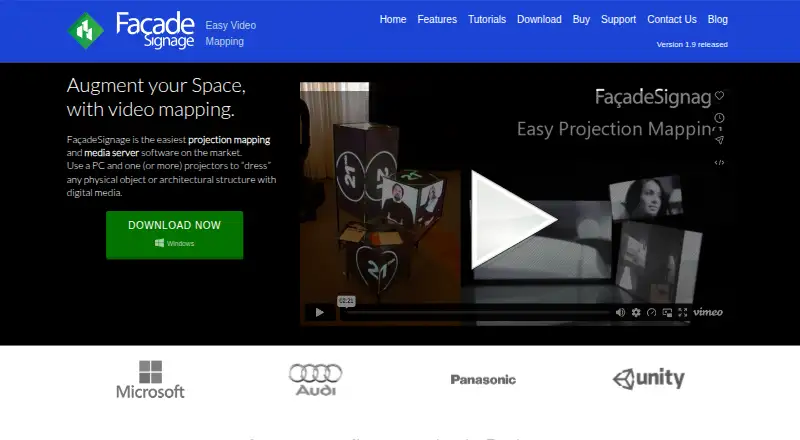
What FaçadeSignage is
FaçadeSignage is Windows software for projection mapping and media playback, using a PC with one or more projectors to put digital content onto objects and buildings. It handles flat, curved, and irregular surfaces, with unlimited mapping surfaces and layers. Content can include videos, images, and live feeds; sub-regions can be combined for synchronized presentations. Realtime cropping and alpha masks provide multiple cropping areas for media.
Its built-in client-server mode allows a control panel on one PC to operate players from another PC. Listed input resources include WebCam, DirectShow, Spout, PowerPoint, and Epiphan Grabber, while MIDI, OSC, and HTTP are available for remote automation. The maker names events, shops, showrooms, fairs, museums, theatres, conferences, and lobbies as possible settings.
The download page offers version 2021.1.4.1 for Windows in 64-bit and 32-bit editions. Lite is limited to one projector, home use, one set per project, and 1920x1080 output. Standard supports multiple projectors, live input, remote control, movie export, and 3840x1200 output. Professional adds a second editing license, live application capture, advanced remote control, and unlimited output resolution. A one-time 21-day trial license comes with the installer.
Who it suits
FaçadeSignage suits Windows users creating projected media for spaces such as museums, theatres, shops, events, or lobbies. Its plan options address one-projector home use through multi-projector setups with remote control and higher output resolution.
What it does well
- Maps flat, curved, and irregular shapes with unlimited surfaces and layers.
- Supports video, images, live content, cropping, and alpha masks.
- Client-server control lets another PC operate players.
- Lists MIDI, OSC, and HTTP remote automation.
- A 21-day trial license is included with the installer.
What to know first
- Available for Windows only.
- No free plan is offered.
- Lite is limited to one projector and 1920x1080 output.
- Plan prices are not provided.
Limits
The included trial license lasts 21 days and is one-time. Lite supports one projector, home use, one set per project, and 1920x1080 output; Standard supports up to 3840x1200 output, while unlimited output resolution is listed for Professional.
Plans
| Plan | Billed and limits | Price |
|---|---|---|
| Lite | 1 projector · home use · one set per project · 1920x1080 output | On request |
| Lite | 1 projector · home use · one set per project · 1920x1080 output | On request |
| Standard | Multi-projector · live input and remote control · movie export · 3840x1200 output | On request |
| Standard | Multi-projector · live input and remote control · movie export · 3840x1200 output | On request |
| Professional | Second editing license · live application grab · advanced remote control · unlimited output resolution | On request |
| Lite | 1 projector · home use · one set per project · 1920x1080 output | On request |
| Standard | Multi-projector · live input and remote control · movie export · 3840x1200 output | On request |
| Professional | Second editing license · live application grab · advanced remote control · unlimited output resolution | On request |
The first 8 of 9 plans, as videomappingsoftware.com lists them, read 8 Oct 2026. The maker's own page has the final word. Every plan
Getting started
- Open the maker’s website and go to the download page.
- Choose the Windows 64-bit or 32-bit installer.
- Install the software and use the included one-time 21-day trial license.
- Select Lite, Standard, or Professional according to projector, control, and output needs.
- Contact support through the maker’s web-ticket system if you need assistance.
Verdict
Choose FaçadeSignage if you need Windows projection mapping with support for varied surfaces, live media, and remote control. Look elsewhere if you need a non-Windows platform or a free plan.
Questions
Is FaçadeSignage free?
No. It is paid software and has no free plan; the installer includes a one-time 21-day trial license.
Which platforms does it support?
The listed platform is Windows. The download page offers version 2021.1.4.1 in 64-bit and 32-bit editions.
What do the plans include?
Lite covers one projector, home use, one set per project, and 1920x1080 output. Standard adds multi-projector support, live input and remote control, movie export, and 3840x1200 output; Professional adds a second editing license, live application grab, advanced remote control, and unlimited output resolution.
What is the trial period?
The installer includes a one-time 21-day trial license.
Who makes FaçadeSignage?
The maker identifies itself as TABULA Natural Interfaces Srl, based in S.Giovanni in Persiceto, Italy.
How can I contact support?
Support is available to trial users and customers through the maker’s web-ticket system.
Facts from FaçadeSignage's own pages
- Company
- The maker identifies itself as TABULA Natural Interfaces Srl and lists an address in S.Giovanni in Persiceto, Italy. · videomappingsoftware.com, 8 Oct 2026
- Headquarters
- S.Giovanni in Persiceto, Bologna, Italy · videomappingsoftware.com, 28 Sept 2026
- Inputs and integrations
- The Buy page lists WebCam, DirectShow, Spout, PowerPoint, and Epiphan Grabber resources, plus MIDI, OSC, and HTTP remote automation. · videomappingsoftware.com, 8 Oct 2026
- License terms
- Monthly and yearly subscriptions renew automatically, and the maker says they can be canceled before the next renewal. · videomappingsoftware.com, 8 Oct 2026
- Mapping
- It supports mapping flat, curved, and irregular shapes with unlimited surfaces and layers. · videomappingsoftware.com, 8 Oct 2026
- Masking
- It supports realtime cropping and alpha masks, with multiple cropping regions for media. · videomappingsoftware.com, 8 Oct 2026
- Media
- It can feed videos, images, and live content to surfaces and use sub-regions for synchronized experiences. · videomappingsoftware.com, 8 Oct 2026
- Payment security
- The maker says website payments are securely processed by FastSpring, which acts as its reseller. · videomappingsoftware.com, 8 Oct 2026
- Platform and version
- The download page offers FaçadeSignage 2021.1.4.1 for Windows 64-bit and a separate 32-bit version. · videomappingsoftware.com, 8 Oct 2026
- Purpose
- FaçadeSignage is projection mapping and media server software for using a PC and one or more projectors to dress physical objects or architectural structures with digital media. · videomappingsoftware.com, 8 Oct 2026
- Remote control
- Its built-in client-server mode lets a control panel on one PC control players from any PC. · videomappingsoftware.com, 8 Oct 2026
- Support
- Support is available to trial users and customers through the maker’s web-ticket system. · videomappingsoftware.com, 8 Oct 2026
- System requirements
- The download page lists Windows 7, 8, 8.1, or 10, a dual-core 2.0GHz CPU or Intel i3, 2GB RAM, and Intel HD3000/HD4000 or recommended NVIDIA/ATI graphics. · videomappingsoftware.com, 8 Oct 2026
- Trial
- The installer includes a one-time 21-days trial license. · videomappingsoftware.com, 8 Oct 2026
- Use cases
- The maker identifies events, shops, showrooms, fairs, museums, theatres, conferences, and lobbies as potential uses. · videomappingsoftware.com, 8 Oct 2026
Where FaçadeSignage stands on Freedom251
- Projection Mapping Software#16 of 24