Freedom251 › AI Explainer Video Makers

Explainerify
What Explainerify is
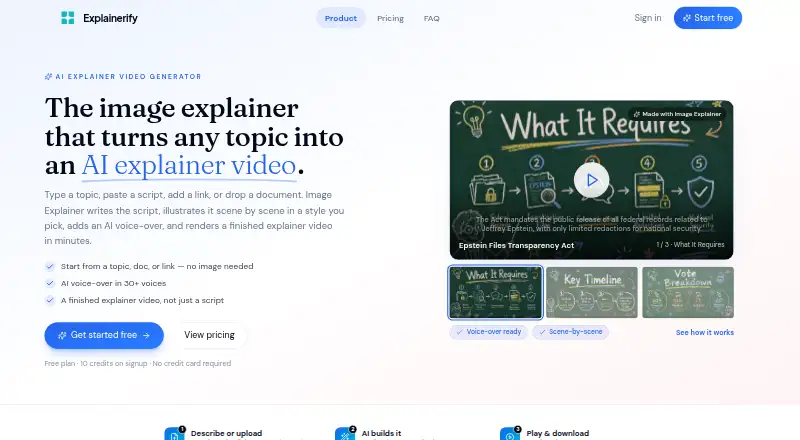
Explainerify’s Image Explainer turns a topic or source material into an illustrated explainer video with AI voice-over. Users can start with a topic, script, URL, or files such as PDF, PPTX, DOCX, TXT, MD, and images. The tool drafts a script, lays out scenes, generates visuals, adds narration, and renders a shareable video. Scenes can be previewed, reordered, and refined before rendering. Visual styles include Watercolor, Swiss Infographic, and Scene Illustration, with a consistent look across scenes. One-click AI voice-over provides more than 30 voices across many languages. The maker describes uses in education, onboarding, HR, operations, product marketing, and social content, and says the product is designed for SaaS teams, educators, creators, and operations teams. Its free plan costs nothing, with 10 signup credits and no credit card required. Paid plans add video credits, HD exports, storage, and priority support. Submitted content may be sent to AI providers to produce requested output; account and project data are kept until deletion or account closure.
Who it suits
Explainerify may suit educators, creators, SaaS teams, and operations teams making illustrated videos from written material, links, or images. The maker also lists onboarding, HR, product marketing, and social content as use cases.
What it does well
- Accepts topics, scripts, URLs, and several file types.
- Scenes can be previewed, reordered, and refined before rendering.
- Voice-over offers more than 30 voices across many languages.
- Free signup includes 10 credits and needs no credit card.
What to know first
- Submitted content may be sent to AI providers for generation.
- Account and project data remain until deletion or account closure.
- HD exports, storage, and priority support are listed as paid-plan additions.
Limits
The free plan includes 10 credits on signup. Paid plans add video credits, HD exports, storage, and priority support.
Plans
| Plan | Billed and limits | Price |
|---|---|---|
| Free | 10 credits on signup · no credit card required | Free |
As explainerify.com lists them, read 8 Oct 2026. The maker's own page has the final word.
Getting started
- Visit the Explainerify website.
- Start with a topic, script, URL, or supported file.
- Use the free plan with 10 signup credits; no credit card is required.
- Preview, reorder, and refine the generated scenes.
- Add narration and render a shareable video.
Verdict
Explainerify provides a web workflow for turning source material into narrated illustrated videos, with scene editing before rendering. The free plan includes 10 signup credits; paid plans add HD exports and other listed benefits.
Questions
How much does Explainerify cost?
The Free plan costs nothing and includes 10 credits on signup. No credit card is required.
What can I use to start a video?
You can start with a topic, script, URL, or PDF, PPTX, DOCX, TXT, MD, or image file.
Which platforms does Explainerify support?
Explainerify is listed as a web product.
What do paid plans add?
The maker says paid plans add video credits, HD exports, storage, and priority support.
Can I edit scenes before making the video?
Yes. You can preview, reorder, and refine scenes before rendering.
How is submitted content handled?
The privacy policy says submitted content may be sent to AI providers solely to generate requested output. Account and project data are kept until deletion or account closure.
Facts from Explainerify's own pages
- AI processing and retention
- Submitted content may be sent to AI providers solely to generate requested output, and account and project data are kept until deletion or account closure. · explainerify.com, 8 Oct 2026
- Inputs
- Users can start with a topic, script, URL, or files including PDF, PPTX, DOCX, TXT, MD, and images. · explainerify.com, 8 Oct 2026
- Intended users
- The About page says it is designed for SaaS teams, educators, creators, and operations teams. · explainerify.com, 8 Oct 2026
- Paid plan additions
- The maker says paid plans add video credits, HD exports, storage, and priority support. · explainerify.com, 8 Oct 2026
- Privacy data
- The privacy policy says it collects account information, submitted content, usage data, and billing information processed by its payment provider. · explainerify.com, 8 Oct 2026
- Purpose
- Image Explainer turns a topic, script, link, document, or image into an illustrated explainer video with AI voice-over. · explainerify.com, 8 Oct 2026
- Scene editing
- Scenes can be previewed, reordered, and refined before rendering. · explainerify.com, 8 Oct 2026
- Support contact
- The About page directs questions, feedback, and partnership inquiries to the listed email address. · explainerify.com, 8 Oct 2026
- Use cases
- The maker describes use for education, onboarding, HR, operations, product marketing, and social content. · explainerify.com, 8 Oct 2026
- Visual styles
- The style library includes Watercolor, Swiss Infographic, and Scene Illustration, with a consistent look across scenes. · explainerify.com, 8 Oct 2026
- Voice-over
- The product offers one-click AI voice-over with more than 30 voices across many languages. · explainerify.com, 8 Oct 2026
- Workflow
- It drafts a script, lays out scenes, generates visuals, adds narration, and renders a shareable video. · explainerify.com, 8 Oct 2026
Where Explainerify stands on Freedom251
- AI Explainer Video Makers#9 of 27