Freedom251 › Personal Finance Software

EveryDollar
by EveryDollar
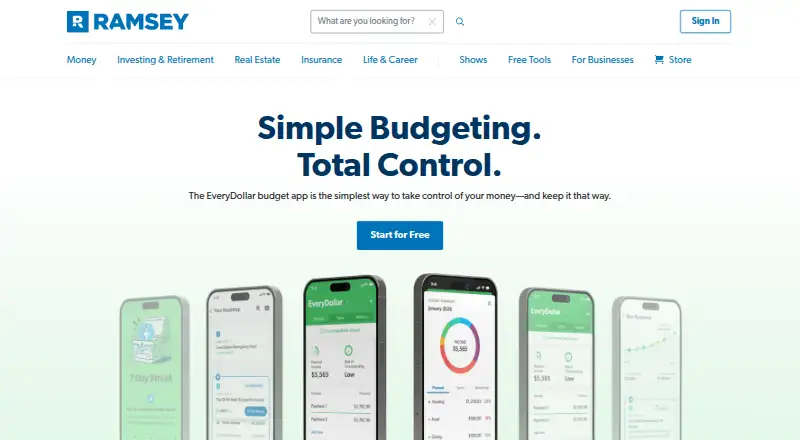
What EveryDollar is
EveryDollar is a budgeting tool for the web, iOS and Android. Its free plan supports monthly budgeting, manual transaction tracking, unlimited budget categories and lines, bill due dates and sinking funds. Listed capabilities also include bill tracking, net-worth tracking, account syncing, report export and mobile apps. Premium adds automatic bank transaction imports, paycheck and bill-date planning, custom reports, CSV export, projected net-worth calculations, coaching and live Q&A. Premium is listed at $17.99 a month after a 14-day free trial; the pricing note also gives an annual rate starting at $6.67/mo. The free plan uses manual transaction tracking, while Premium includes automatic imports. EveryDollar was founded in 2015, and its maker is based in Franklin, Tennessee, United States. Readers can access it in a browser or through mobile apps. Its plan choices distinguish manual budgeting features from Premium's imported transactions and additional planning, reporting and coaching tools.
Who it suits
It suits people who want to organize a monthly budget on the web or a mobile device. The free plan is for manual tracking, while Premium is aimed at people who want bank imports and added planning and reporting tools.
What it does well
- Free plan includes unlimited budget categories and lines.
- Tracks bill due dates and sinking funds.
- Premium adds automatic bank transaction imports.
- Available on web, iOS and Android.
- Includes a 14-day free trial.
What to know first
- Free plan relies on manual transaction tracking.
- Premium is listed at $17.99 a month after trial.
- Annual pricing note lists $6.67/mo as starting rate.
Limits
The free plan uses manual transaction tracking. Automatic bank transaction imports, paycheck and bill-date planning, custom reports, CSV export, projected net-worth calculations, coaching, and live Q&A are listed with Premium.
Plans
| Plan | Billed and limits | Price |
|---|---|---|
| Free | Monthly budgeting · Manual transaction tracking · Unlimited budget categories and lines · Bill due dates · Sinking funds | Free |
| Premium | After a 14-day free trial · Automatic bank transaction imports · Paycheck and bill-date planning · Custom reports · CSV export · Projected net-worth calculations · Coaching and live Q&A | $17.99 a month |
As ramseysolutions.com lists them, read 20 Sept 2026. The maker's own page has the final word.
Getting started
- Visit the EveryDollar website.
- Choose the free plan or start the 14-day Premium trial.
- Use the web version, or access EveryDollar on iOS or Android.
- Create a monthly budget and add categories, lines, bill due dates, or sinking funds.
- Choose Premium for automatic imports, planning, reports, projected net worth, coaching, and live Q&A.
Overview
EveryDollar is a budgeting app for planning monthly spending, tracking bills and monitoring net worth. It is best for people who want a category-based budget and are willing to enter transactions manually on the free plan. Premium is the better fit if automatic bank imports and broader planning tools matter more than avoiding a subscription.
Key features
Free supports unlimited budget categories and lines, so a detailed plan does not run into a category cap. Manual transaction tracking keeps entries in the user’s hands, but it also means maintaining the budget yourself rather than relying on automatic imports. Bill due dates and sinking funds help organize recurring obligations and save toward future expenses.
Premium adds automatic bank transaction imports, paycheck and bill-date planning, custom reports and CSV export. That makes it more useful for people who want less manual entry, need to review their budget in more detail or want to work with exported data. Projected net-worth calculations extend planning beyond monthly cash flow; coaching and live Q&A add guidance for users who value support.
Pricing
Free costs nothing and includes monthly budgeting, manual transaction tracking, unlimited budget categories and lines, bill due dates and sinking funds. It is a sound starting point for users comfortable keeping transactions current themselves, but it does not include automatic imports or Premium’s expanded planning and reporting tools.
Premium costs $17.99 a month after a 14-day free trial. It adds automatic bank transaction imports, paycheck and bill-date planning, custom reports, CSV export, projected net-worth calculations, coaching and live Q&A. Choose it if those tools justify an ongoing monthly charge; the trial gives prospective subscribers a short period to assess the paid tier before billing begins.
The annual starting rate is $6.67 a month (annual), substantially below the monthly plan price when paid annually. Compare the annual commitment with the flexibility of monthly billing before subscribing.
Platforms
EveryDollar is available on web, iOS and Android. That combination suits people who want to manage a budget on a computer or mobile device.
Who it's for
EveryDollar is a good fit for people who prefer to assign income to monthly categories, plan bill due dates and build sinking funds. The free plan works best for someone willing to log transactions manually. Premium is more appropriate for users who want imports, paycheck and bill-date planning, more reporting options or coaching. Look elsewhere if you need a free plan with automatic transaction imports.
Pros and cons
- Pro: Unlimited budget categories and lines on Free allow detailed monthly plans without a category limit.
- Pro: Free includes bill due dates and sinking funds, covering recurring bills and planned future expenses without a paid subscription.
- Pro: Premium combines automatic imports with planning, reporting, export and coaching tools.
- Con: Free relies on manual transaction tracking, which takes ongoing effort.
- Con: Premium’s $17.99 a month price is a meaningful recurring cost for users who only need a basic monthly budget.
Alternatives
For a broader set of personal finance choices, browse Personal Finance Software.
Choose SoFi instead if you want a free budget planner paired with account linking, spending and cash-flow tracking, net-worth tracking and credit-score monitoring. Its Coach / Relay plan is free, and it runs on Android, iOS, macOS, web and Windows.
PocketSmith is an option for users who want a free plan with automatic bank feeds, manual imports, two dashboards and 12 budgets. Its listed platforms include web, mobile and desktop operating systems.
Choose GnuCash if you need free desktop software for personal or small-business accounting rather than a mobile budgeting app.
MoneyPatrol offers a free plan with core tracking and dashboard features, including income and expense tracking. It is available on Linux, macOS and Windows.
Money Manager Ex is a free, open-source option with no ads or charges and desktop and mobile availability.
Choose Rocket Money if subscription tracking, upcoming bill tracking and spending categorization are priorities alongside basic budgeting; its free plan works on web, iOS and Android.
Zaim offers free expense and income recording, budget and spending analysis, automatic bank and card connections, and receipt scanning on web and mobile.
ClearCheckbook is another free option, with unlimited transactions, accounts and categories plus budgeting, bill tracking and reports. Its Sync plan costs $2.49 a month.
Verdict
EveryDollar is a strong choice for people who want a structured monthly budget, bill due dates and sinking funds without paying for the basics. Its main limitation is the manual upkeep required on Free; choose Premium if imports and expanded planning tools are worth $17.99 a month, or look elsewhere if you want those capabilities without that recurring cost.
Verdict
EveryDollar offers a free option for manual monthly budgeting and a Premium tier with imports and expanded planning tools. Compare the monthly plan price with the listed annual starting rate before subscribing.
Questions
Does EveryDollar have a free plan?
Yes. The Free plan costs nothing and includes monthly budgeting, manual transaction tracking, unlimited budget categories and lines, bill due dates, and sinking funds.
How much does Premium cost?
Premium is listed at $17.99 a month after a 14-day free trial. The pricing note also lists paid access starting at $6.67/mo on an annual basis.
What does Premium add?
Premium adds automatic bank transaction imports, paycheck and bill-date planning, custom reports, CSV export, projected net-worth calculations, coaching, and live Q&A.
Which platforms support EveryDollar?
EveryDollar is available on the web, iOS, and Android.
Can EveryDollar track bills and net worth?
Yes. Bill tracking and net-worth tracking are listed capabilities. Premium includes projected net-worth calculations.
Where is EveryDollar's maker based?
EveryDollar's maker is headquartered in Franklin, Tennessee, United States. The maker was founded in 2015.
Facts from EveryDollar's own pages
- Account sync
- both · ramseysolutions.com, 20 Sept 2026
- Bill tracking
- Yes · ramseysolutions.com, 20 Sept 2026
- Budgeting tools
- Yes · ramseysolutions.com, 20 Sept 2026
- Founded
- 2015 · ramseysolutions.com, 28 Sept 2026
- Free plan
- Yes · ramseysolutions.com, 20 Sept 2026
- Headquarters
- Franklin, Tennessee, United States · ramseysolutions.com, 28 Sept 2026
- Mobile apps
- both · ramseysolutions.com, 20 Sept 2026
- Net-worth tracking
- Yes · ramseysolutions.com, 20 Sept 2026
- Report export
- Yes · ramseysolutions.com, 20 Sept 2026
- Paid from
- 6.67 · ramseysolutions.com, 20 Sept 2026
Where EveryDollar stands on Freedom251
- Personal Finance Software#8 of 181
- Budgeting And Expense Tracking#4 of 29