Freedom251 › Mind Mapping Software
Escape
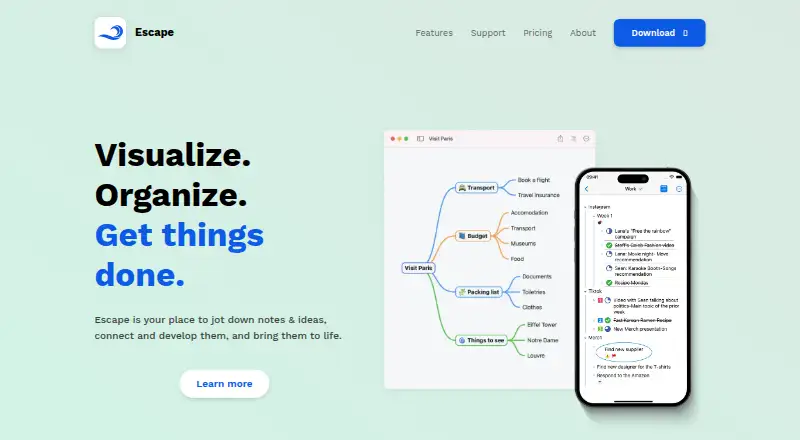
What Escape is
Escape combines note taking with mind mapping for visual brainstorming and organizing notes, tasks, and ideas on iOS/iPadOS and macOS. It offers both a spatial mind-map view and a linear outline view, so you can switch how information is arranged. Maps can contain text notes, images, tasks, and links. Projects can be broken into tasks and subtasks, with completion and priority tracking plus roll-up of subtasks. Escape works offline, stores maps in iCloud or on the device, and automatically syncs iCloud files across devices. It imports MMAP, OPML, Markdown, TextBundle, and plain text files, and exports Markdown, TextBundle, OPML, outline text, MMAP, PNG, and PDF. Apple Shortcuts, Siri, app actions, and a custom URL scheme support automation. Escape Basic is free; paid plans start at $1.99 per month. PRO subscriptions cover one platform at a time, and iOS/iPadOS and Mac require separate subscriptions.
Who it suits
Escape suits people who want a canvas-like way to capture notes or prefer visual organization without creating intricate diagrams. It also fits users planning projects with tasks and subtasks on Apple devices.
What it does well
- Free Basic plan
- Mind-map and outline views
- Works offline
- Broad import and export formats
- Apple automation integrations
What to know first
- iOS and Mac PRO subscriptions are separate
- PRO covers one platform at a time
- Limited to Apple platforms
Plans
| Plan | Billed and limits | Price |
|---|---|---|
| Escape Basic | Full set of mind mapping features; includes topic editing, notes, web and email links, images, basic tasks, widgets, and text & MMAP export | Free |
| Escape PRO | US price; iOS and Mac apps require separate subscriptions · Universal links · Image drawing and annotation on iOS · Roll-up tasks · Text styles · Custom mind-map layouts · Outliner | $1.99 a month |
| Escape PRO Monthly | Monthly; automatically renews unless turned off at least 24 hours before the period ends · PRO features for one platform (iOS/iPadOS or macOS); separate subscriptions required for each platform | $1.99 a month |
| Escape PRO Yearly | Annually; automatically renews unless turned off at least 24 hours before the period ends · PRO features for one platform (iOS/iPadOS or macOS); separate subscriptions required for each platform | $9.99 a year |
As escapeapp.cloud lists them, read 11 Oct 2026. The maker's own page has the final word.
Verdict
Escape offers a flexible visual workspace with offline editing, task structure, and many file formats. Check the platform-specific PRO subscriptions if you need paid features on both iOS/iPadOS and macOS.
Facts from Escape's own pages
- Apple integrations
- Escape supports Apple Shortcuts, Siri, app actions, and a custom URL scheme for automation. · escapeapp.cloud, 11 Oct 2026
- Content
- Mind maps can contain text notes, images, tasks, and links. · escapeapp.cloud, 11 Oct 2026
- Export formats
- Markdown,TextBundle,OPML,outlined text,MMAP,PNG,PDF · escapeapp.cloud, 20 Sept 2026
- Exports
- Escape supports exporting mind maps as Markdown, TextBundle, OPML, outline text, MMAP, PNG, or PDF. · escapeapp.cloud, 11 Oct 2026
- Free plan
- Yes · escapeapp.cloud, 20 Sept 2026
- Hybrid subscription
- After at least 12 consecutive months subscribed, users keep PRO features released before the subscription expires, while later PRO features require resubscribing. · escapeapp.cloud, 11 Oct 2026
- Imports
- Escape supports importing MMAP, OPML, Markdown, TextBundle, and plain text files. · escapeapp.cloud, 11 Oct 2026
- Intended users
- The maker describes Escape for people who want a canvas-like visual note-taking experience or feel they lack the skills for intricate diagrams. · escapeapp.cloud, 11 Oct 2026
- Maker history
- The maker says it launched the iOS mind-mapping app myMind in 2010 and launched Escape in 2018. · escapeapp.cloud, 11 Oct 2026
- Mind map and outline modes
- The app offers both mind map mode and outline mode, allowing users to switch between spatial and linear organization. · escapeapp.cloud, 11 Oct 2026
- Offline mode
- Yes · escapeapp.cloud, 20 Sept 2026
- Supported platforms
- iOS/iPadOS,macOS · escapeapp.cloud, 20 Sept 2026
- Product
- Escape combines note taking with mind mapping for visual brainstorming and organizing notes, tasks, and ideas. · escapeapp.cloud, 11 Oct 2026
- Project planning
- Users can break goals into tasks and subtasks, track completion and priority, and roll up subtasks. · escapeapp.cloud, 11 Oct 2026
- PRO limits
- PRO subscriptions cover one platform at a time, and iOS/iPadOS and Mac apps require separate subscriptions. · escapeapp.cloud, 11 Oct 2026
- Storage and sync
- Mind maps are stored in iCloud or on the device, and iCloud files sync automatically across devices. · escapeapp.cloud, 11 Oct 2026
- Support
- The maker provides a support page with a contact-us section and guides for mind maps, files, synchronization, and automation. · escapeapp.cloud, 11 Oct 2026
Where Escape stands on Freedom251
- Mind Mapping Software#15 of 72
- Mind mapping tools#38 of 72