Freedom251 › Audio Equalizer Software
EqLume
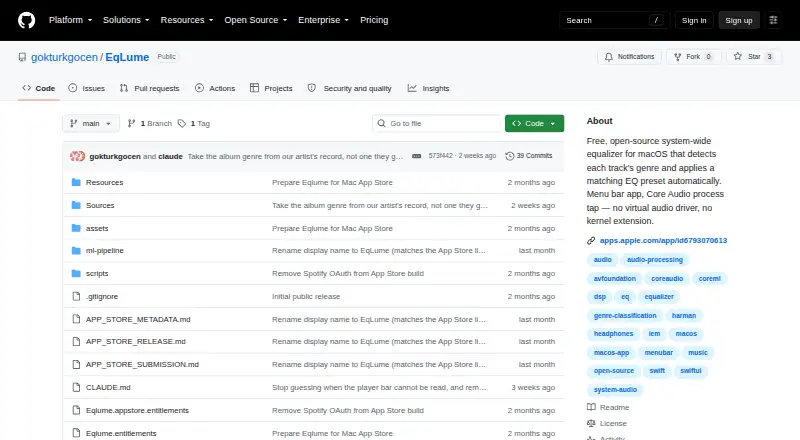
What EqLume is
EqLume is a system-wide equalizer for Mac that identifies the genre of the current track and applies a matching EQ preset. It captures system audio through a Core Audio process tap, without a virtual audio driver or kernel extension. The menu bar app includes 21 genre presets, a live spectrum analyzer, and a rendered EQ response curve. It reads now-playing details from Spotify, YouTube Music, Apple Music, and supported browsers, with transport controls for the three named music services. Genre selection can use MusicBrainz, Apple’s iTunes Search API, or an optional on-device CoreML classifier; pop is the fallback. Audio is processed in memory, not recorded to disk, uploaded, or shared, though track and artist names may be sent to MusicBrainz and Apple iTunes Search for lookup. EqLume is free and requires macOS 26.0 or later on an Apple silicon Mac. The Mac App Store build omits the optional classifier model.
Who it suits
EqLume suits Apple silicon Mac users on macOS 26.0 or later who want system-wide genre-based EQ. It may also suit listeners who want player integrations and per-device output settings.
What it does well
- Includes 21 genre presets.
- Works without a virtual audio driver or kernel extension.
- Audio stays in memory and is not recorded or uploaded.
- Supports device profiles and parametric EQ.
What to know first
- Requires macOS 26.0 or later.
- Requires an Apple silicon Mac.
- Built-in speakers are left unprocessed.
- Mac App Store build omits the optional classifier model.
Limits
EqLume is free, with no trial. The Mac App Store version does not include the optional audio classifier, and built-in speakers are left unprocessed.
Plans
| Plan | Billed and limits | Price |
|---|---|---|
| Free | Free Mac app | Free |
| Mac App Store | macOS 26.0+ · Apple silicon Mac | Free |
As github.com lists them, read 3 Oct 2026. The maker's own page has the final word.
Getting started
- Open the project’s GitHub page or choose the Mac App Store build.
- Install it on an Apple silicon Mac running macOS 26.0 or later.
- Enable Spotify integration if you want to use it.
- Choose outputs in settings; other outputs can be enabled per device.
- Select a preset or let catalog-based genre detection choose one automatically.
EqLume is a free, system-wide equalizer for Apple silicon Macs that changes its EQ preset according to the genre of the track. It suits listeners who want automatic tuning across supported applications and outputs, while its macOS 26 requirement and untreated built-in speakers rule out some Mac setups. The strongest reason to choose it is the combination of genre automation and manual control without a virtual audio driver; the main reason to look elsewhere is limited hardware and platform coverage.
Overview
EqLume captures system audio through a Core Audio process tap and applies equalization without a virtual audio driver or kernel extension. That approach keeps the audio path relatively contained while still providing system-wide control. The app can read now-playing information from Spotify, YouTube Music, Apple Music and supported browsers, so genre changes can follow playback rather than requiring manual preset changes.
Genre selection uses MusicBrainz, the iTunes Search API and an optional on-device CoreML classifier. When no genre is selected, pop is used as the fallback. Audio is processed in memory and is not recorded to disk, uploaded or shared. Track and artist names may be sent to MusicBrainz and Apple for genre and artwork lookups, however, so metadata privacy is a separate consideration. Spotify integration is optional, with access and refresh tokens stored in the macOS Keychain; the developer says it does not run an analytics or tracking server.
Key features
- Genre presets: Twenty-one presets include hip-hop, EDM, rock, jazz, classical and ambient. Automatic selection is useful for listeners who want a sensible starting curve that follows their library, while the parametric EQ remains available when a preset is too broad or simply not to your taste.
- Manual and device-specific control: Parametric EQ, device profiles and system-wide control let you maintain different corrections for supported outputs. The built-in 3.5 mm headphone output receives the tuned correction, and other outputs can be enabled per device in settings. Built-in speakers are left unprocessed, which is a significant limitation if the Mac's internal speakers are your primary listening hardware.
- Visual feedback: The menu bar app includes a live spectrum analyzer and a rendered EQ response curve. These views make changes easier to interpret than controls without any visual reference, particularly for users who prefer shaping frequencies manually.
- Playback controls: Transport controls are provided for Spotify, Apple Music and YouTube Music. Browser and player recognition is broader than the transport-control support, so supported browsers can supply track context even when their playback buttons are not integrated.
- Privacy-conscious audio path: The app does not store or transmit the audio itself. Metadata lookups still send track and artist names to external services, which matters to listeners who want no identifying playback information to leave the Mac.
Pricing
EqLume is free, with no trial period because there is no paid tier. The Free plan costs nothing and provides the free Mac app. The Mac App Store plan also costs nothing and is for macOS 26.0 or later on Apple silicon.
The App Store build leaves out the optional audio classifier model. Catalog-based automatic presets remain available, so choosing that distribution does not remove genre matching altogether, but it does reduce the available classification method. There are no published seat, quota or renewal limits attached to either free plan.
Platforms
EqLume runs on macOS 26.0 or later and requires an Apple silicon Mac. It is not a Windows, Linux, iOS or Android application. Output coverage is selective: the built-in 3.5 mm headphone output is tuned, additional devices must be enabled individually, and built-in speakers are not processed.
Who it's for
Choose EqLume if you use a recent Apple silicon Mac, listen through headphones or an enabled external output, and want genre-aware EQ with the option to refine the result yourself. It is especially well suited to people moving among Spotify, Apple Music, YouTube Music and browser playback who would rather not install a virtual audio driver.
It is a poor fit for older Intel Macs, earlier macOS versions, mobile or non-Apple desktops, or anyone expecting correction from the Mac's built-in speakers. Listeners unwilling to send track metadata to MusicBrainz or Apple should also avoid its catalog-based lookups.
Pros and cons
Pros
- Automatic matching across 21 genre presets reduces repetitive manual adjustment.
- Parametric EQ and device profiles provide a route beyond fixed presets.
- Core Audio processing avoids a virtual driver or kernel extension.
- Audio stays in memory and is not recorded, uploaded or shared.
- Live spectrum and EQ-response views clarify what the controls are doing.
Cons
- macOS 26 and Apple silicon requirements exclude older Macs.
- Built-in speakers are deliberately left unprocessed.
- Genre and artwork lookups can send track and artist names to MusicBrainz and Apple.
- The App Store edition omits the optional CoreML classifier.
- Its platform reach is limited to macOS.
Alternatives
For a broader directory of choices, see Audio Equalizer Software.
- Nahimic is the better option when you need Android, iOS, Windows and macOS coverage, although its compatible computers require an audio-driver update first.
- Buddi is free on Linux, macOS and Windows, but it is budgeting software rather than an audio equalizer.
- DeskFX Audio Enhancer suits users seeking a freemium macOS or Windows alternative, with a free version for non-commercial use.
- JamesDSP is a free choice for Android and Linux users, including a Flathub release and PipeWire package.
- SotF is a free, open-source GPL-3.0 option for Linux, macOS and Windows without a subscription.
- EQBase is another macOS freemium option with a free plan that has no time limit.
- eqMac offers a free macOS tier with community support but reserves Pro features for paid use.
- Equaliser is a free-for-ever macOS alternative with no ads, tracking or subscriptions.
Verdict
EqLume is a strong match for Apple silicon Mac owners who want automatic, genre-based EQ plus parametric control without adding a virtual audio driver. Choose it for its focused playback integrations, visual feedback and in-memory audio processing. Look elsewhere if you need Windows, Linux or mobile support, correction on built-in speakers, an older Mac, or the App Store's omitted classifier model.
Verdict
EqLume combines automatic genre presets with manual audio controls and visualizations. Consider its operating-system and hardware requirements, and note that the App Store version lacks the optional classifier model.
Questions
Is EqLume free?
Yes. The listed Free and Mac App Store plans both cost nothing.
Which Macs can run EqLume?
It requires macOS 26.0 or later and an Apple silicon Mac.
Does EqLume work with Spotify and Apple Music?
It reads now-playing information from both and includes transport controls for Spotify and Apple Music. Spotify integration is optional.
Does EqLume send audio away from the Mac?
Audio is processed in memory and is not recorded to disk, uploaded, or shared. Track and artist names may be sent to MusicBrainz and Apple iTunes Search for genre and artwork lookup.
Is EqLume open source?
Its source code is MIT-licensed. The bundled Discogs-EffNet model has CC BY-NC-SA 4.0 terms, including non-commercial share-alike conditions for distributions that include it.
Does the Mac App Store version include the classifier?
No. It omits the optional audio classifier model, but catalog-based automatic presets remain available.
Facts from EqLume's own pages
- App Store limitation
- The Mac App Store build omits the optional audio classifier model, while catalog-based automatic presets remain available. · github.com, 3 Oct 2026
- Audio processing
- It captures system audio through a Core Audio process tap and applies EQ without a virtual audio driver or kernel extension. · github.com, 3 Oct 2026
- Genre sources
- Automatic genre selection uses MusicBrainz, the iTunes Search API, and an optional on-device CoreML classifier, with pop as the fallback preset. · github.com, 3 Oct 2026
- License
- The app source code is MIT-licensed, while the bundled Discogs-EffNet model is CC BY-NC-SA 4.0 and imposes non-commercial share-alike terms on distributions that include it. · github.com, 3 Oct 2026
- Metadata handling
- Track and artist names may be sent to MusicBrainz and Apple iTunes Search for genre and artwork lookup; the developer says it does not operate an analytics or tracking server. · github.com, 3 Oct 2026
- Output support
- The built-in 3.5 mm headphone output uses the tuned correction, other outputs can be enabled per device in settings, and built-in speakers are left unprocessed. · github.com, 3 Oct 2026
- Player integrations
- It reads now-playing information from Spotify, YouTube Music, Apple Music, and supported browsers, with transport controls for Spotify, Apple Music, and YouTube Music. · github.com, 3 Oct 2026
- Presets
- It includes 21 genre presets, including hip-hop, EDM, rock, jazz, classical, and ambient. · github.com, 3 Oct 2026
- Privacy
- Audio is processed in memory on the Mac and is not recorded to disk, uploaded, or shared with the developer or third parties. · github.com, 3 Oct 2026
- Purpose
- EqLume is a system-wide macOS equalizer that detects the genre of the current track and automatically applies a matching EQ preset. · github.com, 3 Oct 2026
- Requirements
- EqLume requires macOS 26.0 or later and an Apple silicon Mac. · apps.apple.com, 3 Oct 2026
- Spotify credentials
- Spotify integration is optional, and its access and refresh tokens are stored in the macOS Keychain. · github.com, 3 Oct 2026
- Support
- The project directs privacy questions and requests to its public GitHub issues page. · github.com, 3 Oct 2026
- Visualizations
- The menu bar app includes a live spectrum analyzer and a rendered EQ response curve. · github.com, 3 Oct 2026
Where EqLume stands on Freedom251
- Audio Equalizer Software#8 of 22