Freedom251 › Image Upscaling Software
Enlarger
What Enlarger is
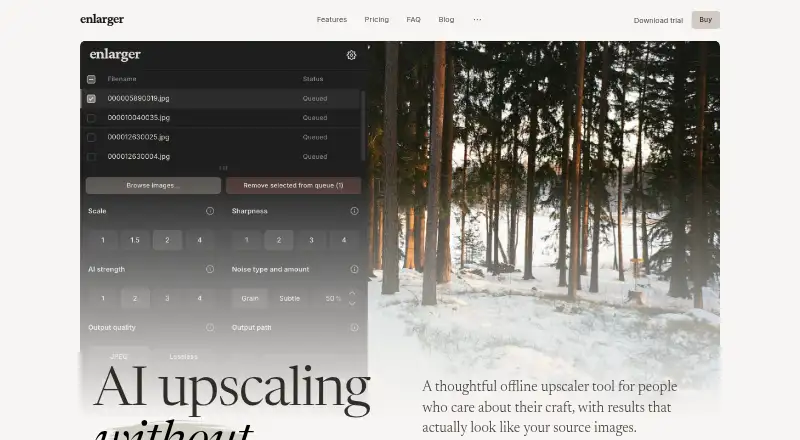
Enlarger is a desktop image upscaler for macOS and Windows that processes files locally. It is designed to restore detail while keeping results similar to the source image; the maker says it does not use generative AI and produces the same result each time. A queue supports parallel batch processing. Enlarger accepts JPEG, PNG, AVIF, and WebP files and exports JPEG or PNG. Listed uses include old photo scans, compressed images, low-resolution album covers, and early smartphone images. The trial processes 10 images at full quality without a watermark or credit card, although there is no free plan. After activation, the app can work offline; internet is required for trial use and activation or deactivation. macOS 11 or later on Apple Silicon and 64-bit Windows 10 or 11 require at least 8 GB memory. Intel Macs, Windows on ARM, Linux, web access, and an API are not supported. The Early bird plan is $39, paid once; another listing shows $39 a month with unclear currency display.
Who it suits
It suits people enlarging images on supported Windows or Apple Silicon Mac computers, especially in batch workflows. It also fits users who want local processing and personal or commercial licensing.
What it does well
- Local, offline-capable processing after activation
- Batch queue with parallel processing
- JPEG, PNG, AVIF, and WebP input
- Ten-image full-quality trial
- Personal and commercial use
What to know first
- No free plan
- No Linux, web app, or API
- Intel Macs are unsupported
- At least 8 GB memory required
Limits
The trial processes 10 images at full quality. The Early bird plan lists no per-image limits or usage caps, while the monthly Enlarger license lists two activations.
Plans
| Plan | Billed and limits | Price |
|---|---|---|
| Enlarger license | Early bird price; taxes may apply. The page displays both $ and € symbols, so the currency is unclear. · 2 activations | $39 a month |
| Early bird | One-time payment; no recurring renewal · Two activations · No per-image limits or usage caps · Updates to current major version | $39, paid once |
As enlarger.app lists them, read 20 Sept 2026. The maker's own page has the final word.
Getting started
- Download the desktop app for supported macOS or Windows hardware
- Install it on macOS 11 or later with Apple Silicon, or 64-bit Windows 10 or 11
- Ensure the computer has at least 8 GB of memory
- Use the trial to process 10 full-quality images without a credit card
- Activate a license through an internet connection
- Add JPEG, PNG, AVIF, or WebP images to the queue and export JPEG or PNG
Verdict
Enlarger offers local, repeatable upscaling with batch support and a watermark-free trial. Check hardware compatibility and the differing listed payment terms before choosing a license.
Questions
Does Enlarger offer a free plan?
There is no free plan, but a trial processes 10 images at full quality without a watermark or credit card.
What systems does Enlarger support?
It supports macOS 11 or later on Apple Silicon and 64-bit Windows 10 or 11, with at least 8 GB of memory.
Can Enlarger work offline?
After activation, the app can be used offline. Internet is required in trial mode and during activation or deactivation.
How much is the Early bird plan?
The Early bird plan is listed at $39, paid once, with no recurring renewal and two activations.
Does Enlarger provide an API?
No. API access is not available.
Facts from Enlarger's own pages
- AI approach
- The maker says Enlarger does not use generative AI and produces the same result on each run. · enlarger.app, 8 Oct 2026
- API access
- No · enlarger.app, 20 Sept 2026
- Availability limits
- The maker says there is no web app, Linux support, or API yet. · enlarger.app, 8 Oct 2026
- Batch processing
- Yes · enlarger.app, 20 Sept 2026
- Batch workflow
- A queue-based workflow supports batch parallel processing of multiple images. · enlarger.app, 8 Oct 2026
- Commercial use
- The maker says the license covers personal and commercial use. · enlarger.app, 8 Oct 2026
- Desktop app
- Yes · enlarger.app, 20 Sept 2026
- Free plan
- No · enlarger.app, 20 Sept 2026
- Image formats
- Enlarger accepts JPEG, PNG, AVIF, and WebP, and exports JPEG and PNG. · enlarger.app, 8 Oct 2026
- Internet access
- Internet is required in trial mode and during activation or deactivation; after activation, the app can be used offline. · enlarger.app, 8 Oct 2026
- Privacy
- The privacy policy says the website uses cookieless Umami analytics and does not sell, rent, or share personal data for third-party marketing. · enlarger.app, 8 Oct 2026
- Processing
- Images are processed locally, and the product says images are not uploaded or sent to cloud processing. · enlarger.app, 8 Oct 2026
- Purpose
- Enlarger is an offline image upscaler designed to restore detail while keeping results similar to the source image. · enlarger.app, 8 Oct 2026
- Requirements
- The support page lists macOS 11 or later on Apple Silicon and 64-bit Windows 10 or 11; each requires at least 8 GB of memory. · enlarger.app, 8 Oct 2026
- Support
- The maker offers a support form for questions, bugs, and error reports. · enlarger.app, 8 Oct 2026
- Trial
- The trial processes 10 images at full quality with no watermark and no credit card required. · enlarger.app, 8 Oct 2026
- Unsupported systems
- Intel Macs and Windows on ARM are not currently supported. · enlarger.app, 8 Oct 2026
- Use cases
- The maker lists old photo scans, compressed images, low-resolution album covers, and early smartphone images as use cases. · enlarger.app, 8 Oct 2026
Where Enlarger stands on Freedom251
- Image Upscaling Software#77 of 99
- AI Image Upscalers#22 of 28