Freedom251 › Home Inspection Software

Eneris
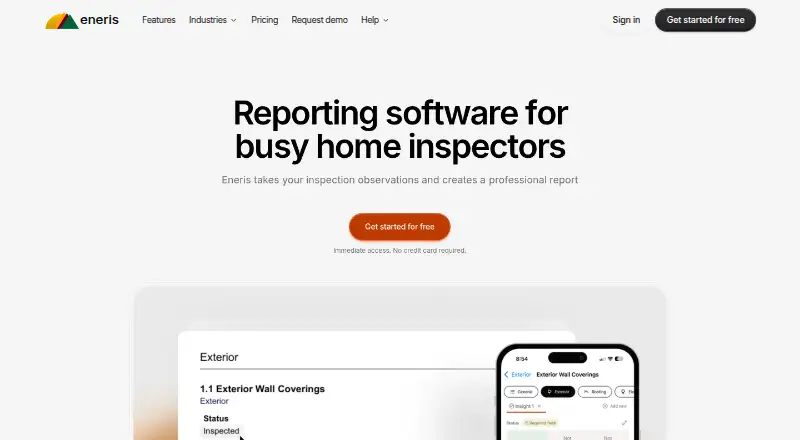
What Eneris is
Eneris is property inspection software that turns inspection observations into professional PDF reports for clients. Inspectors can add text, photos, and videos to an inspection, then build reports using templates they can customize for different job types. Template controls let users adjust report layout and language. Eneris also supports offline inspections: users can work without Wi-Fi or cell coverage, and data syncs automatically when they reconnect.
Teams can track jobs, assign inspectors, and maintain consistency across reports. Eneris is available on the web and on Apple and Android devices, including phones, tablets, and computers. The company says every plan includes all Eneris features, access across Apple, Android, and desktop, unlimited cloud storage for reports, and a dedicated support team. The Free plan allows two inspections per month. A free trial is available, and paid pricing starts at $48/user/mo when billed annually; the Standard plan includes unlimited inspections and priority support. Eneris describes its intended users as self-employed inspectors, small to midsize businesses, and large enterprises involved in home inspections. Founded in 2018, the company is headquartered in Burnaby, British Columbia, Canada. Eneris says personal data from users outside Canada is transferred to and processed in Canada, and it cannot guarantee absolute security.
Who it suits
Eneris suits independent property inspectors who need to turn field observations into client-ready reports, including when working offline. Its job tracking and inspector assignment features also fit small teams and larger home inspection businesses.
What it does well
- Create PDF reports from text, photos, and videos.
- Customize report templates by job type, layout, and language.
- Complete inspections offline and sync data when back online.
- Teams can track jobs and assign inspectors.
- All plans include unlimited cloud storage for reports.
What to know first
- The Free plan is limited to two inspections per month.
- Paid pricing starts at $48/user/mo when billed annually.
- Personal data from users outside Canada is processed in Canada.
Limits
The Free plan includes two inspections per month. The Standard plan is listed with unlimited inspections and priority support at $48/user/mo billed annually.
Plans
| Plan | Billed and limits | Price |
|---|---|---|
| Enterprise | Contact sales | $40 a month |
| Standard | per person / month billed annually · Unlimited inspections · priority support | $48 a month |
| Standard | billed monthly · Unlimited inspections · priority support | $57 a month |
| Free | 2 free inspections/month | On request |
As eneris.ca lists them, read 5 Oct 2026. The maker's own page has the final word.
Getting started
- Visit the Eneris website.
- Choose the Free plan or start the available free trial.
- Open Eneris on the web or an Apple or Android device.
- Add inspection observations as text, photos, or videos.
- Customize a report template for the job type and create a PDF report to share with the client.
Overview
Eneris turns property inspection observations into client-ready PDF reports and supports the field work behind them, from media capture to job assignment. It suits inspectors who need custom report formats or must keep working where connectivity is unreliable. Its free allowance is a narrow trial for regular business use, but the paid Standard plan removes the inspection cap.
Inspectors can add text, photos, and videos to an inspection and combine those observations into a PDF to share with clients. Customizable templates let them adjust layout and language for different job types, which is useful when a business handles varied work but wants reports to remain consistent. Appointment scheduling and payment collection are also supported.
Key features
Offline field work
Inspections can be completed without Wi-Fi or cellular coverage, and data syncs automatically when the device reconnects. This is a practical advantage for inspectors working at properties with poor reception; the workflow need not stop just because a connection does.
Reporting and team coordination
PDF output gives inspectors a shareable client report built from field observations. Teams can track jobs, assign inspectors, and maintain consistency across reports. Those functions make Eneris relevant to businesses coordinating multiple inspectors, while a solo operator may have less need for its team workflow.
Pricing
Eneris uses a freemium model and offers a Free plan with two inspections per month. That cap is enough for occasional use or an initial evaluation, but it is restrictive for inspectors handling a regular workload.
The Standard plan is $48 a year, billed per person per month billed annually, and includes unlimited inspections and priority support. All plans include all Eneris features, access on Apple, Android, and desktop, unlimited cloud storage for reports, and a dedicated support team. Standard is the clearer fit for ongoing work: it removes the Free plan's quota while retaining the same feature set. The stated price is billed annually, so it is not a month-to-month price.
Enterprise is $40 a month and requires contacting sales. The plan is a custom-pricing option for organizations considering an enterprise arrangement; no separate feature differences are given. A free trial is also offered.
Platforms
Eneris works on Android, iOS, and the web, with access across phones, tablets, and computers, including Apple, Android, and desktop devices. That range gives inspectors options in the field and at a computer. Eneris says personal data from users outside Canada is transferred to and processed in Canada, and that it uses commercially acceptable means to protect personal data but cannot guarantee absolute security.
Who it's for
Eneris is aimed at self-employed inspectors, small and midsize businesses, and large enterprises involved in home inspections. The free monthly allowance is best suited to light or occasional activity; inspectors with steady workloads need a plan with unlimited inspections. Teams that need job tracking, inspector assignment, and consistent reporting have a stronger reason to choose Eneris than users seeking only a basic way to produce an occasional report.
Pros and cons
- Offline inspections with automatic syncing: field work can continue without Wi-Fi or cellular coverage.
- Flexible report templates: inspectors can tailor layout and language to different job types.
- Broad device access and included storage: all plans include Apple, Android, and desktop access plus unlimited cloud storage for reports.
- Free plan capped at two inspections a month: useful for light use, but too limited for many working inspectors.
- Annual Standard billing: the $48 a year price is billed per person per month billed annually, rather than as a monthly subscription.
- Personal data from outside Canada is processed in Canada: teams with data-location requirements should consider that before adopting it.
Alternatives
For a broader category comparison, see Home Inspection Software. Consider 3D Inspection Systems if its feature-limited free option or 30-day live trial when available better fits your evaluation needs. SpecMind is worth considering for a no-time-limit free plan that includes five published reports, branded PDF export, and a client portal; its Pro monthly plan is $79 a month. InspectDesk offers a free plan with one full inspection, one custom template, and unlimited backups for export, making it an alternative for very low-volume use.
ReportHost charges $6 per published report on its Classic plan, positioned for one to eight reports per month, which may suit inspectors preferring per-report billing. Horizon Inspection Software has a $67 a year Annual Plan and a $79 a month subscription, an alternative for readers comparing paid subscriptions. ScribeWare offers a $12 per report a la Carte plan with the first three reports free, so it may suit those who want a per-report option rather than a recurring fee. Inspector Toolbelt is another freemium option for Android, iOS, and web. Zekko Inspection offers paid iOS and macOS plans.
Verdict
Choose Eneris if customizable reporting, offline inspections, and coordinated job assignment are central to your inspection work. Its broad device access and uncapped Standard inspections make it a sensible fit for ongoing use, but the Free plan's two-inspection limit is too small for most regular workloads. Look elsewhere if Canadian data processing is unsuitable for your organization or if you need a different billing structure.
Verdict
Choose Eneris if you need customizable inspection reports and offline field work, or if your team needs job tracking and inspector assignment. The Free plan is limited to two inspections per month; unlimited inspections are included with the listed Standard plan.
Questions
Does Eneris have a free plan?
Yes. The Free plan allows two inspections per month.
How much does Eneris cost?
Paid pricing starts at $48/user/mo when billed annually. The Standard plan is listed with unlimited inspections and priority support.
Is there a free trial?
Yes, a free trial is available.
Which devices can run Eneris?
Eneris works on the web and on Apple and Android devices, including phones, tablets, and computers.
Can I complete inspections without an internet connection?
Yes. Eneris supports work without Wi-Fi or cell coverage and syncs data automatically when the user is back online.
Where is user data processed?
Eneris says personal data from users outside Canada is transferred to and processed in Canada.
Facts from Eneris's own pages
- Data location
- Eneris says personal data from users outside Canada is transferred to and processed in Canada. · eneris.ca, 5 Oct 2026
- Founded
- 2018 · eneris.ca, 28 Sept 2026
- Free-plan limit
- The Free plan includes two inspections per month. · eneris.ca, 5 Oct 2026
- Headquarters
- Burnaby, British Columbia, Canada · eneris.ca, 28 Sept 2026
- Included with plans
- The pricing page says all plans include all Eneris features, access on Apple, Android, and desktop, unlimited cloud storage for reports, and access to a dedicated support team. · eneris.ca, 5 Oct 2026
- Inputs
- Inspectors can add text, photos, and videos to an inspection. · eneris.ca, 5 Oct 2026
- Integrations
- The opened maker pages do not state any third-party integrations. · eneris.ca, 5 Oct 2026
- Intended users
- Eneris says it is suitable for self-employed inspectors, small to midsize businesses, and large enterprises involved in home inspections. · docs.ener.is, 5 Oct 2026
- Offline use
- Eneris supports completing inspections without Wi-Fi or cell coverage and syncs data automatically when the user is back online. · eneris.ca, 5 Oct 2026
- Purpose
- Eneris takes property inspection observations and creates professional reports. · eneris.ca, 5 Oct 2026
- Report output
- The software combines inspection observations into PDF reports that inspectors can share with clients. · eneris.ca, 5 Oct 2026
- Security
- Eneris says it strives to use commercially acceptable means to protect personal data but cannot guarantee absolute security. · eneris.ca, 5 Oct 2026
- Supported access
- Eneris says it works on Apple devices, Android devices, and the web, including phones, tablets, and computers. · eneris.ca, 5 Oct 2026
- Team workflows
- Teams can track jobs, assign inspectors, and maintain consistency across reports. · eneris.ca, 5 Oct 2026
- Templates
- Inspectors can customize templates for different job types and control their layout and language. · eneris.ca, 5 Oct 2026
Where Eneris stands on Freedom251
- Home Inspection Software#2 of 25