Freedom251 › Network Monitoring
EMCO Ping Monitor
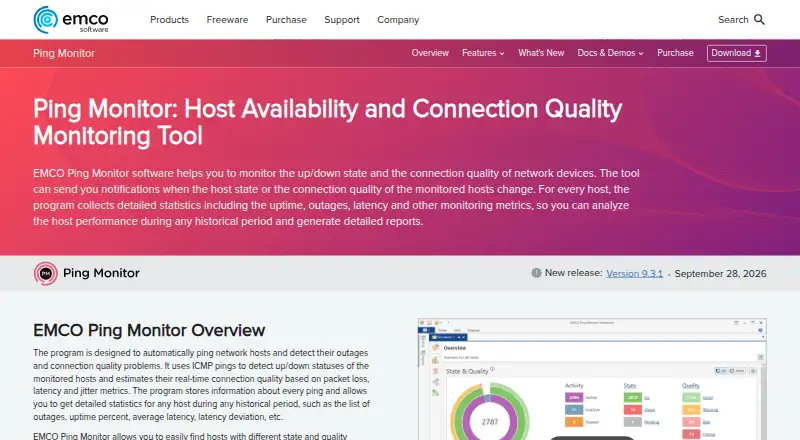
What EMCO Ping Monitor is
EMCO Ping Monitor tracks whether hosts are reachable and measures connection quality with ICMP pings. It records packet loss, latency and jitter, and can monitor up to 32,000 hosts according to its stated technical limit; the product page says modern hardware can handle 8,000+ hosts with low system workload. The Free Edition covers up to five hosts. Paid version 9 licenses are one-time purchases, with Professional editions supporting up to 250 hosts and Enterprise editions allowing unlimited hosts and server connections. Reports in PDF or HTML can be saved, emailed or uploaded to FTP, on demand or on a schedule. Alerts include email, Windows Tray and sound notifications, and events can run custom commands, scripts or executables. Custom actions can connect it to third-party event managers or help desks, and raw ping data can be exported as CSV.
The software is for Windows, with a web interface for reviewing host status, quality and statistics and starting or stopping monitoring. Host and settings management requires the GUI client. Enterprise provides user access permissions; role management is unavailable in Free and Professional editions. EMCO Software was founded in 2001 and is based in Reykjavik, Iceland.
Who it suits
EMCO Ping Monitor suits Windows teams that need to track host availability and connection quality, produce scheduled reports or trigger event actions. The Free Edition fits small monitoring needs of up to five hosts; larger environments can consider Professional or Enterprise licenses.
What it does well
- Tracks packet loss, latency and jitter with ICMP pings.
- Creates PDF and HTML reports on demand or on a schedule.
- Sends email, Windows Tray and sound alerts.
- Exports raw ping data as CSV.
- Enterprise licenses include user access permissions.
What to know first
- The Free Edition covers up to five hosts.
- Host and settings management requires the GUI client.
- Role management is unavailable in Free and Professional editions.
Limits
The Free Edition is limited to five hosts, one server connection, standard ping latency measurement with 1 ms precision and no custom host configuration. Its 30-day Enterprise trial includes all program features, but trial emails and generated reports carry watermarks; the program returns to Free afterward.
Plans
| Plan | Billed and limits | Price |
|---|---|---|
| Free Edition | Up to 5 hosts · One server connection · Standard ping latency measurement with 1ms precision · No custom host configuration | Free |
| Professional Edition — Single Copy | Perpetual license for version 9 · Up to 250 hosts · 2 simultaneous server connections · 0.01 ms latency precision · Statistics with no time limit | $199, paid once |
| Enterprise Edition — Single Copy | Perpetual license for version 9 · Unlimited hosts · Unlimited simultaneous server connections · 0.01 ms latency precision · User access permissions | $445, paid once |
| Professional Edition — Unlimited Copies | Perpetual license for version 9 · Up to 250 hosts · 2 simultaneous server connections · 0.01 ms latency precision · Statistics with no time limit | $455, paid once |
| Enterprise Edition — Unlimited Copies | Perpetual license for version 9 · Unlimited hosts · Unlimited simultaneous server connections · 0.01 ms latency precision · User access permissions | $995, paid once |
As emcosoftware.com lists them, read 8 Oct 2026. The maker's own page has the final word.
Getting started
- Visit the EMCO Ping Monitor website.
- Choose the Free Edition or review the Professional and Enterprise licenses.
- Use the 30-day Enterprise trial to access all program features.
- Install and run the software in a supported Windows environment.
- Use the GUI client to manage hosts and settings; use the web interface to review monitoring and control its start or stop state.
Verdict
Choose EMCO Ping Monitor if you need Windows based host monitoring with detailed ping measurements, reporting and configurable event actions. The Free Edition is limited to five hosts; Professional supports up to 250, while Enterprise removes the stated host limit and adds user permissions.
Questions
Is EMCO Ping Monitor free?
Yes. The Free Edition costs nothing and covers up to five hosts. A 30-day Enterprise trial is also available.
What does the 30-day trial include?
It provides access to all program features. Trial emails and generated reports include watermarks, and the program reverts to Free after the trial.
Which platforms does it support?
The listed platforms are web and Windows. The software is for Windows, with support listed from Windows 7 SP1 through Windows 11 and Windows Server 2008 R2 SP1 through 2025.
How much do the paid licenses cost?
Professional Edition — Single Copy is $199, paid once, Enterprise Edition — Single Copy is $445, paid once, Professional Edition — Unlimited Copies is $455, paid once, and Enterprise Edition — Unlimited Copies is $995, paid once. The purchase page describes these as perpetual licenses for version 9.
Does it support role based access?
Enterprise supports roles and permissions for Windows users and groups. Role management is unavailable in Free and Professional editions.
How are licenses and support handled?
Licenses are one-time purchases with no recurring payments. Minor updates are free, major upgrades are available at a discounted price, and each license includes free technical support by email.
Facts from EMCO Ping Monitor's own pages
- Access control
- Enterprise supports roles and permissions for Windows users and groups; role management is unavailable in Free and Professional editions. · emcosoftware.com, 8 Oct 2026
- Founded
- 2001 · emcosoftware.com, 28 Sept 2026
- Headquarters
- Reykjavik, Iceland · emcosoftware.com, 28 Sept 2026
- Integrations
- Custom actions can connect Ping Monitor to third-party event managers or help desks, and raw ping data can be exported as CSV. · emcosoftware.com, 8 Oct 2026
- License terms
- The purchase page says licenses are one-time purchases with no recurring payments, minor updates are free, and major upgrades are paid at a discounted price. · emcosoftware.com, 8 Oct 2026
- Monitoring
- The software uses ICMP pings to track host availability and connection quality, including packet loss, latency and jitter. · emcosoftware.com, 8 Oct 2026
- Notifications
- Alerts include email, Windows Tray and sound notifications, with custom commands, scripts or executables available for events. · emcosoftware.com, 8 Oct 2026
- Platform requirements
- The product is for Windows, with listed support for Windows 7 SP1 through Windows 11 and Windows Server 2008 R2 SP1 through 2025. · emcosoftware.com, 8 Oct 2026
- Reporting
- It generates PDF and HTML reports that can be saved as files, emailed or uploaded to FTP, on demand or on a schedule. · emcosoftware.com, 8 Oct 2026
- Scale
- The product page states the technical limit is 32,000 hosts and that modern hardware can monitor 8,000+ hosts with low system workload. · emcosoftware.com, 8 Oct 2026
- Security
- Client-server traffic is encrypted; the default self-signed SSL certificate produces a trust warning, and the documentation recommends specifying an SSL certificate to validate the remote server. · emcosoftware.com, 8 Oct 2026
- Support
- The purchase page includes free technical support by email with every license. · emcosoftware.com, 8 Oct 2026
- Trial
- The 30-day Enterprise trial provides access to all program features; trial emails and generated reports include watermarks, and the program reverts to Free afterward. · emcosoftware.com, 8 Oct 2026
- Web interface limit
- The web interface can review host state, quality and statistics and start or stop monitoring, but host and settings management requires the GUI client. · emcosoftware.com, 8 Oct 2026
Where EMCO Ping Monitor stands on Freedom251
- Network Monitoring#13 of 55