Freedom251 › Email Parsing Software

Email Parser
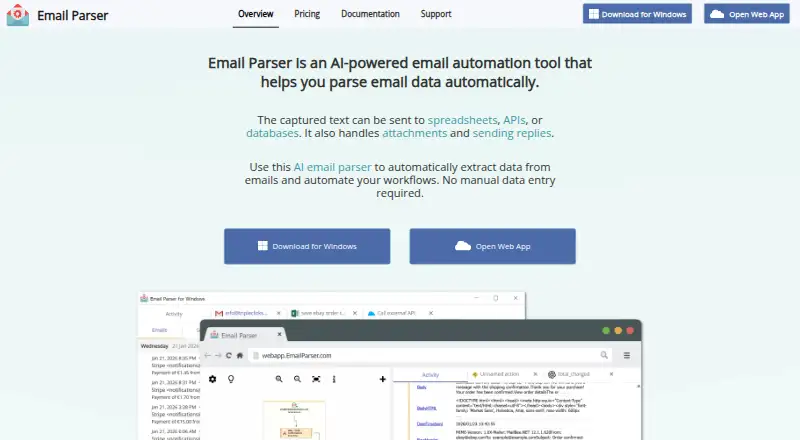
What Email Parser is
Email Parser extracts information from incoming email and can send captured text to spreadsheets, APIs, or databases. It supports Gmail, Office 365, Exchange, POP, and IMAP accounts, and can process attached PDF, Excel, and XML files. To build extraction rules, users can choose natural-language AI prompts, text boundaries, regular expressions, or custom scripts. The Web App plan costs $25 a month and supports up to 5,000 processed emails monthly across up to 10 external accounts, with 500 AI credits per month included. The Windows App costs $145 a year, supports unlimited emails and accounts, and includes local file parsing and unlimited parsing rules and actions. Windows users supply their own OpenAI API key for AI parsing. The Windows app can also use command-line calls, external programs, and C#, JavaScript, or PowerShell scripts for local automation. Both apps have a 30-day free trial before recurring payment is required. The web app runs on servers in Germany, with a containerized environment for each user; the Windows app stores data locally. The site footer identifies the maker as Triple Click Software Ltd.
Who it suits
Email Parser suits teams or individuals who need to capture structured information from incoming email and route it to spreadsheets, APIs, or databases. The Web App may fit workflows within its email and account limits, while the Windows App suits users who want local file parsing or local automation and can provide their own OpenAI API key for AI parsing.
What it does well
- Supports Gmail, Office 365, Exchange, POP, and IMAP.
- Parses PDF, Excel, and XML attachments.
- Offers AI prompts, text boundaries, regex, and custom scripts.
- Includes Google Sheets, databases, APIs, Zapier, and IFTTT output options.
- Both apps offer a 30-day free trial.
What to know first
- The Web App is limited to 5,000 emails monthly and 10 external accounts.
- Windows AI parsing requires your own OpenAI API key.
- The Windows App costs $145 a year.
Limits
The Web App plan costs $25 a month and allows up to 5,000 processed emails per month across up to 10 external accounts; it includes 500 AI credits monthly. The Windows App costs $145 a year and requires your own OpenAI API key for AI parsing. Both apps have a 30-day free trial before recurring payment is required.
Plans
| Plan | Billed and limits | Price |
|---|---|---|
| Windows App | annually · unlimited emails · unlimited email accounts · local file parsing · unlimited parsing rules/actions | $145 a year |
| Web App | $249 per year (save 17%) · Up to 5,000 emails/month · Up to 10 external accounts · 500 AI credits/month included · Unlimited parsing rules and actions | $249 a year |
| Web App annual | annually; save 17% · up to 5,000 emails/month · up to 10 external accounts · 500 AI credits/month · unlimited parsing rules/actions | $249 a year |
| Web App | $25 per month · Up to 5,000 emails/month · Up to 10 external accounts · 500 AI credits/month included · Unlimited parsing rules and actions | $25 a month |
| Web App monthly | monthly · up to 5,000 emails/month · up to 10 external accounts · 500 AI credits/month · unlimited parsing rules/actions | $25 a month |
As emailparser.com lists them, read 15 Oct 2026. The maker's own page has the final word.
Getting started
- Visit the Email Parser website and choose the Web App or Windows App.
- Start the 30-day free trial for the app you want to use.
- Connect an email account using Gmail, Office 365, Exchange, POP, or IMAP.
- Choose an extraction method, such as an AI prompt, text boundaries, regular expressions, or a custom script.
- Set an output such as Google Sheets, a database, or an API.
- For AI parsing in the Windows App, provide your own OpenAI API key.
Verdict
Choose Email Parser if you need to extract information from emails and pass it to spreadsheets, APIs, or databases using the parsing method that fits your messages. The Web App includes monthly AI credits, while the Windows App offers unlimited email and account volumes plus local file parsing. Look elsewhere if the Web App’s monthly limits are too low or you need Windows AI parsing without supplying an OpenAI API key.
Questions
How much does Email Parser cost?
The Web App costs $25 a month. The Windows App costs $145 a year.
Is there a free plan or trial?
A free plan is listed, and both apps have a 30-day free trial before recurring payment is required.
Which platforms are available?
Email Parser is available as a web app and a Windows app.
What email providers does it support?
Supported account types include Gmail, Office 365, Exchange, POP, and IMAP.
Does it parse email attachments?
Yes. It can process attached PDF, Excel, and XML files.
Who makes Email Parser?
The site footer identifies Triple Click Software Ltd. as the maker.
Facts from Email Parser's own pages
- AI extraction
- The product supports natural-language extraction using OpenAI GPT models. · emailparser.com, 15 Oct 2026
- Attachment parsing
- Email Parser can process attached PDF, Excel, XML and other document files. · emailparser.com, 15 Oct 2026
- Attachments
- The product can process attached documents including PDF, Excel, and XML files. · emailparser.com, 7 Oct 2026
- Authentication
- Web App account credentials are stored using AWS Cognito. · emailparser.com, 15 Oct 2026
- AWS Lambda
- Workflows can invoke existing AWS Lambda functions or deploy Node.js 20 code supplied in the product. · emailparser.com, 15 Oct 2026
- Company activity
- A Spanish technology-center profile says Triple Click Software focuses on automation applications and text-analysis technologies and is led primarily by certified software engineer Carlos Andrés Martínez. · fundaciobit.org, 15 Oct 2026
- Data deletion
- After account deletion, the account is disabled and stored data is permanently removed after 15 days. · emailparser.com, 15 Oct 2026
- Data hosting
- The Web App stores data in AWS and Hetzner facilities physically located in Germany and uses a separate containerized environment per user. · emailparser.com, 15 Oct 2026
- Documentation
- The help center covers setup, email accounts, parsing methods, spreadsheets, databases, online integrations, scripting, email actions, troubleshooting, installation and licensing. · emailparser.com, 15 Oct 2026
- Email providers
- Supported account types include Gmail, Office 365, Exchange, POP, and IMAP. · emailparser.com, 7 Oct 2026
- Email sources
- Supported account types include Gmail, Office 365, Exchange, POP and IMAP. · emailparser.com, 15 Oct 2026
- Independent company fact
- SourceForge lists Triple Click Software as founded in 2008 and based in Spain. · sourceforge.net, 15 Oct 2026
- Independent platform listing
- SourceForge lists Cloud and Windows as supported platforms and documentation, in-person training and online or phone support. · sourceforge.net, 15 Oct 2026
- Independent pricing listing
- SourceForge displays a starting price of $59.00 per one-time user and says a free trial is available. · sourceforge.net, 15 Oct 2026
- Independent product description
- SourceForge describes Email Parser as monitoring inboxes, processing existing messages and sending extracted data to spreadsheets, databases, APIs, Zapier or IFTTT. · sourceforge.net, 15 Oct 2026
- Installation size
- The Windows installation occupies about 900MB and its processing database is automatically kept below 1GB. · emailparser.com, 15 Oct 2026
- Integrations
- The product lists Google Sheets, databases, APIs, Zapier, and IFTTT among its integrations or output options. · emailparser.com, 7 Oct 2026
- JavaScript extensibility
- JavaScript can run as an email filter, parser or workflow action using ECMAScript 2023. · emailparser.com, 15 Oct 2026
- Licence
- The Windows licence terms explicitly describe the software as not free software and require payment after a 30-day evaluation period. · emailparser.com, 15 Oct 2026
- Limit: always-on computer
- Parseur notes that continuous Windows operation requires leaving a computer running and that maintaining parsing rules can be complex. · parseur.com, 15 Oct 2026
- Limit: setup complexity
- Nylas reports that complex email structures can be challenging and unintuitive for first-time users. · nylas.com, 15 Oct 2026
- Local automation
- The Windows app supports local files, command-line calls, external programs, and C#, JavaScript, and PowerShell scripting. · emailparser.com, 7 Oct 2026
- Maker
- The site footer identifies Triple Click Software Ltd. and shows a copyright range beginning in 2008. · emailparser.com, 7 Oct 2026
- News: payment processor
- On November 11, 2024 the maker announced that Windows subscriptions were moving from Digital River to Stripe and existing subscriptions would be canceled before renewal. · emailparser.com, 15 Oct 2026
Where Email Parser stands on Freedom251
- Email Parsing Software#16 of 22