Freedom251 › Restaurant Table Management Software

Eat App
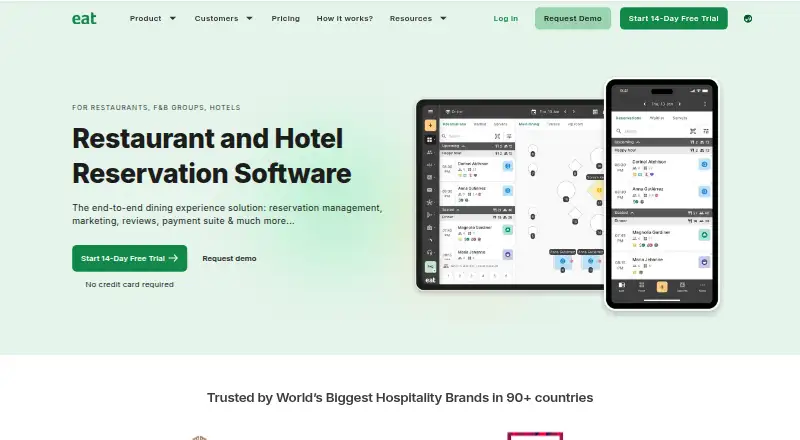
What Eat App is
Eat App is a cloud-based reservation and table-management platform for restaurants and other hospitality venues. It combines online bookings, floor management, guest profiles, and reporting. Guests can make real-time reservations at any time through a venue’s website, social media, or Eat App’s partner network. Staff can organize tables in timeline, grid, floor, and list views, with capacity controls and pacing tools. Guest profiles can hold preferences, visit history, and spending information; CRM tools can segment guests for email and SMS campaigns. Reports cover busy periods, no-shows, waitlists, guest trends, and spending patterns. The integrations directory includes POS, voice, payment, booking-channel, hotel and printer integrations, with examples such as Lightspeed, Google, Instagram, Stripe, and Mews. Eat App is available on web, Android, and iOS. Its mobile and iPad apps support offline use and sync when an internet connection returns. The Free plan costs nothing for up to 100 guests monthly. Paid plans start at $69/mo (annual), and a 14-day trial is available. Eat App says it was founded in 2015 and serves restaurants, cafés, hotels, bars, breweries, nightlife venues, and hospitality groups.
Who it suits
Eat App suits hospitality venues that need online reservations alongside tools for managing tables, guest information, and venue activity. It also serves hospitality groups, with an Enterprise plan for multi-venue groups.
What it does well
- Accepts real-time online reservations around the clock through several channels.
- Offers timeline, grid, floor, and list table views.
- Guest profiles capture preferences, history, and spending.
- Reports cover no-shows, waitlists, busy periods, and guest trends.
- Mobile and iPad apps support offline use and later syncing.
- Integrations include POS, payments, booking channels, and hotel systems.
What to know first
- The Free plan is capped at 100 guests monthly.
- Payment integration is shown as a $39/mo add-on.
- POS integration is shown as a $39/mo add-on.
- Enterprise pricing is listed as “Let’s talk.”
Limits
The Free plan covers up to 100 guests monthly. The Lite plan includes unlimited guests and 200 WhatsApp messages; higher tiers list larger message allowances and additional features.
Plans
| Plan | Billed and limits | Price |
|---|---|---|
| Free | $0/mo · 100 guests monthly | Free |
| Core | $199/mo; yearly option $159/mo · Full suite · 500 WhatsApp messages · white-labeling and marketing suite · Core AI | $199 a month |
| Pro | $389/mo; yearly option $299/mo · Everything in Core · 1500 WhatsApp messages · shared group database · POS and payments integration · private success manager · Pro AI | $389 a month |
| Lite | $99/mo; yearly option $69/mo · Unlimited guests · 200 WhatsApp messages | $99 a month |
| Enterprise | Let's talk · For multi-venue groups · complete AI package included | On request |
As restaurant.eatapp.co lists them, read 5 Oct 2026. The maker's own page has the final word.
Getting started
- Open the Eat App website.
- Choose the Free plan or review the paid plans, which include a 14-day trial.
- Use the web version or access Eat App on Android or iOS.
- Set up online reservations through a website, social media, or the partner network.
- Use the table-management, guest CRM, reporting, and integration tools available with your plan.
Eat App combines restaurant reservations, table management, and guest CRM for hospitality teams that want those jobs in one platform. It is most compelling for venues that will use both floor controls and guest marketing, not just an online booking page.
Overview
Guests can reserve around the clock through a venue’s website, social media, or Eat App’s partner network. The cloud-based platform also covers reporting and integrations, while its mobile and iPad apps can work offline and sync once a connection returns. That makes it a broader operating tool than a booking calendar, though venues that need only basic reservations may not use enough of its scope.
Eat App serves restaurants, cafés, hotels, bars, breweries, nightlife venues, and hospitality groups. The company was founded in 2015 and has major offices in the UAE, United States, and India.
Key features
Reservations and table operations
Timeline, grid, floor, and list views give staff several ways to manage tables. Capacity controls and pacing tools help coordinate bookings with service flow, which is valuable when a venue needs to manage seating as well as accept reservations. Online booking across multiple channels widens access for guests without requiring staff to handle every request directly.
Guest CRM and reporting
Guest profiles can record preferences, history, and spend; segmentation supports targeted email and SMS campaigns. Reports cover busy periods, no-shows, waitlists, guest trends, and spending patterns. Together, these tools suit operators who want to use reservation history for follow-up and planning, not simply keep a list of bookings.
Integrations, offline use, and security
The integrations directory covers POS, voice, payment, booking-channel, hotel/PMS, and printer connections, including Lightspeed, Google, Instagram, Stripe, and Mews. Payment and POS integration are paid add-ons at $39/mo each, so venues should account for those charges if they need either connection. Offline use on mobile and iPad, followed by automatic syncing, is useful when internet access is interrupted.
Eat App states that it holds SOC 2 Type II and ISO/IEC 27001:2022 certifications and complies with GDPR. It says data is encrypted in transit with TLS 1.2+ and at rest with AES-256, with role-based access controls, regular access reviews, redundant infrastructure, daily backups, 24/7 monitoring, and a tested incident response plan. These safeguards may matter to groups handling guest records across multiple venues.
Pricing
The Free plan costs nothing, billed $0/mo, and caps usage at 100 guests monthly. That is a way to try the core product at no charge, but the ceiling makes it a limited fit for busy venues. The 14-day trial provides a separate short-term way to evaluate the paid service.
Lite costs $99/mo, or $69/mo with the yearly option, and includes unlimited guests and 200 WhatsApp messages. It removes the Free plan’s guest ceiling, but the lower message allowance may constrain venues that rely heavily on WhatsApp. Core costs $199/mo, or $159/mo yearly, and adds the full suite, 500 WhatsApp messages, white-labeling, a marketing suite, and Core AI. It suits operators seeking more guest-facing and marketing capabilities than Lite provides.
Pro costs $389/mo, or $299/mo yearly. It includes everything in Core, 1,500 WhatsApp messages, a shared group database, POS and payments integration, a private success manager, and Pro AI. The higher tier is better aligned with groups needing shared guest data and integrated payments or POS, though those needs will make it a more substantial monthly commitment. Enterprise has custom pricing, is aimed at multi-venue groups, and includes the complete AI package; its features include support for SSO/SCIM, audit logs, and granular permission management.
The annual options reduce the stated monthly rates for Lite, Core, and Pro. The pricing also shows payment integration and POS integration separately at $39/mo each; confirm whether those charges apply to the configuration you choose before comparing tiers.
Platforms
Eat App is available on Android, iOS, and the web. The mobile and iPad apps support offline use and sync automatically when connectivity is available.
Who it's for
Eat App is a strong fit for restaurants and other hospitality venues that need reservations, table controls, and guest records in a connected workflow. Its CRM and reporting are most relevant to teams that will use guest preferences, history, and spend to guide campaigns or service planning. A venue with low booking volume may manage on the Free plan, while busier operations should weigh the paid tiers against their guest, messaging, and integration needs.
It is less suitable for a business that only wants a simple booking page or cannot justify a paid subscription once it exceeds 100 monthly guests. Groups with multi-venue needs may find Enterprise more relevant, but should expect custom pricing.
Pros and cons
- Reservations and floor management in one system: Multiple table views, capacity controls, and pacing tools support service operations beyond accepting bookings.
- Guest profiles connect to marketing: Preferences, history, and spend can inform segmentation and targeted email or SMS campaigns.
- Useful operational breadth: Reporting, broad integration categories, and offline mobile use cover needs that a reservation-only tool may not address.
- Free usage is tightly capped: The 100-guest monthly limit makes the no-cost plan a poor long-term fit for many busy venues.
- Costs rise with advanced needs: Paid tiers start at $69/mo with annual billing, and payment or POS integration add-ons are each shown at $39/mo.
Alternatives
For a wider set of restaurant table-management options, compare Restaurant Table Management Software; for broader operational tools, see Restaurant Management Software. If reservations are the main requirement, Restaurant Reservation Software narrows the search.
Choose Odoo Point of Sale if you want a freemium POS with an option for one app and unlimited users on Odoo Online. SpotOn Restaurant is an alternative for venues looking for POS software and hardware, ordering, payments, table layouts, menu management, and reporting, with processing minimums and a two-year minimum term. Wix may suit a business focused on website building, while HungerRush offers a qualified-from-$0 Starter plan for one location and one POS terminal.
Resos, TableSat, Wix Restaurants Table Reservations, and bavoli are other reservation-related options to compare.
Verdict
Choose Eat App if your venue needs reservations, table controls, and guest CRM working together, especially when reporting, marketing, or offline mobile access will be used as part of service. Look elsewhere if you need only basic bookings, exceed the Free plan’s guest cap but cannot budget for paid service, or require integrations without the added cost.
Verdict
Choose Eat App if your venue needs reservations, table controls, and guest CRM together, with access on web and mobile. Its free plan has a 100-guest monthly limit; paid plans start at $69/mo (annual), and payment or POS integration add-ons are each shown at $39/mo.
Questions
Is Eat App free?
Yes. The Free plan costs nothing and is limited to 100 guests monthly.
What does Eat App cost?
Paid plans start at $69/mo (annual). A 14-day trial is listed.
Which platforms does Eat App support?
Eat App is available on Android, iOS, and the web. Its mobile and iPad apps support offline use and sync when connected.
What kinds of venues does Eat App serve?
Eat App describes its audience as restaurants, cafés, hotels, bars, breweries, nightlife venues, and hospitality groups.
What integrations are available?
The integrations directory lists POS, voice, payment, booking-channel, hotel/PMS, and printer integrations, including Lightspeed, Google, Instagram, Stripe, and Mews.
What are the paid plan options?
Lite is $99.00 per month, with a yearly option at $69/mo. Core is $199.00 per month, with a yearly option at $159/mo; Pro is $389.00 per month, with a yearly option at $299/mo. Enterprise pricing is listed as “Let’s talk.”
Facts from Eat App's own pages
- Audience
- Eat App describes the product as serving restaurants, cafés, hotels, bars, breweries, nightlife venues, and hospitality groups. · restaurant.eatapp.co, 5 Oct 2026
- Company
- Eat App says it was founded in 2015 and has major offices in the UAE, United States, and India. · restaurant.eatapp.co, 5 Oct 2026
- Data protection
- The company says data is encrypted in transit with TLS 1.2+ and at rest with AES-256, with role-based access controls and regular access reviews. · restaurant.eatapp.co, 5 Oct 2026
- Floor management
- Its table-management tools include timeline, grid, floor, and list views, capacity controls, and pacing tools. · restaurant.eatapp.co, 5 Oct 2026
- Founded
- 2015 · restaurant.eatapp.co, 23 Sept 2026
- Guest CRM
- Guest profiles can capture preferences, history, and spend, while CRM tools segment guests for targeted email and SMS campaigns. · restaurant.eatapp.co, 5 Oct 2026
- Integrations
- The integrations directory lists POS, voice, payment, booking-channel, hotel/PMS, and printer integrations, including Lightspeed, Google, Instagram, Stripe, and Mews. · eatapp.co, 5 Oct 2026
- Offline use
- The mobile and iPad apps support offline use and automatically sync when an internet connection is available. · restaurant.eatapp.co, 5 Oct 2026
- Online bookings
- The platform accepts 24/7 real-time online reservations through a website, social media, and its partner network. · restaurant.eatapp.co, 5 Oct 2026
- Plan limits
- The pricing page limits the Free plan to 100 guests monthly, and add-on rates shown include $39/mo for payment integration and $39/mo for POS integration. · restaurant.eatapp.co, 5 Oct 2026
- Product
- Eat App is a cloud-based restaurant reservation and table management platform combining reservations, table management, and guest CRM. · restaurant.eatapp.co, 5 Oct 2026
- Reliability
- Eat App says it uses redundant infrastructure, daily backups, 24/7 monitoring, and a tested incident response plan. · restaurant.eatapp.co, 5 Oct 2026
- Reporting
- Analytics and reports cover busy periods, no-shows, waitlists, guest trends, and spending patterns. · restaurant.eatapp.co, 5 Oct 2026
- Security
- Eat App states it has SOC 2 Type II and ISO/IEC 27001:2022 certifications and is GDPR compliant. · restaurant.eatapp.co, 5 Oct 2026
- Support
- The Pro plan includes a private success manager, and Enterprise features include support for SSO/SCIM, audit logs, and granular permission management. · restaurant.eatapp.co, 5 Oct 2026