Freedom251 › Embedded Databases

DuckDB UI
What DuckDB UI is
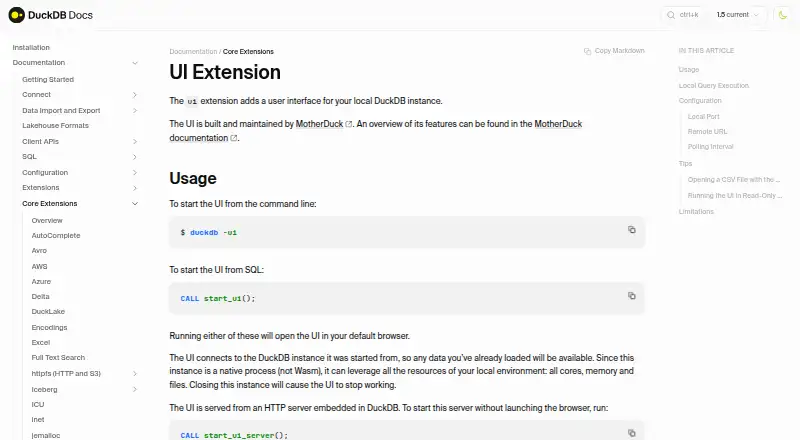
DuckDB UI is a free browser interface added by the ui extension to a local DuckDB instance. Start it with `duckdb -ui` or `CALL start_ui()`; it opens in the default browser and is served by an HTTP server embedded in DuckDB, normally at `http://localhost:4213`. The interface includes a SQL notebook with autocomplete and keyboard shortcuts, a catalog browser, a table explorer with column-level statistics, and a results viewer with sorting and filtering. Queries run locally by default, and queries and data stay on the computer. Because it uses the native DuckDB process, it can use local cores, memory, and files. Connecting to MotherDuck requires opting in and signing in. The UI is built and maintained by MotherDuck. Direct use with a read-only database is unsupported, and windows_arm64 is not supported. The local server fetches UI files from ui.duckdb.org; configured alternate URLs should be trusted because the application can access loaded DuckDB data.
Who it suits
DuckDB UI suits people who want to explore a local DuckDB instance through a browser interface and SQL notebook. It is not suitable for direct use with a read-only database or on windows_arm64.
What it does well
- Free browser interface for local DuckDB
- SQL notebook includes autocomplete and shortcuts
- Table explorer shows column-level statistics
- Results can be sorted and filtered
- Queries and data stay local by default
What to know first
- Read-only databases are unsupported
- windows_arm64 is unsupported
- MotherDuck use requires opt-in and sign-in
Limits
The free local UI does not support direct use with a read-only database. The UI currently does not support windows_arm64.
Plans
| Plan | Billed and limits | Price |
|---|---|---|
| Free local DuckDB UI | browser-based interface · local SQL notebook · optional MotherDuck connection | Free |
As duckdb.org lists them, read 1 Oct 2026. The maker's own page has the final word.
Getting started
- Install or access DuckDB on a supported platform.
- Add the ui extension to the local DuckDB instance.
- Start the interface with `duckdb -ui` or `CALL start_ui()`.
- Use the interface in the default browser at `http://localhost:4213`.
- Opt in and sign in to MotherDuck if you want to use it through the UI.
DuckDB UI is a browser-based interface for working with a local DuckDB instance. It is best suited to people who want to query and inspect data without making a cloud connection part of their normal workflow.
Overview
Start the interface with duckdb -ui or CALL start_ui(); it opens in the default browser. DuckDB serves it through an embedded HTTP server, normally at http://localhost:4213. Queries run through the native DuckDB process, so the UI can use local cores, memory, and files. By default, queries and data stay on the computer, a useful boundary for local analysis.
MotherDuck is an optional connection: using it requires opting in and signing in. The local server fetches UI files from ui.duckdb.org. Take care with alternate configured URLs, since the application can access the DuckDB data loaded into it. DuckDB UI does not support running directly on a read-only database, which makes it unsuitable for workflows that depend on one.
Key features
The SQL notebook pairs autocomplete with keyboard shortcuts, supporting an iterative query workflow. A catalog browser and table explorer help navigate data and inspect column-level statistics; the results viewer adds sorting and filtering. Together, these features make DuckDB UI a focused tool for exploring and working with DuckDB data, rather than a broad database environment. It supports data editing and CSV result export.
Pricing
DuckDB UI is free. The Free local DuckDB UI plan costs free and includes a browser-based interface, a local SQL notebook, and an optional MotherDuck connection. There is no paid plan to weigh against it; the trade-off is the product's narrow focus on DuckDB and its read-only database restriction.
Platforms
DuckDB UI is offered as an extension, with Linux, macOS, Windows, web, and self-hosted platform support. It currently does not support windows_arm64, so Windows users on that architecture should look elsewhere.
Who it's for
Choose DuckDB UI if you want a free browser interface for local DuckDB work, with notebook conveniences and tools to inspect tables and results. Its default local execution suits users who want queries and data to remain on their computer, while the optional MotherDuck connection serves those who want that integration. It is a poor fit for read-only databases or unsupported Windows ARM64 systems.
Pros and cons
Pros
- Local by default: queries and data stay on the computer, while DuckDB can use local cores, memory, and files.
- Useful exploration tools: autocomplete, table statistics, result sorting, and filtering support a practical SQL workflow.
- Free with optional cloud access: local use costs nothing, and MotherDuck requires explicit opt-in and sign-in.
- CSV export and data editing: the UI supports editing data and exporting results in CSV format.
Cons
- No direct use on read-only databases: this rules it out for workflows that require a read-only database.
- No windows_arm64 support: users on that platform cannot use the UI.
- Alternate UI URLs require care: the application can access loaded DuckDB data, so configured sources should be trusted.
Alternatives
For a different database option, consider CrateDB, which has a free shared plan with 2 vCPUs, 2 GiB RAM, and 8 GiB storage. Exasol may suit readers considering a freemium database with pay-as-you-go plans, including an XS plan at $3.30 a month. QuestDB offers a free, self-managed, single-instance open-source core with community support.
Apache Druid is a free, downloadable analytics database for self-hosting. Teradata VantageCloud is another option, with a freemium model and a free trial. For open-source data warehouse software, consider Apache Hive; for open-source software distributed under Apache License 2.0, Apache Impala is another alternative. Apache Kylin is a free open-source OLAP engine.
Readers comparing database categories can browse OLAP Databases, Spatial Databases, Columnar Databases, OLAP Software, Embedded Databases, and Database Client Software.
Verdict
DuckDB UI is a strong choice for people who want a free, local-first SQL notebook and data explorer for DuckDB. Its practical appeal is a useful browser workflow without default data transfer; choose another tool if you need to run against read-only databases or use Windows ARM64.
Verdict
DuckDB UI provides notebook and data-exploration tools while keeping default queries local. Check the database and platform limitations before using it.
Questions
What is DuckDB UI?
It is a browser interface added to a local DuckDB instance by the ui extension. It includes a SQL notebook, catalog browser, table explorer and results viewer.
How do I start it?
Run `duckdb -ui` or `CALL start_ui()`. The interface opens in the default browser and is served by an embedded HTTP server, available by default at `http://localhost:4213`.
Does it send my queries and data away from my computer?
By default, queries run locally and queries and data stay on the computer. Using MotherDuck requires explicit opt-in and signing in.
What does DuckDB UI cost?
The listed Free local DuckDB UI plan costs nothing.
Which platforms does it support?
The listed platforms are extension, Linux, macOS, self-hosted, web and Windows. The UI currently does not support windows_arm64.
Can I use it with a read-only database?
No. Running the UI directly on a read-only database is not supported.
Facts from DuckDB UI's own pages
- Browser launch
- Starting the UI opens it in the default browser. · duckdb.org, 1 Oct 2026
- Cloud security
- MotherDuck has completed SOC 2 Type II attestation and has been GDPR verified. · motherduck.com, 1 Oct 2026
- Data exploration
- The UI includes a catalog browser, table explorer with column-level statistics, and a results viewer with sorting and filtering. · web.staging.motherduck.com, 1 Oct 2026
- Embedded server
- The UI is served by an HTTP server embedded in DuckDB, available by default at http://localhost:4213. · duckdb.org, 1 Oct 2026
- Launch options
- You can start the UI with duckdb -ui or CALL start_ui(). · duckdb.org, 1 Oct 2026
- Local execution
- By default, queries run fully locally and queries and data never leave the computer. · duckdb.org, 1 Oct 2026
- Local resources
- The native DuckDB process lets the UI use all local cores, memory and files. · duckdb.org, 1 Oct 2026
- Maintainer
- The UI is built and maintained by MotherDuck. · duckdb.org, 1 Oct 2026
- MotherDuck integration
- Using MotherDuck through the UI requires explicit opt-in and signing in to MotherDuck. · duckdb.org, 1 Oct 2026
- Notebook features
- The interface includes a SQL notebook with autocomplete and keyboard shortcuts. · web.staging.motherduck.com, 1 Oct 2026
- Platform limitation
- The UI currently does not support windows_arm64. · duckdb.org, 1 Oct 2026
- Purpose
- The ui extension adds a user interface for a local DuckDB instance. · duckdb.org, 1 Oct 2026
- Read-only limitation
- Running the UI directly on a read-only database is not supported. · duckdb.org, 1 Oct 2026
- Remote asset security
- The local server fetches UI files from ui.duckdb.org, and configured alternate URLs should be trusted because the application can access loaded DuckDB data. · duckdb.org, 1 Oct 2026
Where DuckDB UI stands on Freedom251
- Embedded Databases#5 of 30
- Spatial Databases#7 of 40
- Database Client Software#11 of 53
- Analytical Data Store Software#6 of 28
- OLAP Software#8 of 32
- Columnar Databases#7 of 27
- OLAP Databases#9 of 30