Freedom251 › Sega Master System Emulators
DSP Emulator
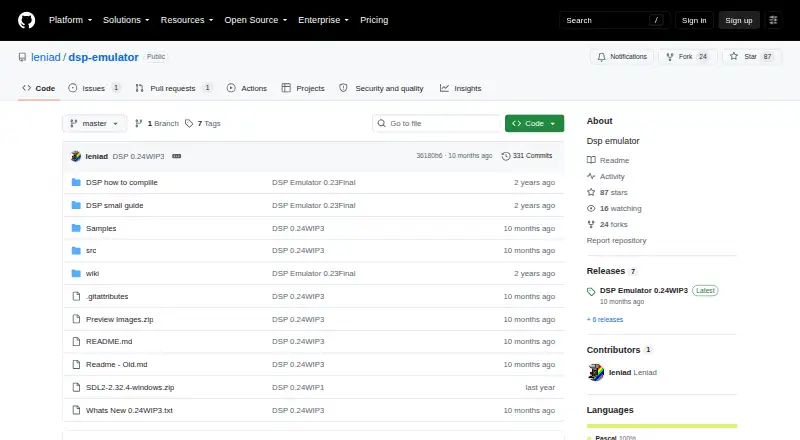
What DSP Emulator is
DSP Emulator is a free project for emulating arcade games and home computers. It runs on Windows, Linux, and macOS, and its GitHub repository provides source code and downloadable binaries. Listed computer systems include ZX Spectrum, Amstrad CPC, Commodore 64, Oric Atmos, and MSX 1. Arcade support includes drivers for Galaxian, CPS1, Sega System 16B, HangOn, Lastduel, and Rastan.
The project describes automatic tape loading for several supported computers, with formats including TZX, TSX, CAS, and WAV for MSX 1. Input handling covers keyboards, joysticks, and arcade controls; joystick buttons can be remapped. Users can type a game name in the selection window to choose it. Other described functions include snapshots for supported systems, saved DIP switch values, and exporting ROM and sample file information read from drivers. The latest listed version is 0.24WIP3, dated 11/11/25, and is labeled work in progress. The maintainer profile describes the project as Pascal. The repository includes a compilation document titled “DSP how to complile” and a user document titled “DSP small guide.”
Who it suits
DSP Emulator suits people looking for one project that covers arcade titles and several home computer systems on Windows, Linux, or macOS. It may also suit users who want public source code and repository guides for compiling and using the emulator.
What it does well
- Free to use, with Windows, Linux, and macOS support.
- Emulates listed home computers and arcade systems.
- Supports keyboard, joystick, and arcade input handling.
- Automatic tape loading covers several computer systems.
- Includes source code, downloadable binaries, and repository guides.
What to know first
- The latest listed version is labeled work in progress.
- Some snapshot support was still not working for Game Boy and NES at that point.
- The latest listed binaries are for Windows and Linux.
Getting started
- Open the DSP Emulator GitHub repository.
- Choose a Windows or Linux binary, or use the source code.
- Consult “DSP small guide” for using the emulator.
- Consult “DSP how to complile” for compilation guidance.
Verdict
Choose DSP Emulator if you want a free project spanning the listed arcade hardware and home computers, with multiple input types and tape loading. Consider its work-in-progress status and the stated snapshot limitation when choosing it for systems such as Game Boy or NES.
Questions
How much does DSP Emulator cost?
It is free, and the listed pricing model includes a free plan.
Which platforms does it support?
The listed supported platforms are Windows, Linux, and macOS. The latest listed binaries are for Windows and Linux.
Which systems can it emulate?
Listed computer systems include ZX Spectrum, Amstrad CPC, Commodore 64, Oric Atmos, and MSX 1. Listed arcade support includes Galaxian, CPS1, and Sega System 16B.
Does it include source code?
Yes. The repository exposes source files publicly and includes source with the latest listed update.
Who maintains DSP Emulator?
The repository is owned by the GitHub account leniad, whose profile displays the name Leniad.
Is the latest version a finished release?
The latest listed version is 0.24WIP3 and is labeled work in progress.
Facts from DSP Emulator's own pages
- Arcade emulation
- The changelog lists arcade drivers and hardware including Galaxian, HangOn, Lastduel, and Rastan. · github.com, 7 Oct 2026
- Arcade games
- The changelog lists arcade hardware and game drivers, including Galaxian, CPS1, and Sega System 16B. · github.com, 7 Oct 2026
- Build guidance
- The repository includes a document titled “DSP how to complile” and a “DSP small guide” for using the emulator. · github.com, 7 Oct 2026
- Compilation guide
- The repository includes a document titled “DSP how to complile.” · github.com, 7 Oct 2026
- Computer emulation
- The changelog lists support for computers including Spectrum, Amstrad CPC, Commodore 64, Oric Atmos, and MSX 1. · github.com, 7 Oct 2026
- Controls
- The changelog describes unified input handling for keyboard, joystick, and arcade controls. · github.com, 7 Oct 2026
- Controls and settings
- The changelog describes DIP switches, including saving DIP switch values, and player controls for some drivers. · github.com, 7 Oct 2026
- File formats
- The changelog lists tape loading support for formats including TZX, TSX, CAS, and WAV on MSX 1. · github.com, 7 Oct 2026
- Game selection
- The changelog says users can type a game name in the game selection window to select it automatically. · github.com, 7 Oct 2026
- Input
- The project describes keyboard, joystick, and arcade input handling, with joystick button remapping. · github.com, 7 Oct 2026
- Languages and frameworks
- The maintainer profile describes the DSP Emulator repository as Pascal. · github.com, 7 Oct 2026
- Latest listed version
- The repository lists DSP Emulator 0.24WIP3, dated 11/11/25, with Windows and Linux binaries and source. · github.com, 7 Oct 2026
- Maintainer
- The repository is owned by the GitHub account leniad, whose profile displays the name Leniad. · github.com, 7 Oct 2026
- Product
- DSP Emulator is an emulator project whose repository includes source code and downloadable binaries. · github.com, 7 Oct 2026
- Purpose
- DSP Emulator is an emulator project for arcade games and home computers. · github.com, 7 Oct 2026
- Release status
- The latest status entry is labeled 0.24WIP3, indicating a work-in-progress version. · github.com, 7 Oct 2026
- ROM and sample information
- The latest listed update says ROM and sample file information can be read from drivers for export. · github.com, 7 Oct 2026
- Security
- The repository’s Security and quality area shows zero items. · github.com, 7 Oct 2026
- Snapshots
- The project has a snapshot system for supported systems, though the changelog notes some snapshot support was still not working for Game Boy and NES at that point. · github.com, 7 Oct 2026
- Source availability
- The README says the latest listed update includes source, and the repository exposes its source files publicly. · github.com, 7 Oct 2026
- Support and contact
- The repository lists one issue and does not state a support policy in its About section. · github.com, 7 Oct 2026
- Systems
- The changelog includes drivers for systems such as ZX Spectrum, Amstrad CPC, Commodore 64, Oric Atmos, and MSX 1. · github.com, 7 Oct 2026
- Tape loading
- The emulator can automatically type loading commands after a tape is inserted for several supported computers. · github.com, 7 Oct 2026
- User guide
- The repository includes a document titled “DSP small guide.” · github.com, 7 Oct 2026
Where DSP Emulator stands on Freedom251
- Sega Master System Emulators#8 of 25