Drafts
What Drafts is
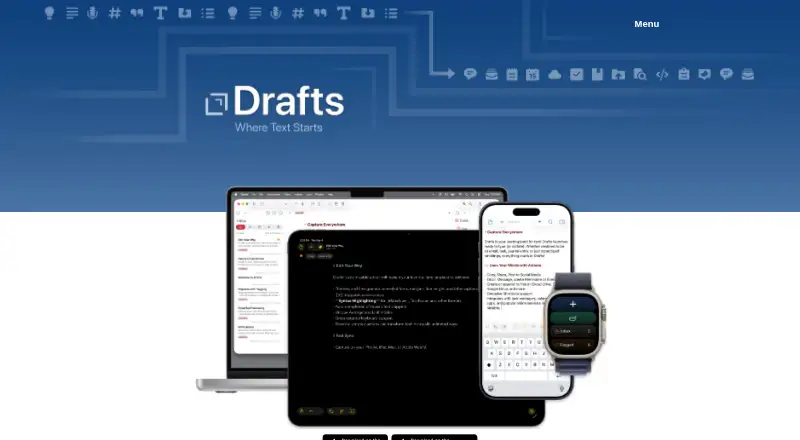
Drafts is an iOS and macOS quick-capture notes app that opens to a new page with the keyboard ready. Text can be captured through Siri, widgets, the share extension, file import and dictation. New entries go to an Inbox, where users can tag, flag or archive them. Actions copy or share text and can deep-link into services, such as sending tasks to Reminders or creating Dropbox files. Drafts supports custom fonts and controls for spacing, line height and margins. It works offline, stores drafts locally and syncs through a private iCloud CloudKit database; the maker says draft data is not stored on Agile Tortoise servers. Data is sent to integrated services only when an action runs, and the app uses no third-party analytics tools or SDKs for in-app tracking. Integrations include Mastodon, Dropbox, Notion, Airtable, Evernote, WordPress, Ghost, Medium, Google Drive, Gmail, Google Tasks, Box, OneDrive, OneNote, Outlook, Microsoft To Do, Todoist and WebDAV. The free plan costs nothing. Drafts Pro costs $1.99 a month or $19.99 a year, with a 7-day trial, and adds action editing, themes, icons, workspaces, extra widgets, improved share-extension options and enhanced automation.
Who it suits
It suits Apple-device users who capture text quickly, organize drafts in an Inbox and send content to many supported services. Pro is aimed at users needing editable actions, workspaces and expanded automation.
What it does well
- Opens directly to a new draft
- Works offline with iCloud sync
- Many publishing, storage and task integrations
- Free plan supports installed actions
- Pro includes a 7-day trial
What to know first
- Available only on iOS and macOS
- Integrated services receive data when actions run
- Pro subscriptions renew automatically unless canceled
Plans
| Plan | Billed and limits | Price |
|---|---|---|
| Free | Create, edit, and sync drafts · Run installed actions | Free |
| Drafts Pro | with Free 7 Day Trial; supports Family Sharing · Advanced features across iPhone, iPad, Mac, and Apple Watch · Create and edit actions · Themes, syntaxes, and icons · Workspaces · Chat Console · Mail Drop | $19.99 a year |
| Drafts free | Always free to use | Free |
| Drafts Pro - Monthly | Monthly subscription; automatically renews unless canceled at least 24 hours before the period ends · Create and edit actions · Themes and icons · Workspaces · Extra widgets · Better share extension options · Enhanced automation | $1.99 a month |
| Drafts Pro - Annual | Annual subscription; automatically renews unless canceled at least 24 hours before the period ends · Create and edit actions · Themes and icons · Workspaces · Extra widgets · Better share extension options · Enhanced automation | $19.99 a year |
| Drafts Pro - Patron | App Store listing labels this in-app purchase “Patron”; duration and included benefits are not stated there | $29.99, paid once |
As getdrafts.com lists them, read 20 Sept 2026. The maker's own page has the final word.
Verdict
Drafts centers on immediate text capture, then adds organization and action-based sharing. The free tier covers core drafting and syncing, while Pro expands customization and automation across Apple devices.
Facts from Drafts's own pages
- Advanced Data Protection
- The user guide lists end-to-end encrypted iCloud content protection when Advanced Data Protection is enabled. · docs.getdrafts.com, 11 Oct 2026
- Capture
- The maker lists Siri, widgets, share extension, file import, and dictation as ways to capture text. · getdrafts.com, 11 Oct 2026
- Customization
- Drafts offers text interface adjustments including custom fonts and controls for spacing, line height, and margins. · getdrafts.com, 11 Oct 2026
- Data sharing
- The privacy policy says draft data is sent to integrated services only when the user runs an action, and Drafts uses no third-party analytics tools or SDKs to track in-app activity. · getdrafts.com, 11 Oct 2026
- Free plan
- Yes · docs.getdrafts.com, 20 Sept 2026
- Integrations
- The user guide describes integrations with email, messages, Dropbox, Evernote, Todoist, and other services, and lists Shortcuts and AppleScript support. · docs.getdrafts.com, 11 Oct 2026
- Note sharing
- Yes · docs.getdrafts.com, 20 Sept 2026
- Offline access
- Yes · docs.getdrafts.com, 20 Sept 2026
- Organization
- New entries go to the Inbox, where users can tag, flag, or archive them. · getdrafts.com, 11 Oct 2026
- Platforms
- The maker’s homepage lists iPhone, iPad, Mac, and Apple Watch downloads; the App Store listings identify iOS and Mac versions. · getdrafts.com, 11 Oct 2026
- Pro features
- The store listing says Drafts Pro adds action editing, themes and icons, workspaces, extra widgets, better share extension options, and enhanced automation. · apps.apple.com, 11 Oct 2026
- Purpose
- Drafts is a quick-capture notes app that opens to a new page with the keyboard ready so users can start typing immediately. · getdrafts.com, 11 Oct 2026
- Storage and sync
- Drafts stores drafts locally and syncs them through the private iCloud CloudKit database; the maker says draft data is not stored on Agile Tortoise servers. · getdrafts.com, 11 Oct 2026
- Support
- The maker directs users to the User Guide, the Drafts Community, the in-app Send Feedback option, or [email protected]. · getdrafts.com, 11 Oct 2026
- Text actions
- Actions can copy or share text and deep link into other apps and services, including sending tasks to Reminders or creating files in Dropbox. · getdrafts.com, 11 Oct 2026
Where Drafts stands on Freedom251
- Note-taking apps#83 of 216