Freedom251 › Container Security Software
Dockle
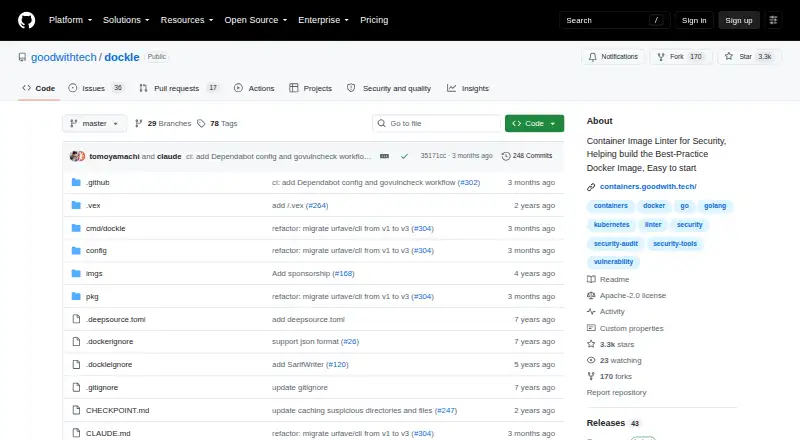
What Dockle is
Dockle is a container image security linter that checks images for vulnerabilities and Docker best practices. Its checks include CIS Docker Image Benchmarks and Docker- and Linux-specific settings such as empty passwords and duplicate user or group IDs. Results can be displayed or saved in JSON or SARIF, and users can set the exit level or skip selected checkpoints through command options, environment variables, or a `.dockleignore` file.
Dockle can be used in CI workflows; the project provides a GitHub Action and examples for Travis CI, CircleCI, and GitLab CI. It documents access to private images in Docker Hub, Amazon ECR, Google Container Registry, and self-hosted registries. It can also scan an image archive made with `docker save` using `--input`. Installation options include Homebrew, Linux distribution packages, Windows binaries, version managers, source builds, and Docker. Dockle runs on Linux, macOS, and Windows, is self-hosted, and is free under the Apache-2.0 license.
Who it suits
Dockle suits developers and teams who want to check container images during development or CI workflows. It can also scan saved image archives and images from listed private registries.
What it does well
- Checks vulnerabilities and Docker best practices.
- Includes CIS Docker Image Benchmarks checkpoints.
- Outputs results as JSON or SARIF.
- Provides a GitHub Action and CI examples.
- Free under the Apache-2.0 license.
What to know first
- Self-hosted deployment requires running it in your environment.
- Private registry credentials are configured through environment variables.
Plans
| Plan | Billed and limits | Price |
|---|---|---|
| Dockle | Open-source container image linter | Free |
As github.com lists them, read 8 Oct 2026. The maker's own page has the final word.
Getting started
- Open the Dockle project at https://github.com/goodwithtech/dockle.
- Install it using a supported route such as Homebrew, a Linux package, a Windows binary, source build or Docker.
- Run Dockle against a container image or use `--input` with an image archive created by `docker save`.
- Adjust exit levels or ignored checkpoints with command options, environment variables or a `.dockleignore` file.
- For CI, use the GitHub Action or follow the documented examples for Travis CI, CircleCI or GitLab CI.
Dockle is a self-hosted command-line linter for container images, focused on security findings and Docker best practices. It suits developers and platform teams that want checks inside local builds or continuous-integration pipelines rather than a hosted security service. Its strongest case is configurable, standards-aware image review with automation-friendly output; teams wanting a managed interface will need another approach.
Overview
Dockle examines container images for vulnerabilities and configuration problems that can undermine a production image. Its checkpoints include the CIS Docker Image Benchmarks, along with Docker- and Linux-specific settings such as empty passwords and duplicate user or group IDs. That combination makes it useful both as a vulnerability gate and as a practical review of image construction choices.
The project is open source under the Apache-2.0 license and uses a self-hosted deployment model. You install and operate it wherever your build or review process runs, so it avoids a hosted subscription but leaves maintenance and integration work to your team.
Key features
Security and best-practice checkpoints
CIS-aligned checks give security-conscious teams a recognizable baseline, while Docker- and Linux-specific rules catch issues that a generic vulnerability scan may not address. Empty-password and duplicate-UID or group checks are especially relevant to images moving from development into shared or production environments.
Automation and reporting
Dockle can print or save results as JSON and SARIF. JSON works for scripts and internal tooling; SARIF is suited to systems that ingest static-analysis findings. Configurable exit levels let a team decide which findings fail a build, and selected checkpoints can be ignored through command options, environment variables, or a .dockleignore file. Those controls help introduce the linter gradually, but they also require discipline so exceptions do not quietly weaken the gate.
CI and registry coverage
Documented CI usage includes a GitHub Action and examples for Travis CI, CircleCI, and GitLab CI. Dockle also documents private-image access for Docker Hub, Amazon ECR, Google Container Registry, and self-hosted registries. Private registry credentials are configured with environment variables; the project advises against putting those credentials on a local machine, which makes secure CI configuration the more appropriate pattern.
Image inputs
Alongside registry-based images, Dockle can scan an archive produced by docker save with its --input option. This is useful when an image must be reviewed from a file rather than pulled from a registry.
Pricing
| Plan | Price | What you get |
|---|---|---|
| Dockle | free | Open-source container image linter |
There is one free plan, with no paid tier, seat charge, quota, or trial term stated. It is a good fit for individuals and teams that can run open-source tooling themselves. The trade-off is operational: the plan provides the software, not a hosted service or a vendor-managed deployment.
Platforms
Dockle supports Linux, macOS, and Windows. Installation routes include Homebrew, RHEL/CentOS, Debian/Ubuntu, Arch Linux, Windows binaries, version managers, source builds, and Docker. That breadth suits mixed developer workstations and CI environments, while the number of installation choices means teams should standardize one supported route for repeatable builds.
Who it's for
Choose Dockle if your team builds Docker images and wants CIS-informed checks, Docker and Linux configuration rules, adjustable failure thresholds, and machine-readable findings in local or CI workflows. It is particularly appropriate for teams comfortable managing a self-hosted command-line tool and handling registry credentials in CI.
Look elsewhere if you need a hosted console, centralized administration, or a service that reduces installation and operational responsibility. Dockle is an image-focused linter, not a broad managed security platform.
Pros and cons
Pros
- Free and Apache-2.0 licensed: teams can adopt the linter without a subscription cost.
- Standards plus practical rules: CIS benchmarks are complemented by Docker- and Linux-specific checks, including empty passwords and duplicate IDs.
- CI-ready output: JSON, SARIF, a GitHub Action, and examples for several CI systems support automated gates and reporting.
- Flexible image access: it covers major private registries and saved image archives as well as ordinary image workflows.
Cons
- Self-hosted operation: installation, upgrades, runtime, and credential handling remain your team's responsibility.
- Exception management needs care: exit-level changes and ignored checkpoints can make enforcement less meaningful if they are not governed.
- Image-linter scope: teams seeking a hosted, wider security-management experience will need another product.
Alternatives
- Docker Desktop is the better choice when you want a freemium desktop environment spanning Docker Engine, Kubernetes, Docker Hub, Docker Scout, and Docker Debug; its Personal plan is free and Pro is $9 a month.
- Snyk Open Source suits teams wanting a freemium service with API and web access; its free plan covers five projects and Team costs $25 a month.
- Kubescape is an alternative for Kubernetes-focused work, offering a free Apache 2.0 CLI and operator in a self-hosted model.
- Trivy is a free Apache-2.0 open-source scanner for teams that want a different vulnerability-scanning tool.
- Deepfence ThreatMapper is a free option with no limits or hidden features for teams seeking broader deployment choices.
- Grype is a free Apache-2.0 licensed open-source vulnerability scanner.
- Kyverno is a free Apache License 2.0 open-source project for teams evaluating policy-oriented tooling.
- Qualys External Attack Surface Management is the alternative when a freemium, web- and API-based service with a 30-day free trial is preferable.
See the broader Container Security Software category for more options.
Verdict
Dockle is a strong choice for developers and platform teams that want a free, self-hosted Docker image linter with CIS benchmarks, configurable enforcement, and CI-friendly reports. Choose it for focused image quality and security gates; look elsewhere when you need a managed console or security coverage beyond the image itself.
Verdict
Dockle brings image security and best-practice checks to local or CI workflows, with configurable checkpoints and machine-readable output. It is a free, self-hosted option for teams prepared to install and run it themselves.
Questions
Is Dockle free?
Yes. Dockle is listed as free and is licensed under Apache-2.0.
Which operating systems does Dockle support?
Dockle supports Linux, macOS and Windows.
Can Dockle scan private registry images?
Yes. Its documentation covers private images in Docker Hub, Amazon ECR, Google Container Registry and self-hosted registries.
Can I use Dockle in CI?
Yes. The project provides a GitHub Action and documents examples for Travis CI, CircleCI and GitLab CI.
What output formats can Dockle produce?
It can display or save results in JSON and SARIF formats.
Can Dockle scan an image without using a registry?
It can scan an image archive created with `docker save` by using the `--input` option.
Facts from Dockle's own pages
- CIS benchmarks
- Its security checkpoints include CIS Docker Image Benchmarks. · github.com, 8 Oct 2026
- CI support
- The project documents CI usage and provides a GitHub Action, with examples for Travis CI, CircleCI, and GitLab CI. · github.com, 8 Oct 2026
- Configurable checks
- Users can change the exit level and ignore selected checkpoints using command options, environment variables, or a .dockleignore file. · github.com, 8 Oct 2026
- Image checks
- It checks container images for vulnerabilities and Docker image best practices. · github.com, 8 Oct 2026
- Image files
- Dockle can scan an image archive created with docker save by using its --input option. · github.com, 8 Oct 2026
- Installation
- Installation options include Homebrew, RHEL/CentOS, Debian/Ubuntu, Arch Linux, Windows binaries, version managers, source builds, and Docker. · github.com, 8 Oct 2026
- License
- The repository lists the project under the Apache-2.0 license. · github.com, 8 Oct 2026
- Other checkpoints
- Dockle also checks Docker-specific and Linux-specific image settings, including empty passwords and duplicate UIDs or groups. · github.com, 8 Oct 2026
- Output formats
- It can display or save results in JSON and SARIF formats. · github.com, 8 Oct 2026
- Private registry credentials
- For private registry access, the documentation describes configuring credentials through environment variables and advises against using them on a local machine. · github.com, 8 Oct 2026
- Purpose
- Dockle is a container image linter for security that helps build best-practice Docker images. · github.com, 8 Oct 2026
- Registry integrations
- Dockle documents access to private images in Docker Hub, Amazon ECR, Google Container Registry, and self-hosted registries. · github.com, 8 Oct 2026
Where Dockle stands on Freedom251
- Container Security Software#7 of 26