Freedom251 › Disk Benchmark Software

DiskBoard
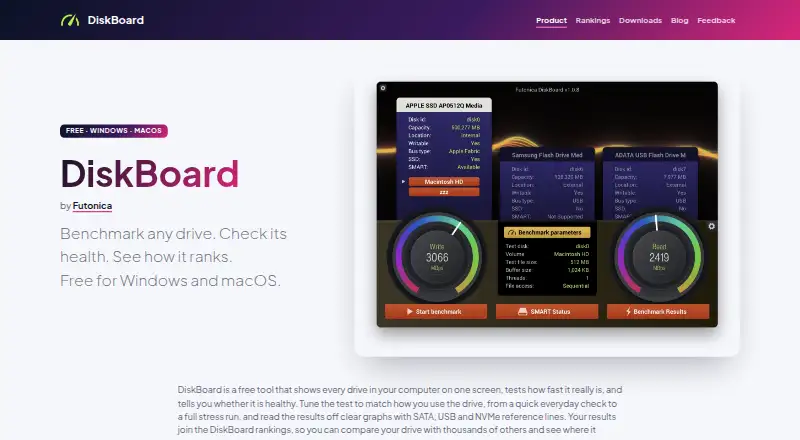
What DiskBoard is
DiskBoard is a free drive benchmarking and health utility for Windows and macOS, developed by Futonica. It runs sequential and random read/write tests, with controls for file size, buffer size, thread count, and access pattern, and displays live graphs. For drive health, it reads reported S.M.A.R.T. attributes such as temperature, wear, and reallocated sectors from internal, external, and USB devices. Users can upload benchmark results to compare with results for the same drive model, or browse ranked drives. DiskBoard lists Windows 10 or later and provides an x64 binary for Intel and AMD chips. On macOS, it requires version 10.14 or later and offers a universal binary for Intel chips and Apple silicon. Windows installation is available through the Microsoft Store or an MSI download; macOS users can download the app or install it with Homebrew. Some USB bridge chips do not pass through S.M.A.R.T. commands, so health data is unavailable for some USB drives. DiskBoard also warns that drive vendor RAM cache utilities can inflate benchmark results; its rankings exclude results that fail its physical-limit check. The maker says the app is built with bgfx and smartmontools.
Who it suits
DiskBoard suits Windows and macOS users who want to benchmark drives, inspect reported S.M.A.R.T. health attributes, and compare results by drive model. It may also suit users who want configurable read/write tests and live graphs.
What it does well
- Free for Windows and macOS.
- Runs sequential and random read/write tests.
- Test settings include file size, buffer size, threads, and access pattern.
- Displays drive-reported temperature, wear, and reallocated sectors.
- Users can compare uploaded results with the same drive model.
What to know first
- Some USB bridge chips prevent S.M.A.R.T. health reporting.
- Vendor RAM cache utilities can inflate benchmark results.
- Windows support requires Windows 10 or later.
- macOS support requires macOS 10.14 or later.
Plans
| Plan | Billed and limits | Price |
|---|---|---|
| DiskBoard | Free for Windows and macOS · Windows 10+ · macOS 10.14+ | Free |
As diskboard.com lists them, read 9 Oct 2026. The maker's own page has the final word.
Getting started
- Visit diskboard.com.
- Choose the Windows download or Microsoft Store installation route, if using Windows.
- On Windows, use Windows 10 or later on an x64 Intel or AMD system.
- On macOS, download the app or install it with Homebrew.
- On macOS, use version 10.14 or later; the universal binary supports Intel chips and Apple silicon.
Verdict
Choose DiskBoard if you want free drive tests and reported health attributes on Windows or macOS, with result comparisons by drive model. Consider its S.M.A.R.T. reporting caveat for USB drives and its warning that vendor cache utilities can inflate benchmark results.
Questions
How much does DiskBoard cost?
DiskBoard is listed as free for Windows and macOS.
Which operating systems does it support?
It supports Windows 10 or later and macOS 10.14 or later. The Windows binary is x64 for Intel and AMD chips; the macOS binary is universal for Intel chips and Apple silicon.
What kinds of drive tests does it run?
It offers sequential and random read/write tests, with configurable file size, buffer size, thread count, and access pattern.
Can it check the health of USB drives?
It displays drive-reported S.M.A.R.T. attributes, but some USB bridge chips do not pass through S.M.A.R.T. commands, preventing health reports for some USB drives.
How can I install DiskBoard?
On Windows, install it from the Microsoft Store or download an MSI. On macOS, download the app or install it with Homebrew.
Who develops DiskBoard?
Futonica develops DiskBoard. The maker says it is built with bgfx and smartmontools.
Facts from DiskBoard's own pages
- Benchmark caveat
- DiskBoard reports that drive vendor RAM cache utilities can inflate benchmark results and says rankings exclude results that fail its physical-limit check. · diskboard.com, 9 Oct 2026
- Benchmark tests
- It offers sequential and random read/write tests with configurable file size, buffer size, thread count, and access pattern, plus live graphs. · diskboard.com, 9 Oct 2026
- Distribution
- Windows users can install from the Microsoft Store or download an MSI; macOS users can download the app or install it with Homebrew. · diskboard.com, 9 Oct 2026
- Drive health
- It displays drive-reported S.M.A.R.T. attributes including temperature, wear, and reallocated sectors for internal, external, and USB devices. · diskboard.com, 9 Oct 2026
- Implementation
- The maker says DiskBoard is built with bgfx and smartmontools. · diskboard.com, 9 Oct 2026
- Known health limitation
- DiskBoard says some USB bridge chips do not pass through S.M.A.R.T. commands, so some USB drives cannot report health. · diskboard.com, 9 Oct 2026
- Maker
- DiskBoard is developed by Futonica. · diskboard.com, 9 Oct 2026
- Purpose
- DiskBoard benchmarks drives, checks S.M.A.R.T. health, and lets users compare results in global rankings. · diskboard.com, 9 Oct 2026
- Rankings
- Users can upload benchmark results and compare them with results for the same drive model or browse ranked drives. · diskboard.com, 9 Oct 2026
- Supported macOS
- The download page lists macOS 10.14+ and a universal binary for Intel chips and Apple silicon. · diskboard.com, 9 Oct 2026
- Supported Windows
- The download page lists Windows 10+ and an x64 binary for Intel and AMD chips. · diskboard.com, 9 Oct 2026
Where DiskBoard stands on Freedom251
- Disk Benchmark Software#10 of 29