Freedom251 › Disk Benchmark Software
D-Bench
What D-Bench is
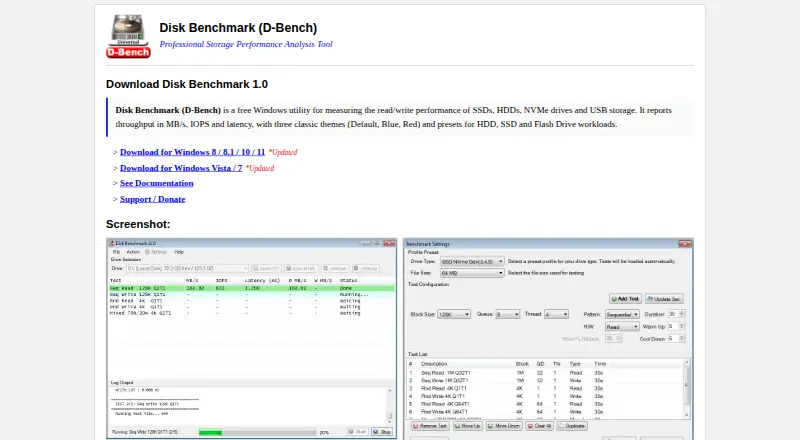
D-Bench is a free Windows utility for measuring read and write performance on SSDs, HDDs, NVMe drives, and USB storage. It reports throughput in MB/s, IOPS, and average latency, with read and write throughput shown separately. Workloads can use sequential or random I/O, and users can set block size, queue depth, and thread count. HDD, SSD, and Flash Drive presets are available, alongside controls for access pattern, read/write mode, read percentage, duration, warm-up, and cool-down. The drive selector lists ready drives with their letter, volume label, free space, and total capacity. Tests can be managed in the settings window, including adding, updating, reordering, duplicating, and removing them. Results can be saved as plain TXT files or styled, self-contained HTML reports. D-Bench uses unbuffered I/O and disables operating-system read caching for write tests as much as possible. Builds are provided for Windows Vista and 7, or Windows 8, 8.1, 10, and 11. Downloads come in Default, Blue, and Red themes; the utility has no command-line interface.
Who it suits
D-Bench suits Windows users who want to measure drive performance with configurable sequential or random workloads. It is also useful for readers who want to save results as text or HTML reports.
What it does well
- Reports throughput, IOPS, and average latency.
- Includes sequential and random workloads.
- Offers HDD, SSD, and Flash Drive presets.
- Exports plain TXT or self-contained HTML reports.
- Supports Windows Vista through Windows 11.
What to know first
- Windows only.
- No command-line interface.
Plans
| Plan | Billed and limits | Price |
|---|---|---|
| Free | Windows 8/8.1/10/11 or Vista/7 · approximately 470 KB download · Default, Blue or Red themes | Free |
As diskbenchmark.github.io lists them, read 1 Oct 2026. The maker's own page has the final word.
Getting started
- Open the D-Bench website.
- Choose the build for your Windows version.
- Download a Default, Blue, or Red theme.
- Select a ready drive and configure a test, or begin with a workload preset.
Verdict
D-Bench offers configurable storage benchmarks and several ways to inspect or save results. It is limited to Windows and does not provide a command-line interface.
Questions
How much does D-Bench cost?
The free plan costs 0.00 USD.
Which Windows versions does it support?
Separate builds support Windows 8, 8.1, 10, and 11, or Windows Vista and 7.
What performance metrics does it report?
It reports throughput in MB/s, IOPS, and average latency, including separate read and write throughput.
Can it run random and sequential tests?
Yes. It supports both random and sequential I/O workloads.
Can I export benchmark results?
Yes. Results can be saved as plain TXT files or styled, self-contained HTML reports.
Does D-Bench have a command-line interface?
No. It does not have a command-line interface.
Facts from D-Bench's own pages
- Caching behavior
- The program uses unbuffered I/O and disables OS read caching for write tests as much as possible. · diskbenchmark.github.io, 1 Oct 2026
- Drive selection
- The drive dropdown lists ready drives with drive letter, volume label, free space and total capacity. · diskbenchmark.github.io, 1 Oct 2026
- Free plan
- Yes · diskbenchmark.github.io, 20 Sept 2026
- Maker location
- The GitHub profile for Ari Sohandri Putra lists Indonesia as the location. · github.com, 1 Oct 2026
- Presets
- It includes HDD, SSD and Flash Drive workload presets. · diskbenchmark.github.io, 1 Oct 2026
- Purpose
- D-Bench is a free Windows utility for measuring read and write performance of SSDs, HDDs, NVMe drives and USB storage. · diskbenchmark.github.io, 1 Oct 2026
- Reported metrics
- It reports throughput in MB/s, IOPS and average latency, including separate read and write throughput. · diskbenchmark.github.io, 1 Oct 2026
- Report export
- Benchmark results can be saved as plain TXT files or styled, self-contained HTML reports. · diskbenchmark.github.io, 1 Oct 2026
- Support
- The homepage links to GitHub Sponsors so users can support the author. · diskbenchmark.github.io, 1 Oct 2026
- Supported Windows
- Two builds are provided: one for Windows 8, 8.1, 10 and 11, and another for Windows Vista and 7. · diskbenchmark.github.io, 1 Oct 2026
- Test controls
- Users can configure block size, queue depth, thread count, access pattern, read/write mode, read percentage, duration, warm-up and cool-down. · diskbenchmark.github.io, 1 Oct 2026
- Test management
- The settings window supports adding, updating, removing, reordering, duplicating and clearing tests. · diskbenchmark.github.io, 1 Oct 2026
- Themes
- Downloads are available in Default, Blue and Red themes. · diskbenchmark.github.io, 1 Oct 2026
- Workloads
- The tool runs sequential and random I/O workloads with configurable block sizes, queue depths and thread counts. · diskbenchmark.github.io, 1 Oct 2026
Where D-Bench stands on Freedom251
- Disk Benchmark Software#9 of 29
- PC Benchmark Software#26 of 73
- PC benchmark tools#52 of 70