Freedom251 › Packaging Design Software

DielineLab
What DielineLab is
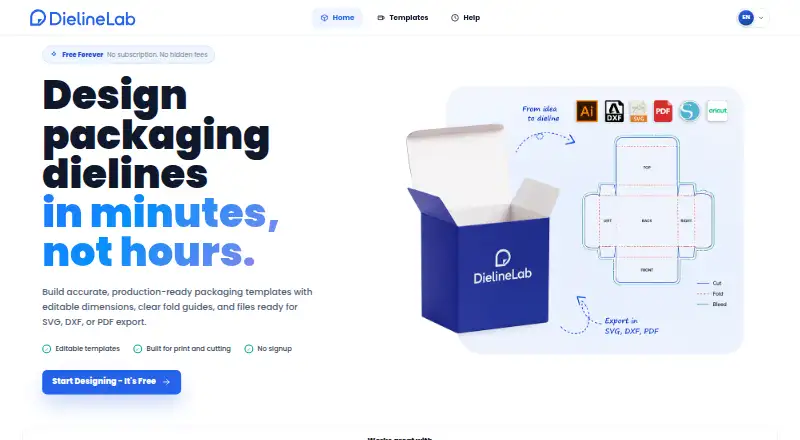
DielineLab is a web-based packaging dieline generator for designers, makers, print shops, and packaging teams. Its editor lets users adjust dimensions, cutouts, bleed, and manufacturing options, while a live preview shows folds, labels, and guides. The library has nine editable templates: eight for paper and board and one for laser cutting. Designs can be exported as SVG, DXF, or PDF, and DielineLab lists compatibility with Adobe Illustrator, CorelDRAW, Inkscape, AutoCAD, LightBurn, Silhouette Studio, and Cricut Design Space. The Free plan costs nothing, has no subscription, and requires no signup. Templates are free for personal and commercial projects. DielineLab describes itself as an independent, community-driven project. Its privacy policy says it does not sell personal information and may store template, unit, line-color, and dimension preferences in the browser. Generated dielines are design aids, so users are responsible for checking dimensions, material behavior, and production suitability before manufacturing.
Who it suits
DielineLab suits people who need editable packaging templates for design or print workflows. Its free web editor may be useful to teams that want SVG, DXF, or PDF output without signing up.
What it does well
- Nine editable templates across paper, board, and laser-cut formats
- Real-time preview includes folds, bleed, labels, and guides
- Exports to SVG, DXF, and PDF
- Templates are free for personal and commercial projects
What to know first
- Only nine templates are listed
- Generated dielines require production suitability checks
- No free trial is offered
Plans
| Plan | Billed and limits | Price |
|---|---|---|
| Free | No subscription · No signup · SVG, DXF, and PDF exports | Free |
As dielinelab.com lists them, read 4 Oct 2026. The maker's own page has the final word.
Getting started
- Open dielinelab.com in a web browser.
- Choose one of the nine editable templates.
- Adjust the dimensions, cutouts, bleed, and manufacturing options.
- Review the preview, then export the design as SVG, DXF, or PDF.
Overview
DielineLab is a web-based editor for creating and exporting packaging dielines. It suits designers, makers, print shops, and packaging teams who want a free way to shape a layout; its output is a design aid, so production checks remain the user’s responsibility.
Key features
The editor lets you change dimensions, cutouts, bleed, and manufacturing options, while a live preview shows folds, labels, guides, and bleed. That makes it useful for adapting a starting shape and catching layout issues during design, rather than working from an unchanging template. The library has nine editable templates—eight for paper and board and one for laser cutting—so it offers a focused starting set, not extensive packaging coverage.
Exports are available as SVG, DXF, and PDF. DielineLab says these formats work with Adobe Illustrator, CorelDRAW, Inkscape, AutoCAD, LightBurn, Silhouette Studio, and Cricut Design Space, which gives users several ways to continue design or fabrication in familiar tools. Templates may be used for personal and commercial projects.
Generated dielines are not a substitute for production validation: users need to check dimensions, material behavior, and suitability before manufacturing. Support handles template requests, bug reports, and production questions, with guidance on what information to include. The privacy policy says personal information is not sold and that template, unit, line-color, and dimension preferences may be stored in the browser. An August 2026 update improved the editor and pages for mobile and tablet screens, including touch interactions.
Pricing
Free — free. There is no subscription and no signup, and the plan includes SVG, DXF, and PDF exports. The no-cost access is unusually straightforward for personal or commercial projects, with no stated quota to weigh against the export formats. There is no free trial because the product is free.
Platforms
DielineLab runs on the web. The editor and pages have been improved for mobile and tablet screens, though the formats it exports are also intended to work with desktop design and fabrication software.
Who it's for
Choose DielineLab if you need to adjust a packaging outline, preview its folds and guides, and take the files into another design or fabrication tool without paying or creating an account. It is a weaker fit for teams needing a large template catalog or a service that validates manufacturing readiness; the library is limited and final checks stay with the user.
Pros and cons
- Pro: Free exports in three useful formats with no signup or subscription make it easy to start and hand off a design.
- Pro: Adjustable dimensions, cutouts, bleed, and manufacturing options provide more flexibility than a fixed outline.
- Con: Nine templates cover a narrow range of shapes, particularly for users seeking a broader packaging library.
- Con: Users must verify dimensions, material behavior, and production suitability themselves before manufacturing.
Alternatives
Packaging Design Software is the broader category guide for readers comparing tools across packaging design.
- ZebraDesigner is a better match for basic barcode label and tag design and printing, including support for Zebra Link-OS and Link-OS Basic printers; its Essentials 3 plan is free, with a free trial also offered.
- PACKZ is worth considering when the task is previewing and inspecting production PDF files: PACKZVIEW is a free downloadable app for macOS and Windows.
- Packly is another web-based option with a free plan and monthly allowances for dieline templates and 3D mockups.
- Cubit Design Studio may suit users seeking unlimited AI generations and canvas annotation tools, with designer handoff and production ordering available.
- Dielineo offers a free plan with unlimited drawing, fast drawing macros, and smart nesting.
- FinalPack may fit users who want basic models and an interactive online 3D preview, but its free starter plan has no PDF or DXF export.
- Pacdora offers a free plan with 3,000+ dieline templates, though its free tier limits workspace membership to one and generated images are public.
- Packaging Dieline is an alternative for users wanting access to four of 18 styles and unlimited PDF, AI, SVG, and DXF exports on a free plan.
Verdict
DielineLab is a sensible choice for designers and makers who need a free, editable dieline generator with several export formats and no account requirement. Its main advantage is straightforward access to customization and exports at no cost; look elsewhere if you need broader template coverage or a tool that takes production validation out of your hands.
Verdict
DielineLab provides a free online way to shape and export packaging dielines. Treat the output as a design aid and verify its dimensions and suitability before manufacturing.
Questions
How much does DielineLab cost?
Its Free plan costs nothing, with no subscription.
Do I need to sign up or start a trial?
No signup is required, and there is no free trial.
What platforms does DielineLab support?
DielineLab is available on web. Its editor and pages have been improved for mobile and tablet screens.
What file formats can I export?
Templates can be exported as SVG, DXF, and PDF files.
Which design and cutting tools are listed as compatible?
DielineLab lists Adobe Illustrator, CorelDRAW, Inkscape, AutoCAD, LightBurn, Silhouette Studio, and Cricut Design Space.
Can I use the templates for commercial projects?
Yes. The templates are free for personal and commercial projects.
Facts from DielineLab's own pages
- Customization
- Users can adjust dimensions, cutouts, bleed, and manufacturing options. · dielinelab.com, 4 Oct 2026
- Exports
- Templates can be exported as SVG, DXF, and PDF files. · dielinelab.com, 4 Oct 2026
- Integrations
- The site says its exports work with Adobe Illustrator, CorelDRAW, Inkscape, AutoCAD, LightBurn, Silhouette Studio, and Cricut Design Space. · dielinelab.com, 4 Oct 2026
- Maker
- DielineLab describes itself as an independent, community-driven project for designers and packaging teams. · dielinelab.com, 4 Oct 2026
- Mobile experience
- The August 2026 changelog says the editor and pages were improved for mobile and tablet screens with better touch interactions. · dielinelab.com, 4 Oct 2026
- Preview
- The editor provides a real-time preview with folds, bleed, labels, and guides. · dielinelab.com, 4 Oct 2026
- Pricing and usage
- The site says all templates are free for personal and commercial projects. · dielinelab.com, 4 Oct 2026
- Privacy
- The privacy policy says the site does not sell personal information and may store template, unit, line-color, and dimension preferences in the browser. · dielinelab.com, 4 Oct 2026
- Production limits
- Generated dielines are design aids, and users are responsible for checking dimensions, material behavior, and production suitability before manufacturing. · dielinelab.com, 4 Oct 2026
- Support
- Users can contact support about template requests, bug reports, and production questions, and the site gives guidance on details to include. · dielinelab.com, 4 Oct 2026
- Template library
- The template library lists nine editable templates: eight paper and board templates and one laser-cut template. · dielinelab.com, 4 Oct 2026
- What it does
- DielineLab is an online packaging dieline generator for designers, makers, print shops, and packaging teams. · dielinelab.com, 4 Oct 2026
Where DielineLab stands on Freedom251
- Packaging Design Software#5 of 27