Freedom251 › Packaging Design Software

Cubit Design Studio
What Cubit Design Studio is
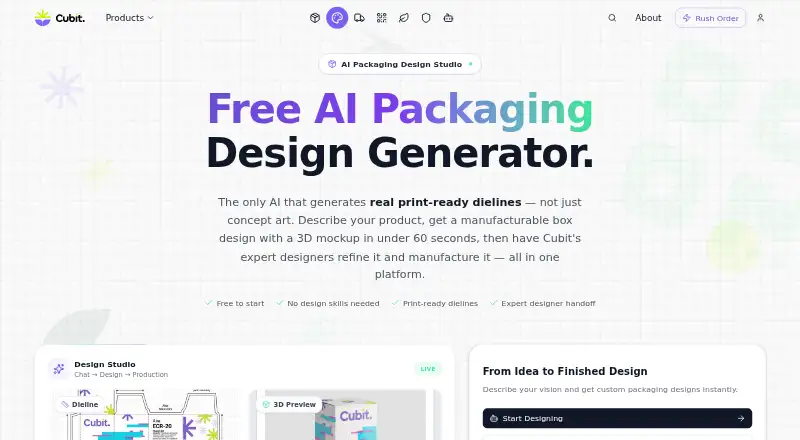
Cubit Design Studio turns written packaging descriptions into designs with print-ready dielines and 3D mockups. The site says its AI can create a design in under 60 seconds, producing a 2K–4K composite image with a dieline and 3D preview of the same design. Supported formats include mailer boxes, rigid boxes, folding cartons, cylinder tubes, sleeve boxes, and pillow boxes. Users can annotate designs on the canvas or request changes in chat; iterations are saved in version history. A design can be submitted for professional review, with a designer assigned for discussion, revisions, and approval. After approval, users can request a production quote and place an order that flows into Cubit Flow for tracking. The site says the AI supports requirements for more than 50 industries, including cosmetics, food and beverage, cannabis, e-commerce, and supplements. Listed examples of compliance guidance include FDA nutrition facts and allergen callouts for food, INCI ingredient lists for cosmetics, and THC warnings for cannabis packaging. The browser-based tool needs no download, installation, or plugin. Its free plan includes unlimited AI generations and canvas annotation tools.
Who it suits
Cubit Design Studio suits founders, small businesses, startups, and DTC brands seeking packaging designs. It may also suit users who want professional review and production ordering after creating a design.
What it does well
- Generates dielines and 3D previews in one image.
- Supports six listed packaging formats.
- Saves design iterations in version history.
- Free plan includes unlimited AI generations.
- Designer review and production ordering are available.
What to know first
- The free plan does not list a paid production quote.
- A production quote is requested after design approval.
Plans
| Plan | Billed and limits | Price |
|---|---|---|
| Free to start | Unlimited AI generations · all canvas annotation tools · professional designer handoff and production ordering available | Free |
As cubitpackaging.com lists them, read 5 Oct 2026. The maker's own page has the final word.
Getting started
- Open the Cubit Design Studio website in a browser.
- Describe the packaging design you want to create.
- Generate a design and review its dieline and 3D preview.
- Use canvas tools or chat to request changes.
- Submit the design for professional review, then request revisions or approve it.
- After approval, request a production quote or place an order.
Overview
Cubit Design Studio is a web app for developing packaging concepts from written briefs. It is best suited to founders and small brands that want to move from an initial design toward professional review and production. Its strongest appeal is the combination of unlimited free generations and a route to ordering; the production quote comes only after a design is approved.
Key features
Describe a package in plain English and Cubit says it can return a design in under 60 seconds. Each generation pairs a 2K–4K composite image with a dieline and 3D preview of that design, helping users assess appearance and structure together. The supported formats are mailer boxes, rigid boxes, folding cartons, cylinder tubes, sleeve boxes, and pillow boxes.
Canvas annotations and chat-based change requests let users refine a concept, with iterations saved in version history. That provides a useful feedback loop without requiring a separate tool for every revision. Users can then submit a design for professional review, communicate with the assigned designer, request revisions, and approve the result. After approval, they can request a production quote and place an order, which is tracked through Cubit Flow.
Cubit says its AI supports requirements for more than 50 industries, including cosmetics, food and beverage, cannabis, e-commerce, and supplements. Examples of guidance include nutrition facts and allergen callouts for food, INCI ingredient lists for cosmetics, and THC warnings for cannabis packaging. This breadth may help users start with category-specific requirements, but it does not replace review of a design before production.
The browser-based tool needs no download, installation, or plugin. Cubit’s privacy policy describes SSL/TLS transmission, encrypted storage for sensitive data, regular security assessments, and PCI-DSS-compliant payment processing. Dieline editing, label design tools, and cloud collaboration are also included.
Pricing
Free to start: free includes unlimited AI generations and all canvas annotation tools. Professional designer handoff and production ordering are available in the workflow, making the free plan useful for exploring ideas without a generation cap. Production still requires design approval and a requested quote, so the free plan is not a stated production price.
Platforms
Cubit Design Studio runs on the web in a browser. That suits users who want to work without installing desktop software; it is not presented as a native mobile or desktop app.
Who it's for
Founders, startups, small businesses, and direct-to-consumer brands developing packaging are the clearest fit. The generated dieline and 3D preview, editing tools, and designer handoff connect early concept work with a production-ordering path. Teams seeking a tool centered on a different packaging workflow or a known production cost should compare alternatives before committing to that path.
Pros and cons
- Pro: Unlimited free generations make it practical to explore multiple package concepts without a generation quota.
- Pro: Each result combines a 2K–4K image with a dieline and 3D preview, giving users both visual and structural views of a concept.
- Pro: Canvas annotations, chat revisions, version history, designer review, and production ordering offer a connected refinement workflow.
- Con: Production pricing comes through a quote after approval, so users cannot calculate an order cost from the free plan alone.
- Con: The six supported package formats define the range; users whose packaging needs fall outside them may need another tool.
- Con: Industry guidance can inform a concept, but users still need to review requirements and approve the design before production.
Alternatives
For more options, browse Packaging Design Software.
- ZebraDesigner is a better fit for basic barcode label and tag design and printing, especially for users working with supported Zebra Link-OS printers; its free Essentials 3 plan is available across Android, iOS, web, and Windows.
- PACKZ suits users on macOS or Windows who need to preview and inspect production PDF files for free, or want to contact Hybrid Software about the paid PACKZ product.
- Packly is worth considering for a browser-based dieline and 3D mockup workflow with a capped free Basic plan: it includes three dieline templates and three mockups per month.
- DielineLab is an option for designers and packaging teams seeking a free, independent, community-driven project.
- Dielineo offers a free plan with unlimited drawing, fast drawing macros, and smart nesting.
- FinalPack has a free starter plan with five basic models per month and an interactive online 3D preview; choose it only if the absence of PDF/DXF export and industrial rendering suits your workflow.
- Pacdora may suit users seeking a large template library: its free plan includes 3,000+ dieline templates, 50 AI credits, one workspace member, and public generated images.
- Packaging Dieline offers a free plan with four of 18 styles and unlimited exports in PDF, AI, SVG, and DXF, with no watermark and commercial use permitted.
Verdict
Cubit Design Studio is a strong starting point for founders and small brands that want to generate packaging concepts freely, refine them, and carry an approved design toward a production order. The unlimited generations and connected designer handoff are its clearest advantages. Look elsewhere if you need a different package format or need production costs settled before design approval.
Verdict
Cubit Design Studio pairs AI-generated packaging concepts with canvas editing, designer review, and a path to production ordering. The free plan includes unlimited generations, while production quotes are requested after approving a design.
Questions
Is Cubit Design Studio free?
Its free plan costs nothing and includes unlimited AI generations and all canvas annotation tools.
Which packaging types does it support?
It supports mailer boxes, rigid boxes, folding cartons, cylinder tubes, sleeve boxes and pillow boxes.
Can a designer review a design?
Yes. Users can submit a design for professional review, chat with the assigned designer, request revisions and approve the result.
Can I order packaging after designing it?
After approving a design, users can request a production quote and place an order that flows into Cubit Flow for tracking.
Does it need to be installed?
No. Cubit describes Design Studio as an online browser tool that needs no download, installation or plugin.
What industry requirements does it cover?
Cubit says it supports requirements for more than 50 industries. Examples include food nutrition facts and allergen callouts, cosmetic INCI ingredient lists, and cannabis THC warnings.
Facts from Cubit Design Studio's own pages
- Browser access
- Cubit describes Design Studio as an online browser tool with no download, installation, or plugin required. · cubitpackaging.com, 5 Oct 2026
- Compliance guidance
- Examples listed include FDA nutrition facts and allergen callouts for food, INCI ingredient lists for cosmetics, and THC warnings for cannabis packaging. · cubitpackaging.com, 5 Oct 2026
- Designer handoff
- Users can submit a design for professional review, chat with the assigned designer, request revisions, and approve the result. · cubitpackaging.com, 5 Oct 2026
- Editing
- Users can annotate designs with canvas tools or request changes through chat, and the site says iterations are saved in version history. · cubitpackaging.com, 5 Oct 2026
- Founded
- 2025 · cubitpackaging.com, 28 Sept 2026
- Generation speed
- The site says the AI can create a packaging design in under 60 seconds. · cubitpackaging.com, 5 Oct 2026
- Headquarters
- Fremont, California, United States · cubitpackaging.com, 28 Sept 2026
- Industry knowledge
- The site says the AI supports requirements for more than 50 industries, including cosmetics, food and beverage, cannabis, e-commerce, and supplements. · cubitpackaging.com, 5 Oct 2026
- Intended users
- The site presents the tool as suitable for founders, small businesses, startups, and DTC brands needing packaging designs. · cubitpackaging.com, 5 Oct 2026
- Maker and founding year
- Cubit says it started in 2025. · cubitpackaging.com, 5 Oct 2026
- Output
- Each generation produces a 2K–4K composite image with a dieline and a 3D preview of the same design. · cubitpackaging.com, 5 Oct 2026
- Packaging types
- The AI supports mailer boxes, rigid boxes, folding cartons, cylinder tubes, sleeve boxes, and pillow boxes. · cubitpackaging.com, 5 Oct 2026
- Payment compliance
- Cubit’s privacy policy says payment processing is PCI-DSS compliant. · cubitpackaging.com, 5 Oct 2026
- Production workflow
- After approving a design, users can request a production quote and place an order that flows into Cubit Flow for tracking. · cubitpackaging.com, 5 Oct 2026
- Purpose
- Cubit Design Studio turns plain-English descriptions into packaging designs with print-ready dielines and 3D mockups. · cubitpackaging.com, 5 Oct 2026
- Security
- Cubit’s privacy policy says it uses SSL/TLS encryption for data transmission, encrypted storage for sensitive data, and regular security assessments. · cubitpackaging.com, 5 Oct 2026
Where Cubit Design Studio stands on Freedom251
- Packaging Design Software#3 of 27