Freedom251 › AI Book Writing Software

DeepQuill
What DeepQuill is
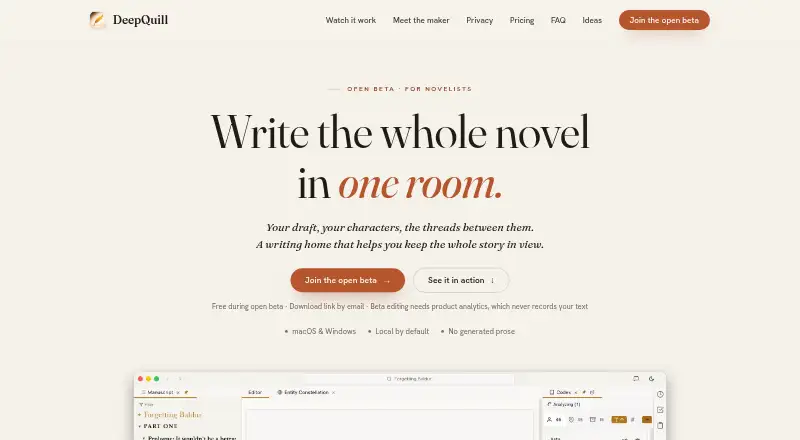
DeepQuill is a desktop novel-writing app for drafting and organizing a long book on macOS or Windows. Writers can arrange scenes into story beats, follow story arcs and scene status, and examine tension and point of view. Its codex connects characters and places with their manuscript mentions and maps relationships among story elements. Research notes and a diagramming canvas linked to story elements bring planning material alongside the manuscript.
Optional AI analysis can identify entities, relationships, story structure, and character details in existing writing. It does not write prose or offer suggestions. Analysis can run locally in the background while work continues, though the first analysis of a full-length novel may take hours depending on the computer. Projects are saved locally by default. Google sign-in enables optional encrypted sync; DeepQuill says projects are encrypted on the device before upload and that it does not have the decryption key. The app imports Scrivener projects and Word, Markdown, HTML, and plain-text documents, and exports to Word, EPUB, FB2, PDF, TXT, or Google Docs. During the free beta, editing requires product analytics; session recordings mask on-screen words and hide images, and the maker says manuscript text is excluded.
Who it suits
DeepQuill suits novelists who want scene planning, continuity links, research notes, and manuscript work together in a desktop app. It may also suit writers who want optional analysis of existing text, provided they do not expect AI-written prose or suggestions.
What it does well
- Links characters and places to their manuscript mentions.
- Tracks story arcs, scene status, tension, and point of view.
- Connects research notes and diagrams to story elements.
- Imports Scrivener projects and several document formats.
- Offers local AI analysis that runs in the background.
- Stores projects locally by default, with optional encrypted sync.
What to know first
- First local analysis of a full novel may take hours.
- Each license activates on up to three devices.
- Lifetime updates cover only the purchased major version.
- Beta editing requires product analytics and session recordings.
Limits
The free open beta is available free of charge during open beta. A license activates on up to three devices; the 49.99 USD one-time lifetime license includes updates only within the purchased major version, with later major versions requiring a paid upgrade. The first local analysis of a full novel may take hours depending on hardware.
Plans
| Plan | Billed and limits | Price |
|---|---|---|
| Open beta | Free during open beta · full desktop application | Free |
| DeepQuill Yearly License | $39.99 per year · Latest version · up to three devices | $39.99 a year |
| DeepQuill Lifetime License | $49.99 one-time · Updates to this major version · later major versions are a paid upgrade · up to three devices | $49.99, paid once |
| DeepQuill Monthly License | $9.99 per month · Latest version · up to three devices | $9.99 a month |
As deepquill.app lists them, read 8 Oct 2026. The maker's own page has the final word.
Getting started
- Open https://deepquill.app/ and choose the free open beta or a license.
- Install the desktop app for macOS or Windows.
- Import a Scrivener project or a Word, Markdown, HTML, or plain-text document, or start a project.
- Organize scenes into story beats and add research notes or diagrams.
- Optionally sign in with Google to enable encrypted sync or connect Google Drive or Docs for selected files and exports.
Overview
DeepQuill is a desktop workspace for drafting and organizing long-form fiction, best suited to novelists who want story planning and continuity tied to the manuscript. Its strongest case is the way it connects scenes, references, and research; writers looking for AI-generated or rewritten prose should look elsewhere.
Key features
The codex links characters and places to their appearances in the manuscript and maps relationships among story elements. That gives writers a way to keep track of a large cast or interconnected setting while drafting, though it is a reference and continuity aid rather than a substitute for writing decisions.
Scenes can be arranged into story beats, with views for tension, point of view, status, and story arcs. This makes DeepQuill a better fit for writers who plan at scene level or want to review pacing across a book than for those who only need a straightforward chapter editor. Research, notes, and a diagramming canvas linked to story elements keep planning material close to the project.
Optional AI analyzes existing writing for entities, relationships, structure, and character details. It does not generate prose or suggestions, so its value is in organizing and examining a draft, not helping overcome a blank page. Local analysis runs in the background while work continues, but a first pass over a full novel can take hours depending on the computer.
Projects are stored locally by default. Google sign-in enables optional encrypted sync: projects are encrypted on the device before upload, and DeepQuill says it does not hold the decryption key. The maker also says manuscript text is not used to train models; text is sent for analysis only when a remote AI provider is configured. During the free beta, editing requires product analytics. Session recordings mask on-screen words and hide images, and the maker says manuscript text is excluded.
DeepQuill imports Scrivener projects and Word, Markdown, HTML, and plain-text documents. It exports to Word, EPUB, FB2, or PDF, with TXT and Google Docs also included among its export formats. Google Drive or Docs can be used with selected files or for manuscript export. These options make it easier to bring an existing project in and move a finished draft out, while the app remains focused on desktop writing.
Pricing
The Open beta plan costs nothing and includes the full desktop application during the open beta. Editing in this plan requires product analytics, a material trade-off for writers who want to keep analytics out of their writing workflow.
The DeepQuill Monthly License costs $9.99 a month, billed $9.99 per month, and includes the latest version on up to three devices. It suits writers who want a short commitment. The DeepQuill Yearly License costs $39.99 a year, billed $39.99 per year, for the latest version on up to three devices; it is the lower-cost recurring option for someone expecting to use the app throughout the year.
The DeepQuill Lifetime License costs $49.99, paid once, billed $49.99 one-time. It covers updates within the purchased major version on up to three devices; later major versions require a paid upgrade. It suits buyers who prefer a one-time payment and can accept that upgrade limit. The plans do not describe different feature sets, so the cheaper recurring options appear to provide the same app access for a shorter or renewable term.
A 14-day trial is offered. The license device cap is three, and the lifetime license does not include later major versions.
Platforms
DeepQuill runs on macOS and Windows. That covers the two desktop platforms named for the app, but it is not a mobile or web writing workspace.
Who it's for
DeepQuill is a strong fit for novelists managing a long draft with many characters, places, plot threads, or research notes. Its connected codex and scene-level planning can help keep those parts of a project organized, while local storage by default and optional encrypted sync suit writers who want control over where project files live.
It is a weaker fit for writers who depend on AI to draft, rewrite, or suggest language, since its AI only analyzes existing text. Writers who need immediate results from a first full-novel analysis should also account for the possibility that local processing will take hours. The beta's required analytics may rule it out for writers who do not want product analytics during editing.
Pros and cons
- Pros: Characters and places connect to manuscript mentions, helping writers follow continuity across a large book.
- Pros: Scene beats, tension, point of view, status, and arcs put structural planning alongside the draft.
- Pros: Local-first projects and optional on-device encrypted sync provide a clear storage approach, and remote AI analysis is opt-in through provider configuration.
- Pros: Scrivener, Word, Markdown, HTML, and plain-text import plus several export formats support moving projects in and manuscripts out.
- Cons: AI does not draft prose or offer rewrites and suggestions, limiting its appeal to writers who want generative help.
- Cons: First-time local analysis of a full novel can take hours depending on hardware.
- Cons: Editing during the free beta requires product analytics, even though recordings mask words and images.
- Cons: Lifetime updates stop at the purchased major version, with later major versions costing extra.
Alternatives
AI Book Writing Software is a useful starting point for comparing tools in the broader AI book-writing category.
Jenova Creative Fiction Writer is the better fit for writers who want a free tier with limited usage and access across Android, iOS, and web. Its Plus plan is $20 a month for 30× Free usage, custom model selection, and no watermarks; Premium is 50.00 USD.
Pendraic suits writers who want a free plan that stays free, supports up to three active books, and includes an editor and worldbuilder, with one AI cover and one world map per day. It also runs on macOS, Windows, and web. Essentials costs 14.9.
AI Novel Studio is a web option with a free starter tier that includes 10 AI Credits, a chapter-one generation, and a character bible. Its Full AI Draft plan costs €97, paid once.
AIWriteBook Audiobook Studio is available on web and as an extension, with a free plan of 100 credits for roughly 12 pages, an outline, and a first chapter. Its Plus plan is $12 a month, billed yearly.
BookBud.ai is a web-based alternative whose free plan provides 25,000 signup credits to start a book, make a cover, and draft early chapters. Its Starter plan is $19 a month.
Bookwiz is a web option with a free plan covering up to three books, eight fast AI prompts, 30 inline autocompletes per day, and EPUB, print PDF, DOCX, and cover output. Its Explorer plan costs 14.00 USD.
Bulbon AI offers a web free plan with one full book outline, one generated sample chapter, and 30 days to explore. Its Author plan costs ₹3,199 a year.
Calliope has a free, unlimited editor for books and a 10.00 EUR one-time credit pack.
Verdict
Choose DeepQuill if you want a desktop novel workspace where continuity, scene structure, research, and the manuscript can stay connected. Its organization tools and local-first storage make a persuasive case for complex projects, while the optional AI can inspect a draft without taking over its prose. Look elsewhere if you need AI writing or rewriting, mobile or web access, or a beta workflow without required analytics.
Verdict
Choose DeepQuill if you want a desktop workspace that ties scene structure, story references, research, and continuity together. Its optional AI examines existing writing rather than generating prose or suggestions, and full-novel local analysis may take hours. The open beta is free; paid licenses start at $9.99 a month, with yearly and lifetime options.
Questions
Is DeepQuill free?
The Open beta plan is free during open beta and includes the full desktop application. The listed paid options are $9.99 a month, $39.99 a year, or 49.99 USD one-time.
Which platforms does DeepQuill support?
DeepQuill is available for macOS and Windows.
What can its AI do?
Optional AI analyzes existing writing for entities, relationships, story structure, and character details. It does not generate prose or suggestions.
Can projects stay on my computer?
Projects are stored locally by default. If sync is enabled, projects are encrypted on the device before upload; DeepQuill says it does not hold the decryption key.
What can DeepQuill import and export?
It imports Scrivener projects and Word, Markdown, HTML, and plain-text documents. Export formats include Word, EPUB, FB2, PDF, TXT, and Google Docs.
How many devices does a license cover?
A license activates on up to three devices. The lifetime license includes updates within its purchased major version; later major versions are a paid upgrade.
Facts from DeepQuill's own pages
- AI behavior
- Optional AI analyzes existing writing to identify entities, relationships, story structure, and character details; it does not generate prose or suggestions. · deepquill.app, 8 Oct 2026
- Beta analytics
- Editing during the free beta requires product analytics, with session recordings that mask on-screen words and hide images; the maker says manuscript text is not included. · deepquill.app, 8 Oct 2026
- Import and export
- DeepQuill says it imports Scrivener projects and Word, Markdown, HTML, and plain-text documents, and exports to Word, EPUB, FB2, or PDF. · deepquill.app, 8 Oct 2026
- Integrations
- Google sign-in supports optional encrypted sync, and Google Drive or Docs can be used to work with selected files or export manuscripts. · deepquill.app, 8 Oct 2026
- License limit
- A license activates on up to three devices; the lifetime license includes updates only within the purchased major version. · deepquill.app, 8 Oct 2026
- Local analysis
- Local AI analysis runs on the writer’s computer, can take hours for a full-length novel depending on hardware, and runs in the background while the writer continues working. · deepquill.app, 8 Oct 2026
- Manuscript privacy
- DeepQuill says it does not train models on manuscript text; text is sent for analysis only when the user configures a remote AI provider. · deepquill.app, 8 Oct 2026
- Notable limit
- The site says first-time local analysis of a full novel may take hours depending on hardware. · deepquill.app, 8 Oct 2026
- Purpose
- DeepQuill is a desktop novel-writing app for writers who want to draft and organize a long book in one place. · deepquill.app, 8 Oct 2026
- Research and planning
- The app includes project research, notes, and a diagramming canvas that can link to story elements. · deepquill.app, 8 Oct 2026
- Storage and encryption
- Projects are stored locally by default; if sync is enabled, projects are encrypted on the device before upload and DeepQuill says it does not hold the decryption key. · deepquill.app, 8 Oct 2026
- Story organization
- Its codex links characters and places to manuscript mentions and maps relationships between story entities. · deepquill.app, 8 Oct 2026
- Structure and pacing
- Writers can arrange scenes into story beats, view tension and point of view, and track scene status and story arcs. · deepquill.app, 8 Oct 2026
- Support
- The maker invites users to contact support by email and offers in-app feedback reports for issues. · deepquill.app, 8 Oct 2026
Where DeepQuill stands on Freedom251
- AI Book Writing Software#7 of 27