Freedom251 › AI Book Writing Software

BookBud.ai
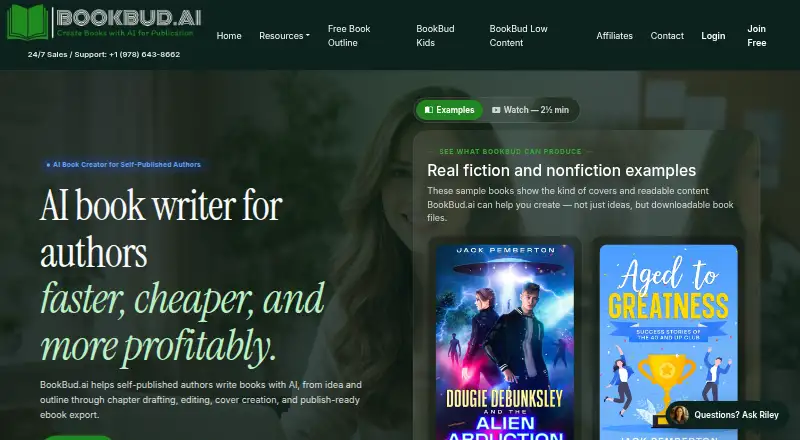
What BookBud.ai is
BookBud.ai guides authors through a book project, from an idea and outline to drafting, editing, cover creation, and export. Nonfiction writers can start from an outline or draft section by section; fiction writers use an interactive section-by-section process. Cover generation provides style presets and custom instructions, and users can upload their own cover. Finished work can be exported as EPUB, PDF, or Word/DOCX, with the cover downloaded separately or bundled with the files in a ZIP. The FAQ says exported EPUBs are checked with EPUBCheck and held back if they fail validation. An optional distribution workflow sends the EPUB, PDF, and cover through selfpublishing.pro, where publishing metadata can be reviewed and edited. That distribution option applies to the listed retailer bundle as a whole, with no per-retailer opt-out. Projects can also be sent to DocToPrint for print formatting or AuthorVoices.ai for audiobook creation. BookBud is a web app without a separate download; the editor works best on desktop or tablet, while dashboard and account pages work on mobile. The free plan includes 25,000 signup credits; paid plans start at $19 a month.
Who it suits
BookBud.ai suits nonfiction and fiction authors, as well as coaches, consultants, educators, and creators working on books. It may fit people who want outlining, drafting, cover creation, and export in a browser-based workflow.
What it does well
- Supports fiction and nonfiction writing workflows.
- Exports EPUB, PDF, and Word/DOCX.
- Allows users to upload their own cover.
- EPUB exports are checked with EPUBCheck.
- Free plan includes 25,000 signup credits.
What to know first
- No separate app download is available.
- Editor works best on desktop or tablet.
- Distribution has no per-retailer opt-out.
- Paid plans start at $19 a month.
Limits
The Free plan includes 25,000 signup credits, described as enough to start a book, create a cover, and draft early chapters. Starter costs $19 a month and supports up to 3 books per month. The $19.00 USD one-time Finish Your Book plan includes 400,000 credits that never expire.
Plans
| Plan | Billed and limits | Price |
|---|---|---|
| Free | 25,000 signup credits · enough to start a book, create a cover, and draft early chapters | Free |
| Free option | 25,000 credits · one project start · early drafting · cover test · no credit card | Free |
| Finish Your Book | One-time payment · 400,000 credits · credits never expire · no subscription | $19, paid once |
| Starter | Billed monthly · Up to 3 books per month · fiction and nonfiction · AI drafting and editing · ebook export · optional retailer distribution | $19 a month |
| Starter | Billed annually · Up to 3 books per month · annual discounted billing | $190 a year |
| Publisher Basic | Billed monthly · Up to 15 books per month · everything in Starter · active publishing schedules · optional retailer distribution | $49 a month |
| Publisher Basic | Billed annually · Up to 15 books per month · annual discounted billing | $490 a year |
| Pro Plan | Billed monthly · Up to 50 books per month · everything in Publisher Basic · publishers and active teams · optional retailer distribution | $99 a month |
The first 8 of 9 plans, as bookbud.ai lists them, read 30 Sept 2026. The maker's own page has the final word. Every plan
Getting started
- Open https://www.bookbud.ai/ in a browser.
- Start with the Free plan, which includes 25,000 signup credits, or choose a paid plan.
- Use an outline or draft section by section for nonfiction, or follow the interactive section-by-section flow for fiction.
- Create a cover with a preset or custom instructions, or upload your own.
- Export the finished book as EPUB, PDF, or Word/DOCX, with the cover separately or in a ZIP.
BookBud.ai is a web-based workspace for authors taking a manuscript from planning through drafting, editing, cover creation, and export. It is best suited to fiction and nonfiction writers who want genre-specific drafting flows and publishing files in one place. Its subscription tiers scale by monthly book volume, but distribution comes as an all-retailer bundle rather than a selective one.
Overview
BookBud.ai combines outlining, chapter work, drafting, revision, cover creation, and file export in a browser. Nonfiction writers can build from an outline or write section by section; fiction writers use an interactive section-by-section process. Chapter workspaces, continuity tools, and rewrite controls support a manuscript as it develops, though writers who prefer an unstructured writing environment may find the guided flows restrictive.
Authors can export EPUB, PDF, and Word/DOCX files, download a cover image, or bundle the files and cover in a ZIP. Exported EPUBs are checked with EPUBCheck and withheld if they fail validation, a practical safeguard before sharing or publishing an ebook. Cover generation offers style presets and custom instructions, while the option to upload an existing cover keeps the tool useful to authors who already have artwork.
Key features
Publishing workflow and integrations
The optional “Distribute My Ebook” workflow sends an EPUB, PDF, and cover through selfpublishing.pro, where authors can review and edit publishing metadata. Distribution applies to the entire listed retailer bundle: there is no per-retailer opt-out. That suits authors comfortable with the bundle, but not those who need to choose retailers individually.
Completed projects can also be sent to DocToPrint for print formatting or AuthorVoices.ai for audiobook creation. These integrations give a book project routes beyond ebook export, but they are separate service handoffs rather than a reason to assume print production or audiobook creation is included in a BookBud.ai plan.
Browser access and support
There is no separate app download. The editor works best on desktop or tablet, while the dashboard and account pages work on mobile, so phone users should not expect the full writing experience there. Contact-form replies typically arrive within hours, and phone and text support are available at +1 978-643-8662.
BookBud.ai’s privacy policy describes security cookies for login, protection against fraudulent logins, and detection and prevention of account abuse or unauthorized use.
Pricing
The free plan costs nothing and includes 25,000 signup credits, enough to start a book, create a cover, and draft early chapters. It offers a way to begin without paying, but the stated allowance is an entry point rather than an ongoing high-volume writing tier.
Starter costs $19 a month, billed monthly, and supports up to 3 books per month. It includes fiction and nonfiction, AI-assisted drafting and editing, ebook export, and optional one-click distribution. This is the clearest fit for an author working on a small number of books who wants a monthly plan.
Finish Your Book costs $19, paid once as a one-time payment for 400,000 credits that never expire. It suits a writer who wants a defined credit balance without a recurring subscription; unlike the monthly plans, it does not promise a monthly book allowance.
Publisher Basic costs $49 a month, billed monthly, and raises the limit to 15 books per month while including Starter features and optional distribution. It makes more sense for authors with a steady higher volume than for someone producing one book at a time.
Pro Plan costs $99 a month, billed monthly, and allows up to 50 books per month with unlimited AI generation. It includes Publisher Basic features and optional distribution, making its higher price most relevant to users whose production needs exceed the lower tiers’ book limits. All subscription tiers retain the same all-or-nothing distribution constraint.
Platforms
BookBud.ai runs on the web. Its editor is best used on desktop or tablet; mobile access is suited to the dashboard and account pages rather than full manuscript work.
Who it's for
The intended audience includes nonfiction authors, fiction writers, coaches, consultants, educators, and creators. Its outline-based nonfiction path may suit people turning expertise into a structured book, while fiction writers get a separate interactive drafting flow. The export and cover options also make it relevant to authors preparing files for publication. Writers who need individual retailer selection for distribution should choose another workflow.
Pros and cons
Pros
- Distinct fiction and nonfiction drafting flows: authors can work from an outline or section by section, depending on genre and approach.
- Multiple practical export options: EPUB, PDF, Word/DOCX, cover image, and a ZIP package cover common manuscript handoff needs.
- EPUB validation: files that fail EPUBCheck are held back rather than passed through as valid exports.
- Non-subscription credit option: the one-time 400,000-credit plan keeps its credits from expiring.
Cons
- Distribution lacks retailer control: the workflow covers its full retailer bundle with no per-retailer opt-out.
- The editor is not optimized for phone use: mobile access covers dashboard and account pages, while the editor works best on desktop or tablet.
- Free access is an initial credit allowance: 25,000 signup credits are positioned for starting a book and drafting early chapters, not as an unlimited free plan.
Alternatives
AI Book Writing Software is the broader category directory for comparing book-writing tools.
Choose Jenova Creative Fiction Writer if you want apps across Android, iOS, and web, or a free plan with all core features and limited usage; its Plus plan costs $20 a month and adds 30× usage versus Free, custom model selection, and no watermarks.
Pendraic is an option for writers wanting macOS, Windows, and web access, with a free plan for up to three active books, a full editor and worldbuilder, and one AI cover and world map per day.
AI Novel Studio offers a web-based free starter plan with 10 AI Credits, Chapter 1 Generation, and a Character Bible.
AIWriteBook Audiobook Studio is another web option, also available as an extension.
Bookwiz may suit authors who want a free plan that includes up to three books, limited prompts and autocompletes, and KDP-ready EPUB, print PDF, DOCX, and cover exports.
Bulbon AI is a web alternative with a free outline, sample chapter, and 30 days to explore.
Calliope offers a free, unlimited-books web editor, with an API also available.
DeepQuill is a desktop alternative for macOS and Windows, with its full application free during open beta.
Verdict
BookBud.ai is a good fit for authors and creators who want guided fiction or nonfiction drafting, revision, cover work, and ebook-ready exports together in a browser. The EPUB validation and non-expiring one-time credit option are useful distinctions. Look elsewhere if you need retailer-by-retailer control or expect to do full editing on a phone.
Verdict
BookBud.ai brings book drafting, cover creation, and export into a browser workflow, with separate options for distribution and production services. Check the all-or-nothing retailer bundle if you plan to use its distribution workflow.
Questions
Is BookBud.ai free?
Yes. The Free plan costs nothing and includes 25,000 signup credits.
What does BookBud.ai cost?
Paid plans start at $19/mo. Starter is $19 a month, and Finish Your Book is $19, paid once.
What file formats can I export?
You can export EPUB, PDF, and Word/DOCX files. You can also download the cover image or export the formats and cover together in a ZIP.
Can I use BookBud.ai on a phone?
It is a web app with no separate app download. The editor works best on desktop or tablet; dashboard and account pages work on mobile.
Can I distribute a book through BookBud.ai?
An optional workflow sends the EPUB, PDF, and cover through selfpublishing.pro, where you can review and edit publishing metadata. Distribution covers the listed retailer bundle and does not offer per-retailer opt-out.
Who is BookBud.ai for?
Its FAQ names nonfiction authors, fiction writers, coaches, consultants, educators, and creators.
Facts from BookBud.ai's own pages
- AI covers
- Users can generate covers with style presets or custom instructions, or upload their own image. · bookbud.ai, 15 Oct 2026
- AI legal responsibility
- The terms place review, fact checking, retailer disclosure and legal compliance responsibilities on the user. · bookbud.ai, 15 Oct 2026
- API and SDK
- The official FAQ and Learn pages describe the browser product and user guides but do not describe a public API, SDK or self-hosted deployment. · bookbud.ai, 15 Oct 2026
- Browser availability
- BookBud is a web app with no separate app download; the editor works best on desktop or tablet, while dashboard and account pages work on mobile. · bookbud.ai, 30 Sept 2026
- Character builder
- Fiction setup lets authors define character names, roles, appearance, personality and backstory for consistency. · bookbud.ai, 15 Oct 2026
- Company headquarters
- BookBud lists Archieboy Holdings, LLC at #1006, 771 Boston Post Road STE 11, Marlborough, Massachusetts 01752. · bookbud.ai, 15 Oct 2026
- Company legal name
- The operating entity identified on BookBud pages is Archieboy Holdings, LLC. · bookbud.ai, 15 Oct 2026
- Company size
- Archieboy says Robert “Bo” Bennett is its founder and only human team member, with other listed roles operated by AI agents. · archieboy.com, 15 Oct 2026
- Content rights disclaimer
- Terms say users retain whatever rights applicable law allows, while BookBud gives no guarantee of originality, exclusivity, copyrightability or enforceability. · bookbud.ai, 15 Oct 2026
- Cover creation
- Cover generation offers style presets and custom instructions, and users can upload a cover they created themselves. · bookbud.ai, 30 Sept 2026
- Credit system
- Subscription credits reset each billing cycle without rollover, while signup and other one-time credits do not expire. · bookbud.ai, 15 Oct 2026
- Crunchbase profile
- Crunchbase lists Archieboy Holdings as a private 1–10-person company in Sudbury, Massachusetts, with Bo Bennett as president and founder; its founded field is obfuscated. · crunchbase.com, 15 Oct 2026
- Distribution economics
- BookBud states that members pay no upfront distribution fee, receive a free ISBN, and keep 85% of net royalties while BookBud keeps 15%. · bookbud.ai, 15 Oct 2026
- Distribution integration
- The FAQ says the “Distribute My Ebook” workflow sends the EPUB, PDF, and cover through selfpublishing.pro, where users can review and edit publishing metadata. · bookbud.ai, 30 Sept 2026
- Distribution limitation
- Distribution is all-or-nothing across the retailer bundle, with no per-retailer opt-out. · bookbud.ai, 15 Oct 2026
- Distribution retailers
- The distribution bundle covers Amazon, Apple Books, Google Play, Kobo, Everand/Scribd, eBookIt and the Ingram retail network. · bookbud.ai, 15 Oct 2026
- Documentation and support
- The site offers a Learn section with nine guides plus contact support and an on-page AI assistant. · bookbud.ai, 15 Oct 2026
- Editorial review
- The paid fiction pass first polishes prose and then checks the complete manuscript for continuity, character knowledge, motivation, causality and plot clarity. · bookbud.ai, 15 Oct 2026
- EPUB validation
- BookBud says every exported EPUB is checked with EPUBCheck before download and failed files are held for correction. · bookbud.ai, 15 Oct 2026
- Export formats
- Exports include EPUB, PDF, Word/DOCX and a ZIP bundle, with the cover downloadable separately. · bookbud.ai, 15 Oct 2026
- Fiction and nonfiction
- The product supports both fiction and nonfiction projects with different guided workflows. · bookbud.ai, 15 Oct 2026
- Headquarters
- Marlborough, Massachusetts, United States · bookbud.ai, 28 Sept 2026
- Idea generator
- Its project wizard can propose a working title, subtitle, audience, tone and style from a general topic. · bookbud.ai, 15 Oct 2026
- Intended users
- The FAQ names nonfiction authors, fiction writers, coaches, consultants, educators, and creators as intended users. · bookbud.ai, 30 Sept 2026
Where BookBud.ai stands on Freedom251
- AI Book Writing Software#5 of 27