
Deepnet SafeKey
What Deepnet SafeKey is
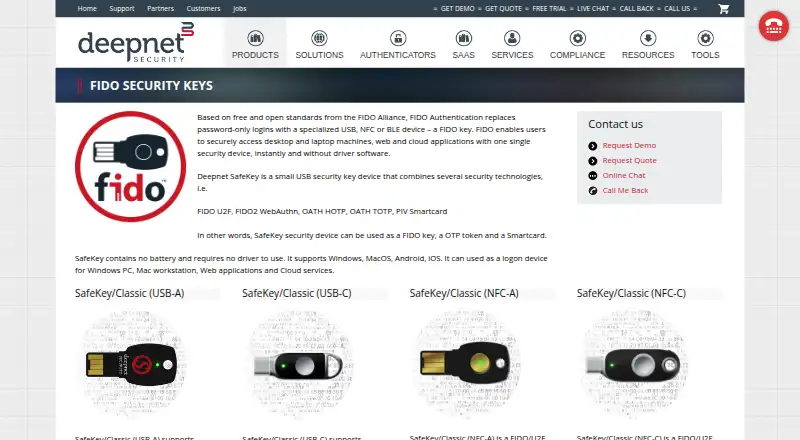
Deepnet SafeKey is a family of hardware security keys for passwordless sign-in or second-factor access to desktop and laptop computers, web applications, and cloud services. The product combines FIDO U2F, FIDO2 WebAuthn, OATH HOTP, OATH TOTP, and PIV Smartcard technologies. Depending on the model, a SafeKey can act as a FIDO key, one-time-password token, or smartcard. The range includes USB-A and USB-C keys, NFC models, and a card with contact ISO7816 and contactless NFC interfaces; several models add fingerprint protection. SafeKey contains no battery and does not require a driver. Deepnet lists support for Windows, macOS, Android, and iOS. Its guides cover registering a FIDO2 key as a passkey for Google and Microsoft personal accounts, and using SafeKey with Bitwarden as a passwordless FIDO2 method or second factor. For Windows 10 security-key sign-in, an administrator must enable the setting through Microsoft Intune and allow FIDO2 keys as an authentication method. The SafeKey/Classic USB-A variant supports HOTP for OTP programming, while NFC variants support TOTP programming. Deepnet offers technical guides, online chat, and callback contact options. The product is paid, and buyers are directed to request a quote rather than shown a price.
Who it suits
SafeKey suits people and organizations seeking a hardware key for passwordless or second-factor authentication across supported computers, web applications, and cloud services. Buyers can choose among connector, NFC, card, and fingerprint-protected models, with some models also supporting smart-card authentication.
What it does well
- Supports FIDO U2F, FIDO2, HOTP, TOTP, and PIV Smartcard technologies.
- Models include USB-A, USB-C, NFC, and card form factors.
- Several models provide fingerprint protection.
- Requires no battery or driver.
- Guides cover passkey setup for Google and Microsoft accounts.
What to know first
- The product page provides pricing by quote request.
- Windows 10 security-key sign-in requires administrator configuration through Microsoft Intune.
- Classic USB-A supports HOTP programming, while TOTP programming is listed for NFC variants.
Limits
Pricing is available by quote request, with no stated amount. Windows 10 security-key sign-in requires administrator setup through Microsoft Intune; the Classic USB-A variant supports HOTP programming, while NFC variants support TOTP programming.
Plans
| Plan | Billed and limits | Price |
|---|---|---|
| SafeKey FIDO security keys | Hardware key family; request a quote | On request |
As deepnetsecurity.com lists them, read 7 Oct 2026. The maker's own page has the final word.
Getting started
- Visit Deepnet's SafeKey product page and request a quote.
- Choose a model with the connection type and features you need, such as USB-A, USB-C, NFC, card, or fingerprint protection.
- Connect or present the key for a supported sign-in method; SafeKey requires no driver.
- Follow Deepnet's guides to register a FIDO2 key as a Google or Microsoft personal-account passkey.
- For Windows 10 security-key sign-in, have an administrator enable the setting through Microsoft Intune and allow FIDO2 keys.
Overview
Deepnet SafeKey is a family of hardware keys for passwordless sign-in and second-factor authentication on computers, websites and cloud services. It suits buyers who want one physical device for FIDO sign-in plus OTP or, on selected models, smart-card work. Its range is a practical strength, but model-specific capabilities and quote-based pricing call for care before purchase.
Key features
SafeKey combines FIDO U2F and FIDO2 WebAuthn with OATH HOTP and TOTP; some models also support PIV smart-card authentication. That makes the family more versatile than a FIDO-only key. SafeKey Pro pairs PIV with FIDO2 and OATH OTP, making it the relevant choice for certificate authentication and digital signing.
Buyers can choose USB-A, USB-C, NFC, or a card with contact ISO7816 and contactless NFC interfaces. Several Classic and Mini models add fingerprint protection. These options help match the key to a device and preferred access method, but they are not interchangeable: the SafeKey/Classic USB-A variant supports HOTP programming only, while NFC variants support TOTP programming. Confirm the intended OTP method against the exact model.
The key has no battery and needs no driver, avoiding charging and driver installation. Deepnet guides explain using a FIDO2 key as a passkey for Google and Microsoft personal accounts, and describe Bitwarden use for passwordless sign-in or as a second factor. For Windows 10 security-key sign-in, an administrator must enable the setting through Microsoft Intune and enable FIDO2 keys as an authentication method; this adds an IT dependency for managed deployments.
SafeKey FIDO Bridge supports passkey registration and authentication over NFC on Android, but requires Android 14 or later and a FIDO2-compatible key or smartcard. The FIDO Alliance standards basis may also suit organizations that want an approach built on open standards.
Pricing
SafeKey FIDO security keys: custom pricing; request a quote. This is a paid hardware family, not a free tier or a subscription plan. Buyers should seek a quote for their required model before comparing total costs; there is no published unit price to budget from.
Platforms
SafeKey supports Windows, macOS, Android and iOS. Deepnet also describes passwordless access to web applications and cloud services. NFC passkey use through SafeKey FIDO Bridge on Android requires Android 14 or later.
Who it's for
SafeKey is a good fit for individuals or organizations choosing a physical FIDO credential who also value OTP flexibility, NFC, fingerprint-protected variants or PIV on the Pro model. It is less suitable for buyers who need a clear upfront price or who cannot verify that a particular model supports their required OTP programming method. Organizations planning Windows 10 key sign-in should also account for administrator configuration through Intune.
Pros and cons
- Pro: FIDO, HOTP, TOTP and selected-model PIV support cover several authentication roles in one product family.
- Pro: USB-A, USB-C, NFC and card options, plus fingerprint-protected models, give buyers meaningful form-factor choices.
- Pro: No battery and no driver requirement reduce routine upkeep and setup friction.
- Con: OTP programming varies by model; the SafeKey/Classic USB-A variant is HOTP-only, while NFC variants support TOTP programming.
- Con: Quote-based pricing makes direct cost comparison difficult before contacting Deepnet.
- Con: Windows 10 security-key sign-in depends on administrator setup in Microsoft Intune.
Alternatives
For a free authenticator app rather than a SafeKey hardware key, Yubico Authenticator is free and open source, but requires a YubiKey to store credentials and generate codes. FEITIAN ePass FIDO-NFC Security Key is a more price-transparent option at $35, paid once, with USB-A or USB-C, NFC, FIDO U2F/FIDO2 and HOTP/TOTP. YubiKey 5 Series is another paid choice, with listed USB-A and USB-C NFC models at $58, paid once and a USB-C model at $65, paid once.
Consider Swissbit iShield Key 2, TrustKey T110, Solo 2, Token2 T2F2-NFC-Slim or SafeNet MobilePASS+ as other alternatives.
Browse more options in Security Keys.
Verdict
Choose SafeKey if you need a hardware key family that spans FIDO, OTP and optional smart-card use, with connection and biometric choices to match. Its main advantage is breadth; its main drawback is the need to verify model-specific support and obtain a quote before committing. Buyers seeking a predictable upfront price or a single narrowly defined key may prefer a more transparently priced alternative.
Verdict
Choose SafeKey if you want a hardware authenticator with several connection options and support for FIDO, OTP, and, on some models, smart-card use. It is a paid product with pricing by quote request. Check the model-specific OTP programming support and administrator requirements for Windows 10 sign-in before choosing.
Questions
How much does Deepnet SafeKey cost?
The product page asks buyers to request a quote and does not state a price.
Which platforms does SafeKey support?
Deepnet lists Windows, macOS, Android, and iOS.
What authentication methods does SafeKey support?
The listed technologies are FIDO U2F, FIDO2 WebAuthn, OATH HOTP, OATH TOTP, and PIV Smartcard.
Does SafeKey need a battery or driver?
No. Deepnet says SafeKey contains no battery and requires no driver.
Which connection types are available?
Listed models include USB-A and USB-C keys, NFC models, and a card with contact ISO7816 and contactless NFC interfaces.
Can SafeKey be used for Windows 10 sign-in?
Deepnet's guide says an administrator must enable security-key sign-in through Microsoft Intune and enable FIDO2 security keys as an authentication method.
Facts from Deepnet SafeKey's own pages
- Android companion app
- SafeKey FIDO Bridge supports passkey registration and authentication over NFC on Android and requires Android 14 or later plus a FIDO2-compatible key or smartcard. · wiki.deepnetsecurity.com, 7 Oct 2026
- Authentication standards
- The product page lists FIDO U2F, FIDO2 WebAuthn, OATH HOTP, OATH TOTP and PIV Smartcard among SafeKey’s technologies. · deepnetsecurity.com, 7 Oct 2026
- Authentication technologies
- The product page says SafeKey combines FIDO U2F, FIDO2 WebAuthn, OATH HOTP, OATH TOTP, and PIV Smartcard technologies. · deepnetsecurity.com, 7 Oct 2026
- Biometric models
- Several listed SafeKey models are fingerprint protected. · deepnetsecurity.com, 7 Oct 2026
- Company and location
- Deepnet Security describes itself as a security software developer and hardware provider headquartered in the United Kingdom. · deepnetsecurity.com, 7 Oct 2026
- Compatibility
- The product page lists support for Windows, macOS, Android, and iOS, and says no driver is required. · deepnetsecurity.com, 7 Oct 2026
- Connection options
- Listed models include USB-A and USB-C keys, NFC models, and a card with contact ISO7816 and contactless NFC interfaces. · deepnetsecurity.com, 7 Oct 2026
- Device requirements
- The general SafeKey page says the key contains no battery and requires no driver. · deepnetsecurity.com, 7 Oct 2026
- Example integration
- Deepnet’s technical guide says SafeKey can be used with Bitwarden as a passwordless FIDO2 method or as a second authentication factor. · wiki.deepnetsecurity.com, 7 Oct 2026
- Fingerprint option
- Some SafeKey models use fingerprint protection, including Classic and Mini variants with USB-A or USB-C connectors. · deepnetsecurity.com, 7 Oct 2026
- Google integration
- Deepnet's guide describes registering and using a FIDO2 key as a passkey for a Google account. · wiki.deepnetsecurity.com, 7 Oct 2026
- Headquarters
- United Kingdom · deepnetsecurity.com, 28 Sept 2026
- Manufacturer
- Deepnet Security describes itself as a security software developer and hardware provider focused on MFA, SSO, and IAM. · deepnetsecurity.com, 7 Oct 2026
- Microsoft integration
- Deepnet's guide describes adding a SafeKey FIDO2 key as a passkey and signing in to a Microsoft personal account with it. · wiki.deepnetsecurity.com, 7 Oct 2026
- Model range
- The listed family includes USB-A, USB-C, NFC, fingerprint-protected and card form-factor models. · deepnetsecurity.com, 7 Oct 2026
- Multiple uses
- Deepnet says the device can be used as a FIDO key, an OTP token, and a smartcard. · deepnetsecurity.com, 7 Oct 2026
- Passwordless use
- Deepnet says FIDO keys can access desktop and laptop machines, web applications and cloud applications without driver software. · deepnetsecurity.com, 7 Oct 2026
- Platform support
- Deepnet lists Windows, MacOS, Android and iOS support for SafeKey. · deepnetsecurity.com, 7 Oct 2026
- Power
- The product page says SafeKey contains no battery. · deepnetsecurity.com, 7 Oct 2026
- Pricing
- The product page directs buyers to request a quote; it does not state a price. · deepnetsecurity.com, 7 Oct 2026
- Pro smart-card features
- SafeKey Pro combines PIV smart-card, FIDO2 and OATH OTP technologies, and Deepnet describes PIV use for certificate authentication and digital signing. · deepnetsecurity.com, 7 Oct 2026
- Purpose
- SafeKey is a hardware security key for passwordless or second-factor access to desktop and laptop computers, web applications, and cloud services. · deepnetsecurity.com, 7 Oct 2026
- Standards
- Deepnet says its FIDO authentication is based on free and open standards from the FIDO Alliance. · deepnetsecurity.com, 7 Oct 2026
- Support
- The product page offers links to technical guides and lists online chat and callback contact options. · deepnetsecurity.com, 7 Oct 2026
Where Deepnet SafeKey stands on Freedom251
- Security Keys#1 of 20