Freedom251 › Time Blocking Apps

Daylo
What Daylo is
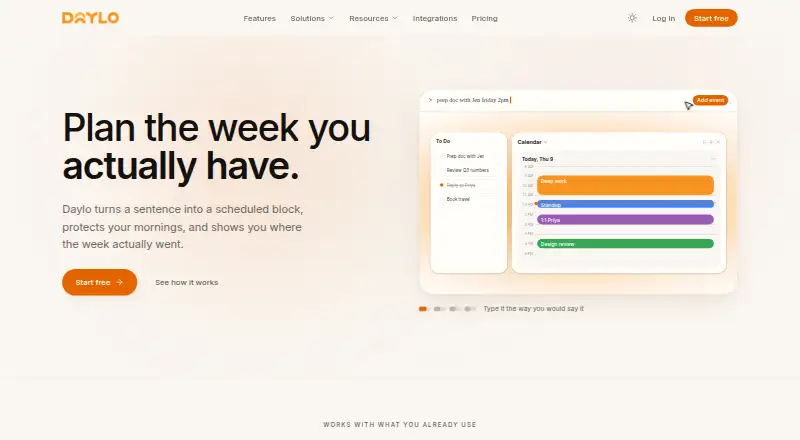
Daylo is a web calendar that brings tasks, meetings, and planning into one place to help users organize and protect their workweek. It accepts event descriptions in plain language, interprets them, and places them on the calendar within the time window the user gives. Calendar, Board, and Timeline views are available, with each day pane able to use a different view. Focus blocks can turn down incoming invitations while offering alternatives, and each session receives a focus score. Daylo keeps the week on the device first, so users can make changes offline; queued edits are reconciled when the connection returns. The homepage says users can connect Google, Outlook, or an ICS feed for two-way sync. The Free plan includes manual to-do capture, drag-and-drop across Calendar, Task Board, and Timeline, and syncing between views. Pro adds unlimited integrations, automatic task capture, planning and scheduling, rules and schedule insights, and advanced natural-language scheduling. Daylo says device traffic uses TLS and calendar contents are encrypted at rest. It also says it does not sell personal data or use calendar contents to train models outside providing the service. Users can export calendars and tasks in open formats or delete account data through self-service controls.
Who it suits
Daylo's Free plan is aimed at people looking for a better calendar, while Pro is described for users who want to protect focus time and coordinate multiple tools.
What it does well
- Plain-language event descriptions can be placed on the calendar within a stated time window.
- Calendar, Board, and Timeline views can be assigned independently across day panes.
- Focus blocks can decline invitations with alternatives and track a focus score.
- Offline edits are queued and reconciled after reconnection.
- Calendar and task data can be exported in open formats.
What to know first
- Pro costs $16 a month, billed $192 billed annually.
- The Business plan is coming next and currently requires joining a waitlist.
- Daylo states that it is not yet SOC 2 Type II certified.
Limits
The Free plan includes manual to-do capture and syncing between views. Unlimited integrations, two-way integration sync, automatic task capture, planning and scheduling, rules and schedule insights, and advanced natural-language scheduling are listed with Pro, which costs $16 a month, billed $192 billed annually.
Plans
| Plan | Billed and limits | Price |
|---|---|---|
| Free | Free forever · Manual to-do capture · drag and drop across Calendar, Task Board, and Timeline · sync between views | Free |
| Pro | $192 billed annually · Unlimited integrations · two-way integration sync · automatic task capture · planning and scheduling · rules and schedule insights · advanced natural-language scheduling | $16 a month |
| Business | Coming next; join waitlist · Team planning and controls · SSO · audit trails · workspace security · dedicated rollout support | On request |
As trydaylo.com lists them, read 11 Oct 2026. The maker's own page has the final word.
Getting started
- Open https://trydaylo.com/ in a web browser.
- Choose the Free plan or Pro plan.
- Connect Google, Outlook, or an ICS feed if you want calendar sync.
- Capture to-dos manually or describe an event in plain language.
- Arrange work in Calendar, Board, or Timeline views and add focus blocks.
Verdict
Choose Daylo if you want tasks and meetings organized in a calendar, with multiple views, offline editing, and focus blocks. The Free plan covers manual task capture and view syncing; users needing unlimited integrations, automatic capture, or advanced scheduling need Pro. Teams seeking Business features will need to join the waitlist.
Questions
Is Daylo free?
Yes. Its Free plan costs nothing, billed Free forever.
What does the Free plan include?
It includes manual to-do capture, drag and drop across Calendar, Task Board, and Timeline, and sync between views.
How much does Pro cost?
Pro costs $16 a month, billed $192 billed annually.
Which calendars can Daylo connect?
The homepage says users can connect Google, Outlook, or an ICS feed with two-way sync.
What platforms does Daylo support?
Daylo is available on the web.
Does Daylo offer a Business plan?
Business is marked as coming next, with a waitlist for teams. Listed features include team planning and controls, SSO, audit trails, workspace security, and dedicated rollout support.
Facts from Daylo's own pages
- Business availability
- The pricing page labels Business as coming next and invites teams to join a waitlist. · trydaylo.com, 11 Oct 2026
- Calendar integrations
- The homepage says users can connect Google, Outlook, or an ICS feed with two-way sync; the integrations page could not be opened. · trydaylo.com, 11 Oct 2026
- Compliance
- Daylo states that it is not yet SOC 2 Type II certified. · trydaylo.com, 11 Oct 2026
- Data security
- Daylo says device traffic uses TLS and calendar contents are encrypted at rest. · trydaylo.com, 11 Oct 2026
- Data use
- Daylo says it does not sell personal data or use calendar contents to train models outside providing the service. · trydaylo.com, 11 Oct 2026
- Export and deletion
- Users can export calendars and tasks in open formats and delete account data through self-service controls. · trydaylo.com, 11 Oct 2026
- Focus time
- Focus blocks can decline incoming invitations with alternatives and track a focus score for each session. · trydaylo.com, 11 Oct 2026
- Intended users
- The pricing page describes Free for people who want a better calendar and Pro for users protecting focus time and coordinating multiple tools. · trydaylo.com, 11 Oct 2026
- Natural-language scheduling
- Users can describe an event in plain language, and Daylo parses it and places it on the calendar within the stated time window. · trydaylo.com, 11 Oct 2026
- Offline use
- Daylo stores the week locally first, allows edits without a network connection, and reconciles queued changes after reconnection. · trydaylo.com, 11 Oct 2026
- Product
- Daylo combines tasks, meetings, and planning in a calendar intended to help users shape and protect their workweek. · trydaylo.com, 11 Oct 2026
- Support
- The security page provides an email contact for reaching a person with questions not answered there. · trydaylo.com, 11 Oct 2026
- Views
- Daylo offers Calendar, Board, and Timeline views, which can be switched independently across day panes. · trydaylo.com, 11 Oct 2026
Where Daylo stands on Freedom251
- Time Blocking Apps#13 of 31