Freedom251 › Daily Planner Apps

Daybox
by Daybox
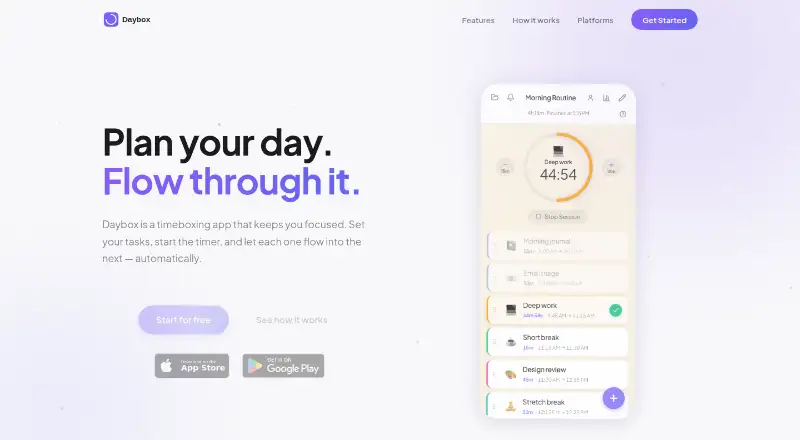
What Daybox is
Daybox is a timeboxing app from Daybox in Paradise, Texas, for organizing focused work into timed tasks. Users set tasks, start a timer, and let the next task begin automatically when one ends. Tasks can be reordered by dragging and dropping, and durations can change while the timer runs. Recurring tasks and focus sessions support repeatable routines, while emojis and colors customize task lists. A chime marks each completed task and a celebration signals the end of a session. Daybox works on Android, iOS, and the web. Its progressive web app runs offline, can be installed from a browser home screen, and says data stays on the device. Optional cloud sync synchronizes task lists across devices after sign-in. iOS adds an Apple Watch companion, Live Activities, haptic taps, and background notifications; Android provides lock-screen and background timer notifications. The app is free to use and needs no account to begin.
Who it suits
Daybox suits people who plan work with time blocks, recurring tasks, and focus sessions. It also fits users who need browser, Android, or iOS access and optional offline use.
What it does well
- Automatic task-to-task timer flow
- Drag-and-drop task reordering
- Works offline as a progressive web app
- Android, iOS, and web versions
- No account required to start
What to know first
- Optional cloud sync requires signing in
- Platform-specific features differ
Plans
| Plan | Billed and limits | Price |
|---|---|---|
| Daybox Pro Monthly | — | On request |
| Daybox Pro Annual | — | On request |
| Daybox Pro Lifetime | — | On request |
As daybox.app lists them, read 22 Sept 2026. The maker's own page has the final word.
Verdict
Daybox focuses on straightforward timeboxing with automatic progression and adjustable tasks. Its free, account-free start and broad platform coverage are useful, while cloud sync and some features depend on sign-in or device.
Facts from Daybox's own pages
- Adjustable durations
- Task durations can be adjusted while the timer is running. · daybox.app, 12 Oct 2026
- Android platform
- The native Android app offers a lock-screen timer and background timer notifications. · daybox.app, 12 Oct 2026
- Audio notifications
- Daybox plays a chime when each task completes and a celebration when the session is done. · daybox.app, 12 Oct 2026
- Auto-advancing timer
- Tasks flow into each other automatically when a task finishes. · daybox.app, 12 Oct 2026
- Cloud sync
- Optional cloud sync lets users sign in to sync task lists across devices. · daybox.app, 12 Oct 2026
- Focus sessions
- Yes · daybox.app, 22 Sept 2026
- Free plan
- Yes · daybox.app, 22 Sept 2026
- Headquarters
- Paradise, Texas, United States · daybox.app, 28 Sept 2026
- iPhone and Apple Watch
- The native iOS app has an Apple Watch companion, lock-screen Live Activities, haptic taps, and background timer notifications. · daybox.app, 12 Oct 2026
- Mobile platforms
- both · daybox.app, 22 Sept 2026
- Offline use
- Daybox is a PWA that works without an internet connection, and says data stays on the device. · daybox.app, 12 Oct 2026
- Planning method
- time blocking · daybox.app, 22 Sept 2026
- Price and account
- Daybox says it is free to use and requires no account to start timeboxing. · daybox.app, 12 Oct 2026
- Purpose
- Daybox is a timeboxing app for focused productivity: set tasks, start a timer, and let tasks flow into one another automatically. · daybox.app, 12 Oct 2026
- Recurring tasks
- Yes · daybox.app, 22 Sept 2026
- Reordering
- Tasks can be reordered by dragging and dropping. · daybox.app, 12 Oct 2026
- Task customization
- Users can add emojis and colors to tasks. · daybox.app, 12 Oct 2026
- Web platform
- The web app works in any browser and can be installed to a home screen without an app store. · daybox.app, 12 Oct 2026
Where Daybox stands on Freedom251
- Daily Planner Apps#53 of 137