Freedom251 › Daily Planner Apps
Flick
What Flick is
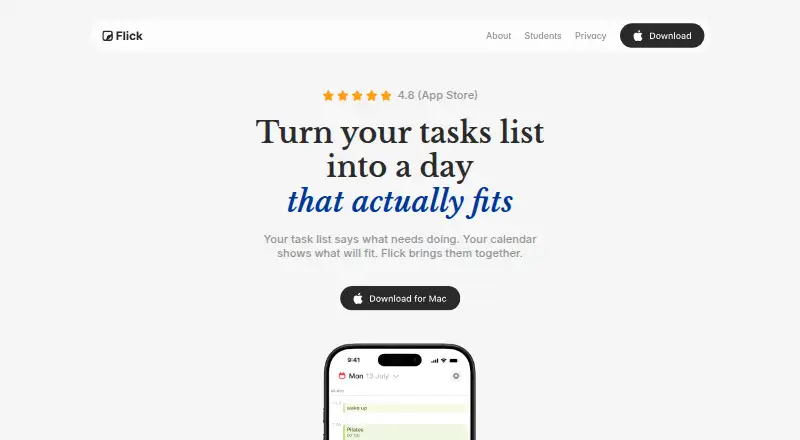
Flick is a planner for iOS and macOS that combines tasks with calendar events so users can choose priorities and assign work to time. Its planning method is time blocking: tasks can be dragged onto the calendar for focused work, errands, or personal plans. Tasks can be grouped into projects, given dates and priorities, and supplemented with files, links, or images. Flick supports recurring tasks and reminders for tasks, events, and birthdays, including stronger task alarms. Apple and Google calendar events can appear beside tasks; connected Google Calendar events can be viewed, created, edited, or deleted in the app. The maker says calendar events remain on the device and Google data is not uploaded to Flick servers. Tasks and cloud-stored data are described as end-to-end encrypted. A free plan is available. Flick Pro Monthly costs $3.99 a month and adds unlimited calendar tasks, more projects, secure sync, reminders, intelligent follow-ups, and completion statistics and trends. Voice capture can create draft tasks and events from spoken lists on supported devices.
Who it suits
Flick suits people planning everyday tasks, deadlines, projects, and personal plans through calendar time blocking. It is especially relevant to iOS and macOS users who want recurring tasks, reminders, and connected calendars.
What it does well
- Combines tasks and calendar events
- Supports time blocking with draggable tasks
- Includes recurring tasks and multiple reminder types
- Offers files, links, and images on tasks
- Free plan available
What to know first
- Flick Pro Monthly costs $3.99 a month
- Apple Intelligence planning requires iOS 26 and supported hardware
- Calendar editing depends on connected account access
Plans
| Plan | Billed and limits | Price |
|---|---|---|
| Flick Pro Monthly | $3.99 monthly · Unlimited calendar tasks · more projects · secure sync · reminders · intelligent follow-ups · completion stats and trends | $3.99 a month |
| Flick Pro Annual | $12.99 annually · Unlimited calendar tasks · more projects · secure sync · reminders · intelligent follow-ups · completion stats and trends | $12.99 a year |
| Flick Pro Yearly | $79.99 yearly · Unlimited calendar tasks · more projects · secure sync · reminders · intelligent follow-ups · completion stats and trends | $79.99 a year |
As flickplanner.com lists them, read 12 Oct 2026. The maker's own page has the final word.
Verdict
Flick centers planning on assigning tasks to calendar time, with projects, reminders, recurring tasks, and calendar connections. The free plan provides an entry point, while Pro adds unlimited calendar tasks and progress features.
Facts from Flick's own pages
- Analytics and data sales
- The privacy policy says Flick collects anonymous usage analytics for internal product improvement and does not sell or share that analytics data with third parties. · flickplanner.com, 12 Oct 2026
- Apple and Google calendars
- Flick can show calendar events alongside tasks, and its privacy policy says connected Google Calendar events can be viewed, created, edited, or deleted in the app. · flickplanner.com, 12 Oct 2026
- Apple Intelligence availability
- The maker says Apple Intelligence planning features require iOS 26 on a supported device and were coming to Mac in a future release. · flickplanner.com, 12 Oct 2026
- Attachments
- Tasks can include files, links, and images. · flickplanner.com, 12 Oct 2026
- Audience
- The maker describes Flick as a planner for everyday tasks, deadlines, projects, and personal plans, and its creator says it began as a student project. · flickplanner.com, 12 Oct 2026
- Calendar data handling
- The maker says calendar events stay on the user's device and Google data is not uploaded to Flick's servers. · flickplanner.com, 12 Oct 2026
- Calendar sync
- Yes · flickplanner.com, 22 Sept 2026
- Encryption
- The maker says tasks and cloud-stored data are end-to-end encrypted so only the user can access their content. · flickplanner.com, 12 Oct 2026
- Free plan
- Yes · flickplanner.com, 22 Sept 2026
- Mobile platforms
- ios · flickplanner.com, 22 Sept 2026
- Planning method
- time blocking · flickplanner.com, 22 Sept 2026
- Purpose
- Flick brings tasks and calendar events together to help users choose priorities and plan their day. · flickplanner.com, 12 Oct 2026
- Recurring tasks
- The maker says users can set daily habits, weekly to-dos, and monthly bills to repeat. · flickplanner.com, 12 Oct 2026
- Reminders
- Flick supports reminders for tasks, events, and birthdays, with task alarms for stronger alerts. · flickplanner.com, 12 Oct 2026
- Support
- The privacy policy lists [email protected] for questions or data requests. · flickplanner.com, 12 Oct 2026
- Task organization
- Users can group tasks into projects, add dates and priorities, and see what needs attention. · flickplanner.com, 12 Oct 2026
- Time blocking
- Users can drag tasks onto the calendar to plan focused work, errands, and personal plans. · flickplanner.com, 12 Oct 2026
- Voice capture
- On supported devices, users can hold the plus button and speak a list that Apple Intelligence turns into draft tasks and events for review. · flickplanner.com, 12 Oct 2026
Where Flick stands on Freedom251
- Daily Planner Apps#50 of 137