Freedom251 › Container Monitoring

ctop
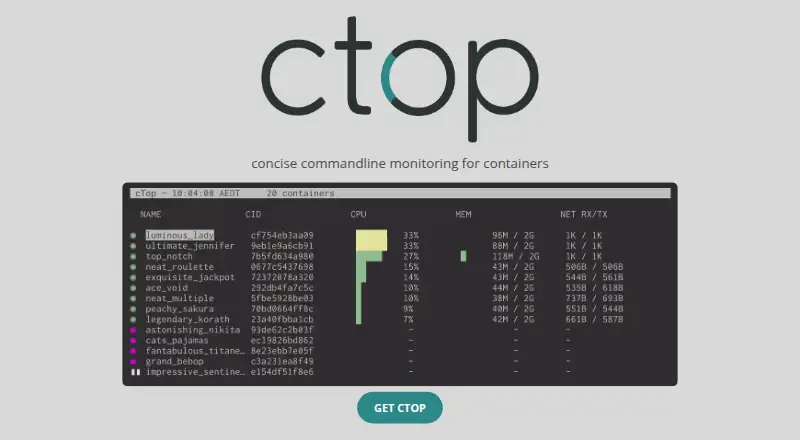
What ctop is
ctop is free software for a concise, real-time view of metrics across multiple containers, with a separate screen for inspecting one container. Keybindings can display container logs or execute a shell inside a container. Users can filter containers, select and reverse the sort order, and configure displayed columns. Filters, sorting, and other options can be saved in a configuration file for the next launch. Built-in connectors support Docker and runC. Docker uses its command-line environment variables and defaults to unix://var/run/docker.sock. The runC connector requires full privileges to the local container-state directory, which defaults to /run/runc. Installation instructions cover Linux, OS X, Windows through Scoop, and Docker. Listed capabilities include container metrics, image monitoring, runtime events, and container log collection. ctop is distributed under the MIT License, allowing use, copying, modification, and distribution under its conditions. The license also provides the software without warranty. Connectors for other container and cluster systems were planned for future releases.
Who it suits
ctop suits people who need terminal-oriented monitoring for Docker or runC containers. It is useful when filtering, sorting, logs, shell access, and saved display settings matter.
What it does well
- Real-time metrics for multiple containers
- Docker and runC connectors included
- Container logs and shell access
- Configurable filters, sorting, and columns
- Linux, macOS, Windows, and Docker installation
What to know first
- Other connectors were only planned
- runC requires full state-directory privileges
- MIT license provides software without warranty
- Docker defaults to a Unix socket
Limits
The runC connector needs full privileges to the local runC container-state directory, which defaults to /run/runc. ctop includes built-in connectors for Docker and runC.
Plans
| Plan | Billed and limits | Price |
|---|---|---|
| ctop | MIT-licensed software · Docker and runC connectors | Free |
As ctop.sh lists them, read 4 Oct 2026. The maker's own page has the final word.
Getting started
- Open the ctop website or project README
- Install on Linux, OS X, Windows through Scoop, or Docker
- Configure Docker environment variables or use the default socket
- Grant runC access to its local state directory when needed
- Launch ctop and save display options to its configuration file
Verdict
ctop provides a focused container view with practical navigation, filtering, and inspection controls. Its built-in integrations are limited to Docker and runC, with specific privilege and connection requirements.
Questions
How much does ctop cost?
The ctop plan is free. It is MIT-licensed software.
Which platforms does ctop support?
Supported platforms are Linux, macOS, Windows, and Docker; self-hosted use is also listed.
Which container systems connect to ctop?
ctop has built-in connectors for Docker and runC. The Docker connector defaults to unix://var/run/docker.sock.
What can ctop monitor and display?
Listed capabilities include container metrics, image monitoring, runtime events, and container log collection. Users can filter, sort, and configure columns.
What does the runC connector require?
It requires full privileges to the local runC container-state directory, which defaults to /run/runc.
What license covers ctop?
ctop is distributed under the MIT License, which permits use, copying, modification, and distribution subject to its conditions. The license provides the software without warranty.
Facts from ctop's own pages
- Configuration
- Users can save filters, the sort field, and other options to a config file for the next launch. · github.com, 4 Oct 2026
- Container actions
- Its keybindings include viewing container logs and executing a shell in a container. · github.com, 4 Oct 2026
- Display controls
- Users can filter containers, choose and reverse the sort order, and configure columns. · github.com, 4 Oct 2026
- Docker configuration
- The Docker connector uses Docker command-line environment variables and defaults to the socket at unix://var/run/docker.sock. · github.com, 4 Oct 2026
- Installation
- The README provides installation instructions for Linux, OS X, Windows through Scoop, and Docker. · github.com, 4 Oct 2026
- Integrations
- ctop has built-in connectors for Docker and runC; the README says connectors for other container and cluster systems were planned for future releases. · github.com, 4 Oct 2026
- License
- The project is distributed under the MIT License, which grants permission to use, copy, modify, and distribute the software subject to its conditions. · github.com, 4 Oct 2026
- Purpose
- ctop provides a concise, real-time overview of metrics for multiple containers, with a separate view for inspecting one container. · github.com, 4 Oct 2026
- runC requirement
- The runC connector requires full privileges to the local runC container-state directory, which defaults to /run/runc. · github.com, 4 Oct 2026
- Warranty
- The MIT license states that the software is provided without warranty. · github.com, 4 Oct 2026
Where ctop stands on Freedom251
- Container Monitoring#8 of 49