Freedom251 › Keyboard and Mouse Customization Software
CrossMacro
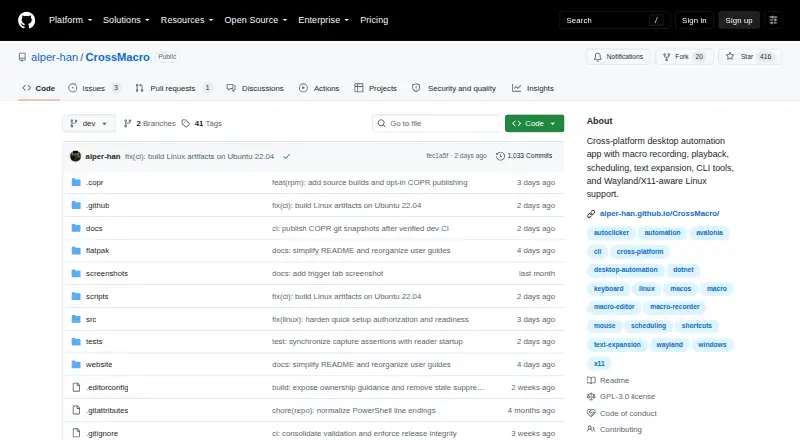
What CrossMacro is
CrossMacro is a free, GPL-3.0 desktop automation app for Linux, Windows, and macOS. It records mouse and keyboard actions, then replays them with adjustable speed, repeats, delays, pause, and resume controls. The visual editor combines text, clipboard, and window actions with variables, loops, conditions, and waits for colors, images, or windows. Macros can run from keyboard or mouse shortcuts, schedules, or rules tied to a focused window or active workspace where supported. Text expansion stores reusable entries in named profiles. A command-line interface records, validates, and runs macros or scripts desktop actions with structured JSON output. A local MCP server works through standard input and output without opening a network listener; restricted mode limits access to status and macro metadata. Linux downloads include Flatpak, native packages, AppImage, and NixOS. Windows offers Store, winget, and portable builds. macOS 14 or newer has Apple Silicon and Intel DMGs. Capabilities depend on the operating system and active desktop session.
Who it suits
It suits users automating repetitive desktop work across Linux, Windows, and macOS. Developers and advanced users can also use its CLI and local MCP integration.
What it does well
- Free and licensed under GPL-3.0
- Records and replays mouse and keyboard actions
- Supports loops, conditions, variables, and waits
- Provides scheduling and shortcut triggers
- Offers CLI and local MCP server
What to know first
- Requires an active desktop session
- Capabilities vary by operating system
- Linux features vary by package and desktop session
- macOS requires version 14 or newer
Plans
| Plan | Billed and limits | Price |
|---|---|---|
| Free | Open-source desktop automation app | Free |
As github.com lists them, read 11 Oct 2026. The maker's own page has the final word.
Verdict
CrossMacro provides broad desktop automation with visual editing, text expansion, scheduling, CLI control, and restricted local MCP access. Its behavior depends on the operating system and an active graphical session.
Facts from CrossMacro's own pages
- CLI
- The CLI can record, validate, and run macros or script desktop actions with structured JSON output. · github.com, 11 Oct 2026
- Free plan
- Yes · github.com, 22 Sept 2026
- Installation
- Linux downloads include Flatpak, native packages, AppImage, and NixOS; Windows offers the Store, winget, and portable builds; macOS 14 or newer has Apple Silicon and Intel DMGs. · github.com, 11 Oct 2026
- License
- CrossMacro is licensed under GPL-3.0. · alper-han.github.io, 11 Oct 2026
- Linux support
- Linux support includes Wayland and X11, with setup and available capabilities varying by package and desktop session. · alper-han.github.io, 11 Oct 2026
- Local agent integration
- CrossMacro includes a local MCP server for trusted tools, operating over standard input/output without opening a network listener. · github.com, 11 Oct 2026
- Macro support
- Yes · github.com, 22 Sept 2026
- MCP safety
- Restricted MCP mode permits status and macro metadata reads while denying screen, clipboard, window, file, command, input, recording, settings, profile, text-expansion, and task operations. · github.com, 11 Oct 2026
- Per-app profiles
- Yes · github.com, 22 Sept 2026
- Platform limits
- Capabilities depend on the operating system and desktop session, and automation requires an active desktop session rather than a display-less server. · github.com, 11 Oct 2026
- Purpose
- CrossMacro records, edits, and replays repetitive desktop tasks on Linux, Windows, and macOS. · alper-han.github.io, 11 Oct 2026
- Recording and playback
- It captures mouse and keyboard actions and can replay them with adjustable speed, repeats, delays, pause, and resume. · github.com, 11 Oct 2026
- Scheduling and triggers
- Saved macros can run from keyboard or mouse shortcuts, schedules, or rules matching a focused window or active workspace on supported desktops. · github.com, 11 Oct 2026
- Security reporting
- The security policy asks users to report vulnerabilities privately through GitHub or by email and says the latest stable release and dev branch receive security updates. · github.com, 11 Oct 2026
- Support
- The project directs questions to GitHub Discussions or Discord and bug reports to GitHub Issues. · github.com, 11 Oct 2026
- Supported operating systems
- cross-platform · github.com, 22 Sept 2026
- Text expansion
- Text expansion turns short abbreviations into reusable text, with entries organized in named profiles. · github.com, 11 Oct 2026
- Visual workflows
- The editor supports text, clipboard and window actions, variables, loops, conditions, and waits for colors, images, or windows. · github.com, 11 Oct 2026