Freedom251 › Container Registries

Cosmoner Container Registry
What Cosmoner Container Registry is
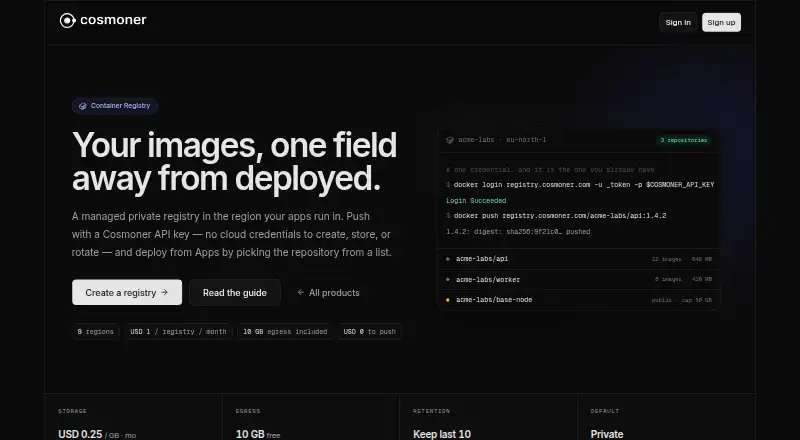
Cosmoner Container Registry is a managed private registry backed by Amazon ECR for storing container images used by apps. Developers can push and pull images from a laptop or CI environment with Docker and a Cosmoner API key. Images in a project’s registries appear in the Apps image deployment flow, which authenticates deployments without a pull secret. Push-time scanning is enabled by default and checks images against known vulnerabilities. Images are encrypted with AES256 by default; repositories created afterward can optionally use a customer KMS key. Retention settings can preserve a selected number of recent images and expire untagged images after a chosen number of days. Repositories start private; public repositories require a monthly egress cap and return to private when it is reached. The product lists nine regions across North America, Europe and Asia Pacific, but a registry cannot be moved to another region after creation. Uploading images is not charged. Storage is $0.25 a month per GB, egress is $0.15 a month per GB after the first 10 GB per organization per billing period, and the registry fee is $1 a month per registry, prorated from creation.
Who it suits
This service suits teams that store app container images and want to use Docker or CI to manage them. It also supports teams deploying from Cosmoner project registries.
What it does well
- Push-time vulnerability scanning is enabled by default
- AES256 encryption is the default
- Retention settings cover recent and untagged images
- First 10 GB of egress included per billing period
What to know first
- No free plan
- Registry region cannot change after creation
- Image-based app deployments run as a single instance
Limits
The listed $1/mo registry fee is separate from storage and egress charges. The first 10 GB of egress per organization per billing period is included; additional egress is billed per GB. An app deployed from an image runs as one instance, without scale-out or autoscaling.
Plans
| Plan | Billed and limits | Price |
|---|---|---|
| Pushes | Image uploads · Uploading images is never charged | Free |
| Egress | Per GB after the included allowance · First 10 GB per organization per billing period included | $0.15 a month |
| Storage | Per GB · measured daily across the organization · Totaled across all repositories | $0.25 a month |
| Registry fee | Per registry; prorated from creation · Repositories are not charged individually | $1 a month |
As cosmoner.com lists them, read 11 Oct 2026. The maker's own page has the final word.
Getting started
- Open https://cosmoner.com/en/products/container-registry.
- Create a registry in one of the listed regions, keeping in mind its region cannot be changed later.
- Use Docker and a Cosmoner API key to push images from a laptop or CI.
- Configure retention defaults or repository overrides as needed.
- Select a repository in the Apps image deployment flow to deploy its image.
Cosmoner Container Registry is a managed private registry for teams storing images for Cosmoner-deployed apps. It fits organizations that want registry, vulnerability checks, retention and deployment authentication in one service, but its single-instance app deployments and metered usage make it a poor match for elastic workloads or predictable, high-volume distribution.
Overview
You can push and pull images from a laptop or CI pipeline with Docker and a Cosmoner API key. Repositories created in a project’s Cosmoner registries appear directly in the Apps image-deployment flow, which authenticates the deployment without a pull secret. That removes a common piece of deployment plumbing when your applications already run on Cosmoner. The trade-off is fundamental: an app deployed from a container image runs as one instance, with no scale-out or autoscaling.
Key features
- Security at ingest: Scanning is enabled on push and checks images against known vulnerabilities, giving teams an automatic checkpoint in their build flow. Images use AES256 encryption by default. Repositories created afterward can instead use a customer KMS key, which suits organizations with their own key-management requirements.
- Retention controls: Policies can retain a selected number of recent images and remove untagged images after a selected number of days. Repositories can override organization-wide defaults, allowing different cleanup rules for production and development. Immutable tags are supported, helping prevent an existing tag from being replaced.
- Image visibility: The control panel exposes tags, size, digest, push time and last pull, including untagged images. Those fields make it easier to identify stale artifacts and verify exactly what a deployment references.
- Private and public repositories: Repositories start private. Public repositories require a monthly egress cap and automatically return to private when that cap is reached, so public distribution needs monitoring rather than being a set-and-forget option.
- Regions and automation: Nine regions span North America, Europe and Asia Pacific. A registry’s region cannot be changed after creation, so location choice should be made before repositories and pipelines are established. The Platform SDK can create repositories, list images and manage retention with an API key.
Pricing
Cosmoner has no free plan. The registry fee is $1 a month per registry, prorated from creation; repositories themselves are not charged individually. Image uploads cost 0.00 USD, so pushing frequently does not add an upload fee.
Storage costs $0.25 per GB per month, measured daily at 02:00 UTC and totaled across all repositories in the organization. Egress is $0.15 per GB per month after the first 10 GB per organization in each billing period; billing uses compressed image layers actually downloaded. This structure favors teams that keep artifacts compact and control pulls, while large retained histories or heavy distribution can raise the bill beyond the $1/month entry point.
The paid model suits a small Cosmoner project that needs an integrated registry and can manage usage. It is less compelling for individuals seeking a permanently free registry or for organizations that need a fixed, all-inclusive allowance.
Platforms
Cosmoner provides an API, Linux support and a web control panel. Docker workflows cover laptop and CI access, while the SDK supports repository and retention automation.
Who it's for
Choose it when your team already deploys applications through Cosmoner and wants private image storage connected to that process, default push-time scanning, configurable cleanup and optional customer-managed keys. It is also sensible for organizations able to select a permanent region and budget variable storage and download costs.
Look elsewhere when containerized applications require multiple replicas, autoscaling, or a registry designed for broad public distribution without an egress-triggered privacy change. A free tier is also absent.
Pros and cons
Pros
- Deployment integration: Cosmoner repositories flow into app deployment without a separate pull secret.
- Built-in safeguards: Push scanning, AES256 encryption, immutable tags and retention rules address common image-management risks.
- Operational detail: Digests, pull times and untagged-image visibility support cleanup and release tracking.
- Automation support: The Platform SDK handles repository, image-list and retention operations.
Cons
- Single-instance deployments: Image-based apps cannot scale out or autoscale.
- Usage-based billing: Storage and egress are metered, with only 10 GB of egress included per organization per billing period.
- Region lock: A registry cannot be moved after creation.
- Public-repository constraint: Reaching the egress cap switches a public repository back to private.
- No free plan: Even a minimal setup carries the prorated registry fee.
Alternatives
Container Registries is the broader directory starting point when you want to compare more services.
Docker Desktop is the better fit for a freemium desktop-oriented workflow across Linux, macOS, web and Windows, with a free Personal plan and a $9.00/month Pro plan.
Inedo ProGet suits teams wanting a self-hosted or web registry with a free edition, unlimited private Docker feeds and a free trial.
JFrog Container Registry is preferable when a free self-managed edition covering Docker, OCI, Helm and generic artifacts is more important than Cosmoner’s deployment integration.
Zot Registry is a free Apache 2.0 project for teams choosing an open-source, self-hosted registry.
8gears Container Registry offers a free Individuals plan with 1 GB of storage and unlimited private repositories, while enterprise pricing is custom.
Chainguard Registry is worth considering for its free allowance of up to five images per organization.
KakaoCloud Container Registry provides a free 30 GiB outbound-traffic allowance and regional KRW overage pricing.
lazer.sh fits hobby users wanting a $4.99/month plan with 100 GB storage, unlimited pulls and no egress fees.
Verdict
Cosmoner Container Registry is a strong choice for Cosmoner-based teams that value deployment integration, automatic scanning and controllable retention more than horizontal scale. Choose it for a region-fixed, private workflow with manageable image traffic; look elsewhere for free plans, self-hosting, broad public delivery or applications that must run beyond one instance.
Verdict
Cosmoner combines image storage, scanning, retention controls and an app deployment path. Account for storage, egress and registry fees, and note that image deployments cannot scale beyond one instance.
Questions
How much does Cosmoner Container Registry cost?
The listed starting price is $1/mo. The registry fee is per registry and prorated from creation; storage and egress are billed separately.
Is there a free plan?
No. Image uploads are free, but the product has no free plan.
What platforms are supported?
The listed platforms are API, Linux, and web.
Can I make a repository public?
Repositories are private by default. Public repositories require a monthly egress cap and return to private when that cap is reached.
Can it deploy images to apps?
Yes. Repositories in a project’s registries appear in the Apps image deployment flow, which authenticates without a pull secret. An image deployment runs as a single instance.
How is image storage protected and maintained?
Images use AES256 encryption by default, with a customer KMS key option for repositories created afterward. Retention settings can preserve recent images and expire untagged images.
Facts from Cosmoner Container Registry's own pages
- API
- The Platform SDK can create repositories, list images, and manage retention using an API key. · cosmoner.com, 11 Oct 2026
- App deployment
- Repositories from a project’s Cosmoner registries appear in the Apps image deployment flow, which authenticates deployments without a pull secret. · cosmoner.com, 11 Oct 2026
- Billing measurement
- Storage is measured daily at 02:00 UTC across the organization, while egress counts compressed image layers actually downloaded. · cosmoner.com, 11 Oct 2026
- Deployment limit
- An app deployed from a container image runs as a single instance, so scaling out and autoscaling are unavailable for that deployment. · cosmoner.com, 11 Oct 2026
- Docker access
- You can push and pull images from a laptop or CI using Docker and a Cosmoner API key. · cosmoner.com, 11 Oct 2026
- Encryption
- Images use AES256 encryption by default, with an option to use a customer KMS key for repositories created afterward. · cosmoner.com, 11 Oct 2026
- Image details
- The control panel shows image tags, size, digest, push time, and last pull, including untagged images. · cosmoner.com, 11 Oct 2026
- Image scanning
- Image scanning on push is enabled by default and checks images against known vulnerabilities. · cosmoner.com, 11 Oct 2026
- Public repositories
- Repositories are private by default; public repositories require a monthly egress cap and revert to private when it is reached. · cosmoner.com, 11 Oct 2026
- Regions
- The product page lists nine regions across North America, Europe, and Asia Pacific, and says a registry’s region cannot be changed after creation. · cosmoner.com, 11 Oct 2026
- Retention
- Retention settings can keep a chosen number of recent images and expire untagged images after a chosen number of days; repositories can override the defaults. · cosmoner.com, 11 Oct 2026
- What it does
- Cosmoner provides a managed private container registry backed by Amazon ECR for storing images used by apps. · cosmoner.com, 11 Oct 2026
Where Cosmoner Container Registry stands on Freedom251
- Container Registries#40 of 60