
Cosmic Watch
What Cosmic Watch is
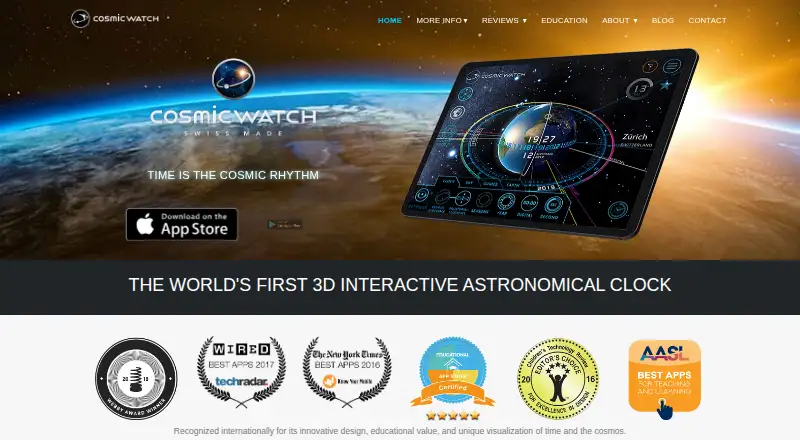
Cosmic Watch combines a 3D planetarium, sky guide and clock, with real-time views of Earth and the sky. Point a phone or tablet upward to identify constellations, stars and planets through augmented reality, or switch among views from your location, of Earth and of the solar system. Its free plan includes these views, the sky guide, layers, star names, a world clock and astronomical-event notifications. Other built-in features include a 360-degree celestial sphere, geocentric and heliocentric solar-system views, astrology mode and retrograde motion. Paid subscriptions or Cosmic Pro add tools such as a Moon Calendar, meteor showers, comets, real-time clouds and Time Control. Cosmic Astro offers Western or Vedic natal charts with interactive 3D horoscopes and PDF export to subscribers and Pro members. The app is available on Android, iOS and macOS. Optional anonymous Matomo analytics can be turned off in settings; the maker says it does not store or share location or network information.
Who it suits
It suits sky watchers, amateur astronomers, outdoor enthusiasts and clock fans who want a mobile sky guide or an educational way to explore the solar system. Birth-chart tools are available to subscribers and Cosmic Pro members.
What it does well
- Free plan includes sky guide and solar-system views.
- Augmented reality identifies stars, planets and constellations.
- Includes a world clock and event notifications.
- Available on Android, iOS and macOS.
- Optional analytics can be disabled in settings.
What to know first
- Moon Calendar and other tools require paid access.
- Natal-chart export requires subscription or Cosmic Pro.
- No telescope control or mission tracking.
Limits
The Free plan includes the sky guide, layers, star names, world clock, notifications and sky, Earth and solar system views. Additional tools are paid; Cosmic Astro natal charts and PDF export are for subscribers and Cosmic Pro members.
Plans
| Plan | Billed and limits | Price |
|---|---|---|
| Free | Sky, Earth, solar system views · sky guide · layers · star names · world clock · notifications | Free |
| Monthly Plan | Monthly Plan · Tools and Time Control | $0.99 a month |
| Yearly | Yearly · Tools and Time Control | $14.99 a year |
| Monthly | Monthly · Tools and Time Control | $2.99 a month |
| Tools Pack | Tools Pack · Moon Calendar · Atmosphere Clockface · Meteor Showers · Aspects · Retrogrades Year · Dreamspell Calendar · Date/time/location saving · Camera tools | $2.99, paid once |
| Yearly Plan | Yearly Plan · Tools and Time Control | $4.99 a year |
| Cosmic Pro | Cosmic Pro · Tools and Time Control permanently unlocked | $69.99, paid once |
As cosmic-watch.com lists them, read 30 Sept 2026. The maker's own page has the final word.
Getting started
- Visit https://cosmic-watch.com/.
- Choose the Android, iOS or macOS version for your device.
- Start with the Free plan, which includes the sky guide and core views.
- Choose a monthly or yearly plan, Tools Pack or Cosmic Pro for additional tools.
Cosmic Watch is an interactive sky guide, planetarium and clock for people who want to explore the sky and solar system from a phone, tablet or Mac. It suits curious stargazers and learners especially well; the free plan is useful on its own, but calendars and time-control tools sit behind paid options.
Overview
Point a phone or tablet toward the sky to identify stars, planets and constellations in augmented reality, or switch to views of Earth and the solar system. That blend makes Cosmic Watch a practical companion for looking up outdoors and a visual aid for learning about Earth cycles and basic astronomy.
Its geocentric and heliocentric models, 360-degree celestial sphere, retrograde motion, astrology mode, world clock and astronomical-event notifications give it more breadth than a straightforward sky identifier. But it is not built to control a telescope or track missions, so observers who need either function should choose a more specialized tool.
Key features
Sky, Earth and time
The AR guide makes the app’s astronomical reference immediate: users can match named celestial objects to the direction they see overhead. Earth and solar-system views add context, while the world clock and event notifications extend its usefulness beyond a single viewing session. This is a strong combination for casual exploration and introductory learning, though the educational scope is framed around basic concepts rather than advanced observing workflows.
Paid additions
Paid access adds tools including a Moon Calendar, real-time clouds, meteor showers, comets, planetary aspects, a Retrograde Year, Dreamspell Calendar, Atmosphere Clockface, saved date, time and location, and Time Control. Cosmic Astro also provides Western or Vedic natal charts, interactive 3D horoscopes and PDF export to subscribers and Cosmic Pro members. These additions make sense for users who specifically want calendars, astrology or saved-time exploration; they are less compelling if the core sky guide is all that is needed.
Pricing
The Free plan costs nothing and includes sky, Earth and solar-system views, the sky guide, layers, star names, world clock and notifications. It is a meaningful starting point rather than a short trial, and should cover the app’s main exploration use.
- Monthly Plan: $0.99 a month, with Tools and Time Control.
- Monthly: $2.99 a month, with Tools and Time Control.
- Tools Pack: $2.99, paid once, including Moon Calendar, Atmosphere Clockface, Meteor Showers, Aspects, Retrogrades Year, Dreamspell Calendar, saved date/time/location and camera tools.
- Yearly Plan: $4.99 a year, with Tools and Time Control.
- Yearly: $14.99 a year, with Tools and Time Control.
- Cosmic Pro: $69.99, paid once, permanently unlocking Tools and Time Control.
The Tools Pack is a one-time route to a defined set of additions, while Cosmic Pro is the one-time choice for permanent access to Tools and Time Control. The monthly and yearly options provide those tools on a recurring basis; the lower-priced Plan variants cost less than the similarly named Monthly and Yearly options, though both pairs list the same inclusions. Subscribers and Cosmic Pro members also receive Cosmic Astro natal charts and PDF export. No seat or usage quotas are stated.
Platforms
Cosmic Watch is available on Android, iOS and macOS. Apple device support includes iPhone, iPad, iPod touch, Apple Silicon Mac and Apple Vision, with iOS 15, iPadOS 15, macOS 12 on M1 or later, and visionOS requirements. The maker is based in Zürich, Switzerland.
On privacy, the maker says it does not store or share location or network information and does not collect names, email addresses, account information, precise location data or advertising identifiers. Optional self-hosted Matomo analytics can collect anonymous usage, session, device, country-level location and purchase-related events; it can be disabled in settings. Google Play says no data is shared with third parties, data is encrypted in transit, and the app may collect app activity and app info/performance data.
Who it's for
Cosmic Watch is a good fit for outdoor explorers, amateur astronomers, advanced stargazers, clock enthusiasts and science-fiction fans who want one app spanning sky identification, Earth and solar-system views, and time features. Its educational framing also suits learners exploring basic astronomy. Those managing telescope hardware or following missions should look elsewhere.
Pros and cons
- Pros: The free plan combines AR identification with Earth and solar-system views, a world clock and notifications, giving beginners useful range without an upfront purchase.
- Pros: Paid access covers specialized calendars, time-control features and natal-chart tools, so users interested in those subjects can extend the app beyond basic sky viewing.
- Cons: Moon, meteor, retrograde and other specialized tools require paid access, so the free plan is not the complete package for calendar-focused users.
- Cons: No telescope control or mission tracking means it cannot serve as an equipment-control or mission-following hub.
Alternatives
For a free option that runs in a web browser and requires an internet connection, choose NASA Eyes. Celestia is another free alternative whose project describes itself as open source. Choose Solar System Scope if its free online desktop-browser version suits your setup. Night Sky is another freemium option on Android, iOS and macOS. Star Chart offers a free plan with every feature and upgrade included and no subscriptions or paywalls. The other Star Chart is free and includes in-app upgrades. Stellarium is a free choice for Linux, macOS, web and Windows. If you use a DWARFLAB smart telescope, consider the free DWARFLAB App, which is designed for that hardware. Browse more options in Astronomy Apps.
Verdict
Choose Cosmic Watch if you want an approachable, cross-platform way to identify the sky and move between celestial, Earth and solar-system views, with a useful free tier. Its paid options are best justified by a clear interest in calendars, astrology or Time Control. Look elsewhere if telescope control or mission tracking is essential.
Verdict
Cosmic Watch brings sky identification, Earth and solar-system views, and clock features together in one app. Its free plan covers core viewing tools, while specialized calendars and other additions require paid access.
Questions
Is Cosmic Watch free?
Yes. The Free plan costs nothing and includes sky, Earth and solar system views, the sky guide, layers, star names, world clock and notifications.
What does it cost to unlock more tools?
Listed options include Monthly Plan at $0.99 a month, Monthly at $2.99 a month, Tools Pack at $2.99, paid once, Yearly Plan at $4.99 a year, Yearly at $14.99 a year, and Cosmic Pro at $69.99, paid once.
Which platforms does it support?
Cosmic Watch is available on Android, iOS and macOS. Supported Apple devices include iPhone, iPad, iPod touch, Apple Silicon Mac and Apple Vision, subject to the listed operating-system requirements.
Does it show the sky in augmented reality?
Yes. Point a phone or tablet toward the sky to see constellations, stars and planets.
Does it include natal charts?
Cosmic Astro offers Western or Vedic natal charts with interactive 3D horoscopes and PDF export for subscribers and Cosmic Pro members.
What does the maker say about privacy?
The maker says it does not store or share location or network information and does not collect names, email addresses, account information, precise location data or advertising identifiers. Optional self-hosted Matomo analytics can be disabled in app settings.
Facts from Cosmic Watch's own pages
- Analytics
- Optional self-hosted Matomo analytics collects anonymous usage, session, device, country-level location and purchase-related events, and can be disabled in app settings. · cosmic-watch.com, 30 Sept 2026
- Audience
- The maker describes Cosmic Watch as being for nature lovers, outdoor adventurers, amateur astronomers, advanced stargazers, clock fans and science-fiction enthusiasts. · cosmic-watch.com, 30 Sept 2026
- Awards
- The app listing cites a Webby Award for Best Educational App 2018 and recognition from Wired, TechRadar, AASL, The New York Times and Space.com. · play.google.com, 30 Sept 2026
- Birth charts
- Cosmic Astro provides Western or Vedic natal charts with interactive 3D horoscopes and PDF export for subscribers and Cosmic Pro members. · play.google.com, 30 Sept 2026
- Core features
- The app includes a geocentric and heliocentric solar system, a 360-degree celestial sphere, astrology mode, retrograde motion, a world clock and astronomical-event notifications. · play.google.com, 30 Sept 2026
- Data safety
- Google Play states that no data is shared with third parties, data is encrypted in transit, and the app may collect app activity and app info/performance data. · play.google.com, 30 Sept 2026
- Education
- The app is presented as an educational tool for learning the solar system, Earth cycles and basic astronomical concepts. · cosmic-watch.com, 30 Sept 2026
- Headquarters
- Zürich, Switzerland · cosmic-watch.com, 28 Sept 2026
- Paid tools
- Subscriptions or Cosmic Pro unlock Moon Calendar, real-time clouds, meteor showers, comets, planetary aspects, Retrograde Year, Dreamspell Calendar, Atmosphere Clockface, saved date/time/location and Time Control. · play.google.com, 30 Sept 2026
- Privacy
- The maker says it does not store or share location or network information and does not collect names, email addresses, account information, precise location data or advertising identifiers. · cosmic-watch.com, 30 Sept 2026
- Product
- Cosmic Watch is a 3D planetarium, sky guide and clock that renders real-time graphics of Earth and the sky. · cosmic-watch.com, 30 Sept 2026
- Sky guide
- The app lets users point a phone or tablet toward the sky to see constellations, stars and planets in augmented reality. · cosmic-watch.com, 30 Sept 2026
- Support
- The maker directs app support and feature requests to [email protected]. · cosmic-watch.com, 30 Sept 2026
- Supported Apple devices
- The App Store listing supports iPhone, iPad, iPod touch, Apple Silicon Mac and Apple Vision, with iOS 15, iPadOS 15, macOS 12 on M1 or later, and visionOS requirements. · apps.apple.com, 30 Sept 2026
- Views
- It provides views from the user's location, of Earth and of the solar system. · cosmic-watch.com, 30 Sept 2026
Where Cosmic Watch stands on Freedom251
- Astronomy Apps#5 of 35