
CortexDJ
What CortexDJ is
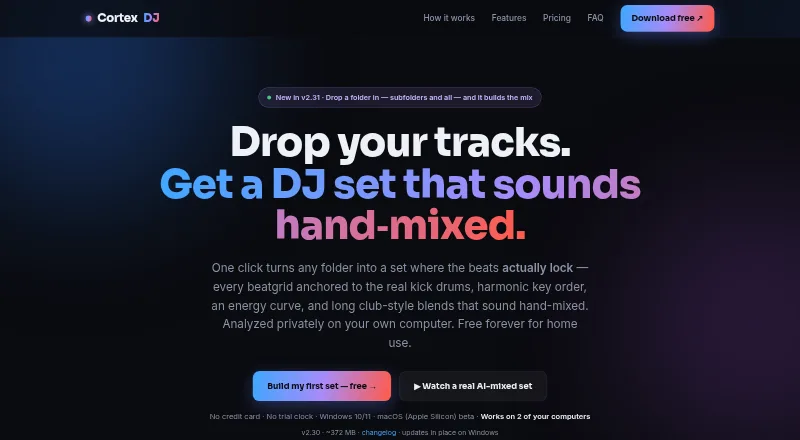
CortexDJ analyzes local music files and builds beatmatched DJ sets based on a selected folder, vibe and length. It detects Camelot key, energy, BPM and song structure, then adjusts beatgrids to real kick drums. Its AI sequences tracks harmonically, shapes the set's energy curve and applies transitions such as filter sweeps, echo throws and bass swaps. Tracks with beatgrids it cannot lock confidently are excluded from auto-mixes and identified to the user. Live decks include EQ, effects, loops, hot cues and pads, and users can take over while the AI is mixing. The Free plan is described as free forever for home use and includes analysis, AI auto-mix, mashups, live decks, mix rendering and exports. Pro costs $7.45 a month and adds controller support, recording, streaming and priority email support; Lifetime costs $127, paid once. The software reads local audio formats including MP3, FLAC, WAV, AIFF, M4A/AAC and OGG. It does not support Spotify, Apple Music or TIDAL libraries. The desktop app supports 64-bit Windows 10/11 and a macOS Apple Silicon beta; the separate browser mixer is also beta, not the full app.
Who it suits
CortexDJ suits home DJs who want software to analyze a local music collection and assemble sets automatically. Pro may suit DJs who need listed controller support, recording or live-streaming.
What it does well
- Free plan includes auto-mixing and mashups for home use
- Live decks provide EQ, effects, loops, hot cues and pads
- Exports rekordbox XML and Serato-readable playlists
- Music analysis runs locally, according to the maker
What to know first
- Spotify, Apple Music and TIDAL libraries are unsupported
- macOS desktop support is listed as an Apple Silicon beta
- Browser mixer is beta and is not the full app
Limits
The Free plan is for home use and supports up to 2 computers. Pro costs $7.45 a month and Lifetime costs $127, paid once; each key works on up to two computers.
Plans
| Plan | Billed and limits | Price |
|---|---|---|
| Free | forever · Home use · analysis · auto-mixed WAV/FLAC sets · mashups · live decks · rekordbox/Serato export · 2 computers | Free |
| Lifetime | one-time · Everything in Pro · future Pro features · 30-day money-back guarantee · 2 computers | $127, paid once |
| Pro | Up to 2 computers · MIDI controllers · audio and HD video recording · live-streaming · priority email support · cancel anytime | $59 a year |
| Pro yearly | yearly · Everything in Free · MIDI controllers · audio/HD-video recording · YouTube/Twitch/Facebook/custom RTMP streaming · priority email support · 2 computers | $59 a year |
| Pro | Up to 2 computers · MIDI controllers · audio and HD video recording · live-streaming · priority email support · cancel anytime | $7.45 a month |
| Pro monthly | monthly · Everything in Free · MIDI controllers · audio/HD-video recording · YouTube/Twitch/Facebook/custom RTMP streaming · priority email support · 2 computers | $7.45 a month |
As cortexdj.com lists them, read 15 Oct 2026. The maker's own page has the final word.
Getting started
- Visit the CortexDJ website.
- Choose the desktop app for supported 64-bit Windows 10/11 or the macOS Apple Silicon beta; the separate browser mixer is beta.
- Start with the Free plan for home use; it requires no trial clock or credit card.
- Select a local music folder, vibe, and set length for analysis and auto-mixing.
- Export to rekordbox or Serato, or choose Pro for controllers, recording, streaming, and priority email support.
Overview
CortexDJ is DJ software that analyzes music stored on your computer and turns a selected folder into a beatmatched set. It suits DJs who want AI-assisted preparation while retaining access to live-deck controls. Its local-library approach is appealing, but streaming-service collections are out of scope.
Analysis identifies key, energy, BPM and song structure, then uses that information to sequence tracks and shape a set. The maker says your library, mixes and analysis stay on your computer.
Key features
Analysis and set building
CortexDJ detects Camelot key, energy, exact BPM and song structure, and re-anchors beatgrids to kick drums. It arranges tracks harmonically, shapes an energy curve and uses transitions including filter sweeps, echo throws and bass swaps. If it cannot lock a track’s beatgrid confidently, it excludes the track from the auto-mix and flags it to you. That is a sensible guard against unreliable transitions, though it can mean a set does not use every track in the folder.
The software works with local MP3, FLAC, WAV, AIFF, M4A/AAC and OGG files. Spotify, Apple Music and TIDAL libraries are not supported, making CortexDJ a poor fit if those services are the center of your collection. It does not provide music licenses, so recording or streaming a set does not settle the rights question.
Decks, controllers and exports
Live decks include EQ, effects, loops, hot cues and pads, and you can take over controls while the AI is mixing. Pro detects and maps listed Pioneer/AlphaTheta, Hercules and Numark controllers; other class-compliant USB MIDI devices can be configured with MIDI learn. That gives controller users a route beyond automatic mixing, but controller support is a paid feature.
Pro also adds audio and HD video recording and live-streaming to YouTube, Twitch and Facebook. Every tier can export rekordbox XML with beatgrids, hot cues and crates, as well as Serato-readable M3U8 playlists and crate files. Serato hot cues are not exported, a meaningful limitation if those cues are part of your established workflow.
Pricing
The Free plan costs nothing and is described as free forever for home use. It includes analysis, AI auto-mix and mashups, live decks, rendered mixes and rekordbox and Serato exports, for up to two computers. There is no trial clock or credit-card requirement. It is a substantial starting point for home DJs, but does not include the Pro controller, recording, streaming or priority-support features.
Pro costs $7.45 a month and covers up to two computers. It adds MIDI controllers, audio and HD video recording, live-streaming and priority email support; you can cancel anytime. Choose it if you need those capabilities without a one-time commitment.
Lifetime costs $127, paid once for one key covering up to two computers. It includes Pro and future Pro features, with a 30-day money-back guarantee. It is the option for buyers who prefer a one-time payment and expect to use the Pro feature set over time.
Platforms
The desktop app supports 64-bit Windows 10/11 and macOS on Apple Silicon, with the macOS version in beta; about 8 GB of RAM is listed. A separate browser mixer is also described as beta and is not the full app, so browser access should not be treated as equivalent to the desktop product. Every license key works on up to two computers.
Who it's for
CortexDJ is best suited to DJs with local music libraries who want analysis and automatic set building alongside the option to intervene on live decks. It is less suitable for users who rely on Spotify, Apple Music or TIDAL libraries, or who need a mature browser-based version. DJs planning to publish or stream mixes should also account for music licensing themselves.
Pros and cons
- Local analysis: The maker says the library, mixes and analysis stay on the computer, which suits DJs who want their music workflow kept local.
- Useful safeguards: Uncertain beatgrids are excluded from auto-mixes and identified, rather than silently used for questionable transitions.
- Exports across tiers: Even the free plan exports rekordbox data and Serato-readable playlists and crates, though Serato hot cues are omitted.
- Streaming-library gap: Spotify, Apple Music and TIDAL collections cannot be used as libraries.
- Platform caveats: The Apple Silicon desktop version and browser mixer are beta, and the browser mixer is not the full app.
Alternatives
For a broader look at AI DJ Software, compare options by platform and workflow. Choose djay if you want an option spanning Android, iOS, macOS and Windows, with a free download and optional PRO subscription. Offtrack is another freemium choice for Android, iOS and macOS.
SetPrep is worth comparing if its free allowance of three mixes a month or its £5.99 a month Pro plan fits your needs. AuraJam is a web-based alternative, with five free exports a day and a small mark on those exports. automixer.ai offers a web plan with three projects, six tracks per project and five exports a month for free.
Consider Mixbridge if you want a free option on iOS or the web. PulseGrid is a free alternative spanning Linux, macOS, self-hosted, web and Windows. CRATELAB is another freemium option for web, Windows and macOS.
Verdict
Choose CortexDJ if your music is stored locally and you want automated harmonic set building without giving up manual deck control. Its free home-use plan makes that workflow easy to try, and its exports remain available across tiers. Look elsewhere if your library depends on Spotify, Apple Music or TIDAL, or if you need a full browser app rather than a beta mixer.
Verdict
CortexDJ centers on local-library analysis and AI-assisted set building, with deck controls available for manual input. Consider its beta platform notes and unsupported streaming libraries if they matter to your setup.
Questions
What does CortexDJ cost?
Free costs nothing for home use. Pro is $7.45 a month, and Lifetime is $127, paid once.
What is included in the Free plan?
It includes analysis, AI auto-mix and mashups, live decks, mix rendering, and exports to rekordbox and Serato. It is described as free forever for home use, supports up to 2 computers, and requires no trial clock or credit card.
Which platforms does CortexDJ support?
The desktop app supports 64-bit Windows 10/11 and a macOS Apple Silicon beta. A separate browser mixer is beta and is not the full app.
Which music libraries and files can it use?
It reads local MP3, FLAC, WAV, AIFF, M4A/AAC, and OGG files. Spotify, Apple Music, and TIDAL libraries are unsupported.
What do paid plans add?
Pro adds MIDI controller support, audio and HD video recording, live-streaming, and priority email support. Lifetime includes Pro and future Pro features.
Does CortexDJ provide music licenses?
No. The software does not provide music licenses.
Facts from CortexDJ's own pages
- Audio formats
- The app reads MP3, FLAC, WAV, AIFF, M4A/AAC and OGG files. · cortexdj.com, 15 Oct 2026
- Audio formats and streaming libraries
- It reads local MP3, FLAC, WAV, AIFF, M4A/AAC and OGG files; Spotify, Apple Music and TIDAL libraries are not supported. · cortexdj.com, 28 Sept 2026
- Beatmatching
- Beat grids are anchored to real kick drums to keep overlapping tracks synchronized. · cortexdj.com, 15 Oct 2026
- Browser version
- A separate browser mixer is offered as beta with two decks, BPM detection and one-tap auto-blend, and it is not the full desktop app. · cortexdj.com, 15 Oct 2026
- Capterra listing check
- Capterra's Cortex listings opened during research were for lending, drawing-management and blockchain products rather than CortexDJ. · capterra.com, 15 Oct 2026
- Changelog: v2.29.5
- The July 27, 2026 release added updater cleanup, disk-space checks, cryptographic stem-model verification and long-stream stability fixes. · cortexdj.com, 15 Oct 2026
- Changelog: v2.30.3
- The July 29, 2026 release added live control takeover, rekordbox/Serato export and automatic Pro-key renewal. · cortexdj.com, 15 Oct 2026
- Changelog: v2.31.0
- The August 30, 2026 release added recursive folder scanning, drag-and-drop loading, screen-size fitting, render error handling and clearer menus. · cortexdj.com, 15 Oct 2026
- Controller extensibility
- Pro auto-maps listed Pioneer/AlphaTheta, Hercules and Numark controllers and supports MIDI-learn for other class-compliant USB MIDI devices. · cortexdj.com, 15 Oct 2026
- Controller support
- Pro auto-detects and maps listed Pioneer/AlphaTheta, Hercules and Numark controllers, with MIDI-learn for other class-compliant USB MIDI devices. · cortexdj.com, 28 Sept 2026
- Crunchbase listing check
- The Crunchbase Cortex profile opened during research identifies Cortex Applications, Inc., a different company from the CortexDJ maker. · crunchbase.com, 15 Oct 2026
- Deck controls
- The live decks include EQ, effects, loops, hot cues and pads, and users can take over controls while the AI is mixing. · cortexdj.com, 28 Sept 2026
- Diagnostics
- Diagnostics can include app version, OS, hardware load, connected devices, plan, errors and activity counts; the setting can be disabled. · cortexdj.com, 15 Oct 2026
- Export integrations
- CortexDJ exports rekordbox XML with grids, cues, keys and crates, plus Serato crate and M3U8 playlists. · cortexdj.com, 15 Oct 2026
- Independent-review availability
- Search results located editorial pages about CortexDJ but no verified G2, Capterra, GetApp, Software Advice, TrustRadius or Trustpilot review profile for CortexDJ itself. · g2.com, 15 Oct 2026
- Intended use
- The Free plan is described as free forever for home use, with no trial clock or credit card required. · cortexdj.com, 28 Sept 2026
- Library exports
- All tiers can export rekordbox XML with beatgrids, hot cues and crates, plus Serato-readable M3U8 playlists and crate files; Serato hot cues are not exported. · cortexdj.com, 28 Sept 2026
- License activation
- Each license key is limited to two computers and activation sends the key plus a hashed computer identifier to the maker's server. · cortexdj.com, 15 Oct 2026
- Live decks
- The desktop app provides two decks with sync, keylock, EQ, filters, echo, flanger, loops, hot cues and crossfader controls. · cortexdj.com, 15 Oct 2026
- macOS limitation
- The macOS build is identified as an Apple-Silicon beta, with recording and streaming described as newer beta functionality. · cortexdj.com, 15 Oct 2026
- Manual takeover
- A user can take control of EQ, filters, effects or other deck controls while the AI continues mixing. · cortexdj.com, 15 Oct 2026
- Mashup finder
- The mashup tool scores potential vocal and instrumental pairings from 0 to 100. · cortexdj.com, 15 Oct 2026
- MIDI mappings
- Controller mappings can be imported and exported for sharing or backup. · cortexdj.com, 15 Oct 2026
- Music-rights limitation
- CortexDJ supplies streaming tools but no music licenses; users remain responsible for rights to tracks they publish or stream. · cortexdj.com, 15 Oct 2026
Where CortexDJ stands on Freedom251
- AI DJ Software#2 of 17