AuraJam
What AuraJam is
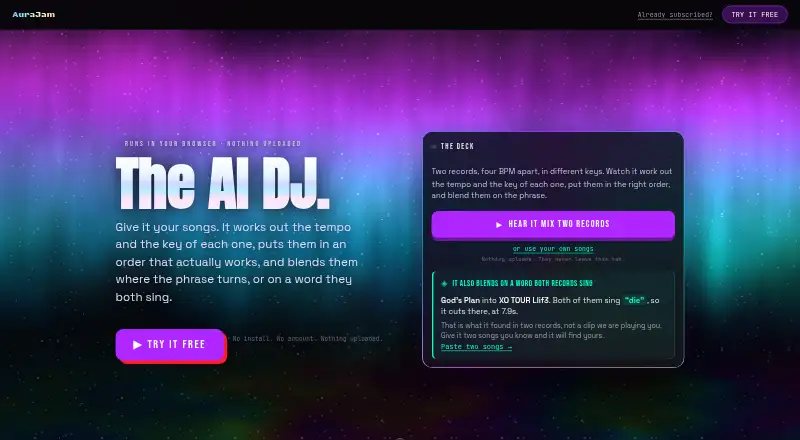
AuraJam is a browser-based AI DJ for building and mixing sets from your own tracks. Drop in a folder or paste a link, and it analyzes tempo, key, and phrase turns to order songs and create beatmatched transitions. You can edit its choices by removing a track, moving a blend, or changing where a transition cuts. AuraJam can also separate vocals and drums, and align video footage to the music’s beat grid. For a party, open a room so guests can request records from their phones using a QR code; the AI DJ adds requests to the set. It runs in a browser on your GPU, requires no installation, and can be tried without an account. The site says separation, transcription, tempo and key analysis, and exports happen on your machine; AI video generation is an exception identified before use. The Free plan is $0/forever and allows five marked exports a day. Pro is $9.99/month for unlimited unmarked exports and 500 monthly AI-generation credits. The AI explains its mechanical decisions, but you judge whether tracks sound good together.
Who it suits
AuraJam suits DJs and music fans who want help arranging and beatmatching tracks, with the option to revise transitions. It also fits party hosts who want guests to request songs, and creators aligning footage to music.
What it does well
- Analyzes key, tempo, and phrase turns for mixing.
- Lets users revise tracks and transition points.
- Guests can request records by scanning a QR code.
- Runs in a browser without installation or an account.
- Pro includes unlimited unmarked exports.
What to know first
- Free exports are limited to five per day.
- Free exports carry a small mark.
- Users must judge whether tracks sound good together.
Limits
The Free plan allows five exports a day, and those exports carry a small mark. Pro costs $9.99/month and includes unlimited exports without a mark and 500 credits a month for AI generation.
Plans
| Plan | Billed and limits | Price |
|---|---|---|
| Free | $0/forever · Five exports a day · exports carry a small mark · on-device tools are unmetered | Free |
| Pro | $9.99/month · Unlimited exports · no mark on exports · 500 credits a month for AI generation | $9.99 a month |
As aurajam.com lists them, read 29 Sept 2026. The maker's own page has the final word.
Getting started
- Open https://www.aurajam.com/ in a browser on a GPU-equipped device.
- Try AuraJam without creating an account; no installation is required.
- Drop in a folder of tracks or paste a link to provide songs.
- Review the AI’s set and adjust records, blends, or transition cuts as needed.
- Choose Pro at $9.99/month for unlimited unmarked exports and 500 monthly AI-generation credits, if needed.
Overview
AuraJam is a browser-based AI DJ for building and editing beatmatched sets from supplied tracks. It is best suited to people who want automated preparation without giving up control of the sequence. Its core limitation is that it handles mechanical decisions, not musical taste.
Drop in a folder of tracks or paste a link, and AuraJam analyzes tempo, key and phrase turns to order songs and place transitions. You can remove a track, move a blend or change where a transition cuts. That editability makes the automation more useful as a first pass than as a finished set you should accept without listening.
Key features
Analysis and editable mixing
Tempo, key and phrase-turn analysis guide the AI’s track choices and beatmatched transitions. This can reduce the manual work of arranging a set, but AuraJam leaves the crucial question—whether two tracks sound good together—to you. It explains its mechanical reasoning; it does not replace your judgment about musical fit.
Stems and video
AuraJam can separate vocals and drums, with that processing running on your machine. It can also align footage to a music beat grid so video edits land with the mix. Those tools extend its usefulness beyond set assembly, though the stated local-processing approach depends on the user’s GPU.
Party requests
You can open a room for guests to scan a QR code and request records from their phones. The AI weaves requests into the set, giving hosts a way to involve guests without having to manage every request manually.
Local processing and requirements
AuraJam runs in a browser on your GPU, requires no installation and can be tried without an account. Its site says stem separation, transcription, tempo and key analysis, and exports run on the user’s machine. AI video generation is the exception, and AuraJam identifies it before use. This local approach may appeal to privacy-conscious users, but browser-based operation does not remove the GPU requirement.
Pricing
| Plan | Price | What it includes |
|---|---|---|
| Free | free (billed $0/forever) | Five exports a day; exports carry a small mark; on-device tools are unmetered. |
| Pro | $9.99 a month (billed $9.99/month) | Unlimited exports, no mark on exports and 500 credits a month for AI generation. |
Free is a practical way to try the workflow or make occasional mixes, but the five-export daily cap and mark limit it for regular publishing. Pro is the straightforward choice for frequent exports or clean output; its monthly AI-generation credits also suit users who need that capability. The free plan’s unmetered on-device tools are a meaningful distinction if analysis and separation matter more than export volume.
Platforms
AuraJam is available on the web and runs in a browser using the user’s GPU. No installation is required, and an account is not needed to try it.
Who it's for
AuraJam fits DJs and hobbyists who want help turning a track collection into an editable set, video editors who want cuts aligned to music, and party hosts who want guests to request songs. It is less suitable for anyone expecting the AI to judge musical compatibility or seeking a workflow that does not rely on a GPU.
Pros and cons
- Pro: Track ordering and beatmatched transitions are guided by key, tempo and phrase turns, reducing arrangement work while keeping edits under user control.
- Pro: On-device analysis and stem separation, plus unmetered on-device tools on Free, support experimentation without an export quota.
- Pro: Browser access, no installation and no-account trial lower the barrier to trying the workflow.
- Con: The AI makes mechanical choices but leaves musical compatibility to the user, so the set still needs an attentive listener.
- Con: Free exports are limited to five a day and carry a mark, making Pro necessary for unlimited clean exports.
- Con: The browser workflow requires a GPU on the user’s machine.
Alternatives
CortexDJ is worth considering for home users who want a free option spanning macOS, Windows and web, with analysis, AI auto-mix, mashups, live decks, mix rendering and exports to rekordbox and Serato, on up to two computers.
CRATELAB is an alternative for people who want a free, cross-platform cloud-library workflow with synced-library browsing and streaming playback.
djay is the alternative to consider for a free-download mixing app across mobile and desktop platforms, with optional PRO unlocking advanced features.
Offtrack is another freemium option for Android, iOS and macOS.
SetPrep is a desktop alternative for macOS and Windows, with a free tier of three mixes a month and a Pro Monthly plan at £5.99 a month for users who need more.
automixer.ai is another web-based freemium option; its free plan is capped at three projects, six tracks per project, five exports a month, MP3 320kbps and 1 GB of storage.
Mixbridge is a free app for iOS and web.
MIXX Intelligence is a macOS option for people focused on preparing and analyzing a music crate, with a free Prepare tier.
See more options in AI DJ Software.
Verdict
Choose AuraJam if you want an editable, AI-built set and value local analysis, browser access and tools that extend to stems, video and guest requests. Its strongest case is saving arrangement effort without locking you into the AI’s choices. Look elsewhere if you need the system itself to judge whether tracks work together, or if you cannot rely on a GPU-equipped machine.
Verdict
AuraJam automates track analysis and beatmatched mixing while leaving set decisions editable. Its free plan limits daily exports, while Pro adds unlimited unmarked exports and AI-generation credits.
Questions
Is AuraJam free?
Yes. Its Free plan is $0 forever, with five exports a day that carry a small mark and unmetered on-device tools.
How much does Pro cost?
Pro costs $9.99/month. It includes unlimited exports without a mark and 500 credits a month for AI generation.
What platform does AuraJam run on?
AuraJam runs in a browser on the user’s GPU and requires no installation.
Do I need an account to try it?
No. AuraJam can be tried without an account.
Can I change the AI DJ’s choices?
Yes. You can remove a record, move a blend, or change where a transition cuts.
Does AuraJam decide whether tracks sound good together?
No. Its AI makes mechanical decisions and explains its reasoning, but users judge whether tracks sound good together.
Facts from AuraJam's own pages
- AI limitation
- The site says the AI makes mechanical decisions and explains its reasoning, but leaves users to judge whether two tracks sound good together. · aurajam.com, 29 Sept 2026
- Editable decisions
- Users can change the DJ’s choices, including removing a record, moving a blend, or changing where a transition cuts. · aurajam.com, 29 Sept 2026
- Party requests
- Users can open a room where guests scan a QR code and request records from their phones; the AI DJ weaves requests into the set. · aurajam.com, 29 Sept 2026
- Privacy
- The site says separation, transcription, tempo and key analysis, and exports happen on the user’s machine; AI video generation is an exception and is identified before use. · aurajam.com, 29 Sept 2026
- Product
- AuraJam is an AI DJ that analyzes songs’ tempo and key, orders them into a set, and mixes them beatmatched at phrase turns. · aurajam.com, 29 Sept 2026
- Requirements
- AuraJam runs in a browser on the user’s GPU, requires no installation, and can be tried without an account. · aurajam.com, 29 Sept 2026
- Stem separation
- It can separate vocals and drums from tracks, and the site says this runs on the user’s machine. · aurajam.com, 29 Sept 2026
- Track analysis
- The product reads track key and tempo and identifies phrase turns to guide its mix decisions. · aurajam.com, 29 Sept 2026
- Track input
- Users can drop a folder of tracks or paste a link to provide songs. · aurajam.com, 29 Sept 2026
- Video editing
- AuraJam can align footage to the music’s beat grid so edits land with the mix. · aurajam.com, 29 Sept 2026
Where AuraJam stands on Freedom251
- AI DJ Software#5 of 17