Freedom251 › AI Grammar Checkers

Correctly
What Correctly is
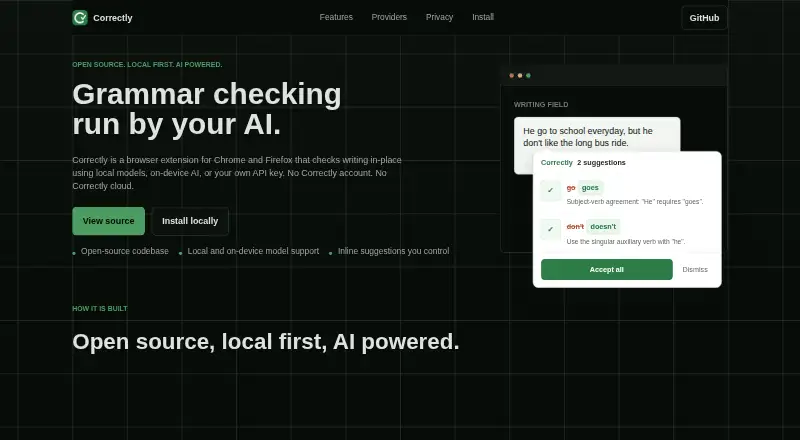
Correctly is a free, open-source browser extension that checks grammar, spelling, and punctuation as users write. It works in text inputs, textareas, and contentEditable elements, showing each proposed correction in an inline tooltip that users can accept or dismiss. The extension supports English and provides packages for Chrome/Chromium and Firefox; its landing page also names Edge, Brave, and Opera as Chrome-compatible options. AI choices include OpenAI, compatible APIs, Ollama, LM Studio, and Chrome's built-in Gemini Nano. Ollama and LM Studio can run checks locally, while Chrome Free AI uses on-device Gemini Nano. For OpenAI or compatible endpoints, users supply their own API key and select a model in the extension popup. Correctly has no cloud service or account: text is processed locally or sent directly to the configured provider. Keys are stored in browser extension storage and sent only to that provider. Sensitive fields such as passwords and credit card inputs are excluded automatically. With providers other than Chrome Free AI, text is sent to the selected provider for checking.
Who it suits
Correctly suits people who want writing suggestions inside browser text fields and are comfortable choosing or configuring an AI provider. It may suit users who prefer local checking through Ollama, LM Studio, or Chrome Free AI.
What it does well
- Checks writing in inputs, textareas, and contentEditable elements.
- Inline suggestions can be accepted or dismissed individually.
- Offers local checking through Ollama and LM Studio.
- Excludes password and credit card fields automatically.
- Open source under the BSD 3-Clause License.
What to know first
- English is the only currently supported language.
- Hosted providers require users to supply their own API key.
- Text goes to the selected provider except with Chrome Free AI.
Limits
The free extension requires your own API key when using OpenAI or compatible hosted endpoints. English is currently the only supported language.
Plans
| Plan | Billed and limits | Price |
|---|---|---|
| Correctly | Open-source browser extension · bring your own API key for hosted providers | Free |
As iamaamir.github.io lists them, read 9 Oct 2026. The maker's own page has the final word.
Getting started
- Open the Correctly website.
- Choose the package for Chrome/Chromium or Firefox.
- Install the extension in your browser.
- For OpenAI or a compatible endpoint, provide your API key and choose a model in the extension popup.
- Alternatively, configure Ollama, LM Studio, or Chrome Free AI where supported.
Verdict
Correctly offers in-place writing suggestions with several provider choices, including local options. Users should choose a provider with its text-handling implications in mind.
Questions
How much does Correctly cost?
Correctly is free: its listed plan is free. It is open source.
Which browsers can I use it with?
The maker provides packages for Chrome/Chromium and Firefox. The landing page also names Edge, Brave, and Opera as Chrome-compatible options.
Which AI providers does it support?
Supported options include OpenAI, OpenAI-compatible APIs, Ollama, LM Studio, and Chrome's built-in Gemini Nano. Groq, OpenRouter, and DeepSeek are named as compatible-service examples.
Does Correctly send my writing to a cloud service?
Correctly has no cloud service or account. Text is processed locally or sent directly to the provider you configure; providers other than Chrome Free AI receive text for checking.
Is Correctly open source?
Yes. Correctly is open source under the BSD 3-Clause License.
Facts from Correctly's own pages
- AI providers
- Supported providers include OpenAI, OpenAI-compatible APIs, Ollama, LM Studio, and Chrome's built-in Gemini Nano. · github.com, 9 Oct 2026
- Browser extension
- Yes · github.com, 21 Sept 2026
- BYOK
- Users provide their own API key for OpenAI or compatible endpoints and choose a model in the extension popup. · iamaamir.github.io, 9 Oct 2026
- Inline suggestions
- Corrections appear in an inline tooltip where users can accept or dismiss each suggestion. · github.com, 9 Oct 2026
- Input support
- The extension works on text inputs, textareas, and contentEditable elements. · github.com, 9 Oct 2026
- Integrations
- The maker names Groq, OpenRouter, and DeepSeek as examples of OpenAI-compatible services. · github.com, 9 Oct 2026
- Key storage
- The README says API keys are stored in local browser extension storage and sent only to the chosen AI provider. · github.com, 9 Oct 2026
- Languages
- The README says English is currently supported, with more languages coming. · github.com, 9 Oct 2026
- License
- Correctly is open source under the BSD 3-Clause License. · iamaamir.github.io, 9 Oct 2026
- Local AI
- Ollama and LM Studio can run local grammar checks, and Chrome Free AI uses on-device Gemini Nano. · iamaamir.github.io, 9 Oct 2026
- Notable limit
- When using providers other than Chrome Free AI, text is sent to the chosen AI provider for grammar checking. · github.com, 9 Oct 2026
- Privacy
- The maker says there is no Correctly cloud or account, and that text is processed locally or sent directly to the provider the user configures. · iamaamir.github.io, 9 Oct 2026
- Sensitive fields
- Password fields, credit card inputs, and other sensitive field types are automatically excluded; individual elements can opt out with data-correctly="false". · github.com, 9 Oct 2026
- Supported browsers
- The maker provides packages for Chrome/Chromium and Firefox; the landing page also names Edge, Brave, and Opera as Chrome-compatible options. · iamaamir.github.io, 9 Oct 2026
- What it does
- Correctly checks writing in place for grammar, spelling, and punctuation using AI. · github.com, 9 Oct 2026
Where Correctly stands on Freedom251
- AI Grammar Checkers#9 of 26
- Grammar checkers#63 of 88