Freedom251 › Production Scheduling Software

CoreScheduler
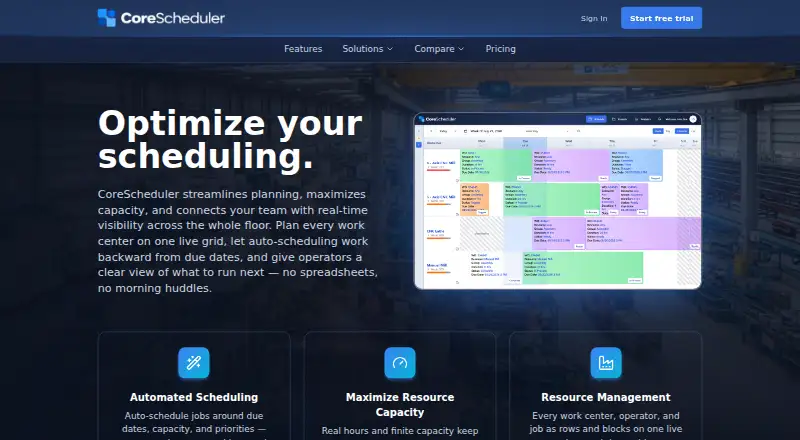
What CoreScheduler is
CoreScheduler is a cloud-based production scheduling tool for small and mid-size manufacturers. A live drag-and-drop grid combines work centers, operators and jobs, while automatic scheduling places work around due dates, machine and crew capacity, and priorities. Draft Mode lets teams test changes privately before publishing them. Shop-floor features include live job queues, schedule-change notifications and barcode scanning. Operators can see current and upcoming tasks and record start and finish actions from a phone, tablet or shop-floor display. Analytics show utilization, backlog hours, late and on-time tasks, and capacity forecasts by resource or group. The service describes role-based access, audit logs, tenant data isolation, TLS encryption in transit and session protections. Every new account begins with a free trial without a credit card. The single plan includes all features and costs $10 per user per month for users 1–20; users beyond 20 cost 5 USD per user per month. Mid-month changes are prorated, and cancellation can be made in account settings before the next billing cycle. The maker also offers a tailored 15-minute demo.
Who it suits
It is intended for small and mid-size manufacturers coordinating finite-capacity work across machines, crews and shop floors. Operators can use phones, tablets or shop-floor screens.
What it does well
- Live drag-and-drop schedule
- Automatic planning around capacity and priorities
- Private what-if planning with Draft Mode
- Shop-floor queues, notifications and barcode scanning
- Free trial without a credit card
What to know first
- No free plan after trial
- Per-user monthly billing
- Users beyond 20 cost 5 USD/user/mo.
- Cloud deployment only
Limits
The trial is free, but the ongoing plan is paid. The first 20 users cost $10/user/mo each; users beyond 20 cost $5/user/mo each, and mid-month changes are prorated.
Plans
| Plan | Billed and limits | Price |
|---|---|---|
| One plan | Per user per month for users 1–20; users 21+ are $5/user/mo. · First 20 users: $10/user/mo · each user beyond 20: $5/user/mo · all features included | $10 a month |
As corescheduler.net lists them, read 30 Sept 2026. The maker's own page has the final word.
Getting started
- Open the CoreScheduler website.
- Create an account to start the free trial; no credit card is required.
- Set up work centers, operators, and jobs in the schedule grid.
- Use the free trial to explore scheduling and shop-floor workflows.
- Request the maker's 15-minute demo tailored to your shop's scenario, if useful.
Verdict
CoreScheduler connects visual scheduling with shop-floor updates and resource analytics. Its per-user plan includes all listed features, with pricing that changes after the first 20 users and prorated billing for mid-month adjustments.
Questions
What does CoreScheduler cost?
Its one plan costs $10/user/mo for the first 20 users and $5/user/mo for each user beyond 20. Billing is per user per month, and mid-month changes are prorated.
Is there a free plan or trial?
There is no free plan. Every new account starts with a free trial, and a credit card is not required to begin.
Which platform does it support?
CoreScheduler is available on the web and is deployed in the cloud.
What does the plan include?
The one plan includes all features, including scheduling, Draft Mode, shop-floor updates, and analytics.
Can operators use phones or tablets?
Operators can view their current task and upcoming work and record start and finish actions on a phone, tablet, or shop-floor screen.
Facts from CoreScheduler's own pages
- Analytics
- The analytics view includes utilization, backlog hours, late and on-time tasks, and capacity forecasts by resource or group. · corescheduler.net, 30 Sept 2026
- Auto-scheduling
- It can auto-schedule jobs around due dates, capacity, and priorities across machines and crews. · corescheduler.net, 30 Sept 2026
- Cancellation
- The maker says customers can cancel from account settings at any time and will not be charged for the next billing cycle. · corescheduler.net, 30 Sept 2026
- Demo
- The maker offers a 15-minute demo tailored to the shop's scenario, with a live schedule. · corescheduler.net, 30 Sept 2026
- Draft planning
- Draft Mode lets teams test schedule changes privately before publishing them. · corescheduler.net, 30 Sept 2026
- Operator dashboard
- Operators can view their current task, start and finish actions, and upcoming work on a phone, tablet, or shop-floor screen. · corescheduler.net, 30 Sept 2026
- Purpose
- CoreScheduler is a live visual production scheduling tool aimed at small and mid-size manufacturers. · corescheduler.net, 30 Sept 2026
- Schedule grid
- It puts work centers, operators, and jobs on one live drag-and-drop schedule. · corescheduler.net, 30 Sept 2026
- Security
- The security page describes role-based access, audit logs, tenant data isolation, TLS encryption in transit, and session protections. · corescheduler.net, 30 Sept 2026
- Setup
- The maker says shops can set up CoreScheduler in a day and describes it as a per-seat subscription. · corescheduler.net, 30 Sept 2026
- Shop-floor visibility
- Live job queues, schedule-change notifications, and barcode scanning connect the schedule with the shop floor. · corescheduler.net, 30 Sept 2026
- Trial and billing
- Every new account starts with a free trial without requiring a credit card; billing is per user per month, with mid-month changes prorated. · corescheduler.net, 30 Sept 2026
Where CoreScheduler stands on Freedom251
- Production Scheduling Software#5 of 23