Freedom251 › Shop Floor Management Software

Asprova APS
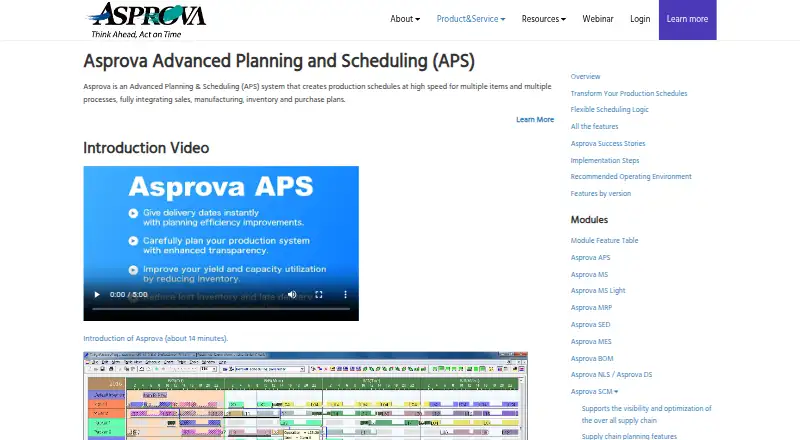
What Asprova APS is
Asprova APS is production scheduling software for factories and manufacturers. It creates schedules for multiple items and processes by integrating sales, manufacturing, inventory and purchasing plans. Its synchronized multi-process planning supports capacity planning from standard times down to the second, taking individual machines, molds and personnel into account. Planners can create multiple scenarios, adjust an existing plan manually in part, then reschedule. Charts and graphs show line overloads, delivery delays and load discrepancies by day, week or month. Asprova connects to relational database tables and CSV files, with configurable mappings and differential imports and exports. The maker says it can integrate with most ERP, production management, MES, shop floor control and legacy systems. Optional modules include Sales, Purchasing, KPI, Time Constraint MAX, Resource Lock, Event and Optimization. The software is self-hosted for Windows. A trial edition can be used with e-learning exercises, but no duration is stated. Pricing is on request; implementation, training, consultation and integration may add costs.
Who it suits
Asprova APS is aimed at factories and manufacturers planning production across multiple items and processes. It may suit planners who need to account for machine, mold and personnel capacity or compare scenarios.
What it does well
- Plans can account for individual machines, molds and personnel.
- Supports multiple planning scenarios.
- Charts show overloads and delivery delays.
- Trial edition can be paired with e-learning exercises.
What to know first
- Pricing is available on request.
- Implementation, training, consultation and integration may add costs.
- A maintenance contract is required to upgrade.
- 64-bit APS is not available for normal download.
Limits
Package pricing is open, and implementation, training, consultation and integration may add costs. The maker says a maintenance contract is required to upgrade Asprova.
Plans
| Plan | Billed and limits | Price |
|---|---|---|
| Asprova APS | Package price is open; implementation, training, consultation and integration may add costs · Request a quote from a distributor | On request |
As asprova.com lists them, read 4 Oct 2026. The maker's own page has the final word.
Getting started
- Contact an Asprova distributor to request a package quote.
- Ask about the trial edition and use it with the e-learning exercises.
- Prepare data from relational database tables or CSV files.
- Configure data mappings and differential imports and exports for connected systems.
- Install the self-hosted software on a supported Windows system.
Asprova APS is an on-premises production-planning system for factories coordinating orders, processes and constrained resources. It fits manufacturers whose planners need fine-grained capacity schedules and what-if analysis rather than a simple job list. Its depth is attractive, but Windows deployment, quote-based buying and upgrade conditions make commercial and technical fit essential.
Overview
The software links sales demand, manufacturing activity, inventory and purchasing into synchronized plans for multiple items and processes. Capacity calculations can use standard times to the second, while schedules model individual machines, molds and personnel. That precision is useful when a bottleneck or specialist resource determines delivery dates; smaller operations with uncomplicated routing may find the planning model heavier than necessary.
Planners can maintain several scenarios, alter part of an existing plan manually and then reschedule. Visual charts expose overloaded lines, late deliveries and differences between required and available load, with day, week and month perspectives. These views support practical trade-off discussions instead of relying on a single forecast.
Key features
- Multi-process scheduling: Synchronized schedules connect orders with manufacturing, inventory and purchasing plans, helping production teams see the consequences of demand across the operation.
- Machine and labor capacity: Plans can include specific machines, molds and people, with both machine and labor capacity planning. This suits facilities where interchangeable-resource assumptions would produce unrealistic dates.
- Scenario planning: Multiple planning scenarios and partial manual edits before rescheduling make it possible to compare alternatives while retaining useful planner decisions.
- Material constraints: Material requirements can be reflected in the schedule, so a theoretically open machine is not treated as ready when required inputs are unavailable.
- Data exchange: Connections to relational database tables and CSV files support imports and exports. Configurable mappings and differential transfers can limit the volume of data exchanged with ERP, MES, shop-floor-control, production-management and legacy systems.
- Optional modules: Sales, Purchasing, KPI, Time Constraint MAX, Resource Lock, Event and Optimization functions are available as optional additions, allowing a deployment to target particular planning needs but potentially increasing scope and cost.
Pricing
Asprova APS uses custom pricing. The package price is open, and implementation, training, consultation and integration can add to the total, so a distributor quote is needed before comparing it with alternatives. A trial edition is available and can be used with the maker's e-learning exercises, but no trial duration is stated.
The single published plan, Asprova APS, is the complete production-scheduling offering rather than a free or scaled-down tier. It is the natural fit for manufacturers needing detailed resource, material and scenario planning. Buyers should budget for services as well as software and confirm what the quote covers.
Platforms
Deployment is on premises and self-hosted on Windows. The maker lists Windows 11, Windows 10 and several Windows Server versions for Asprova NLS/DS; the 64-bit APS edition is not offered as a normal download. Licensing is typically enabled with a USB dongle, and a maintenance contract is required to upgrade. More than 30 partners provide sales and support contacts, alongside free webinars and e-learning.
Who it's for
Asprova APS is aimed at factories and manufacturers with multi-stage production, tight machine or labor constraints, and a need to align purchasing and inventory with shop-floor schedules. It is especially relevant when planners must compare scenarios or preserve manual adjustments during rescheduling. Organizations wanting browser-first deployment, transparent self-service pricing or a lightweight scheduling board should look elsewhere.
Pros and cons
Pros
- Very granular capacity modeling: Second-level standard times and named machines, molds and personnel support realistic schedules.
- Useful what-if workflow: Scenario creation plus partial edits before rescheduling helps evaluate changes without discarding all prior planning work.
- Broad integration approach: Database and CSV connectivity, mappings and differential transfers can fit established ERP, MES and legacy environments.
- Operational visibility: Overload, delay and load-discrepancy charts give planners several time horizons for diagnosis.
Cons
- Ownership cost is not transparent: Pricing is by quote, with implementation and related services potentially extra.
- Windows and on-premises commitment: It is not a general web or cross-platform deployment.
- Upgrade dependency: A maintenance contract is required for upgrades, and dongle-based licensing adds a physical administration step.
- Optional scope can expand: Specialized modules may improve fit while increasing configuration and purchasing complexity.
Alternatives
For open-source flexibility and Linux, API or web deployment, choose frePPLe; its Community edition is free, while Cloud is capped at six scenarios. Phoenix APS is worth considering for a free beta evaluation, though its temporary license is not for production use.
GE Vernova Proficy Plant Applications suits buyers seeking hosted or on-premises support across process, discrete and mixed manufacturing. NETVIBES is an enterprise data-science option with Android, iOS, web and self-hosted access.
For a subscription-oriented scheduler on Android, iOS and Windows, consider FitFactory Scheduler; training is charged separately at £955+VAT per day. Accevo APS offers either perpetual on-premises ownership or a subscription license. DELMIA Demand Planning is a Windows alternative priced according to package, business size, contract and requirements. PlanetTogether APS provides self-hosted or web deployment with subscription or perpetual licensing.
For broader category comparisons, see Production Scheduling Software, Manufacturing Scheduling Software, Advanced Planning and Scheduling Software and Material Requirements Planning Software.
Verdict
Choose Asprova APS when a manufacturing operation needs synchronized, highly detailed schedules across materials, machines, molds and labor, with serious scenario analysis. Look elsewhere if transparent pricing, browser access, cross-platform operation or simple scheduling matters more than that depth. Before committing, obtain a distributor quote that separates licensing, implementation, training, integration and maintenance.
Verdict
Asprova APS offers detailed production scheduling, scenario planning and connections to existing systems. Buyers should clarify implementation costs, licensing and upgrade arrangements with a distributor.
Questions
How much does Asprova APS cost?
The package price is open; request a quote from a distributor. Implementation, training, consultation and integration may add costs.
Is there a free trial?
The maker describes a trial edition that can be used with its e-learning exercises.
Which operating system does Asprova APS support?
It is self-hosted Windows software. The maker lists Windows 11, Windows 10 and several Windows Server versions for Asprova NLS/DS.
Can it connect to other business systems?
It connects to relational database tables and CSV files. The maker says it can integrate with most ERP, production management, MES, shop floor control and legacy systems.
What optional modules are available?
Optional functions include Sales, Purchasing, KPI, Time Constraint MAX, Resource Lock, Event and Optimization.
Who makes Asprova APS?
Asprova was founded in 1994 and is headquartered in Tokyo, Japan.
Facts from Asprova APS's own pages
- Founded
- 1994 · asprova.com, 28 Sept 2026
- Headquarters
- Tokyo, Japan · asprova.com, 28 Sept 2026
- Integration method
- Users can configure data mappings and differential imports and exports to reduce the amount of data exchanged with existing systems. · asprova.com, 4 Oct 2026
- Integrations
- Asprova can connect to external relational database tables and CSV files, and the maker says it can integrate with most ERP, production management, MES, shop floor control and legacy systems. · asprova.com, 4 Oct 2026
- Intended users
- The company describes Asprova APS as production scheduling software for factories and manufacturers. · asprova.com, 4 Oct 2026
- License and maintenance
- Asprova licenses are typically enabled via a USB dongle, and the maker says a maintenance contract is required to upgrade Asprova. · asprova.com, 4 Oct 2026
- Operating system
- The maker lists Windows 11, Windows 10 and several Windows Server versions for Asprova NLS/DS, and says the 64-bit APS version is not available for normal download. · asprova.com, 4 Oct 2026
- Optional modules
- Optional functions include Sales, Purchasing, KPI, Time Constraint MAX, Resource Lock, Event and Optimization. · asprova.com, 4 Oct 2026
- Planning scenarios
- Standard functionality supports multiple planning scenarios, and previously created plans can be partially adjusted manually before rescheduling. · asprova.com, 4 Oct 2026
- Purpose
- Asprova APS creates production schedules for multiple items and processes, integrating sales, manufacturing, inventory and purchase plans. · asprova.com, 4 Oct 2026
- Resources
- Production plans can account for individual machines, molds and personnel. · asprova.com, 4 Oct 2026
- Scheduling
- It supports synchronized multi-process plans and capacity planning based on standard times, down to the second. · asprova.com, 4 Oct 2026
- Support
- The company says it has sales and support contacts through more than 30 partners and offers free webinars and e-learning content. · asprova.com, 4 Oct 2026
- Trial and training
- The maker describes a trial edition that can be used with its e-learning exercises; the source does not state a trial duration. · asprova.com, 4 Oct 2026
- Visual tools
- Charts and graphs show line overloads and delivery delays, and load discrepancies can be viewed by day, week or month. · asprova.com, 4 Oct 2026