Cool Retro Term
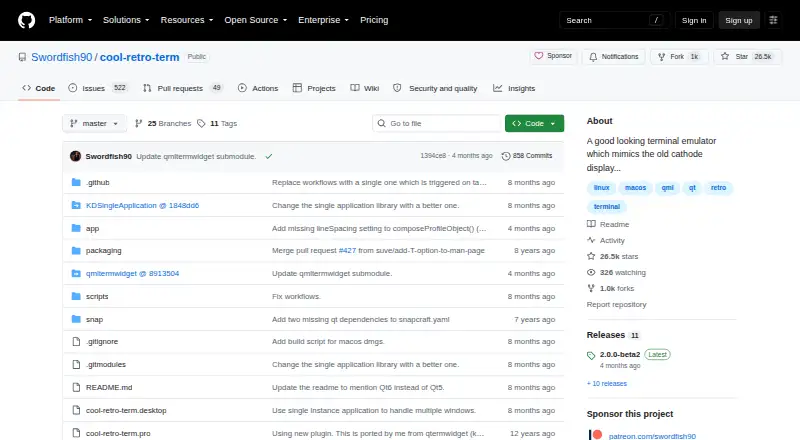
What Cool Retro Term is
Cool Retro Term is a free, open-source terminal emulator for Linux and macOS designed to give terminal sessions the look of cathode tube screens. The project describes it as customizable and reasonably lightweight. Users can reach color, font and visual-effect settings through the context menu. Community theme profiles include effects such as flicker, scanline rasterization, screen curvature, static noise and burn-in, and the wiki provides JSON theme examples.
Release notes list support for multiple tabs and windows, as well as shortcuts for managing tabs. Cool Retro Term uses the QML port of qtermwidget, a terminal widget based on Konsole. Linux users can download an AppImage or look for the application in distribution repositories, including those for Ubuntu, Fedora and Arch; macOS users can download a DMG. The project wiki includes installation and build instructions for both systems, along with theme guidance and information about the terminal widget.
Who it suits
Cool Retro Term suits Linux and macOS users who want a customizable terminal with CRT-style visual effects. Its theme options may appeal to users who want to adjust colors, fonts and screen effects.
What it does well
- Customizable colors, fonts and visual effects.
- Community themes include scanlines, curvature and static noise.
- Release notes list multiple tabs and windows.
- Available as a Linux AppImage and macOS DMG.
- Open-source and free.
What to know first
- Available platforms are Linux and macOS.
- Build requirements differ between the README and Linux build wiki.
Plans
| Plan | Billed and limits | Price |
|---|---|---|
| Free | Linux and macOS desktop terminal emulator · AppImage or DMG releases · distribution packages | Free |
As github.com lists them, read 15 Oct 2026. The maker's own page has the final word.
Getting started
- Visit the Cool Retro Term GitHub page.
- On Linux, download the latest AppImage from Releases or check your distribution’s official repository.
- On macOS, download the DMG from Releases.
- Use the context menu to adjust colors, fonts, or visual effects.
- Consult the project wiki for installation, build, or theme guidance.
Verdict
Cool Retro Term pairs a terminal emulator with configurable CRT-inspired appearance options. Check its system-specific installation guidance if you plan to build it yourself.
Questions
How much does Cool Retro Term cost?
The Free plan is listed as free. The project describes the emulator as free.
Which platforms does it support?
The listed platforms are Linux and macOS.
Is Cool Retro Term open-source?
Yes. It is listed as open-source.
Where can I download it?
The README directs Linux users to the latest AppImage in Releases and macOS users to the DMG there. It also says many distributions package it in their official repositories.
Can I customize its appearance?
Yes. Colors, fonts, and visual effects are available through the context menu. Community theme profiles include several CRT-style effects.
What does the project wiki provide?
It provides installation and Linux/macOS build instructions, theme guidance, and information about the terminal widget.
Facts from Cool Retro Term's own pages
- API and SDK
- The official README and wiki describe a desktop application and build process but do not document a public API or SDK. · github.com, 15 Oct 2026
- Build requirement
- The README says the application requires Qt6, while the Linux build wiki lists Qt5 dependencies and qmake build instructions. · github.com, 7 Oct 2026
- Configuration format
- An independent repository analysis reports that settings are configured through the GUI and no documented configuration-file format is provided. · hysenlabs.com, 15 Oct 2026
- Creator identity
- The Swordfish90 GitHub account identifies the maintainer as Filippo Scognamiglio. · github.com, 15 Oct 2026
- CRT effects
- Its presentation includes scanlines, phosphor glow, screen curvature, flicker, bloom and burn-in effects. · techradar.com, 15 Oct 2026
- Design
- The project describes the emulator as customizable and reasonably lightweight. · github.com, 7 Oct 2026
- Distribution packages
- The README says many distributions, including Ubuntu, Fedora, and Arch, package the application in their official repositories. · github.com, 7 Oct 2026
- Documentation depth
- Documentation consists mainly of the README, GitHub wiki build pages and release notes. · github.com, 15 Oct 2026
- Download
- The README directs users to download the latest AppImage for Linux or DMG for macOS from Releases. · github.com, 7 Oct 2026
- Frame customization
- The 2.0.0-beta1 release added a frame with customizable size, color and shininess. · github.com, 15 Oct 2026
- Free plan
- Yes · github.com, 20 Sept 2026
- Headquarters
- Albuzzano, Italy · github.com, 28 Sept 2026
- Integration
- Cool Retro Term uses the QML port of qtermwidget, a terminal widget based on Konsole. · github.com, 7 Oct 2026
- Keyboard shortcuts
- The 2.0.0-beta2 release notes list tab management shortcuts. · github.com, 7 Oct 2026
- Latest release
- GitHub lists 2.0.0-beta2 as the latest release, published 31 May 2026. · github.com, 15 Oct 2026
- Licence
- The repository contains GPL-2.0 and GPL-3.0 licence text files, while an independent directory classifies the project as open source under GPL-3. · terminaltrove.com, 15 Oct 2026
- Limit: missing functionality
- TechRadar lists lack of functionality as a reason to avoid the application. · techradar.com, 15 Oct 2026
- Limit: older Snap package
- It's FOSS warns that the Snap package is older than the version available in distribution repositories. · itsfoss.com, 15 Oct 2026
- Limit: resource use
- Softpedia reports that the program is relatively resource-heavy for a terminal emulator. · linux.softpedia.com, 15 Oct 2026
- Limit: unsupported features
- Terminal Trove lists no image support, Sixel, Kitty graphics, true color, split panes, shell integration, notifications or built-in multiplexer. · terminaltrove.com, 15 Oct 2026
- Limit: weaker modern capability
- Softpedia says it is less capable and customizable than many modern open-source terminal emulators. · linux.softpedia.com, 15 Oct 2026
- Linux build
- The Linux wiki documents Qt5 package dependencies, recursive cloning, qmake and make. · github.com, 15 Oct 2026
- Linux installation
- Linux users can download an AppImage or use packages supplied by distributions such as Ubuntu, Fedora and Arch. · github.com, 15 Oct 2026
- macOS build
- The macOS wiki documents Qt5 LTS dependencies, qmake, make and macdeployqt DMG creation. · github.com, 15 Oct 2026
Where Cool Retro Term stands on Freedom251
- Terminal apps#1 of 41
- Terminal Emulators#1 of 40