Freedom251 › RSS Reader Software

CommaFeed
What CommaFeed is
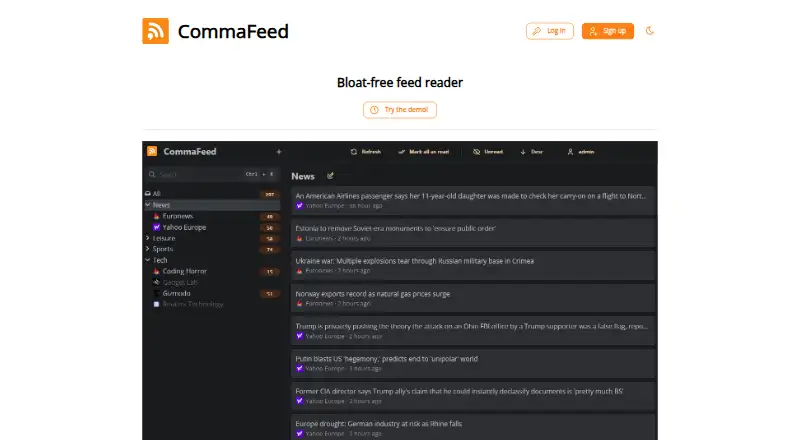
CommaFeed is a personal RSS reader inspired by Google Reader, available through a public instance or self-hosted deployment. It has four layouts, light and dark themes, and a responsive interface for mobile and desktop. Readers can import and export OPML files and set rules to mark articles as read automatically. It also supports keyboard shortcuts, right-to-left feeds, and more than 25 languages. APIs include REST, Fever, and Google Reader interfaces for native mobile apps; the project also lists a browser extension and push notifications. Self-hosted installations support H2, PostgreSQL, MySQL, and MariaDB, with Docker images and downloadable packages including Linux and Windows builds. The free public instance has no ads or tracking, according to the project, and donations fund the service. Its account limit is 1,000 feeds, with up to 500 entries per feed kept for 365 days. Public feeds are fetched every 10 minutes to 24 hours; feeds over 5 MB are ignored, and public-instance push notifications are disabled.
Who it suits
CommaFeed suits individual RSS readers who want a public instance or the option to host their own installation. Its language, layout, and feed-management options support different reading preferences.
What it does well
- Four layouts and light or dark themes
- OPML import and export
- Supports more than 25 languages
- Self-hosted database choices include four systems
- Public instance has no ads or tracking
What to know first
- Public accounts are limited to 1,000 feeds
- Public-instance push notifications are disabled
- Feeds over 5 MB are ignored
Limits
The free public plan allows 1,000 feeds per account and 500 entries per feed, retained for 365 days. It ignores feeds over 5 MB and disables push notifications; feeds are fetched every 10 minutes to 24 hours, and feeds for accounts inactive for 30 days pause refreshing until the user interacts again.
Plans
| Plan | Billed and limits | Price |
|---|---|---|
| Public instance | 1000 feeds per account · 500 entries per feed · entries kept for 365 days · feeds over 5 MB ignored · push notifications disabled | Free |
As commafeed.com lists them, read 4 Oct 2026. The maker's own page has the final word.
Getting started
- Open the CommaFeed website to use the public instance.
- Import feeds with an OPML file or add feeds through the reader.
- Choose one of the four layouts and a light or dark theme.
- For self-hosting, use a Docker image or a downloadable package.
- Choose H2, PostgreSQL, MySQL, or MariaDB for a self-hosted installation.
CommaFeed is a personal RSS reader inspired by Google Reader, offered as a hosted service or a self-managed installation. It best suits individual readers who want control over deployment, feed portability, and reading presentation. The public option is convenient and private, while self-hosting is the stronger choice when refresh behavior and infrastructure control matter more than convenience.
Overview
CommaFeed keeps its focus on personal feed reading but gives you an uncommon choice of where the service runs. The public instance avoids server administration; self-hosting lets technically capable users choose the database and package that fit their environment. This is a poor match for collaborative newsrooms or households needing shared access because team sharing is not provided.
The public service has no ads or tracking, and CommaFeed says it does not exploit or sell user data; donations fund its operation. Its 1,000-feed allowance is ample for most individual collections. However, 500 entries per feed and 365-day retention make the hosted account a reader rather than a dependable long-term archive.
Key features
Four layouts and light and dark themes let you adjust density and appearance instead of accepting a single reading view. The responsive interface works on mobile and desktop, while keyboard shortcuts speed navigation for frequent readers. Right-to-left feed support and more than 25 languages make it suitable for a wider range of reading habits and locales.
OPML import and export provide a practical way to migrate a collection in or out. Rules can automatically mark matching articles as read, which is useful for reducing repetitive or low-priority items without manually processing every feed.
A REST API and Fever and Google Reader-compatible APIs allow native mobile clients to connect. CommaFeed also lists a browser extension and push notifications for new articles. Those notifications are not available on the public plan, so they are mainly relevant to a self-hosted deployment or another compatible setup.
Self-hosting supports H2, PostgreSQL, MySQL, and MariaDB. Docker images and downloadable packages include native Linux and Windows builds, plus a JVM package described as working across platforms. CommaFeed blocks access to local resources by default to help prevent SSRF attacks; administrators should treat disabling that protection as a deliberate security decision when users are untrusted.
Pricing
CommaFeed is free. The Public instance costs free and includes up to 1,000 feeds per account, 500 entries per feed, and entries retained for 365 days. Feeds larger than 5 MB are ignored, and push notifications are disabled. These limits are generous for ordinary personal reading but restrictive for oversized sources, notification-driven workflows, or archival use. There are no paid tiers or seat-based plans, and team sharing is unavailable.
Public-instance feeds refresh from every 10 minutes to every 24 hours, rather than on a single guaranteed schedule. Accounts inactive for 30 days stop getting feed refreshes until the user returns. Readers who need predictable, frequent updates should therefore favor self-hosting, where deployment control is the central advantage rather than a different paid allowance.
Platforms
CommaFeed is available through the web and supports API connections, browser extensions, Linux and Windows, and self-hosted deployment. The responsive web interface covers desktop and mobile screens, while the compatible APIs broaden client choices. Its packaging options make it practical for administrators who prefer Docker, native builds, or a JVM-based installation.
Who it's for
Choose CommaFeed if you want a personal reader with a substantial free feed allowance, portable OPML collections, multiple layouts, and the option to run the service yourself. It is particularly well suited to readers comfortable administering a database-backed service or those who value a no-ad, no-tracking public instance.
Look elsewhere if you need shared team workflows, guaranteed short refresh intervals on a hosted plan, push alerts without self-hosting, or a large permanent article archive. The public limits and inactivity rule are meaningful constraints for monitoring and research use.
Pros and cons
Pros
- Two deployment paths: use the public service or self-host it with Docker and several database choices.
- Large personal allowance: 1,000 feeds per public account covers substantially more than a small starter collection.
- Portable and adaptable reading: OPML transfer, four layouts, themes, shortcuts, RTL support, and more than 25 languages.
- Privacy-focused public service: no ads or tracking, with a stated policy against exploiting or selling user data.
- Client integration: REST, Fever, and Google Reader APIs support native mobile applications.
Cons
- Hosted freshness varies: public feeds may refresh only every 24 hours, and inactive accounts stop refreshing after 30 days.
- Archive and source caps: each feed keeps 500 entries for 365 days, while feeds over 5 MB are ignored.
- No hosted push alerts: push notifications are disabled on the public plan.
- No collaboration: team sharing is not available.
- Self-hosting demands administration: database and deployment choices bring operational responsibility that a hosted reader avoids.
Alternatives
RSS Reader Software is the broader directory for comparing more readers.
Pick Fluent Reader instead if you want a free, open-source desktop reader for Android, iOS, Linux, macOS, or Windows. FreshRSS is a better fit for a free, self-hosted RSS and Atom aggregator spanning web, mobile, and desktop platforms. Feeder suits readers who prefer a freemium hosted product with a 200-feed free tier, 30-minute updates, and paid upgrades. Feedly is the alternative for a freemium service with a free account, up to three personal Boards, and a trial option. Feedreader offers free Linux, web, and Windows editions plus a paid MySQL edition. Passman is another free, open-source option with no paid plan or usage limits stated. FeedBro is a freemium browser-oriented reader with a free feed allowance. Inoreader is suited to readers who want a freemium service with a 150-subscription free tier and a paid Pro plan.
Verdict
CommaFeed is a strong choice for individual RSS readers who value privacy, feed portability, and the ability to self-host across familiar databases and deployment formats. Choose it for the 1,000-feed public allowance or for the control a self-managed installation provides. Look elsewhere if you need team sharing, dependable hosted refreshes, push notifications on the free service, or an archive larger than its retention and entry caps.
Verdict
CommaFeed offers personal RSS reading through a public service or self-hosted deployment, with multiple feed-management and interface options. Public-instance limits include feed caps, ignored large feeds, and disabled push notifications.
Questions
Is CommaFeed free?
Yes. The public instance is listed as a free plan, and donations fund the service.
Can I host CommaFeed myself?
Yes. The project provides Docker images and downloadable packages, including Linux and Windows builds and a JVM package described as working on all platforms.
Which databases can self-hosted installations use?
Self-hosted installations support H2, PostgreSQL, MySQL, and MariaDB.
What platforms does CommaFeed support?
The listed platforms are API, extension, Linux, self-hosted, web, and Windows. Its responsive interface works on mobile and desktop.
What limits apply to the public instance?
The public plan allows 1,000 feeds per account and 500 entries per feed, retained for 365 days. It ignores feeds over 5 MB and has push notifications disabled.
Does CommaFeed have APIs for mobile apps?
Yes. It provides a REST API and Fever and Google Reader APIs for native mobile apps.
Facts from CommaFeed's own pages
- Accessibility and languages
- It supports keyboard shortcuts, right-to-left feeds, and more than 25 languages. · github.com, 4 Oct 2026
- APIs and mobile clients
- CommaFeed provides a REST API and Fever and Google Reader APIs for native mobile apps. · github.com, 4 Oct 2026
- Databases
- Self-hosted installations support H2, PostgreSQL, MySQL, and MariaDB. · github.com, 4 Oct 2026
- Deployment options
- The project provides Docker images and downloadable packages, including native Linux and Windows builds and a JVM package described as working on all platforms. · github.com, 4 Oct 2026
- Feed management
- Users can import and export OPML and set rules to automatically mark articles as read. · github.com, 4 Oct 2026
- Intended users
- The project describes CommaFeed as a personal RSS reader and offers both a public instance and self-hosted deployment. · github.com, 4 Oct 2026
- Layouts and themes
- It offers four layouts and light and dark themes. · github.com, 4 Oct 2026
- Notifications and browser extension
- The project lists push notifications for new articles and a browser extension among its features. · github.com, 4 Oct 2026
- Public instance privacy
- The project says its free public instance has no ads or tracking and does not exploit or sell user data; donations fund the service. · github.com, 4 Oct 2026
- Public instance refresh
- On the public instance, feeds are fetched every 10 minutes to 24 hours, and feeds for accounts inactive for 30 days are not refreshed until the user interacts again. · github.com, 4 Oct 2026
- Purpose
- CommaFeed is a Google Reader inspired, self-hosted personal RSS reader. · github.com, 4 Oct 2026
- Responsive interface
- The interface is responsive and works on mobile and desktop. · github.com, 4 Oct 2026
- Security
- CommaFeed blocks access to local resources by default to help prevent SSRF attacks; the project cautions against disabling this when users are untrusted. · github.com, 4 Oct 2026
Where CommaFeed stands on Freedom251
- RSS Reader Software#3 of 33