Freedom251 › AI Newsletter Generators

Feeder
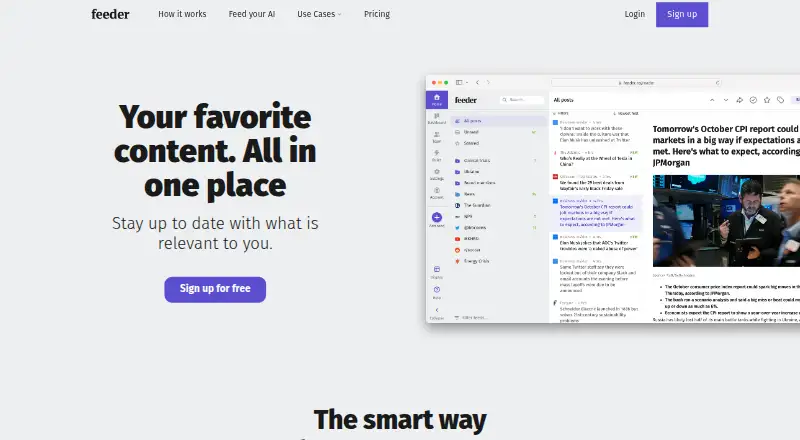
What Feeder is
Feeder gathers online sources selected by the user into a reading experience. Sources can include blogs, news, weather, government databases, job boards, Mastodon and newsletters. Users can filter posts by keywords or topics, exclude terms, organize feeds into folders, save favorites, create collections and share content. AI options include summaries, text-to-speech, feeds generated for pages without RSS, and a setup assistant. Feeder lists integrations for MCP, Slack, Microsoft Teams, Discord, Telegram, Zapier and webhooks, with availability depending on plan. The Free plan allows up to 200 feeds, checks as often as every 30 minutes, 50 posts of history per feed and two AI summaries per day. Plus costs $7.99 a year, billed yearly; Professional costs $14.99 a year, billed yearly. Enterprise pricing is available by contacting sales. Feeder offers web, browser extension, iOS and Android access. It has no self-serve API keys; REST API access is available by request for app builders and is included with Enterprise.
Who it suits
Feeder suits people who want to follow and organize many online sources, with filtering and AI reading tools. Its listed use cases include cybersecurity, marketing, software engineering and financial services.
What it does well
- Supports varied online sources, including newsletters.
- Feeds can be filtered and organized.
- Includes AI summaries and text-to-speech.
- Available on web, extension, iOS and Android.
What to know first
- Free plan is limited to 200 feeds.
- Free plan includes two AI summaries daily.
- No self-serve API keys.
Limits
The Free plan allows up to 200 feeds, stores 50 posts of history per feed and includes two AI summaries per day. Its default check interval is every two hours, with checks as often as every 30 minutes. Plus is $9.99 a month and Professional is $19.99 a month; Enterprise pricing is available by contacting sales.
Plans
| Plan | Billed and limits | Price |
|---|---|---|
| Free | 200 feeds · 30-minute updates · RSS sources · ad-free · 50 posts/feed | Free |
| Professional | yearly per user · 10,000 feeds · 1-minute updates · collaboration · integrations · create RSS feeds · public dashboards | $14.99 a month |
| Professional | monthly per user · 10,000 feeds · 1-minute updates · collaboration · integrations · create RSS feeds · public dashboards | $19.99 a month |
| Plus | yearly · 2,500 feeds · 5-minute updates · premium sources · dashboard · rules and filters · email summaries | $7.99 a month |
| Plus | monthly · 2,500 feeds · 5-minute updates · premium sources · dashboard · rules and filters · email summaries | $9.99 a month |
| Enterprise | customized limits · SSO/SAML · custom permissions · invoice billing · webinars · premium support · all features | On request |
As feeder.co lists them, read 14 Oct 2026. The maker's own page has the final word.
Getting started
- Visit feeder.co.
- Choose web, Android, iOS or the extension.
- Start with the Free plan or select a paid plan.
- Add the online sources you want Feeder to track.
- Arrange feeds into folders and set keyword or topic filters.
Feeder suits readers and teams who need to monitor many kinds of online sources and sort incoming posts by relevance. Its strongest case is the mix of broad source coverage, filtering and AI-assisted reading; the trade-off is that faster refreshes and team features require a paid plan.
Overview
Feeder brings user-selected sources into one reading experience, covering blogs, news, weather, government databases, job boards, Mastodon and newsletters. That breadth makes it useful for both everyday reading and focused monitoring. Keyword and topic filters, with options to exclude terms, help cut noise; folders, favorites, collections and sharing help readers keep useful posts organized.
AI summaries and text-to-speech offer alternatives to reading every post in full. Feeder can also generate feeds for pages without RSS and includes an AI setup assistant. These additions make it more capable than a simple feed list, though the daily summary allowance is capped by plan.
Key features
Monitoring and organization
Feeder's range of sources and filtering tools suit people tracking several subjects or information streams at once. The Free plan supports up to 200 feeds, but its default check interval is two hours; checks can be as frequent as every 30 minutes. Readers who need near-current updates will find that interval limiting and may prefer a paid tier.
AI and integrations
Summaries can help scan posts quickly, while text-to-speech provides another way to consume them. AI-generated feeds address pages without RSS, a useful extension beyond conventional feed reading. Feeder also connects with MCP, Slack, Microsoft Teams, Discord, Telegram, Zapier and webhooks, but integration availability varies by plan.
App builders should note that Feeder does not provide self-serve API keys. REST API access is available by request, while Enterprise includes API access, making that tier the relevant option for organizations that need a supported API path.
Pricing
Feeder uses a freemium model and has no free trial. Its free tier is capable for personal monitoring, but the short post history and slower default refresh make it less suited to time-sensitive tracking.
| Plan | Price and terms | What it includes |
|---|---|---|
| Free | free | Up to 200 feeds, 30 minute updates, 50 posts of history per feed and 2 AI summaries per day. The default check interval is two hours. |
| Plus | $7.99 a year; billed yearly; $7.99 a month | Up to 2,500 feeds, 5 minute updates, premium sources, dashboard, rules and filters, and 10 AI summaries per day. |
| Professional | $14.99 a year; billed yearly; $14.99 per user a month | Up to 10,000 feeds, 1 minute updates, collaboration, software integrations, RSS feed creation and 60 AI summaries per day. |
| Enterprise | Custom pricing; contact sales for a price quote | Customized limits, SSO/SAML, custom permissions, invoice billing, webinars, premium support and API access. |
Plus is the practical step up for an individual who wants a much larger feed allowance, five-minute checks and more summaries. Professional is aimed at teams: collaboration and software integrations accompany its higher feed and summary limits, while its per-user monthly rate matters as seats grow. Enterprise is for organizations needing tailored limits, identity controls or API access. Feeder directs questions to [email protected] and says the team will respond as soon as possible.
Platforms
Feeder is available on web, iOS and Android, with a browser extension. That mix supports desktop monitoring as well as reading on mobile.
Who it's for
Feeder presents use cases for cybersecurity teams, marketing professionals, software engineers and financial services. Its broad source support and filters are most valuable when monitoring spans multiple subjects or specialized sources. For casual readers with a small number of feeds, Free may be enough; readers who need faster updates, longer history, collaboration or integrations have a clearer reason to pay.
Pros and cons
- Pros: The source mix includes specialist channels such as government databases, job boards and Mastodon, not only blogs and news.
- Pros: Keyword and topic filters, exclusions, folders and collections provide several ways to manage high-volume reading.
- Pros: AI summaries, text-to-speech and feed generation for pages without RSS extend how readers can consume and collect content.
- Cons: Free's default two-hour check interval and 50-post history per feed may frustrate readers following fast-moving topics.
- Cons: AI summary quotas are limited on every tier, including two per day on Free.
- Cons: App builders cannot create their own API keys; REST API access requires a request or Enterprise.
Alternatives
Choose an RSS Reader Software option if you want to compare tools in the same broad reading category. For newsletter-creation workflows rather than source monitoring, the AI Newsletter Generators list is a better starting point.
- Audienceful is a freemium web and API option for newsletter work, with a free plan that includes 1,000 contacts, one collaborator and one automated journey.
- AWeber is a freemium web and API alternative with a free plan offering up to 500 subscribers and 3,000 monthly emails, plus a free trial.
- DailyDraft is a freemium web and API alternative from the team behind ClickFunnels; its listed paid tier is $97 a month.
- DigestFlow AI is a freemium web option with a free plan for up to three RSS feeds and three newsletters per month.
- Letter is a freemium web option for generating newsletters, with a free plan for one letter and a Pro plan at $20 a month.
- Welcome.AI Plus is a freemium web option with a free plan that includes company and category follows, bookmarks, AI briefings and a personalized digest email.
- Pressmark is a freemium web option with a free tier of 50 credits per month and a Pro tier at $39 a month.
- WittyHat is another freemium web option.
Verdict
Feeder is a strong choice for readers and teams who need to track varied sources, filter out noise and organize discoveries in one place. Its free plan makes it possible to start with a substantial feed count, while paid tiers make sense for faster refreshes, larger monitoring loads and collaboration. Look elsewhere if you need a self-serve API key or a reader with fewer limits on update speed and history.
Verdict
Feeder combines source tracking, filtering, organization and AI reading features. Plan limits differ, and app builders need to request REST API access unless they use Enterprise.
Questions
Does Feeder have a free plan?
Yes. The Free plan costs nothing and supports up to 200 feeds, 50 posts of history per feed and two AI summaries per day.
How much do the paid plans cost?
Plus costs $9.99 a month, billed monthly. Professional costs $19.99 a month, billed monthly; Enterprise pricing is available by contacting sales.
Which platforms does Feeder support?
Feeder is available on the web, Android, iOS and as an extension.
What integrations does Feeder list?
It lists MCP, Slack, Microsoft Teams, Discord, Telegram, Zapier and webhooks. Availability varies by integration and plan.
Can I get API access?
Feeder does not offer self-serve API keys. REST API access is available by request for app builders and is part of Enterprise.
Where is Feeder based?
Feeder is headquartered in Stockholm, Sweden.
Facts from Feeder's own pages
- AI features
- Feeder offers AI summaries, text-to-speech, AI-generated feeds for pages without RSS, and an AI setup assistant. · feeder.co, 30 Sept 2026
- AI functions
- Optional AI functions include post summaries, translation, beta audio narration and feeds generated from pages without RSS. · feeder.co, 14 Oct 2026
- AI quotas
- The Free tier includes two summaries per day and three AI feeds; Professional includes 60 summaries, 5,000 translated posts, five audio narrations and 200 AI feeds daily or in-plan. · feeder.co, 14 Oct 2026
- Android requirement
- The Feeder.co Android app supports phones and tablets running Android 7.0 or later. · feeder.co, 14 Oct 2026
- API documentation depth
- The public feeder-api repository documents OAuth2 endpoints and feed, folder, post and unread-count resources, but Feeder warns that its documentation was written in 2017 and may be outdated. · github.com, 14 Oct 2026
- API limits
- Feeder does not offer self-serve API keys; REST API access is available by request for app builders, and API access is part of Enterprise. · feeder.co, 30 Sept 2026
- Company legal name
- The service is operated by Really Simple i Stockholm AB, organization number 559064-1428. · feeder.co, 14 Oct 2026
- Company size
- LinkedIn lists Feeder as a privately held software-development company with 2–10 employees, headquartered in Stockholm. · linkedin.com, 14 Oct 2026
- Content sources
- Feeder connects to sources including blogs, news, weather, government databases, job boards, Mastodon and newsletters. · feeder.co, 30 Sept 2026
- Cross-platform sync
- Logged-in web, extension, iOS and Android clients synchronize feeds, folders and read state through Feeder servers. · feeder.co, 14 Oct 2026
- Data handling
- Feeder stores account email, device IP addresses, device identifiers and user-created feeds, folders, preferences, starred posts and unread posts; web-server IP logs are kept seven days. · feeder.co, 14 Oct 2026
- Filtering
- Users can filter posts by keywords or topics and exclude keywords to reduce unwanted content. · feeder.co, 30 Sept 2026
- Filters
- Keyword include and exclude filters can reduce feed noise and trigger targeted notifications. · feeder.co, 14 Oct 2026
- Founders and start
- Erik Rothoff and Johan Rothoff are identified as founders, and Feeder says it began in 2010. · feeder.co, 14 Oct 2026
- Free-plan limit
- The Free plan allows up to 200 feeds and checks them as often as every 30 minutes; its default check interval is every two hours. · feeder.co, 30 Sept 2026
- Headquarters
- Stockholm, Sweden · feeder.co, 28 Sept 2026
- Hosted architecture
- Feeder describes its main product as software hosted on its own servers with client apps connecting to those servers. · feeder.co, 14 Oct 2026
- Integrations
- MCP, webhooks, Zapier, Slack, Microsoft Teams, Discord, Telegram and RSS or JSON publishing are documented, with availability depending on plan. · feeder.co, 14 Oct 2026
- Intended users
- Feeder presents use cases for cybersecurity teams, marketing professionals, software engineers and financial services. · feeder.co, 30 Sept 2026
- Limit: Android performance
- A Google Play reviewer reports sluggish swipes and a non-native, glitchy feel in the Android app. · play.google.com, 14 Oct 2026
- Limit: extension reliability
- Another Firefox reviewer says the extension must be disabled and re-enabled every few days to work again. · addons.mozilla.org, 14 Oct 2026
- Limit: extension settings
- A Firefox reviewer reports that layout settings are forgotten after a page reload. · addons.mozilla.org, 14 Oct 2026
- Limit: notification delays
- A Google Play reviewer says Gengo notifications sometimes arrived several hours late and found support unhelpful. · play.google.com, 14 Oct 2026
- Limit: subscription complaints
- Apple App Store reviews complain that unlimited reading is paywalled and that annual pricing can feel excessive or unclear. · apps.apple.com, 14 Oct 2026
Where Feeder stands on Freedom251
- AI Newsletter Generators#1 of 28
- RSS Reader Software#4 of 33