Freedom251 › AI Newsletter Generators
DigestFlow AI
What DigestFlow AI is
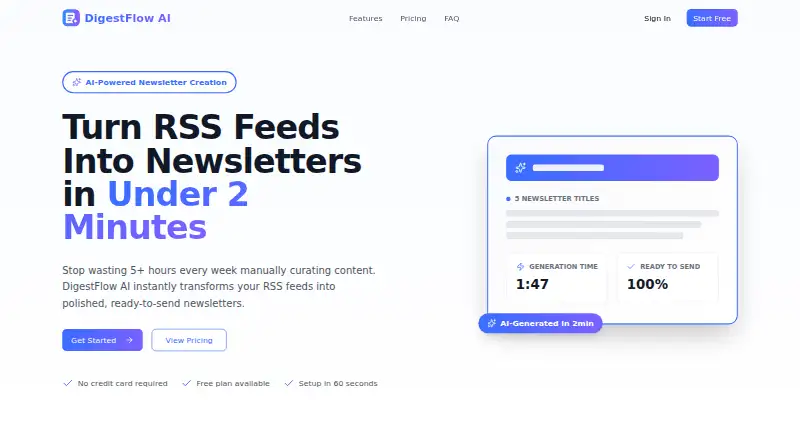
DigestFlow AI turns selected RSS feeds into newsletter drafts for users to copy into an email or publishing service. A generation includes five title ideas, five subject lines, a complete newsletter body, and top highlights. The service selects five important stories from the chosen sources, which can include blogs, news sites, podcasts, industry publications, and company updates. Users can choose daily, weekly, monthly, or custom date ranges; the site says generation takes under two minutes. DigestFlow does not send email directly. Drafts can be copied into services including Mailchimp, ConvertKit or Kit, Substack, Beehiiv, Klaviyo, and ActiveCampaign. Pro users can set audience context, brand voice, and tone, and edit the generated copy. The Free plan allows up to three RSS feeds and three newsletters per month, with no history. Pro costs $8.99 a month and includes unlimited feeds and newsletters, saved history, custom settings, and priority support. A seven-day trial is listed. The service says feed URLs and generated content are encrypted, not shared with third parties, and remain user-owned.
Who it suits
DigestFlow AI suits solo newsletter operators, content marketers, publishers, and teams that regularly prepare digests from RSS sources. It is for drafting and exporting copy, not sending newsletters directly.
What it does well
- Generates titles, subject lines, body, and highlights.
- Supports daily, weekly, monthly, and custom periods.
- Works with RSS sources such as blogs and podcasts.
- Pro includes brand voice and audience settings.
- Pro costs $8.99 a month.
What to know first
- Does not send emails directly.
- Free plan is limited to three feeds.
- Free plan allows three newsletters monthly and has no history.
Limits
The Free plan allows up to three RSS feeds and three newsletters per month, and it does not include history. Pro costs $8.99 a month and includes unlimited feeds and newsletters.
Plans
| Plan | Billed and limits | Price |
|---|---|---|
| Free | Always free · Up to 3 RSS feeds · Up to 3 newsletters per month · Full Newsletter body · Basic generation (5 titles, 5 subjects, body, top 5) · No history | Free |
| Pro | per month · Unlimited RSS feeds · Unlimited newsletters · Save history · Custom settings (brand voice, tone, audience) · Priority support | $8.99 a month |
As digestflowai.com lists them, read 30 Sept 2026. The maker's own page has the final word.
Getting started
- Open the DigestFlow AI website.
- Choose the Free plan or start the seven-day trial.
- Add RSS sources such as blogs, news sites, podcasts, industry publications, or company updates.
- Choose a daily, weekly, monthly, or custom date range.
- Generate and edit the draft, then copy it into an email or publishing service.
DigestFlow AI is a web-based RSS-to-newsletter drafting tool for solo publishers, marketing teams, agencies, and content marketers. It is most useful when you already send through another email or publishing service and want AI to assemble a repeatable first draft. The main question is whether its focused curation and Pro controls justify adding a separate drafting step to your workflow.
Overview
DigestFlow AI turns selected RSS sources into a newsletter package: story highlights, title choices, subject-line choices, and a complete body. You choose the coverage period, review the generated copy, and move it to your existing sending tool. This narrow workflow can reduce the routine work of building recurring digests, but it is not an all-in-one newsletter publisher because delivery happens elsewhere.
The service is a good fit for operators with a defined set of feeds and an established email stack. It is less suitable if you want subscriber management, scheduling, and sending in the same application.
Key features
RSS curation and generation
You can add feeds from blogs, news sites, podcasts, industry publications, and company updates. DigestFlow says its AI identifies the five most important stories, then creates five newsletter titles, five subject lines, a full newsletter body, and top highlights in under two minutes. Daily, weekly, monthly, and custom date ranges let a publisher match the draft to its own cadence.
That combination is practical for turning a known source list into an editorial starting point. The five-story selection gives a digest a defined scope, while multiple title and subject options leave room for editorial choice. AI selection and prose still require review, particularly for publishers whose audience expects a specific angle or strict factual framing.
Personalization and editing
Pro adds audience context, brand voice, and tone settings, and lets users edit the generated content before publication. These controls are meaningful for recurring newsletters that need a consistent style; they are not included on Free, so occasional users must accept basic generation and do more shaping themselves.
Export workflow and privacy
DigestFlow does not send email directly. Drafts can be copied into Mailchimp, ConvertKit or Kit, Substack, Beehiiv, Klaviyo, ActiveCampaign, or another email service. This broad export approach works well for teams that already have a delivery platform, but it adds a manual handoff and makes DigestFlow a drafting component rather than the complete publishing system.
The company says RSS feed URLs and generated content use industry-standard encryption, are not shared with third parties, and remain owned by the user. Pro subscribers also receive priority support.
Pricing
Free
Free costs 0.00 USD and is billed always free. It allows up to three RSS feeds and three newsletters per month, with the full newsletter body and basic generation of five titles, five subjects, the body, and the top five highlights. There is no history. This is enough for a small personal digest or a cautious trial, but the monthly quota and feed cap quickly constrain multiple publications or a high-frequency schedule.
Pro
Pro costs $8.99 a month, billed per month. It removes the RSS-feed and newsletter limits, adds saved history, custom brand voice, tone and audience settings, and priority support. Pro is the sensible tier for agencies, marketing teams, and publishers producing regular or multiple digests. A seven-day trial gives prospective subscribers a short evaluation period, and paid subscribers can request a full refund within the first 30 days of the paid subscription by contacting [email protected].
Platforms
DigestFlow AI runs on the web. Its output can be transferred to the listed email platforms or another publishing tool, but sending remains outside DigestFlow.
Who it's for
Choose it if you curate recurring content from RSS feeds and already use a separate service for subscribers and delivery. Pro is aimed at operators who need unlimited production and repeatable voice controls. Free suits light-volume experimentation or a single small digest. Look elsewhere if you need built-in sending, audience administration, or a workflow without manual copying.
Pros and cons
- Pros: Fast generation packages five stories, five title options, five subject lines, highlights, and a complete body.
- Pros: Daily through custom date ranges support different editorial schedules.
- Pros: Pro's audience, tone, and brand-voice settings improve consistency for repeat newsletters.
- Pros: Unlimited feeds and newsletters on Pro remove the Free plan's small-scale ceiling.
- Cons: DigestFlow cannot send messages, so every issue requires a copy-and-paste handoff to another tool.
- Cons: Free is limited to three feeds, three newsletters monthly, and no history.
- Cons: Customization and saved drafts are reserved for the paid tier.
Alternatives
For feed reading across more platforms, Feeder offers Android, iOS, web, and extension access; its Free plan supports 200 feeds, 30-minute updates, feed history, and two AI summaries per day.
Quaily is a free, multi-platform option that stays free until revenue, then takes a 10% commission plus channel transaction fees.
Choose Audienceful when contact management and automated journeys matter more than RSS drafting; its Free plan includes 1,000 contacts, one collaborator, and one automated journey.
AWeber suits publishers wanting built-in email delivery, with a free tier for up to 500 subscribers and 3,000 monthly emails.
DailyDraft, Distill, E-Nuntii, and EmailBuilder.ai are alternative newsletter-focused services with their own plan structures.
Browse AI Newsletter Generators for a wider shortlist.
Verdict
DigestFlow AI is a focused choice for anyone who already has an email platform and wants RSS-based drafts produced quickly, with Pro adding useful voice and audience controls. Its strongest reason to choose it is the concise, repeatable curation-to-draft workflow at $8.99 a month. Its main reason to look elsewhere is equally clear: it does not deliver newsletters, and Free is capped at three feeds and three issues per month.
Verdict
DigestFlow AI can prepare newsletter drafts from selected feeds and lets users choose the time period and, on Pro, tailor the voice. Users still need to move the draft into a separate email or publishing tool to send it.
Questions
Is DigestFlow AI free?
Yes. The Free plan costs $0.00 USD and allows up to three RSS feeds and three newsletters per month.
How much does Pro cost?
Pro costs $8.99 a month. It includes unlimited feeds and newsletters, saved history, custom settings, and priority support.
Is there a free trial?
Yes. DigestFlow AI offers a seven-day trial.
Does DigestFlow AI send newsletters?
No. Users copy the generated draft into their email platform or publishing tool.
Which email services can receive the draft?
Listed options include Mailchimp, ConvertKit or Kit, Substack, Beehiiv, Klaviyo, and ActiveCampaign, as well as another email service.
What platforms does DigestFlow AI support?
DigestFlow AI is available on the web.
Facts from DigestFlow AI's own pages
- Automatic curation
- AI highlights the five most important stories from selected feeds. · digestflowai.com, 30 Sept 2026
- Core function
- DigestFlow AI transforms RSS feeds into polished, ready-to-send newsletters. · digestflowai.com, 30 Sept 2026
- Customization
- Pro users can configure audience context, brand voice, and tone, and edit generated content before sending. · digestflowai.com, 30 Sept 2026
- Email platforms
- Generated copy can be copied into Mailchimp, ConvertKit or Kit, Substack, Beehiiv, Klaviyo, ActiveCampaign, or another email service. · digestflowai.com, 30 Sept 2026
- Generated content
- It generates five newsletter titles, five subject lines, a complete newsletter body, and top highlights. · digestflowai.com, 30 Sept 2026
- Generation speed
- The site says newsletters are generated in under two minutes. · digestflowai.com, 30 Sept 2026
- Intended users
- The product is described for solo newsletter operators, marketing teams with recurring digests, agencies, content marketers, and publishers. · digestflowai.com, 30 Sept 2026
- Refund policy
- Paid subscribers can request a full refund within the first 30 days of their paid subscription by contacting [email protected]. · digestflowai.com, 30 Sept 2026
- RSS inputs
- Users can add RSS sources including blogs, news sites, podcasts, industry publications, and company updates. · digestflowai.com, 30 Sept 2026
- Security
- The site says RSS feed URLs and generated content use industry-standard encryption, are not shared with third parties, and remain owned by the user. · digestflowai.com, 30 Sept 2026
- Sending workflow
- DigestFlow does not send emails directly; users copy the draft into their email platform or publishing tool. · digestflowai.com, 30 Sept 2026
- Support
- The Pro plan includes priority support. · digestflowai.com, 30 Sept 2026
- Timeframes
- Users can choose daily, weekly, monthly, or custom date ranges. · digestflowai.com, 30 Sept 2026
Where DigestFlow AI stands on Freedom251
- AI Newsletter Generators#7 of 28