Freedom251 › Mobile Development IDEs
CodeAssist
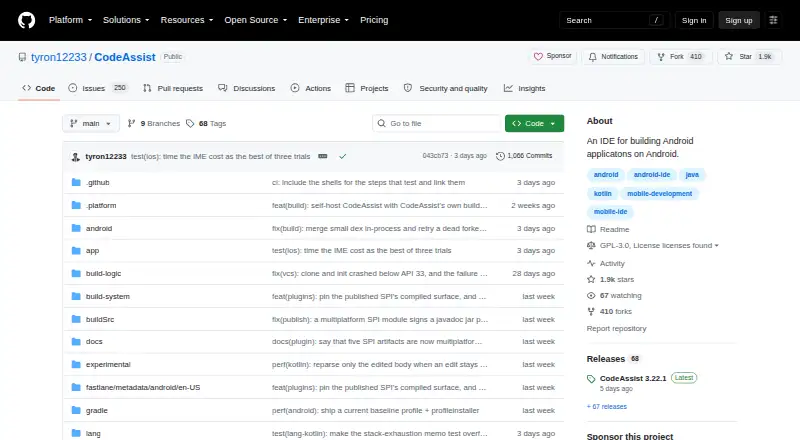
What CodeAssist is
CodeAssist is a free, on-device IDE for editing and building Android and Java projects. It builds, signs, and installs APKs on Android without a Gradle daemon. Java code intelligence, powered by Eclipse JDT, provides completion, diagnostics, and quick fixes; Kotlin completion is labeled beta. Java files can also be edited in a Scratch-style block view, with changes written back to source. Supported languages include Java, Kotlin, C, and C++, and app packaging is available. On-device Git supports GitHub sign-in, cloning private repositories, publishing repositories, and opening pull requests. A CodeAssist GitHub Action can build CodeAssist projects in CI and annotate compiler errors on the diff. The project is licensed under GPL-3.0-or-later, with a Classpath exception for specified plugin APIs. Its privacy policy says project source, files, paths, project data, and credentials stay on the device. Optional performance and crash telemetry is off by default; when enabled, it is sent over HTTPS and stored using Supabase. Distribution options include the Google Play testing track, F-Droid, and IzzyOnDroid. Support is offered through Discord.
Who it suits
CodeAssist suits Android users who want to edit, build, sign, and install projects directly on a device. It also fits developers using GitHub repositories and the listed Java, Kotlin, C, or C++ languages.
What it does well
- Builds and installs APKs on Android
- Works without a Gradle daemon
- Provides Java diagnostics and quick fixes
- Supports GitHub repository workflows
- Project data stays on device
What to know first
- Kotlin completion is labeled beta
- The listed platform is Android
- Optional telemetry requires separate enablement
- Licensed under GPL-3.0-or-later
Limits
Kotlin completion is labeled beta. The listed platform is Android, and the Free plan is GPL-3.0-or-later software priced at $0.
Plans
| Plan | Billed and limits | Price |
|---|---|---|
| Free | GPL-3.0-or-later software | Free |
As github.com lists them, read 9 Oct 2026. The maker's own page has the final word.
Getting started
- Open the CodeAssist GitHub repository
- Install the Android app through the Google Play testing track, F-Droid, or IzzyOnDroid
- Sign in to GitHub for on-device repository access
- Clone a private repository or open an Android or Java project
- Edit code and build, sign, and install the resulting APK
Verdict
CodeAssist brings Android project editing, packaging, GitHub workflows, and CI support to an on-device IDE. Its privacy policy keeps project data and credentials on the device, with optional telemetry off by default.
Questions
How much does CodeAssist cost?
The Free plan costs nothing, and the project is licensed under GPL-3.0-or-later with a Classpath exception for specified plugin APIs.
Which devices does it support?
Android is the listed platform and mobile target.
Which languages can I use?
The listed languages are Java, Kotlin, C, and C++. Kotlin code completion is labeled beta.
Can it work with GitHub?
Yes. On-device Git supports GitHub sign-in, cloning private repositories, publishing repositories, and opening pull requests.
Does CodeAssist collect project files?
Its privacy policy says project source, files, paths, project data, and credentials stay on the device. Optional performance and crash telemetry is off by default; when enabled, it is sent over HTTPS and stored using Supabase.
Is there a CI integration?
A CodeAssist GitHub Action can build CodeAssist projects in CI and annotate compiler errors on the diff.
Facts from CodeAssist's own pages
- Block editing
- Java files can be edited in a Scratch-style block view that writes changes back to source. · github.com, 9 Oct 2026
- Builds
- It builds, signs, and installs APKs on Android without a Gradle daemon. · github.com, 9 Oct 2026
- CI integration
- A CodeAssist GitHub Action can build CodeAssist projects in CI and annotate compiler errors on the diff. · github.com, 9 Oct 2026
- Data handling
- The policy says project data and credentials stay on device; optional telemetry is sent over HTTPS and stored using Supabase. · github.com, 9 Oct 2026
- Distribution
- The README lists Google Play testing track and F-Droid or IzzyOnDroid as Android distribution options. · github.com, 9 Oct 2026
- GitHub integration
- On-device Git supports GitHub sign-in, cloning private repositories, publishing repositories, and opening pull requests. · github.com, 9 Oct 2026
- Java tools
- Java code intelligence includes completion, diagnostics, and quick fixes powered by Eclipse JDT. · github.com, 9 Oct 2026
- Kotlin
- Kotlin code completion is labeled beta. · github.com, 9 Oct 2026
- License
- The project is licensed under GPL-3.0-or-later, with a Classpath exception for specified plugin APIs. · github.com, 9 Oct 2026
- Privacy
- The privacy policy says project source, files, and paths are not collected, and optional performance and crash telemetry is off by default. · github.com, 9 Oct 2026
- Purpose
- CodeAssist is an on-device IDE for editing and building Android and Java projects. · github.com, 9 Oct 2026
- Support
- The project directs users to its Discord to get help, report bugs, and share projects. · github.com, 9 Oct 2026
Where CodeAssist stands on Freedom251
- Mobile Development IDEs#18 of 41