Freedom251 › Explainer Video Software

CoAnimator
What CoAnimator is
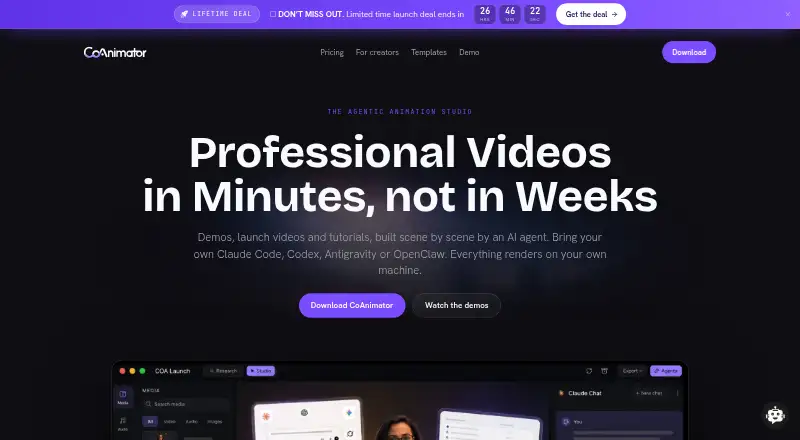
CoAnimator is a desktop app for making product demos, launch videos, tutorials, and animations with AI agents. Users can assemble scenes, then add effects, captions, and overlays to real footage. Renders happen locally, and the maker says local rendering is unlimited. The app includes a studio and the coa CLI, with video projects stored as plain files on disk. It runs on Linux, macOS, and Windows. The free plan costs $0 forever and allows 720p exports with a “Made with CoAnimator” watermark. A $99 one-time lifetime licence supports exports up to 4K without a watermark, includes premium plugins and research mode, covers two devices, and includes one year of updates. Users can connect agents such as Claude, Codex, Antigravity, and OpenClaw, and documented plugins include ElevenLabs Audio, Gemini Images, YouTube, and Postiz. Plugin provider usage is billed through users’ own accounts, and generation or publishing may send inputs to those services. The maker says project files, media, renders, and API keys stay on the user’s machine, while the app sends licence checks, update checks, and crash reports.
Who it suits
CoAnimator may suit creators editing podcast clips, reels, and tutorials, as well as product teams producing demos, launch videos, and changelog updates. It is a single-user app for people comfortable using AI agents and plugins.
What it does well
- Unlimited local renders are included.
- Projects are stored as plain files on disk.
- Free plan includes all templates and free tools.
- Lifetime licence supports exports up to 4K.
- AI voiceover is available.
What to know first
- Free exports are limited to 720p and watermarked.
- Plugin provider usage is billed through user accounts.
- No desktop screen-recording plugin in version 0.7.2.
- Lottie export has not shipped.
Limits
The free plan limits exports to 720p and adds a “Made with CoAnimator” watermark. The $99 lifetime licence supports two devices and includes one year of updates; optional updates afterward cost $79 per year. Plugin provider usage is billed through your own accounts.
Plans
| Plan | Billed and limits | Price |
|---|---|---|
| Free | $0 forever · Unlimited local renders · 720p exports with watermark · all templates and free tools · screen capture, voiceover and publishing · bring your own AI agent | Free |
| Optional updates | $79/yr · Optional updates after the first year; the existing version keeps working if you do not renew | $79 a year |
| Lifetime licence | $99 one time · tax included · Up to 4K exports without watermark · premium plugins and research mode · use on 2 devices · one year of updates included | $99, paid once |
As coanimator.com lists them, read 7 Oct 2026. The maker's own page has the final word.
Getting started
- Visit the CoAnimator website.
- Install the desktop app on Linux, macOS or Windows.
- Start with the free plan or choose the $99 one-time lifetime licence.
- Use the included studio or coa CLI and bring an AI agent.
- Connect any desired plugins using your own provider accounts.
CoAnimator is a desktop app for making videos scene by scene with AI agents, from product demos and launch videos to tutorials and short-form clips. It best suits solo creators and product teams comfortable working with AI tools and project files. Its unlimited local rendering and one-time $99 licence are compelling, though the free tier’s watermark and 720p cap limit finished exports.
Overview
CoAnimator combines a desktop studio with the coa command-line interface. Projects are stored as plain files on disk, and video rendering happens on the user’s machine, which the maker says allows unlimited local renders. That setup suits people who want their projects and media kept locally and are comfortable with a file-based workflow.
AI agents can build scenes for demos, tutorials, launch videos and animations, while effects, captions and overlays can be applied to real footage. The maker lists Claude, Codex, Antigravity and OpenClaw, among other agents. It also documents plugins for audio, image generation, website capture, YouTube and publishing. Plugin usage is billed through the user’s own provider accounts, and using generation, capture, research or publishing services may send inputs to those providers.
The maker says project files, media, renders and API keys stay on the user’s device. The app does send licence and update checks and crash reports. Website and API traffic is encrypted in transit, and credentials are held server-side rather than shipped to the app. CoAnimator is single-user, so it is not a shared editing workspace.
Key features
- Scene-based creation: Agents can assemble product demos, launch videos, tutorials and animations. This gives creators a workflow for building structured videos, while plugin-based generation may add costs through their own service accounts.
- Local rendering: Videos render on the user’s machine, and the maker says local renders are unlimited. That removes a stated render quota, but export quality still depends on the plan.
- Agent and plugin connections: The app works with several named AI agents and plugins covering audio, images, capture, research and publishing. Users who already have those accounts can connect them, but should account for provider charges and the possibility of sending inputs to those services.
- Voiceover and footage effects: AI voiceover is supported, and effects, captions and overlays can be applied to real footage. This broadens the workflow beyond animated scenes alone.
- Export limits: Free exports top out at 720p and carry a “Made with CoAnimator” watermark; the lifetime licence raises the maximum to 4K and removes it. The free plan is useful for making drafts, but the paid licence is the practical choice for polished, unbranded delivery.
CoAnimator 0.7.2 has no desktop screen-recording plugin, and Lottie export has not shipped. Those gaps matter for teams expecting to record their desktop directly in the app or deliver animation as Lottie files.
Pricing
CoAnimator is freemium, with no free trial. The free plan is billed at $0 forever and includes unlimited local renders, 720p exports with a watermark, all templates and free tools, screen capture, voiceover and publishing, plus the option to bring your own AI agent. It is a capable way to explore the workflow, but the watermark and resolution cap make it less suitable for final client-facing or branded videos.
The $99 one-time lifetime licence includes up to 4K exports without a watermark, premium plugins and research mode, use on 2 devices, and one year of updates. For a solo user who expects to export regularly, it removes the free plan’s most visible delivery constraints without a recurring licence payment. The single-user collaboration level still makes it a poor fit for teams needing shared editing seats.
Optional updates cost $79 per year after the first year. Renewal is not required to keep using the existing version, so users who do not need later updates can continue with the version they have. Plugin providers charge separately through the user’s own accounts.
Platforms
CoAnimator is available for Linux, macOS and Windows. The desktop app includes both the studio and coa CLI, so it is aimed at desktop workflows rather than browser-based editing.
Who it's for
CoAnimator fits creators making podcast clips, reels and tutorials, as well as product teams producing demos, launch videos and changelog updates. It is especially suitable for solo users who value local rendering, want to direct AI agents scene by scene, and can work with their own plugin accounts.
Look elsewhere if you need multi-user collaboration, desktop screen recording inside CoAnimator 0.7.2, or Lottie output. The free tier also may not suit anyone who needs clean, high-resolution exports without paying.
Pros and cons
Pros
- Unlimited local renders: The maker places no limit on local rendering, which helps frequent creators avoid a stated render quota.
- One-time licence option: The $99 payment removes the watermark, raises exports to 4K and includes one year of updates, without requiring annual renewal for continued use of the existing version.
- Flexible scene workflow: Agent integrations, voiceover, plugins and effects for real footage support several kinds of creator and product video.
- Local project storage: Project files, media, renders and API keys stay on the user’s machine, according to the maker.
Cons
- Free exports are constrained: 720p and a CoAnimator watermark limit the free plan’s usefulness for finished branded work.
- External services can add cost and data sharing: Plugin usage is billed through the user’s accounts, and some workflows may send inputs to those providers.
- Single-user only: The collaboration level does not meet teams’ needs for shared editing.
- Some production workflows are absent: Version 0.7.2 has no desktop screen-recording plugin, and Lottie export has not shipped.
Alternatives
For a wider comparison, browse Explainer Video Software.
- Animaker is a browser, mobile and API option with a free plan, free trial, basic animation tools and limited premium assets; choose it if those platforms or its free trial suit you better, while accepting watermarked exports on the free tier.
- Powtoon runs on web, Android, iOS and as an extension. Its free plan supports 720p videos up to 3 minutes, with screen recording, basic templates and characters, and a Powtoon watermark; consider it if those stated limits and platforms match your needs.
- Doratoon offers a free plan with 150+ templates, stock assets, 720p output and 10 downloads per month, with a watermark. It may suit users who prefer a template-led option and can work within that download cap.
- Explain Everything is available on web and mobile. Its free plan allows up to 3 projects, 1 slide per project, 3-minute videos, 1 collaborator, 15-minute collaboration and 500 MB of cloud storage; choose it if those collaboration and cloud limits fit your work.
- Explideo supports macOS, Windows and web, with unlimited browser exports on its free plan, plus one watermarked server export per month, 5-minute videos and 150 MB of storage. It is an option when browser exports and those caps fit better than CoAnimator’s desktop workflow.
- Mango Animation Maker is a Windows and macOS option whose free plan limits output to 576p, 2 scenes per project, 2 backgrounds and 2 cameras per scene, with 2 GB of cloud storage and a watermark. Consider it if a more constrained scene-based free plan meets your needs.
- Renderforest Slideshow Maker offers a free plan with HD video and a watermark, and a Lite plan at $12 a month with 400 AI credits per month and HD720 templates. Its web and mobile availability may suit users seeking a slideshow maker with a monthly paid option.
- Scribe Animator is another freemium option for users comparing animation software.
Verdict
CoAnimator is a strong fit for solo creators and product teams who want to build scene-based videos with AI agents, render locally and keep project files on their own machine. Its $99 one-time licence is the clearest reason to choose it: it unlocks unwatermarked 4K exports, premium plugins and use on two devices. Choose another tool if your work depends on team collaboration, desktop recording within CoAnimator, or Lottie export.
Verdict
CoAnimator supports locally rendered, scene-based video creation and works with multiple AI agents. The free plan has a 720p watermark, while the $99 one-time licence raises export quality and removes it.
Questions
Does CoAnimator have a free plan?
Yes. It costs $0 forever and includes unlimited local renders, with 720p exports carrying a “Made with CoAnimator” watermark.
How much does the lifetime licence cost?
It costs $99 one time, with tax included. It supports exports up to 4K without a watermark, premium plugins and research mode, use on two devices, and one year of updates.
Which platforms does CoAnimator support?
It runs on Linux, macOS and Windows.
Does it offer a free trial?
No. CoAnimator has no free trial; it offers a free plan.
What AI agents and plugins are listed?
The maker lists Claude, Codex, Antigravity, OpenClaw and other agents. Documented plugins include ElevenLabs Audio, Gemini Images, Grok Imagine, ScreenshotOne, YouTube, Postiz and YouTube Research through MCP360.
Who makes CoAnimator?
Its privacy policy identifies the maker as Delta4 Infotech Pvt. Ltd., incorporated in India.
Facts from CoAnimator's own pages
- Agent integrations
- The maker lists Claude, Codex, Antigravity, OpenClaw and other agents, with project workflows using skills and the coa CLI. · coanimator.com, 7 Oct 2026
- Company
- The privacy policy identifies the maker as Delta4 Infotech Pvt. Ltd., a company incorporated in India. · coanimator.com, 7 Oct 2026
- External service costs
- Plugin provider usage is billed through the user's own accounts, and generation, website capture, research and publishing may send inputs to those services. · coanimator.com, 7 Oct 2026
- Free-tier export limit
- Free exports are limited to 720p and include a “Made with CoAnimator” watermark. · coanimator.com, 7 Oct 2026
- Headquarters
- India · coanimator.com, 28 Sept 2026
- Local rendering
- Videos render on the user's machine, and the product says local renders are unlimited. · coanimator.com, 7 Oct 2026
- Notable missing capability
- The maker says CoAnimator 0.7.2 has no desktop screen-recording plugin, and Lottie export has not shipped. · coanimator.com, 7 Oct 2026
- Plugin integrations
- Documented plugins include ElevenLabs Audio, Gemini Images, Grok Imagine, ScreenshotOne, YouTube, Postiz and YouTube Research through MCP360. · coanimator.com, 7 Oct 2026
- Project format
- The desktop app includes the studio and coa CLI, and a CoAnimator video project is stored as plain files on disk. · coanimator.com, 7 Oct 2026
- Security and privacy
- The maker says project files, media, renders and API keys stay on the user's machine, while the app sends licence checks, update checks and crash reports. · coanimator.com, 7 Oct 2026
- Security in transit
- The maker says traffic to its site and API is encrypted in transit and credentials are held server-side rather than shipped to the browser or desktop app. · coanimator.com, 7 Oct 2026
- What it does
- CoAnimator lets AI agents build product demos, launch videos, tutorials and animations scene by scene, and apply effects, captions and overlays to real footage. · coanimator.com, 7 Oct 2026
- Who it is for
- The maker describes it for creators editing podcast clips, reels and tutorials, as well as product teams making demos, launch videos and changelog updates. · coanimator.com, 7 Oct 2026
Where CoAnimator stands on Freedom251
- Explainer Video Software#5 of 40