Freedom251 › Cloud gaming services
Cloudy Pad
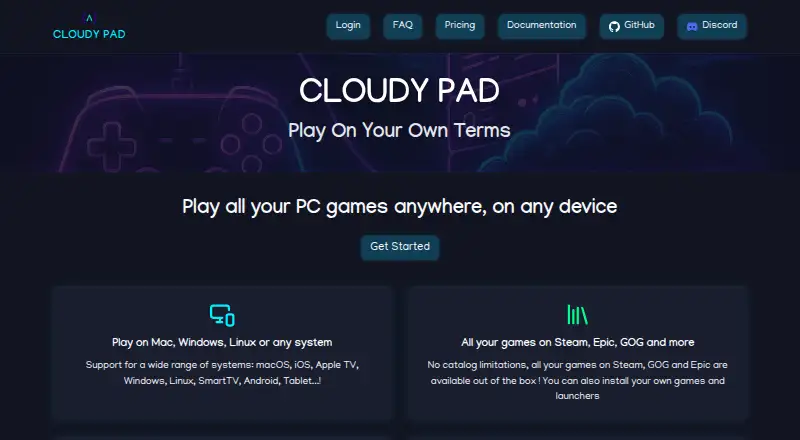
What Cloudy Pad is
Cloudy Pad lets you deploy a cloud gaming instance on your own server, computer, or cloud provider and stream games from your own library. It supports Steam, Epic, GOG, Heroic, and Lutris launchers. For streaming, Cloudy Pad can set up a Sunshine or Wolf server, with Moonlight as the client. Maximum streaming resolution is 1440p, and supported devices include Windows, macOS, Linux, iOS, Android, Smart TV, tablet, and Apple TV.
You can self-deploy Cloudy Pad on a machine or server, including through SSH, or use Cloudy Pad App, a web platform for deploying a gaming instance. Listed cloud providers include AWS, Azure, Google Cloud Platform, Scaleway, and Paperspace. Its documentation describes automated cost alerts, Spot instances that can be up to 90% cheaper, and hourly billing without a subscription. Cloudy Pad is free and open source; cloud provider usage may incur charges. The project is experimental and may have breaking changes. Its self-deployment requirements include Docker, a Moonlight client, an NVIDIA GPU or supported cloud provider, and a stable connection with at least 20 Mbps download speed. Steam games run through Proton, and compatibility can be checked on ProtonDB.
Who it suits
Cloudy Pad suits players who want to stream games from a library they already own using their own machine or a supported cloud provider. It is also a fit for people comfortable with self-deployment, Docker, and Moonlight setup.
What it does well
- Free and open source software
- Supports Steam, Epic, GOG, Heroic, and Lutris
- Streams through Moonlight using Sunshine or Wolf
- Supports up to 1440p streaming
- Offers hourly billing and automated cost alerts
- Runs on desktop, mobile, web, and listed TV devices
What to know first
- Cloud provider usage may incur charges
- Self-deployment requires Docker and a qualifying GPU or provider
- Steam games require Proton compatibility
- The project may have breaking changes
Limits
Cloudy Pad is free, but cloud provider usage may incur charges. Self-deployment requires Docker, Moonlight, an NVIDIA GPU or supported provider, and a stable connection with at least 20 Mbps download speed.
Plans
| Plan | Billed and limits | Price |
|---|---|---|
| Cloudy Pad (self-deployed) | Cloudy Pad is free and open source · cloud provider usage may incur charges | Free |
| Subscription | $12-$17 per month · Cloud gaming service; pricing range listed by AlternativeTo | On request |
As cloudypad.gg lists them, read 8 Oct 2026. The maker's own page has the final word.
Getting started
- Open https://cloudypad.gg/ and choose self-deployment or Cloudy Pad App
- For self-deployment, prepare Docker and a server with an NVIDIA GPU or a supported cloud provider
- Install Cloudy Pad on your machine or server, including directly through SSH
- Set up a Moonlight client and a stable internet connection with at least 20 Mbps download speed
- Launch games through a supported launcher; Steam use requires Proton
Cloudy Pad is a free, open-source way to turn your own machine or cloud account into a place to stream games from your library. It best suits players who want control over the server and are comfortable handling setup, Linux compatibility and cloud costs. Its flexibility is useful, but this experimental project asks more of its users than a ready-made gaming service.
Overview
Cloudy Pad helps deploy a gaming instance on a server, personal machine or supported cloud provider; it does not supply a game catalogue. Support for Steam, Epic, GOG, Heroic and Lutris gives players several ways to connect their existing libraries. Cloudy Pad is Linux-based, and Steam games require Proton, so compatibility can vary by title; ProtonDB offers a way to check individual games.
Users can install Cloudy Pad themselves, including directly on a server via SSH, or use Cloudy Pad App, a web platform designed to deploy an instance in a few minutes. The hosted option can shorten the deployment process, while self-deployment gives technically capable users direct control. Neither route removes the need for appropriate hardware or a supported provider.
Key features
- Sunshine or Wolf streaming: Cloudy Pad can deploy either streaming server and stream through the Moonlight client. The choice is useful for people who already have a preferred setup, but Moonlight is a requirement for self-deployment.
- Cloud provider choice: AWS, Azure, Google Cloud Platform, Scaleway and Paperspace are supported. This broadens the options for building an instance around a chosen provider, while leaving the user responsible for provider setup and usage charges.
- Cost controls: Automated cost alerts, hourly billing and Spot instances that can be up to 90% cheaper give cloud users ways to monitor and reduce spend. Spot pricing is a potential saving rather than a fixed cost, and cloud usage can still incur charges.
- Resolution and devices: Streaming supports up to 1440p, with Windows, macOS, Linux, iOS, Android, Smart TV, tablet and Apple TV among the supported devices. That offers room for sharper play and varied screens, provided the connection and setup meet the requirements.
Pricing
The self-deployed version costs free and is free and open source. That makes it a sensible starting point for users with suitable hardware who can manage installation themselves. The software price is free; using a cloud provider may still generate hourly charges.
Cloudy Pad App is a hosted web platform, but there is no published plan price or limit to compare. Users considering the hosted route should account for possible cloud usage charges rather than assuming the free software means a free gaming instance.
Platforms
Cloudy Pad lists Android, iOS, Linux, macOS, self-hosted, web and Windows platforms. It also supports streaming to Smart TVs, tablets and Apple TV. Self-deployment requires a Moonlight client, a server with an NVIDIA GPU or a supported cloud provider, Docker, and a stable internet connection with at least 20 Mbps download speed. Those requirements narrow the fit for users without suitable hardware, connectivity or server experience.
Who it's for
Choose Cloudy Pad if you already own the games you want to play, value a choice of launchers and cloud providers, and are willing to manage the instance. It is less suited to players who want a simple subscription library or a dependable service that handles server setup. The maker describes the project as experimental and warns that breaking changes may occur, so it is a risky foundation for anyone who needs a stable setup.
The privacy policy says the service may collect a user's name, email address, IP address, browser data and usage logs, and that absolute security cannot be guaranteed. Questions go to Discord, while bug reports are directed to GitHub issues.
Pros and cons
- Pro: Free, open-source software with support for multiple game launchers lets players build around libraries they already own.
- Pro: Choice of self-deployment or supported cloud providers, plus hourly billing, cost alerts and potentially cheaper Spot instances, gives cloud users meaningful control over deployment and spending.
- Con: Users must supply the instance, meet the hardware or provider and Docker requirements, and maintain a stable connection of at least 20 Mbps.
- Con: Linux and Proton compatibility can limit which Steam games work, and the experimental project may introduce breaking changes.
- Con: Cloud charges can apply even though Cloudy Pad itself is free, and the hosted app's plan price and limits are not published.
Alternatives
Cloud gaming services is a useful starting point for comparing other approaches. Consider GeForce NOW if you want a service with a free ad-supported tier and a Performance plan at $9.99 a month; its free tier uses basic cloud gaming rigs.
CloudMoon offers a freemium service with a Standard Plan at $4.99 a month, for players who prefer a priced service over managing their own instance. Blacknut is a paid option with a Focus Entertainment plan at $9.99 a month for 20 Focus Entertainment Pass games; its listed billing terms say the first month is $9.99, then $21.98 per month. Broming offers free hours earned by watching short ads, an option for players willing to trade ad viewing for playtime.
TIM Cloud Gaming by AWG has a Premium plan described as unlimited use, as well as a plan at 3,990 BRL a month; some games require a license. now.gg offers ad-supported access to Android games on a free plan, which may fit players focused on that game platform. Xbox Cloud Gaming requires a paid plan and has a Game Pass Essential tier with five hours of cloud gaming per month and more than 50 games; consider it if that included catalogue and allowance match your needs.
Verdict
Cloudy Pad is a strong fit for technically capable players who want to stream games they own using their own machine or a cloud provider, with control over launchers and streaming server. Free, open-source software and provider cost controls are its clearest advantages. Look elsewhere if you need stable, hands-off access, want a supplied game catalogue, or are unwilling to manage setup and possible cloud charges.
Verdict
Choose Cloudy Pad if you want to stream games you own from a self-deployed or cloud gaming instance, with multiple launchers and a choice of streaming server. Consider another option if you need a stable project or do not want to manage the server requirements and possible cloud usage charges.
Questions
Is Cloudy Pad free?
Cloudy Pad is free and open source. Cloud provider usage may incur charges.
Which platforms and devices does it support?
Listed platforms are Android, iOS, Linux, macOS, self-hosted, web, and Windows. Supported devices also include Smart TV, tablet, and Apple TV.
Which game launchers can I use?
The listed launchers are Steam, Epic, GOG, Heroic, and Lutris. Steam use requires Proton.
Which cloud providers are supported?
The listed providers are AWS, Azure, Google Cloud Platform, Scaleway, and Paperspace.
What do I need for self-deployment?
The guide requires Docker, a Moonlight client, a server with an NVIDIA GPU or supported cloud provider, and a stable internet connection with at least 20 Mbps download speed.
How can I get help?
The maker directs questions to Discord and bug reports to GitHub issues.
Facts from Cloudy Pad's own pages
- Automatic stopping
- Instances can automatically shut down after inactivity, with an example threshold of 15 minutes. · docs.cloudypad.gg, 14 Oct 2026
- CLI commands
- The public CLI supports creating, provisioning, configuring, deploying, starting, stopping, restarting, pairing and destroying instances. · docs.cloudypad.gg, 14 Oct 2026
- Cloud providers
- Stable providers listed are AWS, Azure and Google Cloud; Scaleway is stable, Linode is experimental, Paperspace is deprecated, and SSH deployment is supported. · docs.cloudypad.gg, 14 Oct 2026
- Company founder
- Pierre Beucher’s published résumé says he created Cloudy Pad in 2023 as an open-source project and expanded it into a SaaS platform in 2024. · crafteo-public-data.s3.eu-west-3.amazonaws.com, 14 Oct 2026
- Company location
- The founder’s professional site lists Lyon, France as his location and identifies Cloudy Pad among his maintained open-source projects. · crafteo.io, 14 Oct 2026
- Cost alerts
- Cloudy Pad can monitor cloud spending and email users when configured thresholds are reached. · docs.cloudypad.gg, 14 Oct 2026
- Cost controls
- The documentation describes automated cost alerts, Spot instances that can be up to 90% cheaper, and hourly billing with no subscription required. · docs.cloudypad.gg, 8 Oct 2026
- Development status
- Official documentation describes Cloudy Pad as experimental and warns that future breaking changes may occur. · docs.cloudypad.gg, 14 Oct 2026
- Disk snapshots
- AWS, Azure and GCP support data-disk snapshots that restore when an instance starts. · docs.cloudypad.gg, 14 Oct 2026
- Documentation depth
- The documentation includes provider setup, CLI lifecycle commands, environment variables, installation, troubleshooting links, cost guidance and contribution instructions. · docs.cloudypad.gg, 14 Oct 2026
- Experimental status
- The maker says the project is experimental and may have breaking changes in the future. · docs.cloudypad.gg, 8 Oct 2026
- Free plan
- Yes · cloudypad.gg, 20 Sept 2026
- Game access model
- byo_library · cloudypad.gg, 20 Sept 2026
- Game compatibility
- Cloudy Pad is Linux-based and says Steam use requires Proton, with game compatibility checkable on ProtonDB. · docs.cloudypad.gg, 8 Oct 2026
- Game launchers
- The documentation lists Steam, Epic, GOG, Heroic, and Lutris as supported game launchers. · docs.cloudypad.gg, 8 Oct 2026
- Game libraries
- The service supports Steam, Epic, GOG, Heroic and Lutris, with Lutris marked experimental. · docs.cloudypad.gg, 14 Oct 2026
- Heroic support
- Heroic Games Launcher is installed natively and provides access to Epic, GOG and Amazon Prime Games. · docs.cloudypad.gg, 14 Oct 2026
- Hosted app
- The documentation describes Cloudy Pad App as a web platform for deploying a gaming instance in a few minutes. · docs.cloudypad.gg, 8 Oct 2026
- Hosted pricing page
- The hosted pricing page opened with “Loading offers...” and did not show plan prices or limits. · app.cloudypad.gg, 8 Oct 2026
- Independent listing
- AlternativeTo lists Cloudy Pad as open source under AGPL-3.0, written in TypeScript, with no comments or reviews on that page. · alternativeto.net, 14 Oct 2026
- Independent security check
- ScamAdviser reports a valid SSL certificate and a low site-traffic rank, while categorizing the domain as very likely safe. · scamadviser.com, 14 Oct 2026
- Installation systems
- CLI installation instructions cover Linux, macOS, Windows through WSL, and Nix/NixOS. · docs.cloudypad.gg, 14 Oct 2026
- Licence
- The GitHub repository identifies the project as GNU AGPL-3.0 licensed and says a business-oriented licence is available by contacting the maintainer. · github.com, 14 Oct 2026
- Limit: cloud charges
- Independent discussion notes that total cost depends on provider, virtual-machine type, storage and actual usage, because cloud providers bill those resources separately. · reddit.com, 14 Oct 2026
Where Cloudy Pad stands on Freedom251
- Cloud gaming services#1 of 40