Freedom251 › Cloud gaming services
CloudMoon
by CloudMoon
What CloudMoon is
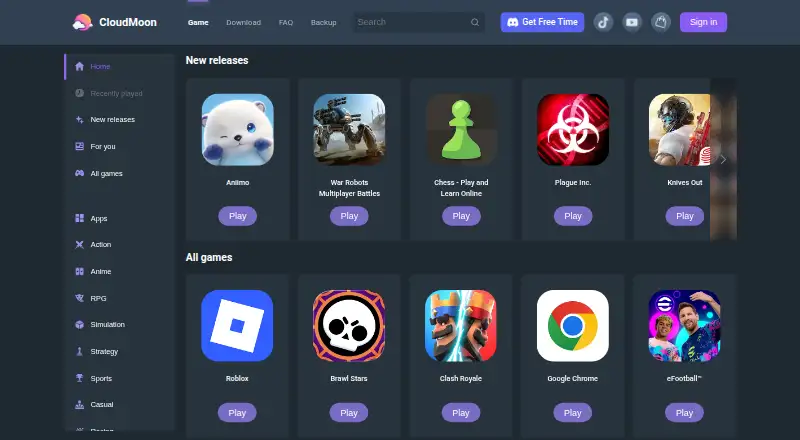
CloudMoon is a cloud gaming service for playing mobile games online without downloading them. It offers a library of over 300 games and apps, rendering graphics on GPU servers and streaming them to supported devices. CloudMoon says devices with 3–4 GB of RAM can stream at up to 60 fps, and that its 15 MB app can run 200+ games. It also says edge servers in 22 locations bring latency below 55 ms, although network speed and server policies may affect latency. Supported devices include web, Android, iOS, tablets, Chromebooks, and low-spec laptops. The service has a free option for casual gaming and lists a Standard Plan at $4.99 a month. One-time options listed are 4.99 USD for seven days of Premium and 4.99 USD for 20 hours. CloudMoon directs users to Discord for support and payment issues; users can request games through Discord or Reddit. On Mac, the app requires macOS 12.0 or later and an Apple M1 chip or later.
Who it suits
CloudMoon may suit players who want to stream mobile games on a web browser, phone, tablet, Chromebook, or low-spec laptop. Mac users need macOS 12.0 or later and an Apple M1 chip or later.
What it does well
- Offers over 300 games and apps.
- Supports web, Android, iOS, tablets, and Chromebooks.
- Says devices with 3–4 GB RAM can reach 60 fps.
- Free cloud gaming is listed for casual users.
- One-time 4.99 USD options cover seven days or 20 hours.
What to know first
- Latency can depend on network speed and server policies.
- Mac app requires macOS 12.0 or later and Apple M1 or later.
- Discord is the listed channel for support and payment issues.
Limits
The free plan is described as cloud gaming for casual users. CloudMoon states that latency can occur depending on network speed and server policies; the listed Standard Plan costs $4.99 a month.
Plans
| Plan | Billed and limits | Price |
|---|---|---|
| Premium Plan (6-Month) | — | On request |
| Standard Plan (6-Month) | — | On request |
| Free | free cloud gaming for casual users | Free |
| Premium Plan | — | $14.99 a month |
| Hourly Package (5 Hours) | 5 hours · 5 hours | $1.99, paid once |
| Hourly Package (80 Hours) | 80 hours · 80 hours | $19.99, paid once |
| Pro Plan | — | $19.99 a month |
| Pro Plan (12-Month) | 12 months · 12 months pro | $199.99 a year |
The first 8 of 12 plans, as web.cloudmoonapp.com lists them, read 20 Sept 2026. The maker's own page has the final word. Every plan
Getting started
- Open https://web.cloudmoonapp.com/.
- Choose a supported platform: web, Android, iOS, or macOS.
- Start with the Free plan for casual cloud gaming, or choose a paid package.
- On Mac, use a device with macOS 12.0 or later and an Apple M1 chip or later.
- Use Discord for support or payment issues, or request games through Discord or Reddit.
CloudMoon is a cloud gaming service for playing mobile games and apps without downloading them. It is best suited to players who want a broad library on phones, tablets, Chromebooks or modest laptops. Its free option and $4.99 monthly Standard plan make it easy to start, but streaming quality depends on the network and Mac support has a firm hardware requirement.
Overview
CloudMoon renders games on remote GPU servers and streams them in real time, so the device does not need to run each game locally. Its library spans more than 300 popular games and apps, and the maker says its 15 MB app can run more than 200 games. That is a useful combination for devices with limited storage or computing power, though it does not remove the need for a reliable connection.
CloudMoon says devices with 3–4 GB of RAM can stream at up to 60 fps, and that edge servers in 22 locations keep latency below 55 ms. Those figures describe the service's stated capability, not a result every player should expect: CloudMoon also warns that network speed and server policies can cause latency.
Key features
- Cloud game library: More than 300 games and apps are available through a subscription access model. Players can request additions through CloudMoon's Discord or Reddit communities, which offers a route to suggest gaps without guaranteeing that a game will be added.
- Remote rendering: Global GPU servers handle graphics and stream them to the device. This can extend play to lower-spec hardware, but responsiveness remains tied to network conditions.
- Session security: CloudMoon says traffic is encrypted with TLS 1.3 and each user session runs in a separate sandbox virtual machine. It says it serves paying players in more than 150 countries without a data-breach incident. The Google Play listing says data is not shared with third parties, is encrypted in transit, and can be deleted on request.
- Support: Discord is the support channel for help and payment issues. That makes the community hub central to getting assistance.
Pricing
CloudMoon has a free plan and paid packages. The Standard Plan costs $4.99 a month, billed monthly, making it the clearest recurring option for regular players. Free costs nothing and is described as free cloud gaming for casual users; it is a sensible way to start, but the plan terms do not give a quota or other cap to weigh against paid access.
For a shorter commitment, 7 Days of Premium costs $4.99, paid once, billed for 7 days, and includes 7 days of premium. The Hourly Package (20 Hours) also costs $4.99, paid once and covers 20 hours, a better fit for occasional sessions than an ongoing monthly subscription. The Hourly Package (5 Hours), 7 Days of Standard, Standard Plan (6-Month), Premium Plan, Premium Plan (6-Month), and Pro Plan have custom pricing. Without those prices, it is not possible to compare their value with the monthly Standard or one-time packages.
Platforms
CloudMoon supports Android, iOS, macOS and web, and names tablets, Chromebooks and low-spec laptops among supported devices. Mac users need macOS 12.0 or later and an Apple M1 chip or later, so older Macs are not a fit. Device support alone does not guarantee a smooth stream: the service warns that network speed and server policies affect latency.
Who it's for
CloudMoon suits players who want mobile games without local downloads, especially those using low-spec devices or trying the free option before paying. The 20-hour package suits occasional play, while Standard is the straightforward choice for someone who expects to play regularly. It is a weaker choice for players who need predictable responsiveness on an unreliable connection, or Mac owners without an M1-or-later machine.
Pros and cons
- Pro: More than 300 games and apps, streamed without downloads, give players a broad catalog without needing to install each title.
- Pro: A free option, a $4.99 monthly Standard plan and one-time 7-day and 20-hour packages provide several ways to try or pay for access.
- Pro: Cloud rendering is designed to support devices with 3–4 GB RAM at up to 60 fps, widening the potential audience beyond high-spec hardware.
- Con: Network speed and server policies can affect latency, making performance less predictable than locally run games.
- Con: Mac support requires macOS 12.0 or later and an Apple M1 chip or later, excluding older hardware.
- Con: Discord is the route for support and payment issues, and several package prices are custom pricing, making some purchase comparisons difficult.
Alternatives
For more options, browse Cloud gaming services.
- GeForce NOW is worth comparing for players who want support for Linux and Windows as well as mobile, Mac and web, or an explicitly ad-supported free tier with basic cloud gaming rigs. Its Performance plan is $9.99 a month and includes 100 hours of monthly playtime.
- now.gg is another freemium option with Android-game access, ad-supported free cloud gameplay, and platforms including Linux and Windows. Its nowPremium Daily Pass is $0.99 a month.
- Xbox Cloud Gaming is a paid alternative with a free trial and support across Android, iOS, Mac, web and Windows; consider it if those terms and platform coverage suit your needs.
- Blacknut is a paid service available on Android, iOS, Linux, Mac, web and Windows.
- Boosteroid is a paid alternative with no free plan; its Ultra plan costs €16.89 a month and includes up to 4K resolution, up to 120 FPS, ray tracing and unlimited gaming time.
- Cloudy Pad is a free alternative with Android, iOS, Linux, Mac and Windows support.
- PlayStation Plus Cloud Streaming is a paid Windows option with a free trial; its Premium plan costs $19.99 a month and includes cloud streaming, game and classics catalogs, game trials and online multiplayer.
- Tencent START is a paid iOS option with monthly VIP and SVIP packages.
Verdict
Choose CloudMoon if you want a large streamed mobile-game library on a phone, tablet, Chromebook or modest laptop, with a free entry point and a $4.99 monthly Standard option. Its strongest case is access without local downloads; its central trade-off is network-dependent latency, compounded for Mac users by the M1-or-later requirement. Look elsewhere if those constraints do not suit your setup or you need more predictable play.
Verdict
CloudMoon streams a broad game and app library across several device types, with a free option and paid packages. Network conditions and the stated Mac requirements are important to consider.
Questions
Does CloudMoon have a free plan?
Yes. Its Free plan is listed as free for casual cloud gaming.
How much does CloudMoon cost?
The Standard Plan is $4.99 a month. A seven-day Premium option and a 20-hour package are each listed at $4.99, paid once.
Which devices does CloudMoon support?
Listed platforms are Android, iOS, macOS, and web. Supported devices also include tablets, Chromebooks, and low-spec laptops.
What does the Mac app require?
The App Store listing says it requires macOS 12.0 or later and an Apple M1 chip or later.
How can I get help or request a game?
CloudMoon directs users to Discord for support and payment issues. Users can request games through Discord or Reddit.
Facts from CloudMoon's own pages
- App size
- CloudMoon says its app is 15 MB and can run 200+ games. · web.cloudmoonapp.com, 2 Oct 2026
- Cloud gaming service
- CloudMoon lets users play mobile games online without downloading them. · web.cloudmoonapp.com, 2 Oct 2026
- Cloud rendering
- Graphics render on global GPU servers and stream to users in real time. · web.cloudmoonapp.com, 2 Oct 2026
- Data practices
- The Google Play listing says no data is shared with third parties, data is encrypted in transit, and users can request deletion. · play.google.com, 2 Oct 2026
- Free plan
- Yes · web.cloudmoonapp.com, 20 Sept 2026
- Game access model
- subscription · web.cloudmoonapp.com, 20 Sept 2026
- Game library
- The service offers over 300 popular games and apps. · web.cloudmoonapp.com, 2 Oct 2026
- Game requests
- Users can request new games through CloudMoon's Discord or Reddit communities. · web.cloudmoonapp.com, 2 Oct 2026
- Geographic reach
- CloudMoon says it serves paying players in more than 150 countries without a data-breach incident. · web.cloudmoonapp.com, 2 Oct 2026
- Headquarters
- Hong Kong · web.cloudmoonapp.com, 28 Sept 2026
- Latency
- CloudMoon says edge servers in 22 locations cut latency below 55 ms. · web.cloudmoonapp.com, 2 Oct 2026
- Low-end devices
- Devices with 3–4 GB RAM can stream at up to 60 fps according to CloudMoon. · web.cloudmoonapp.com, 2 Oct 2026
- Mac compatibility
- The App Store listing says the app requires macOS 12.0 or later and an Apple M1 chip or later on Mac. · apps.apple.com, 2 Oct 2026
- Network limitation
- CloudMoon states that latency may occur depending on network speed and server policies. · apps.apple.com, 2 Oct 2026
- Security architecture
- CloudMoon says traffic is TLS 1.3 encrypted and each user session runs in its own sandbox virtual machine. · web.cloudmoonapp.com, 2 Oct 2026
- Paid from
- 4.99 · web.cloudmoonapp.com, 20 Sept 2026
- Support channel
- CloudMoon directs users to Discord for support and payment issues. · web.cloudmoonapp.com, 2 Oct 2026
- Supported devices
- web,Android,iOS,tablets,Chromebooks,low-spec laptops · web.cloudmoonapp.com, 20 Sept 2026
Where CloudMoon stands on Freedom251
- Cloud gaming services#7 of 40